




Skip to content
View in the app

A better way to browse. Learn more.

Unraid

A full-screen app on your home screen with push notifications, badges and more.

To install this app on iOS and iPadOS
  1. Tap the Share icon in Safari
  2. Scroll the menu and tap Add to Home Screen.
  3. Tap Add in the top-right corner.
To install this app on Android
  1. Tap the 3-dot menu (⋮) in the top-right corner of the browser.
  2. Tap Add to Home screen or Install app.
  3. Confirm by tapping Install.

Holaf

Members
  • Joined

  • Last visited

Everything posted by Holaf

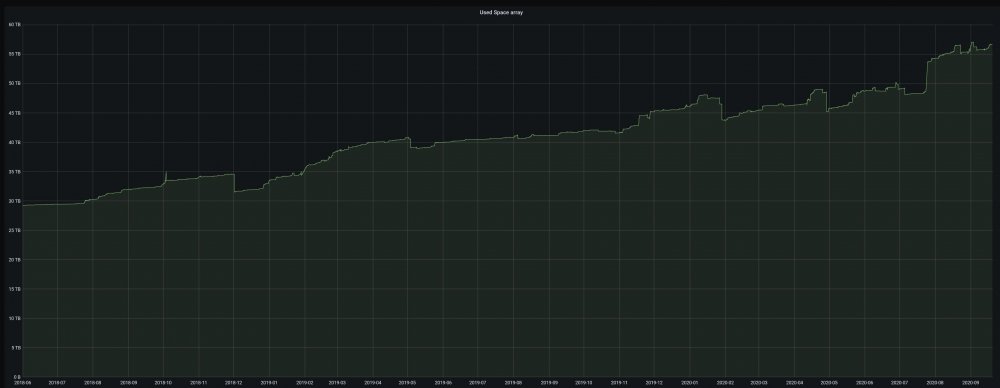
  1. this topic reminded me that I did set up a simple grafana dashboard a long time ago 😅 I have more than 2 years of logs now ...
  2. 32GB DDR4 3200MHz. Plenty enough (73% free) since i'm only using unraid for Storage and containers.
  3. Xigmatek Elysium ... Je connaissais pas, ca aurait été parfait pour moi 😢
  4. Salut tout le monde Moi C'est Holaf (46 ans) de Montpellier. Apres avoir passé pas mal d'années a Faire des NAS sur divers OS (Windows/FreeNas/OMV/OpenFiler/etc...) je suis tombé sur Unraid il y a 3 ans, et depuis c'est mon NAS principal et j'en suis très content (malgré quelques petits défauts) 👍

Account

Navigation

Search

Search

Configure browser push notifications

Chrome (Android)
  1. Tap the lock icon next to the address bar.
  2. Tap Permissions → Notifications.
  3. Adjust your preference.
Chrome (Desktop)
  1. Click the padlock icon in the address bar.
  2. Select Site settings.
  3. Find Notifications and adjust your preference.
