





p.wrangles
Members
-
Joined
-
Last visited
-
Definitely not New Config! I booted in maintenance mode, clicked disk one, did check then fix, then rebooted
-
After i fixed the drive the array just started
-
I cancelled the rebuild yesterday and repaired the filesystem first - I haven't rebuilt yet, let me know if i should? ppnhost-diagnostics-20251005-1926.zip
-
okay, disk repaired all looks good, should i unmount the disk and remount to rebuild ontop again?
-
This is an existing dish. How do I repair the file system? Format the disk?
-
new cables installed and rebuild started ppnhost-diagnostics-20251004-1639.zip
-
There are some important things that i dont have a backup of.
-
Am i at risk of loosing any data?
-
So what do i do now? just stop the rebuild?
-
just started the rebuild, this looks bad ppnhost-diagnostics-20251003-1904.zip

-
In the meantime i swapped one over Swapped the sata cable in disk 1 and the sata cable in parity. any changes in the logs.ppnhost-diagnostics-20251003-1526.zip
-
Im going to buy some more cables and replace what i currently have 1 by 1.
-
Interesting, Its only disk one with the cross?
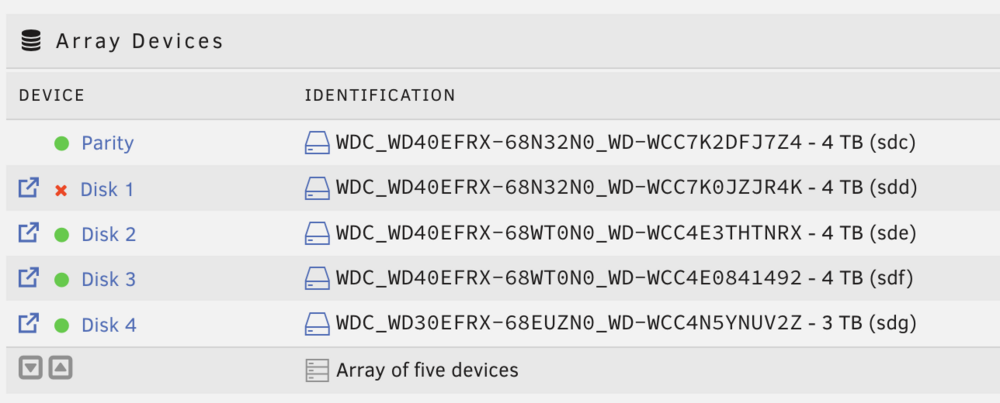
-
Ive replaced the cable on Disk 1ppnhost-diagnostics-20251002-0924.zip
-
Sorry!ppnhost-diagnostics-20251001-1839.zip

