





timekiller
Members
-
Joined
-
Last visited
Everything posted by timekiller
-
Update: I powered down the server and removed the unmountable drive. After rebooting, unraid didn't start the array and I had to tell it to with a missing drive, as expected. However, the missing data is still missing. I pulled the unmountable drive and attached it to my desktop (Linux). I opened the drive with cryptsetup and had to run xfs_repair befor eI could mount it, but the missing data is still there, so that's good. But now unraid is in a state where it knows a drive is missing, but unraid is not emulating the missing data. I can rsync the entire drive back, but that will take a long while. I don't think there is any way around this though since unraid believes the missing drive was just waiting to be formatted. Unraid shows the missing drive, but is still labelling it as "Unmountable" and there is no directory for it under /mnt/. I feel like the only option now is to reinstall the drive use the Tools->New Config option to construct a new array with all the drives in place. Anyone see another option here?
-
Hello, last night I went to watch a movie on my server and plex was showing I had 6 movies (I have have way more than six). After looking into it I noticed the entire array was offline. I rebooted the server (Yes I should have gotten a diagnostics snapshot first, but I didn't). When the server came up, the array was back online, and a plex rescan repopulated all my movies. This morning I woke up to many missing files and the unraid UI showing a drive as "Unmountable: not mounted", and Unraid wants me to format the disk. I logged into the server and dmesg shows a bunch of [54431.657222] ata5: SATA link up 1.5 Gbps (SStatus 113 SControl 310) [54433.274993] ata5.00: configured for UDMA/33 [54433.275011] ata5: EH complete [54433.465251] ata5.00: exception Emask 0x10 SAct 0x1fc00 SErr 0x190002 action 0xe frozen [54433.465253] ata5.00: irq_stat 0x80400000, PHY RDY changed [54433.465254] ata5: SError: { RecovComm PHYRdyChg 10B8B Dispar } [54433.465256] ata5.00: failed command: READ FPDMA QUEUED [54433.465258] ata5.00: cmd 60/40:50:90:2b:d9/05:00:09:00:00/40 tag 10 ncq dma 688128 in res 40/00:00:d0:30:d9/00:00:09:00:00/40 Emask 0x10 (ATA bus error) [54433.465258] ata5.00: status: { DRDY } [54433.465259] ata5.00: failed command: READ FPDMA QUEUED [54433.465261] ata5.00: cmd 60/10:58:d0:30:d9/02:00:09:00:00/40 tag 11 ncq dma 270336 in res 40/00:00:d0:30:d9/00:00:09:00:00/40 Emask 0x10 (ATA bus error) [54433.465262] ata5.00: status: { DRDY } [54433.465262] ata5.00: failed command: READ FPDMA QUEUED [54433.465264] ata5.00: cmd 60/40:60:e0:32:d9/05:00:09:00:00/40 tag 12 ncq dma 688128 in res 40/00:00:d0:30:d9/00:00:09:00:00/40 Emask 0x10 (ATA bus error) [54433.465264] ata5.00: status: { DRDY } [54433.465265] ata5.00: failed command: READ FPDMA QUEUED [54433.465267] ata5.00: cmd 60/b0:68:20:38:d9/03:00:09:00:00/40 tag 13 ncq dma 483328 in res 40/00:00:d0:30:d9/00:00:09:00:00/40 Emask 0x10 (ATA bus error) [54433.465267] ata5.00: status: { DRDY } [54433.465268] ata5.00: failed command: READ FPDMA QUEUED [54433.465270] ata5.00: cmd 60/40:70:d0:3b:d9/05:00:09:00:00/40 tag 14 ncq dma 688128 in res 40/00:00:d0:30:d9/00:00:09:00:00/40 Emask 0x10 (ATA bus error) [54433.465270] ata5.00: status: { DRDY } [54433.465271] ata5.00: failed command: READ FPDMA QUEUED [54433.465273] ata5.00: cmd 60/40:78:10:41:d9/05:00:09:00:00/40 tag 15 ncq dma 688128 in res 40/00:00:d0:30:d9/00:00:09:00:00/40 Emask 0x10 (ATA bus error) [54433.465273] ata5.00: status: { DRDY } [54433.465274] ata5.00: failed command: READ FPDMA QUEUED [54433.465275] ata5.00: cmd 60/40:80:50:46:d9/05:00:09:00:00/40 tag 16 ncq dma 688128 in res 40/00:00:d0:30:d9/00:00:09:00:00/40 Emask 0x10 (ATA bus error) [54433.465276] ata5.00: status: { DRDY } [54433.465278] ata5: hard resetting link This time I did take a diagnostic snapshot (attached). I rebooted the server and it came up in the same state - 1 drive is "unmountable" and the data on it is missing. Furthermore, Unraid is running a parity check (which I cancelled). What I can't figure out is: 1) Why isn't unraid emulating the missing drive? 2) Why did unraid restart the array if a drive is missing? 3) Is the data on the missing "unmountable" drive gone if the parity check started? My fear is that it started rewriting parity to align with the missing drive. how screwed am I? storage-diagnostics-20211031-1033.zip
-
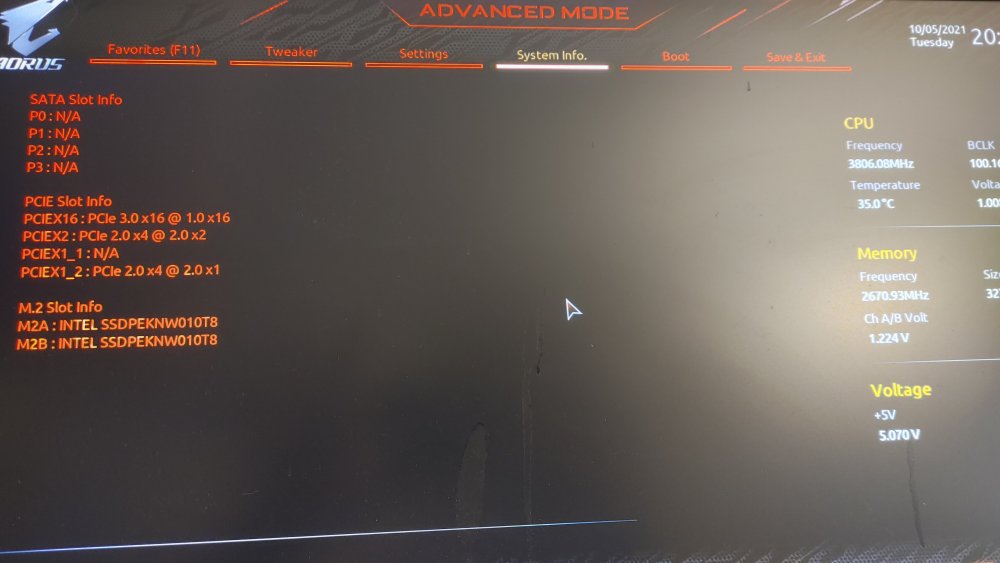
Sorry for the long post, but I an trying to get all the information into 1 post so there isn't a lot of back and forth. I am trying to upgrade my Unraid server with a new CPU/MOBO and I'm having a hell of a time. My existing hardware is a Core i7-6700k. I have a Ryzen 5800x CPU and I've been trying to find a motherboard to match with it that will support my existing hardware. Specifically I have (2) IO Crest 16 Port SATA cards, and (2) 1TB m.2 NVME drives for cache. My existing motherboard (MSI Z170A), which is like 5-6 years old at this point is able handle all this hardware without issue. I have now bought 2 motherboards (first board details and issues are in this thread) I returned that board and now I have a Gigabyte X570 UD which almost fits all my hardware requirements. I'm ok on PCI slots, but there is only 1 m.2 slot. Not a HUGE deal, I can buy a new 2TB m.2 drive to replace my (2) 1TB drives. The problem is that now this board will not show any drives from the SATA cards. I have tried several configurations, including removing the m.2 drive and only installing 1 SATA card. No matter what I do, I can not see any drives attached to any SATA controller on this board. The UEFI screen is very stripper and does not have a section to see installed peripherals, so I can't even confirm that the card is recognized by the system. When the system boots, I do see a ton of errors related to ATA, so I'm not sure if my issue is at the bios level, or if there is something up with the UNRAID configs. I did pull a diagnostic dump and attached it to this post. Any help is appreciated. storage-diagnostics-20211009-0128.zip
-
Correction. The slots are as follows: (1) PCIE x16 slot (PCIEX16) (1) PCIE x16 slot (PCIEX2) (1) PCIE x16 slot (PCIEX1) (1) PCIE x1 slot (PCIEX1) So the second PCIE x16 slot is actually only an x1, this might explain why on boot Unraid is showing a bunch of "limiting drive to 3Gbps" lines on boot. Not sure if the mismatch of x2 and x1 for to two identical cards is causing the issue, but now that I know the slot is only x1, I don't want to use this board since half my drives would be bandwidth limited. Going to yank the board and return it for something better. Guessing I'll have to go to a X570 to get all the PCI lanes I need. Thanks everyone!
-
I was able to swap the board back in, but added no m.2 drives. Still have the same problem. Only 1 SATA card is recognized. It shoudln't matter, but I have (2) IO Crest 16 Port SATA III PCIe 2.0 x2. The motherboard has (3) 16x slots, but only the top one is true x16. I have a GTX 1050 int hat slot to help with video transcoding. The other 2 slots look like x4 based on the pins I am able to see. I'm consulting the manual to see if it tells me anything.
-
Then I lose my cache pool I'll try later and see what happens
-
I was attempting to upgrade my unraid server, but unraid will only show me drives from one of my sata cards at a time. The cards are fine, and if I switch them around, the drives I see changes (I always see the "second" card). If I remove the second card, I can see the first card. I figure this must be a bios setting issue, but can't figure it out. If I go into the bios, I can see both PCIe sata cards (see picture). I have attached my diagnostics for reference. Old Hardware: Intel Core i7-6700K @4.00Ghxz MSI Z170A Gaming M5 Version 1.0 32GB DDR4 2x 1TB NVME cache pool 2 parity drives, 19 data drives New Hardware (NOT WORKING): AMD Ryzen 5800X B550 Aorus Elite V2 32GB DDR4 2x 1TB NVME cache pool 2 parity drives, 19 data drives Thank you! storage-diagnostics-20211005-2036.zip
-
Perfect! Thanks for the quick turn around!
-
Hmm, don't see elftools as an option...

-
What version of UnRAID? 6.7.0-rc4
-
Getting an error trying to use strace: root@Storage:~# strace strace: error while loading shared libraries: libdw.so.1: cannot open shared object file: No such file or directory Is there another tool I need to install?


