





TacomaTy
Members
-
Joined
-
Last visited
Everything posted by TacomaTy
-
@JorgeB sorry about that - I downloaded them but forgot to attach. Here they are. tower-diagnostics-20261108-2105.zip
-
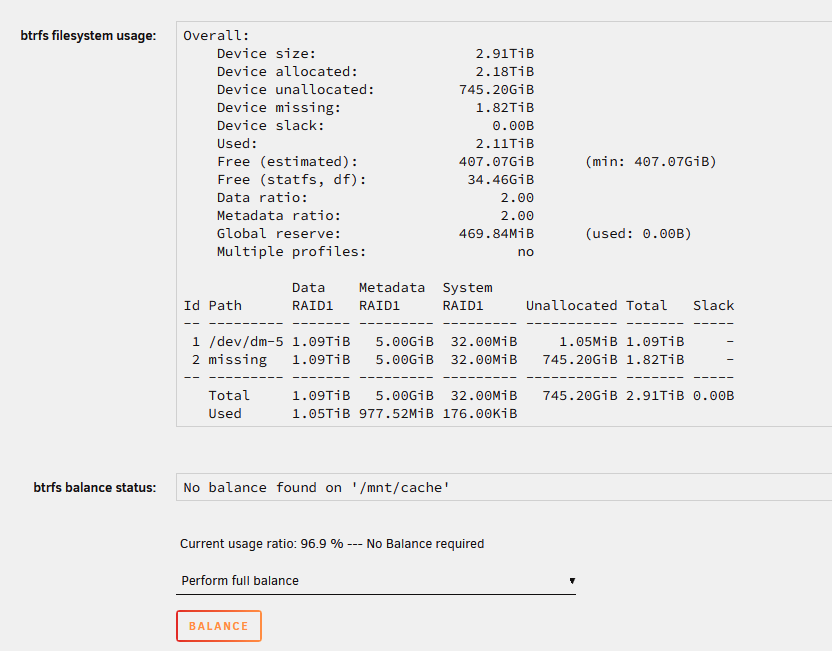
Hi, I had a cache drive fail (device 2) so I replaced it with a spare I had. After replacing, it's now showing degraded. I found several posts with similar issues as mine and it was suggested to follow the commands below. Before I run these commands, can someone please confirm if this is the correct process given my situation? Also, is this process safe for the cache pool data? I am backing up my cache data to my non-cache disks as I type, but just want to understand the commands and process.

-
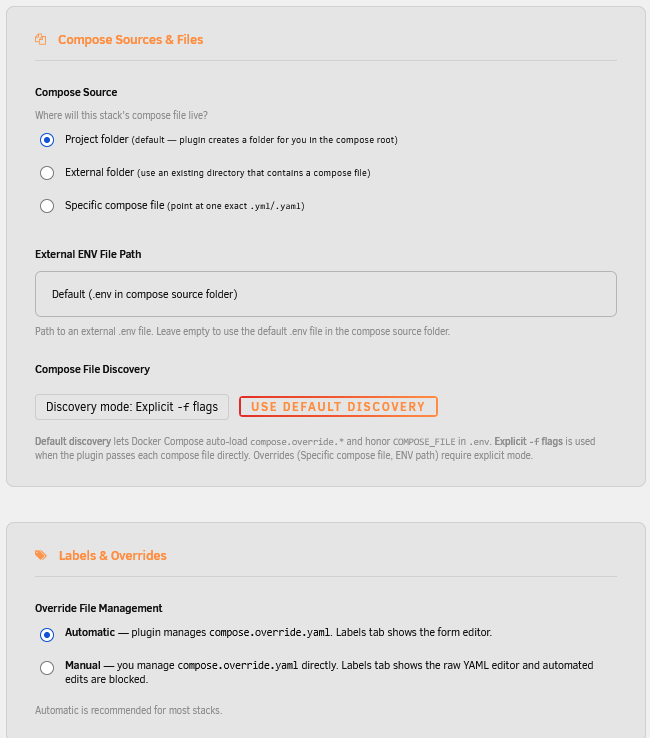
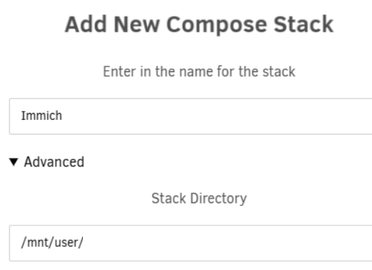
@bmartino1 Thanks for your guides, I appreciate all the time and effort you've put into them. I plan to install via Docker Compose soon using your guide. I have been doing some research and familiarizing myself a bit since I have never used compose. I have a couple questions for you or anyone else who may be able to assist: In the guide, I see the stack directory as /mnt/user/appdata/immich with the photos directory nested below. Since appdata is generally pinned to SSD, is it possible to have the photos in a different directory/share? Below is what I would prefer to avoid my SSD filling up. Guide format: /mnt/user/appdata/immich/config/ /mnt/user/appdata/immich/database/postgres/ /mnt/user/appdata/immich/database/redis /mnt/user/appdata/immich/photos My preferred format: /mnt/user/appdata/immich/config/ /mnt/user/appdata/immich/database/postgres/ /mnt/user/appdata/immich/database/redis /mnt/user/immich_photos (cache>array - separate share landing on cache for processing and then moving to HDD) I'm assuming this would be achieved by adding "/mnt/user" as the stack directory to then allow directories outside of appdata. Is this a bad idea? Is my thinking off here? Looks like Docker Compose has been deprecated and Docker Compose Plus is the new replacement from what I can tell. The "Add New Stack" screen has a several options that look new compared to the old Docker Compose. Would these defaults be sufficient or are there suggested edits? TIA!
-
Hi, I recently installed Immich following the guide below. I chose this guide as it was clear and concise, and had templates for iGPU support. The problem however is that once created, I cannot edit the containers. If I edit and change a path/name/timezone, it completes, but if I edit again it shows the default settings. Any idea on why this would be happening and how to resolve? I suspect it's due to downloading the template via CLI and then adding via "Add Container" rather than downloading from CA, but I'm not positive. Any help is greatly appreciated. https://rorar.github.io/immich-unraid-manual/unraid-create-immich-shares/
-
Hi, I attempted to upgrade my Unraid server with a new motherboard and processor and now I can't get my USB to boot. It shows up in the bios, but won't boot. I have tried disabling secure boot, fast boot, legacy boot, different ports, but no matter what I do I can't get it to boot. The previous board was 15yrs old. I read about someone having a similar issue and they had to create a new bootable USB. I could try this but how would I get all my settings and license on the new USB drive? I did backup but have never restored and transferred to a new flash drive. Any other ideas or suggestions is appreciated. New board is an ASUS TUF Gaming Z790-Plus (overkill I know, but got it used for an amazing deal). Thanks!
-
Thanks I didn't realize that the "edit" button next to the path would give additional options including access options. Absolutely, I have a backup copying critical data to a smaller nas nightly but still wanted to play it safe. Thanks, first time doing that but it worked like a charm.
-
Hi, I would like to install Immich but I'm a bit nervous to give it full access to all my pictures and videos. Is there an easy way to give it read only access? Call me paranoid but this would give me peace of mind pointing it at my 15yrs of pictures and videos.
-
Hi, I'm hoping someone can help with USB passthrough. I'm trying to passthrough an iPhone but the MacOS VM is not recognizing it. Unraid sees it and I have configured the device for passthrough, but nothing inside the VM. Is there a trick to passing through to Mac? Currently running Catalina. Thanks!

