





chutson
Members
-
Joined
-
Last visited
-
The backup source (/drive_d) needs to be updated to (/drive_d/) within the template for it to actually recognize the folder.
-
Yes that would help. I feel like most aren't going to click into the info for each to determine what is the 'latest updated'. I didn't even know there was an update for example until I explicitly looked for it. Is the newest version of the plugin not compatible with older versions of UnRAID? Just curious as to why there are three different plugins that accomplish the same task?
-
I will say...it is a bit confusing having 3 different versions without being able to really differentiate 'which' one you should be using.

-
Just to confirm...I seem to have gotten it working. Removed plugin. Added the 2025.02.24 version of the plugin. Copied previous setup over. Seems to be working accordingly and is currently moving files. Will update in a few days if all keeps working.
-
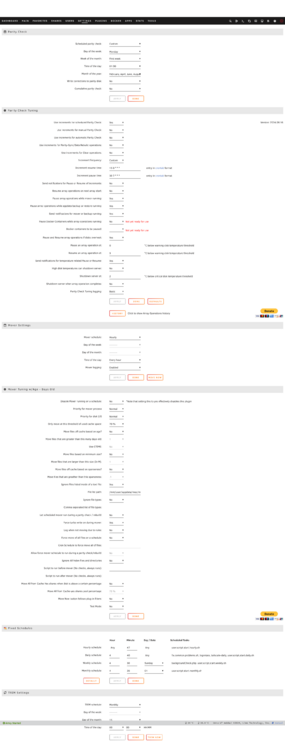
1. Mover Tuning Version: 2023.12.19 2. Attached setup page below 3. Attached exclusion list below mover_ignore.txt
-
Has anyone seen/experienced these issues? Mover is triggered, seeing those errors...and then nothing happens. Have well over a TB of data waiting to be moved...but doesn't seem to be working. Feb 27 15:00:04 PlexRAID move: /usr/local/sbin/move does not exists, creating soft link Feb 27 15:00:04 PlexRAID move: ln: failed to create symbolic link '/usr/local/sbin/move': File exists Feb 27 15:00:04 PlexRAID move: mover: started Feb 27 15:00:04 PlexRAID move: script: Generating exclusions list... Feb 27 15:00:04 PlexRAID move: script: Validating /mnt/user/appdata/misc/mover_tuning_excluded_files.txt Feb 27 15:00:04 PlexRAID move: script: Validating /mnt/user/appdata/misc/mover_tuning_excluded_directories.txt Feb 27 15:00:05 PlexRAID move: script: Generated exclusions list /mnt/user/appdata/misc/mover_tuning_exclusions.txt Feb 27 15:00:05 PlexRAID move: mover: finished
-
When running 'uname -r' I am seeing version 6.7.12-Unraid, which is way out of date and not the version I am running (6.13.0-beta.2). Any ideas how to fix or resolve this issue? Having some intermittent issues, and noticed that version in my syslog. Have attached a snippet of the syslog as well as diagnostics. Thanks in advance! syslog snippet.txt plexraid-diagnostics-20240625-2006.zip
-
Actually have seemed to narrowed this down to a hardware and not a software issue. i7 11700 was dying a slow death. Different CPU (i3 10100) and no issues since. Also, cannot get the i7 to post in 2 other motherboards I had lying around.
-
Here you go! syslog-6.25.24.log
-
Hello, I am inquiring as to if anyone can help me diagnose an issue with my server. Has been rock solid for months now, and just randomly yesterday decided it wanted to start locking up and becoming unresponsive, requiring a hard power-off. I have included the diagnostics. Just not sure what to make out of any of it on my own. Thanks in advance for any help or suggestions! plexraid-diagnostics-20240625-2006.zip
-
Let me give that a go. The last time I 'tried' to migrate to ipvlan, it broke everything. So let me see!
-
These last few weeks every couple of days my server becomes unresponsive/unreachable on the network. Haven't had this issue previously. This requires a hard restart (unplug and replug) to get everything working again. I'd rather not put all of my drives through this, and don't want to have any data corruption due to this issue. I have attached my diagnostics and syslog from the last day prior to it 'locking up'. Anything you see in there that could be an issue, feel free to let me know. https://drive.google.com/file/d/1XI6RAP7ocWfL2pGOk0HbU8cRUT2v1wql/view?usp=sharing The help is greatly appreciated! Thanks in advance! diagnostics and syslog.zip
-
Hello, I have a consistent issue with my server locking up or becoming unresponsive. This happens in standard or GUI mode, and I cannot SSH into the server to capture any logs. I did set up a local syslog, and I want to see if any of you can spot any issues. Looks like it hung up sometime after 'Nov 29 14:16:01' within the log. I have to do a hard reset every time, and I know I am putting unnecessary wear/tear on the drives since they run a parity check every time this occurs (usually a few times a week). Any assistance would be greatly appreciated! syslog-192.168.1.2.log
-
Hello, I am trying to figure out why my server is locking up (unaccessible via WebUI or when booted into GUI mode). The server specs are here: i3-10100 16GB RAM ASRock H570 Phantom Gaming 4 Motherboard Rebuilt the system because I was having other issues along with this on my previous system, and now this seems to be the only re-occuring issue. Attached are the full diagnostics: plexraid-diagnostics-20211004-1115.zip
-
Going to try and reseat everything again just to be sure. Also might try and swap to a different PCIE slot as well to rule that out.


