




.jpg.cff49261e51c3baacc10c35809573d2a.jpg)
Leoyzen
Members
-
Joined
-
Last visited
Everything posted by Leoyzen
-
You can't remove qemu custom cpu args.'kvm=on' and 'invtsch must be passed in this way, it is a QEMU bug. without this MacOS and opencore won't get TSC frequency correctly.
-
The Lilu 1.3.9 officially released now, check the link again and update it. Remember to remove all the grahpics patches.
-
The lastest opencore release(0.5.2) works properly with virtualization(topology support and more accurate frequency reading from new cpuid leaf) and amd(you can just passthrough now with amd vanilla patches), can be downloaded from here now. Also the Lilu officially released too(1.3.9) which add QEMU support, finally we can use Lilu/WEG/AppleALC in Hackintosh VM now. Can be downloaded from here. Recommand to update them all. cheers!
-
I'm trying to say, there should not using qemu custom args, we should just set the cpu info as windows or other vm by libvirt.But this bug let it not happend.The simpler the better,right?Everything that make hackintosh VM not like others may be a bug or compatibility problem, we should just pay attention to it. Yeah,obviously the performance will be dedicated disk(NVME/SSD) > raw format vdisk > qcow2 pre-allocated vdisk> qcow2 sparse vdisk. What ever which type you choose, there will be 3%~5% performance reduction compared to bare metal due to vfio. I'm passing through my nvme as the hackintosh disk now.
-
I've found another QEMUbug. According to the source code of QEMU, "kvm=on" should be default set to "on" when using a X86 CPU Model, but it is not! Libvirt can't set "kvm=on" at all, we must use "qemu custom args" to make it happen.
-
Yeah, that's alright. Good to see there is an other information update of Hackintosh VM😁 Yeah it is truely a important notes I've found but rarely be heard in the internet. Thanks for the feedback!
-
@databaselandI did not seeing that you passthrough the graphic audio with the gfx. And does metal work? Which version of Liu/WEG do you use? 1. passthrough all the part of the graphics(gfx, audio, usb) and set the bus correctly in the xml 2. use iMacPro instead of MacPro7,1 3. remove "Fix Display" and other patch which related to the graphic use the Liu I post and the latest WEG then try again.
-
This is a bug of clover and opencore. I just working on a pull-request to add QEMU/KVM support in opencore, links here. Also, the cpuid feature 'hypervisor' should be exposed too to get proper handles. You didn't set the gpu gfx and audio in same bus, that causes some problem. Should be set like this. <hostdev mode='subsystem' type='pci' managed='yes'> <driver name='vfio'/> <source> <address domain='0x0000' bus='0x09' slot='0x00' function='0x0'/> </source> <rom file='/mnt/user/isos/XFX.RX580.8192.170323.rom'/> <address type='pci' domain='0x0000' bus='0x03' slot='0x00' function='0x0'/> </hostdev> <hostdev mode='subsystem' type='pci' managed='yes'> <driver name='vfio'/> <source> <address domain='0x0000' bus='0x09' slot='0x00' function='0x1'/> </source> <address type='pci' domain='0x0000' bus='0x03' slot='0x00' function='0x1'/> </hostdev> Also, you should put latest Lilu(1.3.9) and WEG/AppleALC to your clover kext folder to avoid black screen. There is a commit which add QEMU support in latest Lilu, the older version not work on QEMU at all. You can custom build the Lilu or download from this post. https://forums.unraid.net/topic/50191-video-guide-how-to-install-macos-mojave-or-high-sierra-as-a-vm/?do=findComment&comment=781179
-
@ghost82 did you put -v in your boot args to see what the error is? I'm on 19A602 with clover and the patch works for me. I don't set it in qemu extra args but livirt topology defination, like this: <cpu mode='host-passthrough' check='none'> <topology sockets='1' cores='4' threads='2'/> <feature policy='require' name='topoext'/> </cpu> I'm not upgrading yet so I'm not quite sure about then problem you say.
-
I demonstrated that I change the QEMU smp(which equal to topology defination in libvirt/xml) between those three tests. If not, how should I change the topology? As far as I know, I don't see a way to change the topology in a bootloader, mind tell me how? Let me quote the conclusion you've made in your thread which I'm argued: The test I've made just demonstrated that "There is no performance difference between declare a topology with/without hyper-threading defination, even with no topology defined at all.", at least it is outdated now.
-
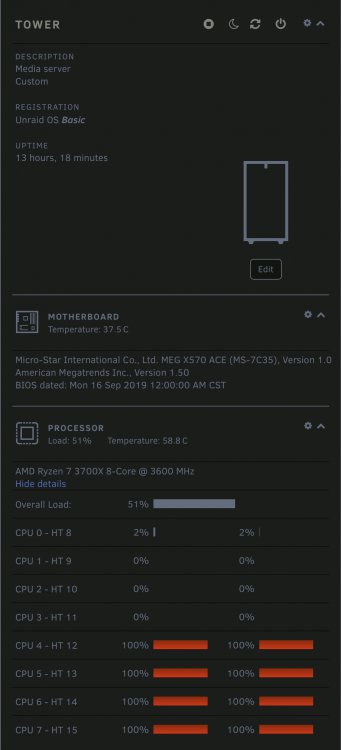
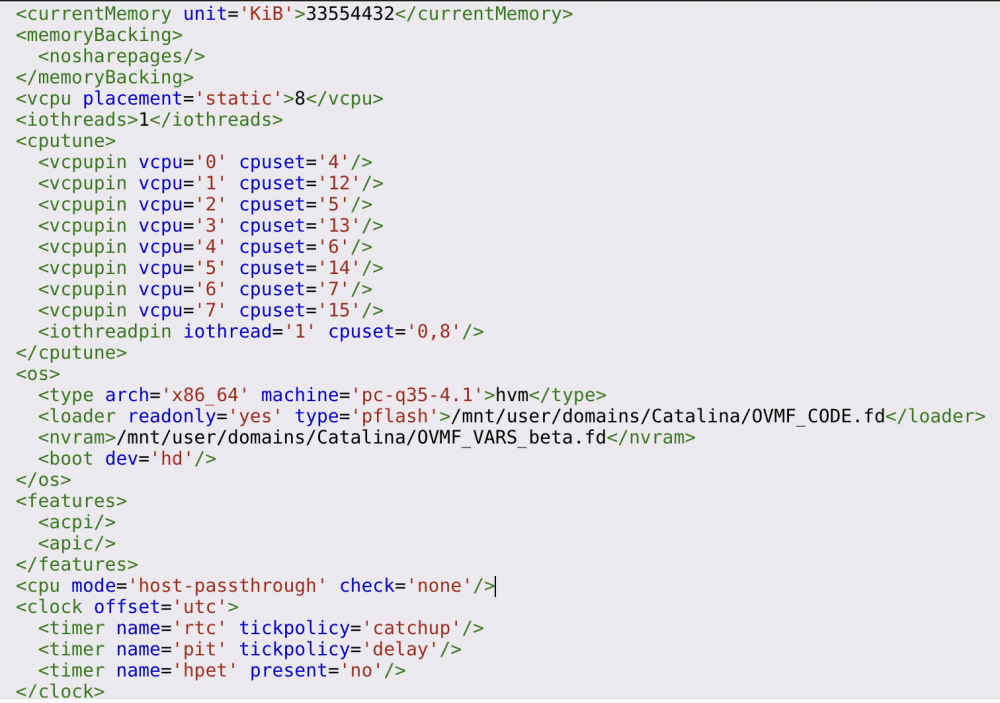
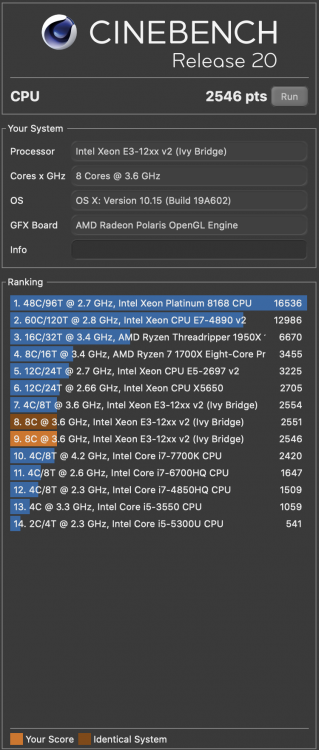
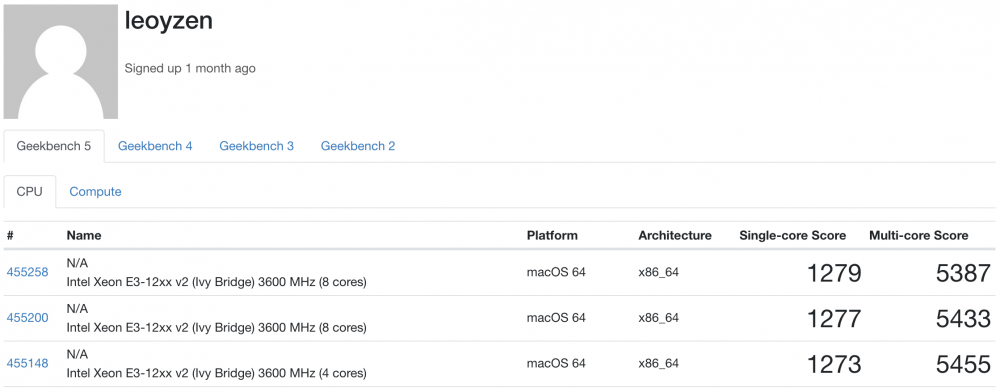
As I mentioned, I don't see any performance reduction before, to prove that, I just did some test to indicate the conclusion you've made is outdated now. VM CPU: 4-7, 12-15, which 4 cores and 8 threads VM OS: Catalina 10.15 (which is as clean as possible, only benchmark softwares) VM Bootloader: opencore with modified to get correct FSBFrequency and Topology (from here) Benchmark software: Cinabench 20 and Geekbench 5 CPU Model: IvyBridge with all features that host supported Results: 4 cores and 8 threads with SMP topology Cinabench: 2554 Geekbench: 1273(S)/5455(M) 8 cores with SMP topology (which MacOS recognized as 8 cores) Cinabench: 2551 Geekbench: 1277(S)/5433(M) 8 cores without SMP topology (which MacOS recognized as 8 sockets, I don't know if there any differences) Cinabench: 2546 Geekbench: 1279(S)/5387(M) Conclusion: I don't see any performance reduction between SMP using and not using hyper-threading during my test. I'm not saying you did things wrong, it may just outdated or apple changes their codes. My point is I won't just buyin someones' conclusion which is rather old from now. It didn't make sense to me, if I fool the MacOS that it is not a thread but a core then there will get some performance gain?On the contrary, performance reduction makes more senses to me. Because it didn't change the fact it is actually a thread, its performance limit by the hardware anyway. Host: VM CPU pins: CPU features: <qemu:commandline> <qemu:arg value='-device'/> <qemu:arg value='-cpu'/> <qemu:arg value='IvyBridge,vendor=GenuineIntel,+hypervisor,-erms,+invtsc,kvm=on,+topoext,+svm,+invtsc,+fma,+mmxext,+avx,+avx2,+aes,+xsave,+xsaveopt,+ssse3,+sse4_2,+popcnt,+sse4a,+bmi1,+bmi2,+arat,+abm,+3dnowprefetch,+adx,+clflushopt,+cr8legacy,+fsgsbase,+fxsr_opt,+misalignsse,+movbe,+osvw,+pclmuldq,+pdpe1gb,+rdrand,+rdseed,+rdtscp,+sha-ni,+smap,+smep,+svm,+vme,+xgetbv1,+xsave,+xsavec,+clwb,+umip,+topoext,+perfctr-core,+amd-ssbd,+wbnoinvd'/> <qemu:arg value='-overcommit'/> <qemu:arg value='cpu-pm=on'/> </qemu:commandline> Cinabench screenshots: Geekbench Screenshots:
-
I read it before, but I have some reason to do so: 1. "what is the difference between vm and bare metal?" is the keypoint and I am trying to figure it out. There definately something wrong in clover and opencore which makes qemu/kvm incompatitable, so I'm trying figure it out. "Do things right" is my goal, I try to make vm as bare metal AMAP, so I'm digging every detail that different from bare metal hackintosh. The point is not performance, but we can't use smp, then QEMU simulate 8 sockets instead of 8 cores for us.I don't know if MacOS handles it well or there is performance impact but I'm trying to do the right thing. 2. It is quite old from now so I'm not believe it. There are many outdated tutorials in the net tell us to do this do that, but I found much of if useless by spending a lot of time, and there are little imformation tells about why doing this, why doing that, that's what I'm doing now. So if it is a thread lately, I may convinced by it. 3. I'm not buyin the conclusion. As a software engineer, I can't image that enable hyper-threading is worse than simulate cores.That does'nt make sense to me, there maybe something buggy in clover or opencore or other things.And as far as I tested, I can't find any performance reduction between those two. There is a way to enable smp/topology in current opencore or clover, just add this patch:

-
I found out that why we can't use topology line (equals to QEMU smp) uppon Penryn. When using Penryn, clover or opencore will lookup the topology from cpuid which is correct; but we using newer cpu model, clover or opencore will check msr 0x35 which qemu/kvm not implemented yet then we get wrong cpu topology (1 core 1 thread) then the kernel panic occured. Here is the details.
-
@phbigred As far as I know there isn't any change beyond the pci reset bug, I just add one commit in latest rc builds. But I may lost some third party drivers which not included in kernel source but added by limetech (I'm not look into it). @MortalMonkeyGlad to hear that.
-
@calebcoverdale Maybe isolate 1~2 cores to handle IO, and add these thread in your xml as iothread, search for more details.
-
Update kernel to support 6.8.0-rc3.
-
It seems not related to the ethernet but the ROM/board-id/Series Number/UUID. You should search for how to make a available id for you hackintosh. My icloud and applestore works well not without problem.
-
@MortalMonkeyI don't know if Limtech update unraid module, if it is then the kernel will not work for RC3.... I'll compile a new version later.
-
I'm made a new thread to discuss hackintosh, because SpaceInvaderOne do not have much replies in this thread and the thread is too deep for peaple to find. you are welcome:
-
RESERVED
-
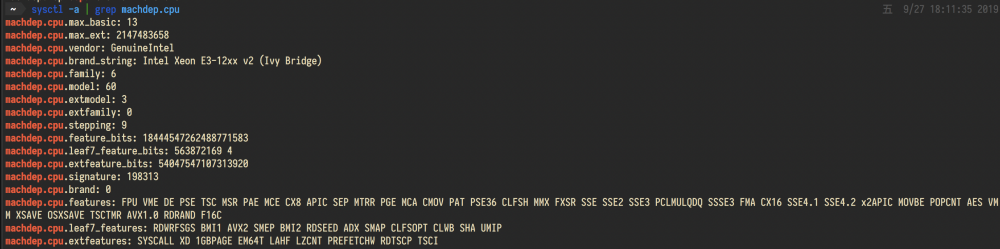
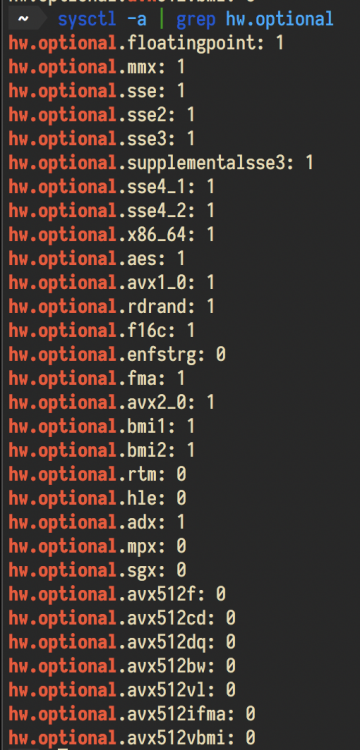
It is time to start a new thread and share my tips, and we can discuss here. For those who don't have much information, see SpaceInvaderOne's **VIDEO GUIDE** How to Install MacOS Mojave or High Sierra as a VM There is not much information about hackintosh in VM, so I will not make an installer guide but some important tips which everyone had miss. If you wanna get quick start(with opencore), I made a github repo to help people. *** if you like those tips, don't hesitate to push the button "like" below this thread, thanks *** 1. CPU 1.1 CPU Model Every Tutorial told us to use Penryn but didn't tell us why. After some digging I've found that CLOVER had some limitation when using simulated newer cpu family than Ivy-Bridge. So If u have older clover, you should use Ivy-Bridge instead of Penryn (I will explain later in performance part)(opencore do not have such problem). with lastest clover (5093) and opencore: If you have Intel Process, you can just use host-passthrough or newer cpu family like Skylake/Cascade-Lake to get most features available. If you have AMD Process, it can't be passthrough directly yet in clover, but is possible when using latest opencore (0.5.2). see this PR I've made. 1.1.1 Why Penryn is recommanded before After digging a lot of code, I have some conclusions why they recommanded Penryn as prefered CPU Model: Penryn is classic, and it missing some features compared to newer generation, which lead to a similar situation with VM. Penryn do not have a msr 0x00000198 leaf to read the perfstatus (like bus ratio, cpu frequency) which the same as a VM. Penryn do not have a msr 0x35 leaf to read topology structure, which also most hypervisors haven't implemented yet.Instead, the MacOS will try to get the topology from acpi when it detect a Penryn process, which the same as a VM. Some bootloaders do have some compatibility issues when using a newer generation in a VM, some causing dividing by zero errors(They can't get correct frequency from acpi or msr, so they may be zero). Some articles have outdated so long from now. It don't have some cpuid features like avx/avx2/bmi/fma so MacOS won't recognized those features even thought you just passed through. 1.2 CPU Topology If you are not using Penryn or a wield cpu thread count, it is safe to remove the cpu-topology line in xml to avoid problems. <cpu mode='host-passthrough' check='none'> <!-- REMOVE THE LINE <topology sockets='1' cores='3' threads='2'/> --> </cpu> I've found it is related to the lack of virtualization support in clover and opencore, also the MacOS. If you using a model newer than Penryn, they try to get the topology from a MSR which the hypervisor(QEMU/KVM) not implement yet, causes some dividing by zero error, and the system won't boot. Update: It is safe to declare the topology of your cpu without any performance reduction now. All you have to do is add one single patch to avoid a x86_validate_topology error (MacOS will compare the acpi topology and the one reading from msr 0x00000198(which most hypervisors don't have), then the error occured.) Although there will still some issues in virtualization support in clover and opencore(like TSC/FSB frequency reading and topology, many hypervisors didn't implement some important msrs like 0x35). Details can be found here(which I submit a PR to opencore to support hypervisor.I'm not familar with svn so clover may not support in near future). 1.3 CPU Performance 1.3.1 Important cpuid features If you gonna get a nearly bare metal cpu performance, you should pass some important cpu features in xml.I will list some and you may try to find which feature your cpu is supported. AVX: without this the newer MacOS will not boot FMA: it is important for metal support AVX2 INVTSC: without this the newer MacOS will not boot BMI1 BMI2 BTW, there is no more need to add "vmware-cpu-freq=on" in the xml because it is default to be on in latest QEMU. 1.3.2 Newer CPU Model is recommanded so MacOS will recognize the features correctly And also, it is important to use a more newer cpu model to make MacOS recognizing the feature correctly. IvyBridge is the bottom line(This is why Penryn is not recommend any more, when you using Penryn, MacOS won't recognize some important feature like avx2 amd fma, then some application will not using those features). 1.3.3 How to check whether the features are recognized correctly in MacOS 1.3.4 Other flags should be notice You should passthrough the "+hypervisor", "+invtsc" and "kvm=on" along with others features. MacOS/opencore will read "0x40000010" to get TSC/FSB frequency only if the hypervisor flag is exposed. QEMU only exposes "0x40000010" leaf when "kvm=on" and "invtsc" is passthroughed. 2. GPU 2.1 GPU assignment It should be noticed that unRaid did not set GPU and its audio correctly by assigning them in same bus but different function, you have to mannaully adjuct it to make it work. IT IS IMPORTANT FOR METAL AND HDMI AUDIO! AND SOMEHOW IT IS RELATED TO AMD PCI RESET BUG! <hostdev mode='subsystem' type='pci' managed='yes'> <driver name='vfio'/> <source> <address domain='0x0000' bus='0x2d' slot='0x00' function='0x0'/> </source> <rom file='/mnt/user/domains/mojave/Sapphire.RX560.4096.170419.rom'/> <address type='pci' domain='0x0000' bus='0x01' slot='0x00' function='0x0' multifunction='on'/> </hostdev> <hostdev mode='subsystem' type='pci' managed='yes'> <driver name='vfio'/> <source> <address domain='0x0000' bus='0x2d' slot='0x00' function='0x1'/> </source> <address type='pci' domain='0x0000' bus='0x01' slot='0x00' function='0x1'/> </hostdev> As you can see , the gfx and graphic audio should be put in same bus (0x01) but different funciton (gfx in 0x0 and audio in 0x1), otherwise the HDMI audio will not work (even with Lilu/WEG/ALC). If you misconfigured it, it will lead to some unknown issues: The HDMI Audio will not work at all If you using a AMD card, you may face the "pci reset error 127" (seems the driver will reset the grahpics in a wrong way) it also makes onboard audio recognized incorrectly. (AppleALC will confuse which audio is truely onbaord, details can be see here) 2.2 GPU Metal Support Every tutorial told us to use Lilu/WEG to make graphic work and get metal support, but I've found Lilu doesn't work in QEMU/KVM at all! I've submit an issues to Lilu, and Lilu add QEMU support after 1.3.9. You have to use this version or newer to make Lilu/WEG works. (This is unofficially released yet, so use the attachment in this thread). You do not need any patch after using the Lilu I mentioned, the Lilu and WEG do the magic tricks. 2.3 GPU DP/HDMI audio Lilu/WEG/AppleALC only works with correct bus assigned gpu and audio so see part 2.1. If you set under the instruction I've made, then check the other hackintosh audio guide to find next step. 3. Networking There is no much choice of nic in hackintosh VM: e1000-82545em, vmxnet3, virtio, passthrough 3.1 e1000-82545em Advantage: Most stable and OOB, recommanded. Disadvantage: The nic will not work in installing a MacOS(seems the installer did not have such driver).So when installing the MacOS, you'd better change it to vmxnet3 or add a second vmxnet3 nic to get network working. 3.2 vmxnet3 Advantage: Better networking throughput (3Gbs~5Gbs) sometimes Disadvantage: quite buggy ( icloud/apple store not work or lower upload speed). 3.3 virtio apple add virtio-net support after catalina, I've found a way to make it work but now, See this post. Advantage: 30Gb/s Disadvantage: it is buggy too. To use virtio net, you have to do two thing: 1. hotplug virtio ethernet instead of predefined 2. boot args with debug=0x100 and keepsyms=1 3.4 passthrough 3.4.1 ASUS XG-C100C It is known to be problemic when using this nic, but after catalina, you will get native support after update the latest firmware. 3.4.2 X540-AT2 and X550-AT2 3.5 nic xml assignment You should assign the nic in bus 0x00 and slot 0x0y(y is number ,recommand to be greater than 5 which not likely occupied by other devce) to make nic recognized by macos as builtin .This is important to make AppleStore and iCloud work. 4. onboard Audio It's important that: 1. you make the graphics audio correctly by step 2.1 2.change your onboard audio from bus 0x0y, to bus 0x00 and slot 0x0z (where x, y means integer. This will make your onboard audio built-in, so AppleALC can easily handle it. detail and discussion can be found here. <hostdev mode='subsystem' type='pci' managed='yes'> <driver name='vfio'/> <source> <address domain='0x0000' bus='0x00' slot='0x1b' function='0x0'/> </source> <alias name='hostdev2'/> <address type='pci' domain='0x0000' bus='0x00' slot='0x02' function='0x0'/> </hostdev> the snippet set the onboard audio (00:1b.0) in bus 0x00, slot 0x02, and this makes the audio built-in. 5. USB working on it now. 6. Others 6.1 SMBios When using kvm, the MacPro7,1 and iMacPro1,1 is preferred, because we don't have iGPU and these two SMBios is super match for us. Update 2019.10.29: MacPro7,1 is no longer prefered as MacOS not officially release this product so will lead to some unpredictable problems. 6.2 Exceptions Lilu-1.3.8-DEBUG.zip

-
DP is with audio,it should work too. According to the code, Lilu will try to find audio device.There are two type of audio: 1.audio with grahpic(indentified by v.video) 2.audio builtin onboard(assigned to variable audioBuiltinAnalog) And Lilu set audio as onboard builtin (audioBuiltinAnalog) only when meet two condition: the audio is in pci-root (not pci-bridge), this is why I sugguest to set audio to bux=0 and slot=y the audio is in pci-bridge, but there is no video under the same bus. This is why I said u make the graphic audio incorrectlly because it will be marked onboard audio If you set graphics audio incorrect, Lilu will not find the video with the audio, then it assigned it to audioBuiltinAnalog; when it meet the true builtin audio, the audioBuiltinAnalog is already occupied by grahpics audio, so it will not recognize the correct onboard audio device. It's interesting. The newest clover works too.
-
@ghost82@ghost82Try move the onboard audio from bus=x to bus=0 but slot=y.This will try to make the audio builtin. According to the code, it recognized the audio as a addon of pci-device (like graphic audio),and some device already occupied the buildin audio position, did u put your graphic audio in the same bus as gfx? Or post your xml, it maybe something wrong with the bus assignment.
-
@tpruszinclover or opencorelif opencore it os not a news which I mentioned before. I f clover it would be interesting.
-
Edit at 2019.10.18 Update kernel with : 1. support unRaid 6.8.0rc1 2. add AGESA reset fix patch 3. update r8125 ethernet driver 4. add zenpower to monitor zen cpu sensors. upload at main floor. @sturmstar @opera
.thumb.jpg.0c644260dacbdbc011d7ad8ba9a1c10a.jpg)





