





Wedgetastic
Members
-
Joined
-
Last visited
-
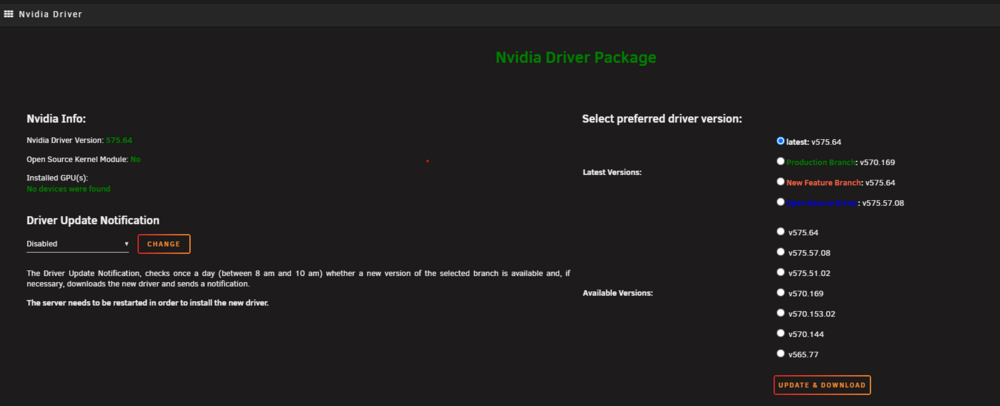
I ended dropping back to the production driver and the GPU is no longer being grabbed by the VM. Seems to be something introduced with the latest driver(s)
-
I ended dropping back to the production driver and the GPU is no longer being grabbed by the VM
-
Cross posted on the thread for the Nvidia driver. https://forums.unraid.net/topic/98978-plugin-nvidia-driver/page/198/#findComment-1564122 If you take a look at the screen recording, you can see the graphics driver for the VM is virtual but as soon as the VM is shut down, the GPU comes back and is available for the system again. This seems to happen overnight when Backup/Restore Appdata is backing up my containers. oldtown-diagnostics-20250628-1220.zipRecording 2025-06-28 121925.mp4
-
Here's diagnostics and a screen recording of how I fix it. I have posted all the things I have been trying to https://forums.unraid.net/topic/191495-unraid-714-random-errors-unsure-where-to-start-troubleshooting/#comment-1563921 as well. It seems like when the Backup/Restore Appdata plugin runs, the VM that I have takes the GPU over. Even though the graphics driver is set to using a virtual driver. Recording 2025-06-28 121925.mp4 oldtown-diagnostics-20250628-1220.zip
-
Hey all- I have been troubleshooting an issue were my server has been locking up randomly. I believe now it is because docker and my VM are fighting over the GPU. Anytime I stop my docker instances to backup and upgrade, the GPU seems to be taken by my VM. Does anyone in this thread know of a way to bind the GPU to docker only or a way to deny the GPU from the VM Manager? I have IOMMU on and would like to leave it on incase I want to do something in the future.. but would it be as easy as turning off IOMMU?
-
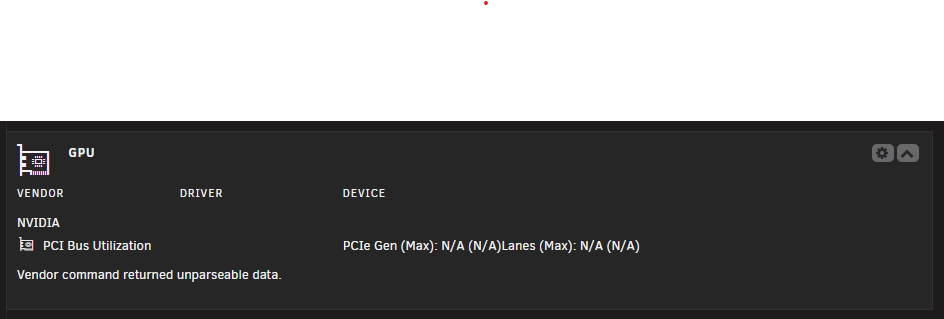
So I think I just stumbled upon my issue. The VM I am running appears to be grabbing the Nvidia GPU when my docker images are backed up and upgraded over night. By rebooting the VM, the gpu comes back and is viewable via the Dashboard and nvidia-smi. However, the docker images that want to use it cannot and must be rebooted as well. So the final question is, how do I force the VM / VM manager to not steal the GPU? The GPU for the VM is set to virtual already.
-
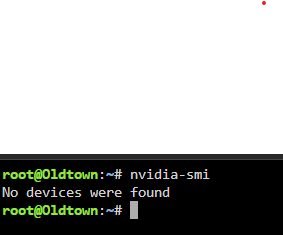
Nvidia GPU dropped off again. Less than 24hrs uptime. Attaching screenshots and updated logs oldtown-diagnostics-20250627-0815.zip
-
I read the links posted https://wiki.archlinux.org/title/Ryzen#Random_reboots and https://community.amd.com/t5/pc-processors/ryzen-5900x-system-constantly-crashing-restarting-whea-logger-id/td-p/423321/page/84 Ended up also disabling PBO and CBP. Will run for a few days and circle back to the thread
-
Thanks for the reply @JorgeB . Current BIOS Settings: Aura - Off DDR - 2666 for 2x16GB SVM - Enabled IOMMU - Enabled HD Audio - Off Onboard Lan - Off (I have a 10Gbit network card) WiFi - Off Bluetooth - Off Fans - Turbo I thought that CStates were largely fixed so I didn't do any CState / idle power management settings. I just went in and turned back on Power Supply Idle to be Typical Current Idle. Would this cause issues with DRAM and the Nvidia GPU disappearing or am I troubleshooting multiple problems?
-
Hey all, I have had a couple random issues starting to creep up on my unraid install and trying to figure out what is going on. First, I keep getting the Nvidia driver to go into an unresponsive state. nvidia-smi says no devices. GPU wont show in settings or in the dashboard widget. Reboot brings back the device for between 1 and 7 days. Within the last week Fix Common Problems kicked off a error stating that there was hardware issue (Ryzen 5800x). I took a look at the diagnostic logs but there wasn't anything that I could glean from the logs. Lastly, my rig locked and the DRAM light kicked on for the motherboard. Seems like the whole thing is going downhill. I am running a Memtest currently but looking at the community to help me understand other things I can test. Seems like these issues are related but since we are taking ram, gpu, and cpu I am having a hard time focusing on what component could be the issue. MCE hardware Error from logs Jun 17 18:23:18 Oldtown kernel: mce: [Hardware Error]: Machine check events logged Jun 17 18:23:18 Oldtown kernel: [Hardware Error]: Corrected error, no action required. Jun 17 18:23:18 Oldtown kernel: [Hardware Error]: CPU:1 (19:21:0) MC20_STATUS[-|CE|-|AddrV|-|-|CECC|-|-|Scrub]: 0x850fc389c08500af Jun 17 18:23:18 Oldtown kernel: [Hardware Error]: Error Addr: 0x0000000000000000 Jun 17 18:23:18 Oldtown kernel: [Hardware Error]: IPID: 0x0000000000000000 Jun 17 18:23:18 Oldtown kernel: [Hardware Error]: Bank 20 is reserved. Jun 17 18:23:18 Oldtown kernel: [Hardware Error]: cache level: L3/GEN, tx: RESV oldtown-diagnostics-20250626-0915(latest).zip oldtown-diagnostics-20250618-0759(hardware error).zip
-
Marking @JorgeB as the correct answer. I have swapped basically everything and what I finally came to was unstable RAM. Both sticks individually passed 3x passes. Both passed together with 3x passes but after running a 7x pass they failed. Currently, I have a 8x2 set of Corsair in there and uptime is at 5+ days
-
I’ll try but this hardware has been running in this config since last year. There are numerous posts on these forums of issues on 6.12.x. I worry there is an unknown software issue. I am considering ether moving to zfs for the cache disks and container images or completely leaving unraid
-
Well I spoke to soon... attaching syslog and diagnostics. Same thing, can ping the server but ssh and webgui down. Looks like issues started at 19:28 in the logs with some kernel errors on several cores that quickly spread into btrfs issues which bricked the whole thing. syslog-192.168.1.30.log oldtown-diagnostics-20240224-1954.zip
-
Dropping an update here for anyone who might be having stability issues with Ryzen and Unraid 6.12.8. Memtested my RAM again and ensured 3 successful passes Down clocked it from 3600 to 2400 (could do a bit higher per the document below but I decided to just run DDR4 default spec). Disabled C-States on the processor (bios) Set my Power Idle Control to typical (bios) Removed both cache SSDs Did a parity check to ensure data on the array Changed Docker from macvlan to ipvlan per some stability issue reports on these forms and reddit Used recovery tool to pull files off BTRFS cache drives Rebuilt the cache drives from scratch ensuring that only critical data was corruption free for the rebuild Overall I have been up for longer than I have been in two weeks. Will keep posting on this thread with any additional updates or recommendations. My best guess at this point is that due to some sort of corruption event from ether cstates, power, memory timings, or macvlan that caused btrfs, vm container or the docker container to become unstable thus rendering the UI to freeze and stop responding after 24-48 hours.
-
Thanks all! Parity check is just finishing up and then I will run the xfs repair. One thing I have tweaked since posting is unassigning my cache drives due to constant btrfs errors being logged out to syslog. Things appear to be running better now that they are out. 18 hours uptime so far! If I had to guess at this point, I believe the btrfs filesystem was hosed and was causing full system instability. When I have tried to do data recovery mounting the btrfs cache drives with read-only mount commands is also when I see instability. Going to run the system without cache drives for a week or so to test stability and if good, likely reformat them, and test them for issues prior to dropping them back in. Memtest also passed three loops without issue.

