





IWasJustHere
Members
-
Joined
-
Last visited
Everything posted by IWasJustHere
-
Perfect! Works now! .cfg file was "Storage" but share is "storage". Its running perfectly. What are the odds. Thanks.
-
The share is "storage". tower-diagnostics-20250312-1742.zip
-
Thanks, I just installed the plug-in now, in hopes it could solve the problem. I have uninstalled had still have the same problem. Either nothing happens when I invoke, or it runs for a few seconds, then stops. I solved the shared folder by correctly putting them in the right share manually, as you eluded to I managed to manually move 50% of my files from cash - so now I can use some of my dockers again.
-
tower-diagnostics-20250312-0859.zip
-
My Cache is full and mover suddenly stopped working for a few days now, worked perfectly for years. i don't get any errors, but nothing happens when i press it. Noting in log either. I have shutdown all dockers ect. rebooted all that. Now to the problem. I manually moved a lot of files from the cache to the array (under Main/Cache/Files). Apparently Unraid decided to make a share for each folder i moved. About 500 folders. Any advise?
-
They are editable again. I didn't do anything - but array is now rebuilding after disk failure, maybe something with this.
-
tower-diagnostics-20250309-2151.zip Here you go!
-
Templets are there - I haven't changes the name and they are not corrupted.
-
Sorry for late reply - I had a array disaster. Here is one for my plex that i can't edit. Best, J my-binhex-plex.xml
-
Quick Q. It seems I have all my most important personal media still intact, and its probably TV/Movies that are gone. Is there anyway to see what is missing? And for the media that shows, is there, do I know it's not corrupted? In other words, will the lost data just not show, or will it show and then be corrupted?
-
Thanks! I will try.
-
Hey, I ran it three times. Keep getting Fatal Error in phase 7: Phase 6 - check inode connectivity... - resetting contents of realtime bitmap and summary inodes - traversing filesystem ... - agno = 0 - agno = 1 - agno = 2 - agno = 3 - agno = 4 - agno = 5 - agno = 6 - agno = 7 - agno = 8 - agno = 9 - agno = 10 - traversal finished ... - moving disconnected inodes to lost+found ... Phase 7 - verify and correct link counts... SB summary counter sanity check failed Metadata corruption detected at 0x48a218, xfs_sb block 0x0/0x1000 libxfs_bwrite: write verifier failed on xfs_sb bno 0x0/0x8 Maximum metadata LSN (1:80) is ahead of log (1:8). Format log to cycle 4. SB summary counter sanity check failed Metadata corruption detected at 0x48a218, xfs_sb block 0x0/0x1000 libxfs_bwrite: write verifier failed on xfs_sb bno 0x0/0x8 xfs_repair: Releasing dirty buffer to free list! xfs_repair: Refusing to write a corrupt buffer to the data device! xfs_repair: Lost a write to the data device! fatal error -- File system metadata writeout failed, err=117. Re-run xfs_repair.
-
“File system corruption detection “ :-O
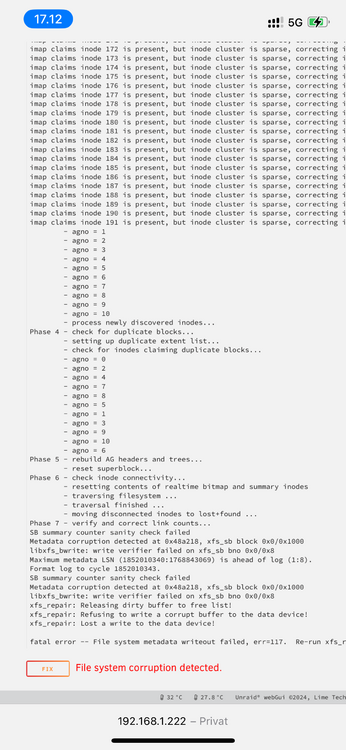
-
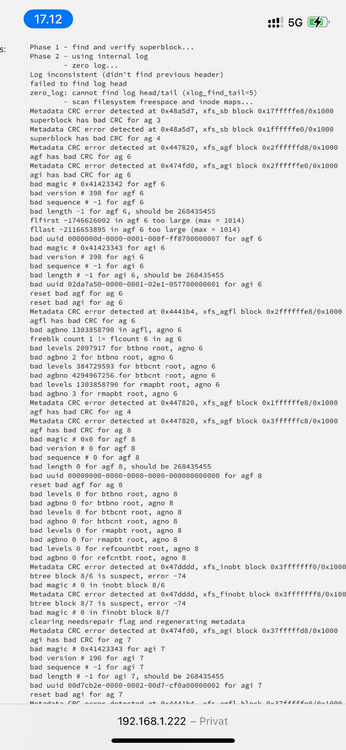
“Dirty log detected.” Should I “Zero log”? Phase 1 - find and verify superblock... Phase 2 - using internal log - zero log... Log inconsistent (didn't find previous header) failed to find log head zero_log: cannot find log head/tail (xlog_find_tail=5) ERROR: The log head and/or tail cannot be discovered. Attempt to mount the filesystem to replay the log or use the -L option to destroy the log and attempt a repair.
-
The Check returned with 10 pages of errors. Should I fix? A small cut --- xfs_repair status: Phase 1 - find and verify superblock... Phase 2 - using internal log - zero log... Log inconsistent (didn't find previous header) failed to find log head zero_log: cannot find log head/tail (xlog_find_tail=5) - scan filesystem freespace and inode maps... Metadata CRC error detected at 0x474fd0, xfs_agi block 0x37fffffd8/0x1000Metadata CRC error detected at 0x485fcd, xfs_rmapbt block 0x40/0x1000 Metadata CRC error detected at 0x48a5d7, xfs_sb block 0x7ffffff8/0x1000 btree block 0/8 is suspect, error -74 bad magic # 0 in btrmap block 0/8 bad rmapbt block count 0, saw 1 superblock has bad CRC for ag 1 agi has bad CRC for ag 7 bad magic # 0x41423343 for agi 7 bad version # 196 for agi 7 bad sequence # -1 for agi 7 bad length # -1 for agi 7, should be 268435455 Metadata CRC error detected at 0x48196d, xfs_refcountbt block 0x48/0x1000 bad uuid 00d7cb2e-0000-0002-00d7-cf0a00000002 for agi 7 Metadata CRC error detected at 0x447820, xfs_agf block 0x80000000/0x1000 would reset bad agi for ag 7 btree block 0/9 is suspect, error -74 bad magic # 0x58444233 in refcount btree b ... - agno = 1 - agno = 2 - agno = 3 - agno = 4 - agno = 5 - agno = 6 - agno = 7 - agno = 8 - agno = 9 - agno = 10 - process newly discovered inodes... Phase 4 - check for duplicate blocks... - setting up duplicate extent list... - check for inodes claiming duplicate blocks... - agno = 0 - agno = 1 - agno = 2 - agno = 3 - agno = 4 - agno = 5 - agno = 7 - agno = 9 - agno = 8 - agno = 6 - agno = 10 would rebuild corrupt rmap btrees. would rebuild corrupt refcount btrees. No modify flag set, skipping phase 5 Inode allocation btrees are too corrupted, skipping phases 6 and 7 Maximum metadata LSN (1684631143:1025660244) is ahead of log (0:0). Would format log to cycle 1684631146. No modify flag set, skipping filesystem flush and exiting. --- And a lot more.
-
Here we go again tower-diagnostics-20250308-1353.zip
-
Ok. Just to make sure, I'll do this again? --- -Tools -> New Config -> Retain current configuration: All -> Apply -Check all assignments and assign any missing disk(s) if needed, including the new disk3, replacement disk should be same size or larger than the old one -IMPORTANT - Check both "parity is already valid" and "maintenance mode" and start the array (note that the GUI will still show that data on parity disk(s) will be overwritten, this is normal as it doesn't account for the checkbox, but it won't be as long as it's checked) -Stop array -Unassign disk3 -Start array (in normal mode now), and post new diagnostics --- Correct?
-
It should be 8tb full.
-
Arghh! I was sure I did:(
-
Here you go! tower-diagnostics-20250308-1210.zip
-
Done New Diagnostics attached. Thanks. tower-diagnostics-20250308-1145.zip
-
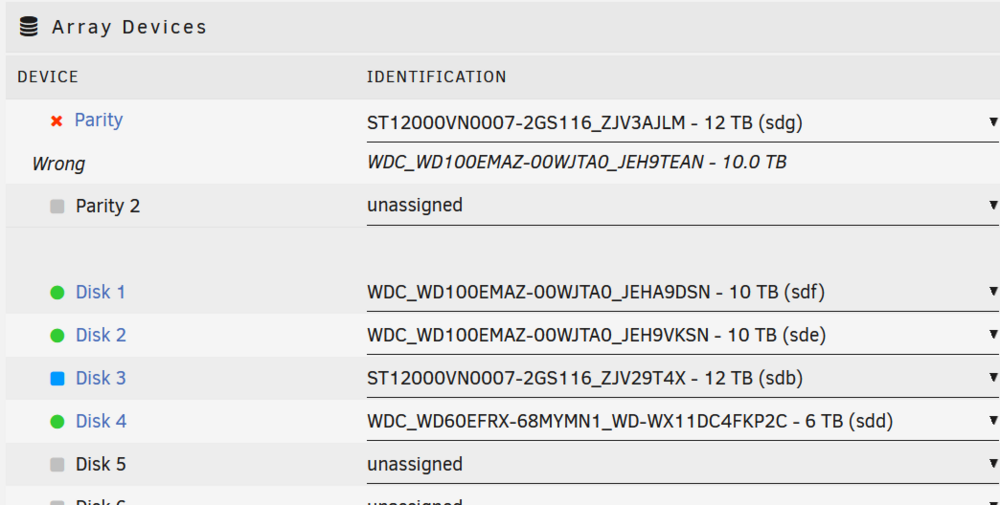
I followed your instructions. After new config, I can't start array. Too many or wrong disc?

-
Thanks! I’ll cross my fingers:)
-
Thanks. Here you go tower-diagnostics-20250308-0804.zip
-
all my drives were good. No warning on either. I monitor manually. I’m n the last failed parity drive I monitored constantly and was not getting hot (around 43c when dead). But good idea to set up alerts. Thanks. For anyones interest, they were both WD Red. (5200). One had 35.000 hours, one had 52.000 hours.


