





IWasJustHere
Members
-
Joined
-
Last visited
Everything posted by IWasJustHere
-
That would be a lifesaver! Jorge helped me before a lot with other stuff. Great guy. Thank you. Best, J
-
First copy went to “100% completed”. But I never got the “rebuild array”. Then I rebooted and I just got “copy” again. The drive failed during the second time Copy.
-
Thanks. That’s at least some semi good news. The drive is dead. Not showing in bios (or my sas controller). “Click click”. I think it was the 2 x Parity swap (40+ hours) that killed it… (first parity swap copy completed, but I never got the “start array”, only “copy” again…. In theory the new parity disk should have the data, but… As I understand, I need to rebuild the array. But I can’t find out what exactly to do without breaking anything :-S
-
Long story short. I had and array drive fail(8TB). Then got new larger drives(12TB) and had to do a parity swap. While doing the Parity Swap, my old parity drive died - What are the odds... Anyway, as far as i can understand, all data on my 8TB drive is now gone for good. Is there a chance i can still save all my other data? And how do I do? Any help is truly and greatly appreciated. Thanks, J
-
Great. I stopped reading after step 2 - unassign parity Thanks again!
-
Perfect - Thanks! (I just don't understand how Unraid can rebuild Parity and array with the "old" parity unassigned and a dead drive - I really really can't lose my data)
-
Are you sure I can use parity swap, when i have a dead disc in my current array? Best, J
-
I did some digging. Looks like this is going to be a long and expensive process. Looks like I have to: -Buy yet another a new 8-10Tb drive. - Rebuild/replace my dead 8Tb. - Add my new 12TB and replace as new Parity. - Add additional Drives, including my old parity. Can anyone confirm that there is no easier way? Thanks, J
-
I have all my templates in e: \config\plugins\dockerMan\templates-user - How to I enable Edit again? Thanks,
-
Hi all. One of my old drives (8tb) just died. I got a great deal on a few 12tb drives. The problem is my parity drive is only 10tb. What is the best way to upgrade/replace/rebuild? best, J
-
Thank you Jorge. I restarted and one of my drives just died. I can reboot, it will get ip, and everything seems fine in console but all services are down and I can’t connect to dashboard I will do som troubleshooting and get back to you. Thanks.
-
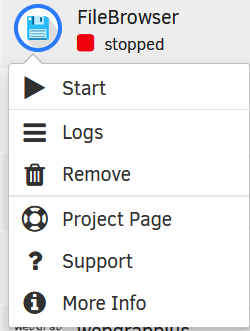
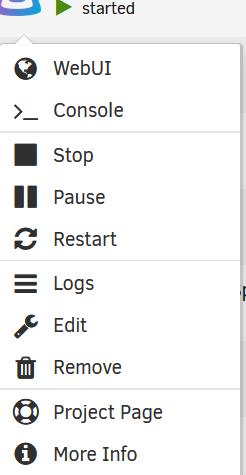
Hi, All my Dockers have lost the ability to be edited after I upgraded from 6 to 7. - I applied a new docker and that works fine. (See pics) - I didn't do any changes to the flash, or anything else. Please advise. Thanks.
-
[SOLVED ]You sir - are a champion! I hired a consultant who couldn't figureit out either. Turns out, the Nextcloud conf file I didn't rename correct! (need to learn Krusader better)
-
Hi All - While trying to set up Nextcloud with Letsincrypt(Spaceinvader One Method) - I get the following error from the Letsencrypt Log, and really have no idea what to do: nginx: [alert] detected a LuaJIT version which is not OpenResty's; many optimizations will be disabled and performance will be compromised (see https://github.com/openresty/luajit2 for OpenResty's LuaJIT or, even better, consider using the OpenResty releases from https://openresty.org/en/download.html) nginx: [error] lua_load_resty_core failed to load the resty.core module from https://github.com/openresty/lua-resty-core; ensure you are using an OpenResty release from https://openresty.org/en/download.html (rc: 2, reason: module 'resty.core' not found: no field package.preload['resty.core'] no file './resty/core.lua' no file '/usr/share/luajit-2.1.0-beta3/resty/core.lua' no file '/usr/local/share/lua/5.1/resty/core.lua' no file '/usr/local/share/lua/5.1/resty/core/init.lua' no file '/usr/share/lua/5.1/resty/core.lua' no file '/usr/share/lua/5.1/resty/core/init.lua' no file '/usr/share/lua/common/resty/core.lua' no file '/usr/share/lua/common/resty/core/init.lua' no file './resty/core.so' no file '/usr/local/lib/lua/5.1/resty/core.so' no file '/usr/lib/lua/5.1/resty/core.so' no file '/usr/local/lib/lua/5.1/loadall.so' no file './resty.so' no file '/usr/local/lib/lua/5.1/resty.so' no file '/usr/lib/lua/5.1/resty.so' no file '/usr/local/lib/lua/5.1/loadall.so') Server ready And when I access Nextcloud from WAN, I just see: "Welcome to Server" Please advise Best,
-
[SOLUTION: Make your USB Legacy, UEFI. Pweh, three days of tampering done] Hi There My Home unRAID server won't boot from usb after reboot / restart. Every time I must enter bios, save changes (without making any changes), restart, then it boots fine. After a restart, there is no errors on screen. Just blank. (Normally it would say something like: no media present, if there is no boot disk). - I tried four different USB sticks (Kingston, Samsung, no-name) - BIOS set to correct Boot Sequence. - Same problem whether headless or with monitor - Disabling all boot devices (emptied the boot sequence) except for the USB. - Searching for similar problems on MSI motherboards forums - Tried to boot from four different USB Ports Same result: Boots fine first time, won’t boot after restart. No boot errors – Just blank screen. Kudos to any advise out there! 😊
