





petecemi
Members
-
Joined
-
Last visited
-
I have just upgraded my Unraid 6.11.5 server to this motherboard and am experiencing the exact same issue, been trawling the BIOS for any SATA settings without any luck so far.
-
Awesome! I didn't know about these things either, just discovered them, small correction to my output above, the default password for monuser is secret: telnet 192.168.1.4 3493 Trying 192.168.1.4... Connected to 192.168.1.4. Escape character is '^]'. username monuser OK password secret OK login ups OK
-
Try this @casperse, it should allow you to telnet in to the NUT port: telnet 192.168.0.10 3493 ... if connected try the following commands (USERNAME, PASSWORD, etc) does it respond with OK? like on mine? telnet 192.168.1.4 3493 Trying 192.168.1.4... Connected to 192.168.1.4. Escape character is '^]'. USERNAME monuser OK PASSWORD mypass OK LIST UPS BEGIN LIST UPS UPS ups "Description unavailable" END LIST UPS GET UPSDESC ups UPSDESC ups "Unavailable" If it returns ERR ACCESS-DENIED or won't let you connect, then it maybe something to do with the "Permitted DiskStation devices" IP address list on the SynologyNAS. I did not change any of the usernames or passwords for my config, left everything as default.
-
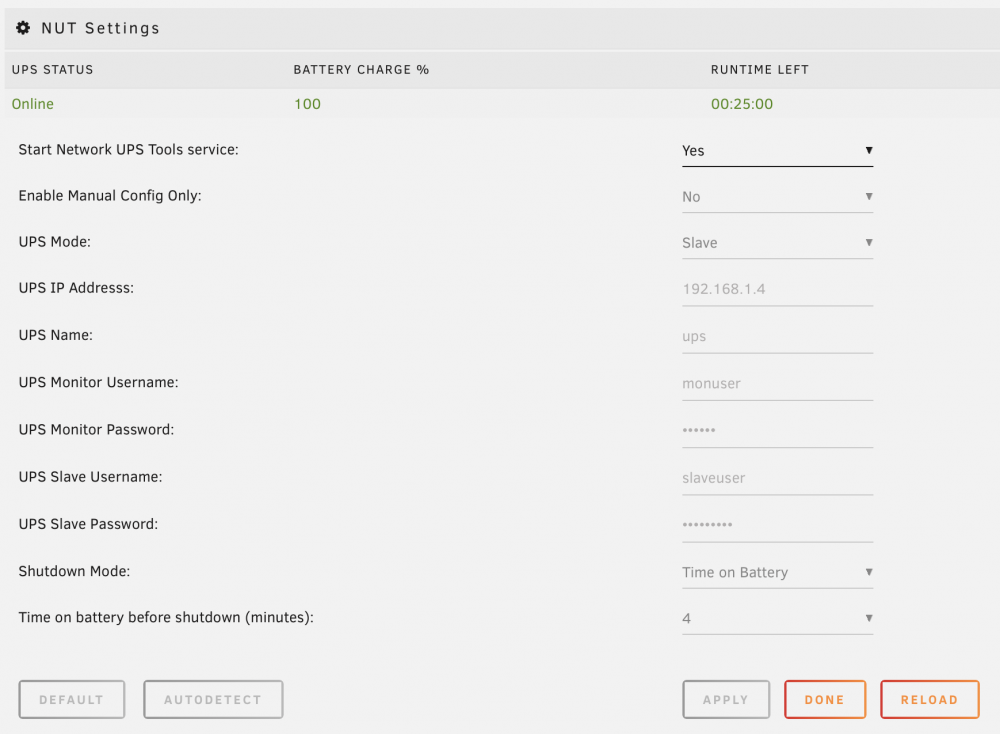
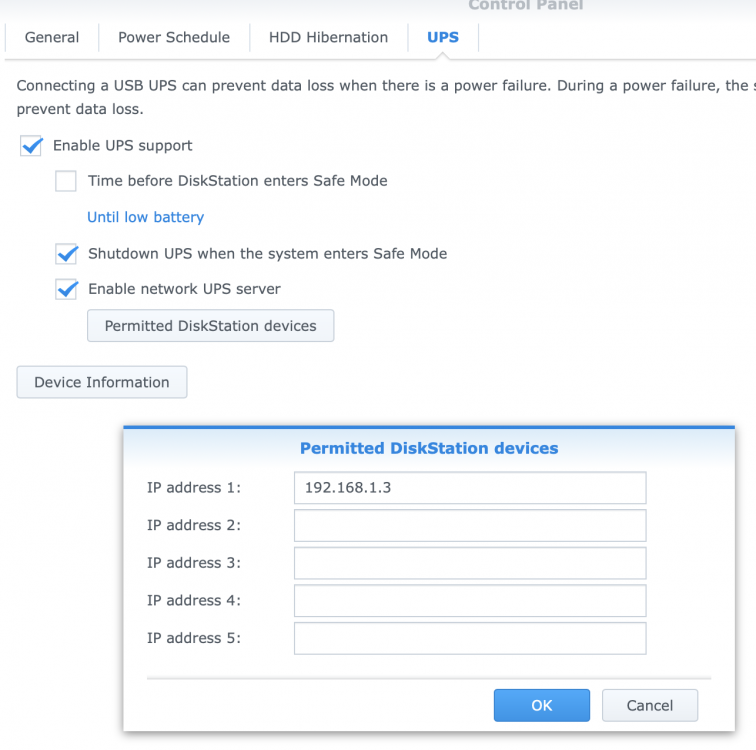
My unRaid box is 192.168.1.3 and my Synology NAS is 192.168.1.4 As mentioned, I changed nothing else other than the UPS Mode in the NUT Settings. Hope it helps!
-
I did get this working by installing the NUT (Network UPS Tools) plugin as mentioned by @casperse configuring the UPS Mode (Settings > NUT) to be a "Slave" and setting the UPS IP Address to the Synology NAS (no port number required) - I left all other values as default and started the UPS Tools Service. On the Synology NAS I simply entered the IP Address of the unRAID box in the Permitted DiskStation devices and checked the "Enable network UPS server" in the UPS tab of the Hardware & Power Control Panel. The NUT plugin displayed all the settings from the UPS and seems to be up and running just fine
-
petecemi changed their profile photo
-
Interesting, thanks bastl, this sounds cool, although I will probably reinstall Debian, but I'll try the different options, to see what works best for me. I guess that storing the OS on unRaid gives me the benefit of safety, if a drive fails. So I just plugged in my Synology DX513 5 x 6TB external box with an external SATA cable to the unRaid machine and all drives show up in Array Devices, this is great!
-
Thanks for the quick reply David, I wish I had discovered unRaid sooner! I mean that I could run my Debian box inside a VM. Would that VM utilise the SSD's? I will experiment with unRaid on my spare box in the meantime and read some more info.
-
Hi there, I have only just discovered unRaid and set it up on a spare box which I have lying around. Somewhat amazed and taking this all in! I currently have a Synology DS1813+ which is somewhat underpowered but nevertheless does a good job for things such as Surveilance station etc. It has 2 x DX513 expansions connected to it, as one is mostly empty, would it be possible to connect it to this unRaid box using eSATA and use the 5 x 6TB drives which it houses? as it's probably a tight squeeze to put them into the spare box I am using. This would be a great migration option as the DX513 is nice and compact with fans! I also use a rather out-dated Debian machine which contains various files and development server etc, for safety I use 2 x RAID1 SSD's for the OS and 2 x RAID1 6TB for data. I guess that I could combine this into the new unRaid box and take advantage of more CPU and RAM etc? Also I like to tinker with VM's and have an ESXi server with a bunch of HDD's that I rarely use, so ideally I could combine the NAS, Debian and ESXi boxes into one unRaid server! Cool!



