






vitaprimo
Members
-
Joined
-
Last visited
Everything posted by vitaprimo
-
i.e; from Overlay2 to native. Or does that only affects the "Docker directory" (by default /mnt/user/system/docker/), Docker.img, whatnot. Thanks!
-
For a while now, I've been unable to use SSH because of "too many open sockets." # IPv6 addresses slightly edited Jul 21 05:30:36 zx3 rc.sshd: Starting SSH server daemon... Jul 21 05:30:36 zx3 rc.sshd: /usr/sbin/sshd Jul 21 05:30:36 zx3 sshd[40808]: Server listening on 2001:db8:b9dd:900::d port 22. Jul 21 05:30:36 zx3 sshd[40808]: Server listening on 10.9.0.13 port 22. Jul 21 05:30:36 zx3 sshd[40808]: Server listening on 2001:db8:b9dd:800::d port 22. Jul 21 05:30:36 zx3 sshd[40808]: Server listening on 10.8.0.13 port 22. Jul 21 05:30:36 zx3 sshd[40808]: Server listening on 2001:db8:b9dd:700::d port 22. Jul 21 05:30:36 zx3 sshd[40808]: Server listening on 10.7.0.13 port 22. Jul 21 05:30:36 zx3 sshd[40808]: Server listening on 2001:db8:b9dd:600::d port 22. Jul 21 05:30:36 zx3 sshd[40808]: Server listening on 10.6.0.13 port 22. Jul 21 05:30:36 zx3 sshd[40808]: Server listening on 2001:db8:b9dd:1200::d port 22. Jul 21 05:30:36 zx3 sshd[40808]: Server listening on 10.18.0.13 port 22. Jul 21 05:30:36 zx3 sshd[40808]: Server listening on 2001:db8:b9dd:1100::d port 22. Jul 21 05:30:36 zx3 sshd[40808]: Server listening on 10.17.0.13 port 22. Jul 21 05:30:36 zx3 sshd[40808]: Server listening on 2001:db8:b9dd:1000::d port 22. Jul 21 05:30:36 zx3 sshd[40808]: Server listening on 10.16.0.13 port 22. Jul 21 05:30:36 zx3 sshd[40808]: Server listening on 2001:db8:b9dd:e00::d port 22. Jul 21 05:30:36 zx3 sshd[40808]: Server listening on 10.14.0.13 port 22. Jul 21 05:30:36 zx3 sshd[40808]: fatal: Too many listen sockets. Enlarge MAX_LISTEN_SOCKS Jul 21 05:30:36 zx3 rc.sshd: SSH server daemon... Failed. Jul 21 05:30:36 zx3 emhttpd: shcmd (2083): rm -f /boot/config/plugins/dynamix/mover.cron Jul 21 05:30:36 zx3 emhttpd: shcmd (2084): /usr/local/sbin/update_cron Jul 21 05:30:36 zx3 emhttpd: Starting services...I still could use the web shell it has most of the time, sometimes it would just open a black window that would never print any text in it other than a blinking cursor. I never found what triggers its failure. In the last few days, the shell with the prompt that never gets ready became the norm effectively locking me out of all CLI but the console itself. The server room, a former walk-in closet, is both freezing and burning, no desk but only the cold floor tile to sit on. It's extremely uncomfortable for more than a quick check. Never mind console use. I read somewhere that it may be do to changes in the go file, and I had edited it to change the default contents of /root but since then I undid the changes but I'm still locked away. I remember also verifying ~/.ssh permissions to be correct, but I don't remember where if the directory was a symlink or not. In any case, that should be irrelevant for the web CLI, right? In some xBSD forum I stumbled on that the solution for this could potentially be making sshd listen in 0.0.0.0 and ::1 rather than on every interface; then use FreeBSD's firewall to police access. Aside that there's a few missing key pieces that solution in Unraid, namely the firewall, as far as I'm aware, /etc is expanded from the Republic of Congo or whatever straight into memory each boot, rewriting whatever was held live since the last boot. Though since it was never there in the first place, maybe rewriting is not the best term. Any ideas? Thanks.
-
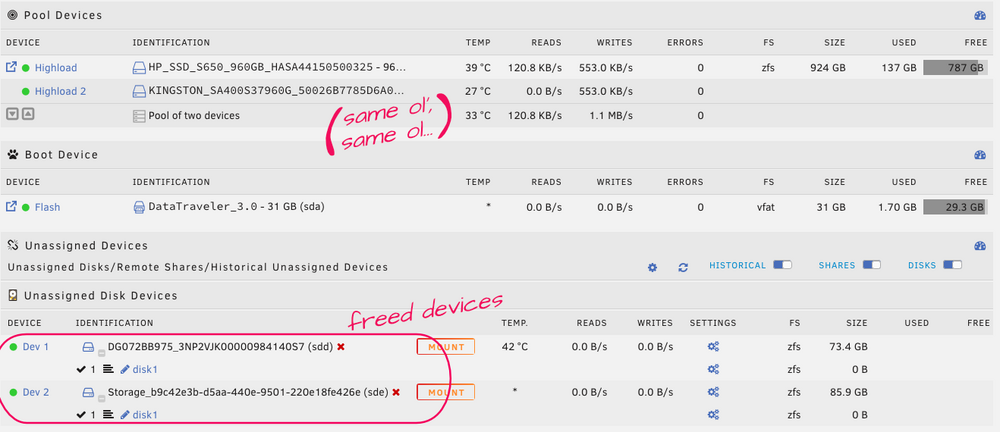
Thanks but I figured it out, I used the New Config tool, preserving the pool assignments. It was the scariest button I've had to click in quite a while but it paid off. The array was startable (and was started) right away. VMs are coming online as I type this. Nevertheless, I do appreciate that you took time to help though. Thank you very much!
-
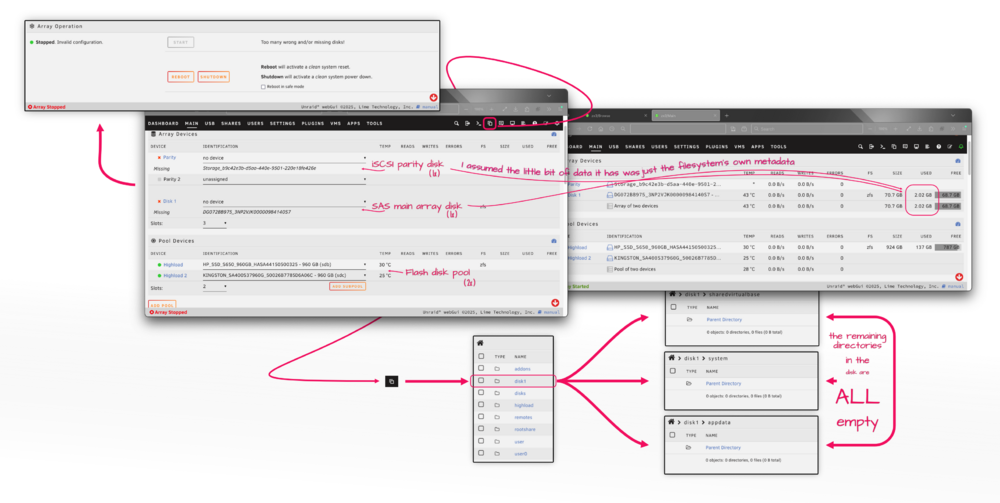
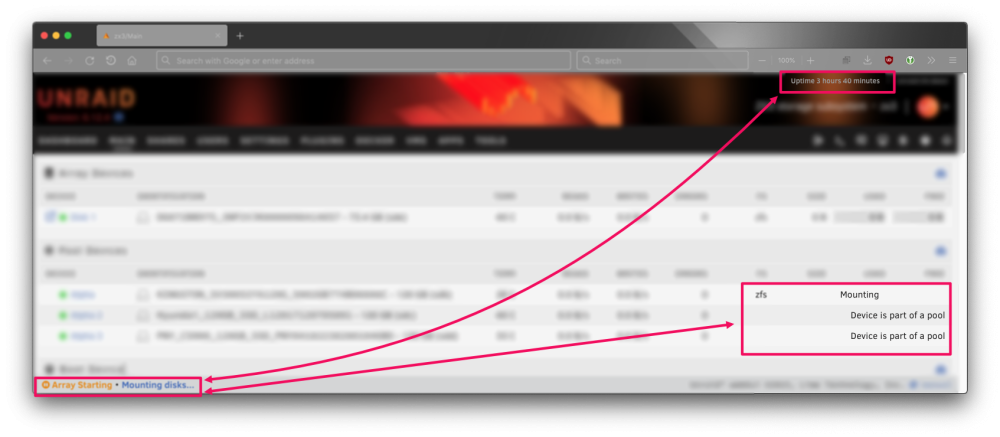
I have a small app server that needs very little space, mostly for binaries as it uses the network for everything else. Nevertheless, that very little space is in the form of a handful of virtual machine disk images. It makes no sense "checking out" relatively giant VM files from the array to a cache disk if those files are the norm, so I opted to change the storage for a small ZFS flash mirror instead so they can be worked with in-place. The server was initially configured with an Unraid array, which I cannot get rid of. In the GUI, unless hidden files are, well… hidden, the Unraid array appears to be empty already but when I remove it from the system it tells me too many disks are missing or something like that as if there was something in the array it needs. I took a few screenshots to help me illustrate my point: I cannot log in via SSH to see if there are any ZFS snapshots or datasets (from the brief period the Unraid array was used for containers) because it's locked up, there is some error about sshd having too many open ports or listening in too many ports or something along those lines. Regardless, since everything was moved to the ZFS pool, I don't see why should there be anything lingering in the array at least from the ZFS standpoint. Could you help me out with some pointers on how to remove the array, please? This is Unraid 7.1.3, BTW. Thanks!
-
I just found this: macvtap's libvirt XML definition ... <devices> <interface type='network'> <mac address='52:54:00:0a:8a:c1'/> <source network='ovs-bridge-eth1'/> <model type='rtl8139'/> <address type='pci' domain='0x0000' bus='0x00' slot='0x03' function='0x0' multifunction='on'/> </interface> <interface type='network'> <mac address='52:54:00:0a:8a:c2'/> <source network='macvtap-bridge-eth2'/> <model type='rtl8139'/> <address type='pci' domain='0x0000' bus='0x00' slot='0x03' function='0x1'/> </interface> ... </devices>Source: https://suhu0426.github.io/Web/Presentation/20150203/index.html I noticed the VM definition thingy now presents both the breakdown of the XML side by side together with much easier to digest boxes too, it should take out much of the guessing for the vSphere immigrants who've never had to deal with this sort of thing before. Since the last post, now I'm running Unraid baremetal, but I have yet to check it out to confirm it works on it. I tried a couple of things but then the DNS cache expired (DNS servers and edge firewall were offline; project got just a bit out of hand) and things got very ugly very fast after that. If it works I'll make sure to confirm back. 🤓 I've no objections on being beaten to it though. For what it's worth; in the logs and drivers section (in Tools→System Drivers) there is mention of macvtap being loaded. I'm optimistic. But still, Unraid? Buddy? You alive? Sh— Should I check on the news? Did a night time "employee" stole your wallet and keys when you fell asleep, again? 😒
-
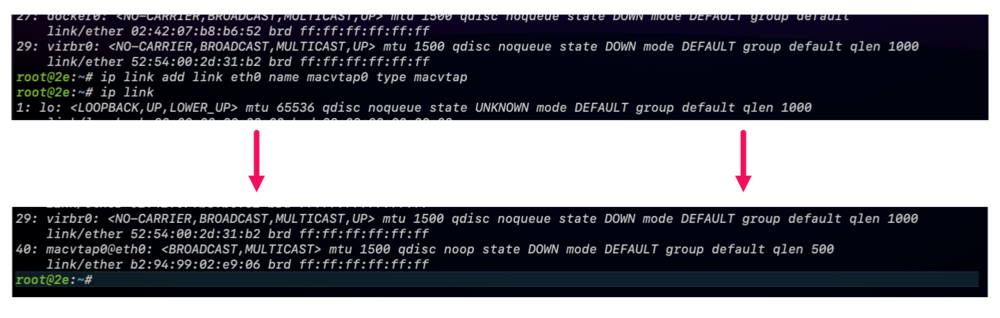
It's called MACVTAP. It's supposed to be supported on Unraid since version 6, I believe. But it's nowhere to be found on the GUI nor the docs, which of course you already know. I'm not running Unraid baremetal for the same reasons as you, on top that I'm also passing though a storage controller to it, thus I can't run do nested virtualization in it to confirm but I think it's done with: # ip link add link eth0 name macvtap0 type macvtap (oh look! In-line code. About time! 🤰) Where you replace eth0 for your network adapter. macvtap0 is the name of the new adapter. I tried it: and...: (not there.) But as I mentioned, I can't actually run VMs, I can only pretend to make them, and a lot of things in Unraid don't present themselves unless you select something else and things of that nature. Also, ip commands are ephemeral; this wouldn't survive a reboot. It would be awesome if somebody from Unraid replied for once to this question as it's not the first time it's been asked. I came in today to ask the same thing because I have this other Unraid server that so big it's occupying the most of the resources of any of the servers of the cluster it's in. It would be much more efficient to run it baremetal in the server the other one that can't run VMs is and consolidate them. I'm not holding my breath though. :( I can sacrifice everything I'm used to on vSphere: I'm fine not being able to clone VMs (especially Debian that takes ages to install) again, not being to cluster servers, using templates. deploying OVAs, all that except for the ability to pass trunk ports. Even Hyper-V does that (surprisingly well actually, if you don't mind PowerShell). Unraid? You there?
-
So… the Silverstone one, I made that one the very first time it was requested, but I didn't like how it came out. I'm not a designer, much less an actual artist, and I think it takes a real artist to simplify a design to a few lines. Mine keep coming out too detailed, that's bad for an icon. And as far as the UGREEN ones, I think they can be used as they are, they almost look like icons if you squint. It will be tiny, you will barely gonna notice: I liked the design both in and out of the Jonsomething, John Deere, whatever. It reminds me to this — I think it was a kickstarter — something about "zima", but the Lil' Jon looks better. In any case, I made them all, but since they're lousy designs (again I'm not a designer); if a real designer wants to take them up I'm attaching the original Affinity Designer file, SVGs and PSDs so they don't have to start from scratch. Very unrelated: have you noticed the 4bay UGREEN thing from the front? I think might be a perfect square. After tracing it, I noticed it was only one pixel of difference from the other side, and I think only because the image was zoomed it way too much, I thought that was y'know… I don't know. Never mind. I must be having hot flashes or something. Have fun. UGREEN NASync DXP4800.psd UGREEN NASync DXP4800.svg UGREEN NASync DXP2800.psd UGREEN NASync DXP2800.svg Jonsbo N3.psd Jonsbo N3.svg Silverstone RM21-308.psd Silverstone RM21-308.svg case icons.afdesign



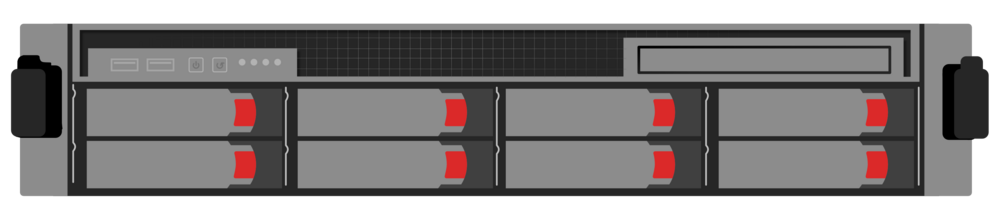

-
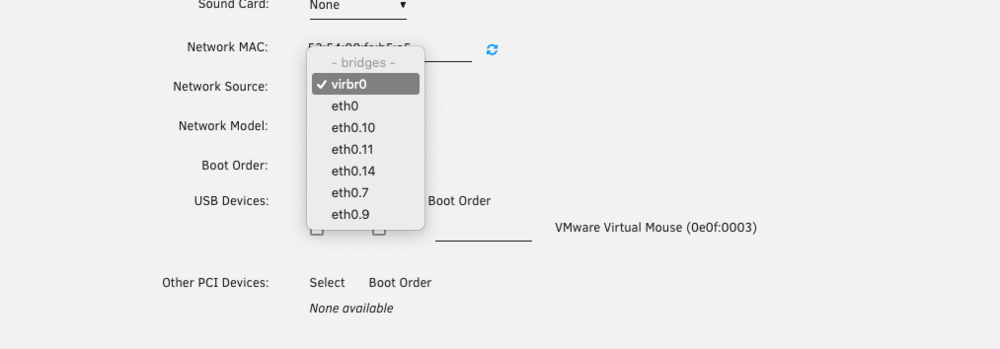
I'm attempting to set up a network appliance-type of VM. I need the equivalent for a [distributed] port group on pseudo-VLAN 4095. I hadn't used Unraid in a minute, but I remember once — while reading some Unraid article — I learned about macvtap, which is essentially sort of "a macvlan" but at the port/interface level but bypassing the networking stack since it's already handled or som' like that; it's kind of like cloning/aliasing an interface, MAC-spoofing it, while the physical pays the bills or moves the packets in this case; interface impersonation. Whatever it is, it seems like it may be able to support tagged traffic of its own whereas macvlan needs to target directly a subinterface to handle its otherwise tagged traffic. (Correct me where needed, please.) The article where I read this not about it, but about a workaround for a bug. Add just enough time to that and now I don't remember how to find it anymore. I remember that it was enabled by disabling bridging, specifically so because it was counterintuitive. I did that and it seems to have worked. If I'm not misreading the logs (attached below). Although I'm still lost about setting the interface to allow guests to set up their own access to VLANs. Is it possible? I still have two options left, I think; SR-IOV network virtual functions and PCIe passthrough. I've never set up SR-IOV VF networking on Unraid before though and the volume of traffic isn't high enough to warrant a VF, let alone a full NIC. It'd be wasteful. Log: … Aug 25 16:01:56 zx4 root: Starting virtlockd... # ↙︎ No longer references virtual construct Aug 25 16:01:56 zx4 kernel: eth0: renamed from vethbc9e72e # ← but rather an interface directly Aug 25 16:01:56 zx4 kernel: IPv6: ADDRCONF(NETDEV_CHANGE): vetha63b935: link becomes ready Aug 25 16:01:56 zx4 kernel: docker0: port 1(vetha63b935) entered blocking state Aug 25 16:01:56 zx4 kernel: docker0: port 1(vetha63b935) entered forwarding state Aug 25 16:01:56 zx4 root: Starting virtlogd... Aug 25 16:01:56 zx4 rc.libvirt: change br0.9 to macvtap in /etc/libvirt/qemu/machine-spec1.xml # ← macvtap Aug 25 16:01:56 zx4 rc.docker: container01: started succesfully! Aug 25 16:01:56 zx4 rc.libvirt: change br0.9 to macvtap in /etc/libvirt/qemu/machine-spec2.xml # ← Aug 25 16:01:56 zx4 rc.libvirt: change br0 to macvtap in /etc/libvirt/qemu/machine-spec3.xml # ← Aug 25 16:01:56 zx4 root: Starting libvirtd... Aug 25 16:01:56 zx4 kernel: ccp 0000:09:00.2: psp enabled Aug 25 16:01:56 zx4 kernel: SVM: TSC scaling supported Aug 25 16:01:56 zx4 kernel: kvm: Nested Virtualization enabled Aug 25 16:01:56 zx4 kernel: SVM: kvm: Nested Paging enabled Aug 25 16:01:56 zx4 kernel: SEV enabled (ASIDs 0 - 15) Aug 25 16:01:56 zx4 kernel: SEV-ES enabled (ASIDs 0 - 4294967295) Aug 25 16:01:56 zx4 kernel: SVM: Virtual VMLOAD VMSAVE supported Aug 25 16:01:56 zx4 kernel: SVM: Virtual GIF supported Aug 25 16:01:56 zx4 kernel: SVM: LBR virtualization supported Aug 25 16:01:56 zx4 kernel: tun: Universal TUN/TAP device driver, 1.6 Aug 25 16:01:56 zx4 dnsmasq[2263]: started, version 2.89 cachesize 150 Aug 25 16:01:56 zx4 dnsmasq[2263]: compile time options: IPv6 GNU-getopt DBus no-UBus i18n IDN2 DHCP DHCPv6 no-Lua TFTP conntrack ipset no-nftset auth cryptohash DNSSEC loop-detect inotify dumpfile Aug 25 16:01:56 zx4 dnsmasq-dhcp[2263]: DHCP, IP range 192.168.122.2 -- 192.168.122.254, lease time 1h Aug 25 16:01:56 zx4 dnsmasq-dhcp[2263]: DHCP, sockets bound exclusively to interface virbr0 … and, consistent to some light research on the Internet, the interfaces change their names too: If I choose the parent interface, "vhost0", is that VLAN-agnostic pass through like VLAN4095? Or is it like VLAN0; the untagged VLAN and nothing else? All advice (and education) is welcome. Thanks.
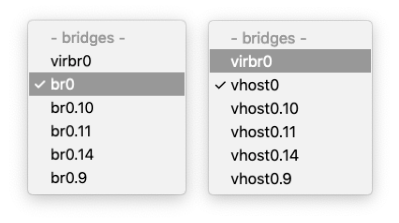
-
Thanks, I'm sorry, I meant to answer earlier but I got food poisoning, slept-on-the-shower-food-poisoning. 🤢 On the plus side, I may have lost some weight. I'm not using the disks anymore, even if they have not shown any signs of failure, I know they old, but pretending they're good I kept trying different things so I'd know how to proceed when an actual emergency presents itself; the disks wouldn't mount again formatted as ZFS either in their own pool or in the Unraid pool, as a group or by each of themselves (after Tools→New Config, of course). I remembered though, that ZFS format data can persist on a disk even after this has been reformatted to something else, so I changed the format to Btrfs and finally they mounted again. I don't know what to make of it, I'm just leaving it out there for whomever it serves a purpose. Gratzie ancora. 🙇♂️
-
When Unraid is virtualized or when it is using iSCSI disks — scenarios where disks can grow in size — how does it respond is a disk size is augmented? Is it able to detect/adjust to the change? Will it crash? I guess that's it. =]
-
Scratch that, I couldn't wait. I did zpool import disk1 to import the main array without starting the thing, it succeeded. Therefore, that's the asnwer to the question. However, in regards to what I wanted to do, it didn't quite work, the problem that appeared earlier when attempting mounting the pool the system would hang forever (and show some micro kpanics) is still there. [Wed22@ 6:15:58][root@zx3:~] #〉zpool import alpha Message from syslogd@zx3 at Nov 22 06:16:46 ... kernel:VERIFY3(size <= rt->rt_space) failed (281442912784384 <= 2054406144) Message from syslogd@zx3 at Nov 22 06:16:46 ... kernel:PANIC at range_tree.c:436:range_tree_remove_impl() I haven't given up though, I think I still might have an idea or two. Thanks! =]
-
It shows up ! Last login: Wed Nov 22 03:15:25 on ttys003 [Wed22@ 5:36:29][v@zx9:~] $〉ssh zx3 Linux 6.1.49-Unraid. [Wed22@ 5:36:32][root@zx3:~] #〉zpool import pool: disk1 id: 9807385397724693529 state: ONLINE action: The pool can be imported using its name or numeric identifier. config: disk1 ONLINE sdd1 ONLINE pool: alpha id: 1551723972850019203 state: DEGRADED status: One or more devices contains corrupted data. action: The pool can be imported despite missing or damaged devices. The fault tolerance of the pool may be compromised if imported. see: https://openzfs.github.io/openzfs-docs/msg/ZFS-8000-4J config: alpha DEGRADED raidz1-0 DEGRADED sdb1 ONLINE sdc1 ONLINE sdd1 UNAVAIL invalid label [Wed22@ 5:36:35][root@zx3:~] #〉zpool list no pools available [Wed22@ 5:38:17][root@zx3:~] #〉 sdd1 is not inserted, BTW. No idea why it says invalid label. Now I just need to figure out the order to start, if I should start at all, the array. I think it should be mountable without starting the array with zpool import alpha though I'll continue reading — I'm using the manpages from Fedora 39's ZFS — a bit more for clues, then I'll skim Unraid's docu one last time. It's very little VM data, of which I have a backup, or rather a version, but the one in these disks has been OCPDed to the max. Thank you ! ❤️
-
Oh yeah, my bad. I just caught on. Thanks for correcting me. I'll do that and come back. It might take a little bit, I had reinserted the ESXi SD card to check on something. It goes inside the giant heavy toaster. 😔 Thanks!
-
Since my ZFS pool fails to mount, I thought maybe I could nudge it into working by changing enough things about it so the system is forced to look into it…or something. It's a ZRAID, it should be able to work with any 1 missing disk. I removed 1 disk and booted the system. I log in to mount it manually the pool (auto-mount is temporarily disabled) but it tells me I have a missing cache disk and won't let me start the array without extra steps. I'm not sure what it's talking about since I don't have a cache anything; it's an all-flash ZFS pool, there's no need. I have one other obligatory disk in the regular array but it's empty and doesn't have any of the supporting pools (parity, cache). Does it refer to this pool – the ZRAID one – as the cache? And followup: when it says "remove the missing cache disk" does it mean the individual disk drive or the volume "disk" would be? And followup of the followup: if it means the whole pool, how do I get it to mount degraded then? I can't remove one disk while mounted to degrade it live because that's why I'm trying to get it to mount degraded, it won't mount when it's normal. C'est tout, thanks.

-
Huh. I thought it was going to take longer to find it. Nov 19 19:48:46 zx3 monitor: Stop running nchan processes Nov 19 19:48:47 zx3 root: error: /plugins/unassigned.devices/UnassignedDevices.php: wrong csrf_token Nov 19 19:48:50 zx3 root: error: /plugins/unassigned.devices/UnassignedDevices.php: wrong csrf_token Nov 19 19:48:50 zx3 root: error: /plugins/unassigned.devices/UnassignedDevices.php: wrong csrf_token Nov 19 19:48:53 zx3 root: error: /plugins/unassigned.devices/UnassignedDevices.php: wrong csrf_token Nov 19 19:48:56 zx3 root: error: /plugins/unassigned.devices/UnassignedDevices.php: wrong csrf_token Nov 19 19:48:58 zx3 root: error: /plugins/unassigned.devices/UnassignedDevices.php: wrong csrf_token Nov 19 19:49:52 zx3 kernel: mdcmd (31): set md_num_stripes 1280 Nov 19 19:49:52 zx3 kernel: mdcmd (32): set md_queue_limit 80 Nov 19 19:49:52 zx3 kernel: mdcmd (33): set md_sync_limit 5 Nov 19 19:49:52 zx3 kernel: mdcmd (34): set md_write_method Nov 19 19:49:52 zx3 kernel: mdcmd (35): start STOPPED Nov 19 19:49:52 zx3 kernel: unraid: allocating 15750K for 1280 stripes (3 disks) Nov 19 19:49:52 zx3 kernel: md1p1: running, size: 71687336 blocks Nov 19 19:49:52 zx3 emhttpd: shcmd (205): udevadm settle Nov 19 19:49:53 zx3 emhttpd: Opening encrypted volumes... Nov 19 19:49:53 zx3 emhttpd: shcmd (206): touch /boot/config/forcesync Nov 19 19:49:53 zx3 emhttpd: Mounting disks... Nov 19 19:49:53 zx3 emhttpd: mounting /mnt/disk1 Nov 19 19:49:53 zx3 emhttpd: shcmd (207): mkdir -p /mnt/disk1 Nov 19 19:49:53 zx3 emhttpd: /usr/sbin/zpool import -d /dev/md1p1 2>&1 Nov 19 19:49:56 zx3 emhttpd: pool: disk1 Nov 19 19:49:56 zx3 emhttpd: id: 9807385397724693529 Nov 19 19:49:56 zx3 emhttpd: shcmd (209): /usr/sbin/zpool import -N -o autoexpand=on -d /dev/md1p1 9807385397724693529 disk1 Nov 19 19:50:01 zx3 emhttpd: shcmd (210): /usr/sbin/zpool online -e disk1 /dev/md1p1 Nov 19 19:50:01 zx3 emhttpd: /usr/sbin/zpool status -PL disk1 2>&1 Nov 19 19:50:01 zx3 emhttpd: pool: disk1 Nov 19 19:50:01 zx3 emhttpd: state: ONLINE Nov 19 19:50:01 zx3 emhttpd: scan: scrub repaired 0B in 00:00:01 with 0 errors on Tue Nov 14 00:00:02 2023 Nov 19 19:50:01 zx3 emhttpd: config: Nov 19 19:50:01 zx3 emhttpd: NAME STATE READ WRITE CKSUM Nov 19 19:50:01 zx3 emhttpd: disk1 ONLINE 0 0 0 Nov 19 19:50:01 zx3 emhttpd: /dev/md1p1 ONLINE 0 0 0 Nov 19 19:50:01 zx3 emhttpd: errors: No known data errors Nov 19 19:50:01 zx3 emhttpd: shcmd (211): /usr/sbin/zfs set mountpoint=/mnt/disk1 disk1 Nov 19 19:50:02 zx3 emhttpd: shcmd (212): /usr/sbin/zfs set atime=off disk1 Nov 19 19:50:02 zx3 emhttpd: shcmd (213): /usr/sbin/zfs mount disk1 Nov 19 19:50:02 zx3 emhttpd: shcmd (214): /usr/sbin/zpool set autotrim=off disk1 Nov 19 19:50:02 zx3 emhttpd: shcmd (215): /usr/sbin/zfs set compression=on disk1 Nov 19 19:50:03 zx3 emhttpd: mounting /mnt/alpha Nov 19 19:50:03 zx3 emhttpd: shcmd (216): mkdir -p /mnt/alpha Nov 19 19:50:03 zx3 emhttpd: shcmd (217): /usr/sbin/zpool import -N -o autoexpand=on -d /dev/sdb1 -d /dev/sdc1 -d /dev/sdd1 1551723972850019203 alpha Nov 19 19:50:29 zx3 kernel: VERIFY3(size <= rt->rt_space) failed (281442912784384 <= 2054406144) Nov 19 19:50:29 zx3 kernel: PANIC at range_tree.c:436:range_tree_remove_impl() Nov 19 19:50:29 zx3 kernel: Showing stack for process 25971 Nov 19 19:50:29 zx3 kernel: CPU: 3 PID: 25971 Comm: z_wr_iss Tainted: P IO 6.1.49-Unraid #1 Then comes the trace: [ look at me, saying things authoritatively as if I knew what they mean 😆 ] Nov 19 19:50:29 zx3 kernel: Call Trace: Nov 19 19:50:29 zx3 kernel: <TASK> Nov 19 19:50:29 zx3 kernel: dump_stack_lvl+0x44/0x5c Nov 19 19:50:29 zx3 kernel: spl_panic+0xd0/0xe8 [spl] Nov 19 19:50:29 zx3 kernel: ? memcg_slab_free_hook+0x20/0xcf Nov 19 19:50:29 zx3 kernel: ? zfs_btree_insert_into_leaf+0x2ae/0x47d [zfs] Nov 19 19:50:29 zx3 kernel: ? slab_free_freelist_hook.constprop.0+0x3b/0xaf Nov 19 19:50:29 zx3 kernel: ? bt_grow_leaf+0xc3/0xd6 [zfs] Nov 19 19:50:29 zx3 kernel: ? bt_grow_leaf+0xc3/0xd6 [zfs] Nov 19 19:50:29 zx3 kernel: ? zfs_btree_find_in_buf+0x4c/0x94 [zfs] Nov 19 19:50:29 zx3 kernel: ? zfs_btree_find+0x16d/0x1b0 [zfs] Nov 19 19:50:29 zx3 kernel: ? rs_get_start+0xc/0x1d [zfs] Nov 19 19:50:29 zx3 kernel: range_tree_remove_impl+0x77/0x406 [zfs] Nov 19 19:50:29 zx3 kernel: ? range_tree_remove_impl+0x3fb/0x406 [zfs] Nov 19 19:50:29 zx3 kernel: space_map_load_callback+0x70/0x79 [zfs] Nov 19 19:50:29 zx3 kernel: space_map_iterate+0x2d3/0x324 [zfs] Nov 19 19:50:29 zx3 kernel: ? spa_stats_destroy+0x16c/0x16c [zfs] Nov 19 19:50:29 zx3 kernel: space_map_load_length+0x93/0xcb [zfs] Nov 19 19:50:29 zx3 kernel: metaslab_load+0x33b/0x6e3 [zfs] Nov 19 19:50:29 zx3 kernel: ? slab_post_alloc_hook+0x4d/0x15e Nov 19 19:50:29 zx3 kernel: ? __slab_free+0x83/0x229 Nov 19 19:50:29 zx3 kernel: ? spl_kmem_alloc_impl+0xc1/0xf2 [spl] Nov 19 19:50:29 zx3 kernel: ? __kmem_cache_alloc_node+0x118/0x147 Nov 19 19:50:29 zx3 kernel: metaslab_activate+0x36/0x1f1 [zfs] Nov 19 19:50:29 zx3 kernel: metaslab_alloc_dva+0x8bc/0xfce [zfs] Nov 19 19:50:29 zx3 kernel: ? preempt_latency_start+0x2b/0x46 Nov 19 19:50:29 zx3 kernel: metaslab_alloc+0x107/0x1fd [zfs] Nov 19 19:50:29 zx3 kernel: zio_dva_allocate+0xee/0x73f [zfs] Nov 19 19:50:29 zx3 kernel: ? kmem_cache_free+0xc9/0x154 Nov 19 19:50:29 zx3 kernel: ? spl_kmem_cache_free+0x3a/0x1a5 [spl] Nov 19 19:50:29 zx3 kernel: ? preempt_latency_start+0x2b/0x46 Nov 19 19:50:29 zx3 kernel: ? _raw_spin_lock+0x13/0x1c Nov 19 19:50:29 zx3 kernel: ? _raw_spin_unlock+0x14/0x29 Nov 19 19:50:29 zx3 kernel: ? tsd_hash_search+0x70/0x7d [spl] Nov 19 19:50:29 zx3 kernel: zio_execute+0xb1/0xdf [zfs] Nov 19 19:50:29 zx3 kernel: taskq_thread+0x266/0x38a [spl] Nov 19 19:50:29 zx3 kernel: ? wake_up_q+0x44/0x44 Nov 19 19:50:29 zx3 kernel: ? zio_subblock+0x22/0x22 [zfs] Nov 19 19:50:29 zx3 kernel: ? taskq_dispatch_delay+0x106/0x106 [spl] Nov 19 19:50:29 zx3 kernel: kthread+0xe4/0xef Nov 19 19:50:29 zx3 kernel: ? kthread_complete_and_exit+0x1b/0x1b Nov 19 19:50:29 zx3 kernel: ret_from_fork+0x1f/0x30 Nov 19 19:50:29 zx3 kernel: </TASK> And ish hann..nnngs… I guess that's it.
-
Well, it is: ... pool: alpha id: 1551723972850019203 state: UNAVAIL status: The pool is formatted using an incompatible version. action: The pool cannot be imported. Access the pool on a system running newer software, or recreate the pool from backup. see: http://www.sun.com/msg/ZFS-8000-A5 config: alpha UNAVAIL newer version raidz1-0 ONLINE disk/by-id/ata-KINGSTON_SV300S3... Oh, wait, do you mean as long as the guest OS expect the partition to be the first--and not the second such as in the case of TrueNAS? That make a little more sense. I couldn't help myself however and sort of already tried importing the pool in another system, Fedora. It seems it comes with outdated ZFS. Well, not "comes" since it's and afterinstall...but you get the idea. 🫤 I'll update to Fedora 39, this is 38, to see if it's like a compatibility thing and gets sorted out on its own. If it doesn't I'm going deep on FreeBSD, maybe even OpenIndiana -- or not, that's kind of a lot -- just FreeBSD then. 😃 For what it's worth though, if Fedora can identify the filesystem and reassemble the Zpool, even thought it didn't occur to me to even mark the disks way after I had taken them out of the caddies, it gives me a little hope. That and the fact that ZFS is not there yet in Unraid and the fact that the unresponsive Zpool came with the cutest little kpanics in the log, which I kinda forgot to mention earlier. I saved the text somewhere, I'll come back to paste it as soon as I find it, maybe it helps the devs. Nevertheless, I don't know why am I rambling on and on instead of just saying thank you, because that's what I logged in for. Thanks.
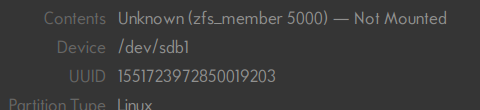
-
Just about when I was flipping into prod my little server, a problem that had already happened once, appeared again. The first time I just figured it was my fault since it was a testing system. Not this time. I had recreated my servers from ZFS snapshot clones, reducing about half a terabyte (OS data only) of very high IO in less than 100GB, super lean de-duplicated, compressed data[sets]. It was meticulous, it was thought through. The original vDisks still exist but, I want kinda want to rescue my work on it. Is the ZFS filesystem implemented on Unraid the standard ZFS (on Linux)? Would it mount (assuming it's OK) in Fedora, FreeBSD or anywhere else? Thanks.
-
😂 I'm definitely gonna be the idiot of the week, aren't I? I haven't bothered to check there in ages since it's not something I needed (pinning). That said, in answer to my question/what I said before, would it work? Dynamically (re-)allocating the core would still be more useful if, say, two VMs with overlapping cores spiked their loads so that they can be scheduled to idle cores instead of sharing the maxed out core(s). After all, oversubscription is kinda the whole main point of hypervisors, right? I'll guess I have to set up a new VM to test. This is when I wish I had an orchestrator for Unraid.
-
Um, that's kinda it. I'll elaborate… I want to assign a number of cores to a VM, but not which cores should it use. I'd like to leave that to the hypervisor to decide on its own. That way I don't need a spreadsheet to keep track of 'em. On containers it's easy, you just add --cpu=#, I believe (might be a little off). Just now, while gathering details to write this, I noticed when you switch to XML view, there are some hard-to-miss CPU-related tags: <vcpu placement='static'>4</vcpu> <cputune> <vcpupin vcpu='0' cpuset='8'/> <vcpupin vcpu='1' cpuset='20'/> <vcpupin vcpu='2' cpuset='9'/> <vcpupin vcpu='3' cpuset='21'/> </cputune> Of those the <cputune> element, obviously seems responsible for the assignment of the cores. I thought maybe if I get rid of the tag I solve the issue, until I noticed the attributes of the <vcpu> tag/element above; placement='static'. Since I don't know what's the opposite of "static", e.g; dynamic, auto, reactive, responsive, elastic, something-NUMA, sky's the limit. If I were to just remove the attribute and the element below it like this: <vcpu>4</vcpu> Would that work? tenquiu veri motsh* Thanks, for real this time. __________________________________________________________________________________ *: "thank you very much", as it would be spelled in Spanish 😆
-
Didn't work. [Sat11@ 1:05:54][root@zx3:~] #〉docker network create \ > --attachable \ > --driver macvlan \ > --gateway 10.10.0.1 \ > --subnet 10.10.0.0/24 \ > --ipv6 \ > --gateway XXXX:XXXX:XXXX:XaXX:: \ > --subnet XXXX:XXXX:XXXX:XaXX::/120 \ > --opt parent="br0" z0a00 Error response from daemon: failed to allocate gateway (XXXX:XXXX:XXXX:XaXX::): Address already in use (Sorry for the Xs, it's a global address) It's the same error for every network, so I removed the IPv6 network and tried again: [Sat11@ 1:07:21][root@zx3:~] #〉docker network create \ > --attachable \ > --driver macvlan \ > --gateway 10.10.0.1 \ > --subnet 10.10.0.0/24 \ > --opt parent="br0" z0a00 Error response from daemon: network dm-27dcdc7bb8a6 is already using parent interface br0 Again, negative — and — if try to see what's dm-27dcdc7bb8a62; [Sat11@ 1:07:42][root@zx3:~] #〉docker network inspect dm-27dcdc7bb8a6 [] Error: No such network: dm-27dcdc7bb8a6 I mean… WT-holy-F! 🤬 ________________________________________________________________________________________________ +info: (trimmed/related) LINKS [Sat11@ 1:18:58][root@zx3:~] #〉ip l 1: lo: <LOOPBACK,UP,LOWER_UP> mtu 65536 qdisc noqueue state UNKNOWN mode DEFAULT group default qlen 1000 link/loopback 00:00:00:00:00:00 brd 00:00:00:00:00:00 … 7: eth0: <BROADCAST,MULTICAST,SLAVE,UP,LOWER_UP> mtu 1500 qdisc mq master bond0 state UP mode DEFAULT group default qlen 1000 link/ether e4:11:5b:bc:c2:8e brd ff:ff:ff:ff:ff:ff 8: eth1: <BROADCAST,MULTICAST,SLAVE,UP,LOWER_UP> mtu 1500 qdisc mq master bond0 state UP mode DEFAULT group default qlen 1000 link/ether e4:11:5b:bc:c2:8e brd ff:ff:ff:ff:ff:ff permaddr e4:11:5b:bc:c2:90 9: eth2: <BROADCAST,MULTICAST,SLAVE,UP,LOWER_UP> mtu 1500 qdisc mq master bond0 state UP mode DEFAULT group default qlen 1000 link/ether e4:11:5b:bc:c2:8e brd ff:ff:ff:ff:ff:ff permaddr e4:11:5b:bc:c2:92 10: eth3: <BROADCAST,MULTICAST,SLAVE,UP,LOWER_UP> mtu 1500 qdisc mq master bond0 state UP mode DEFAULT group default qlen 1000 link/ether e4:11:5b:bc:c2:8e brd ff:ff:ff:ff:ff:ff permaddr e4:11:5b:bc:c2:94 11: bond0: <BROADCAST,MULTICAST,MASTER,UP,LOWER_UP> mtu 1500 qdisc noqueue master br0 state UP mode DEFAULT group default qlen 1000 link/ether e4:11:5b:bc:c2:8e brd ff:ff:ff:ff:ff:ff … 14: bond0.10@bond0: <BROADCAST,MULTICAST,UP,LOWER_UP> mtu 1500 qdisc noqueue master br0.10 state UP mode DEFAULT group default qlen 1000 link/ether e4:11:5b:bc:c2:8e brd ff:ff:ff:ff:ff:ff 20: br0.10: <BROADCAST,MULTICAST,UP,LOWER_UP> mtu 1500 qdisc noqueue state UP mode DEFAULT group default qlen 1000 link/ether e4:11:5b:bc:c2:8e brd ff:ff:ff:ff:ff:ff … 23: docker0: <NO-CARRIER,BROADCAST,MULTICAST,UP> mtu 1500 qdisc noqueue state DOWN mode DEFAULT group default link/ether 02:42:b9:0c:7b:5a brd ff:ff:ff:ff:ff:ff ADDRESSES [Sat11@ 1:18:21][root@zx3:~] #〉ip a 1: lo: <LOOPBACK,UP,LOWER_UP> mtu 65536 qdisc noqueue state UNKNOWN group default qlen 1000 link/loopback 00:00:00:00:00:00 brd 00:00:00:00:00:00 inet 127.0.0.1/8 scope host lo valid_lft forever preferred_lft forever inet6 ::1/128 scope host valid_lft forever preferred_lft forever … 7: eth0: <BROADCAST,MULTICAST,SLAVE,UP,LOWER_UP> mtu 1500 qdisc mq master bond0 state UP group default qlen 1000 link/ether e4:11:5b:bc:c2:8e brd ff:ff:ff:ff:ff:ff 8: eth1: <BROADCAST,MULTICAST,SLAVE,UP,LOWER_UP> mtu 1500 qdisc mq master bond0 state UP group default qlen 1000 link/ether e4:11:5b:bc:c2:8e brd ff:ff:ff:ff:ff:ff permaddr e4:11:5b:bc:c2:90 9: eth2: <BROADCAST,MULTICAST,SLAVE,UP,LOWER_UP> mtu 1500 qdisc mq master bond0 state UP group default qlen 1000 link/ether e4:11:5b:bc:c2:8e brd ff:ff:ff:ff:ff:ff permaddr e4:11:5b:bc:c2:92 10: eth3: <BROADCAST,MULTICAST,SLAVE,UP,LOWER_UP> mtu 1500 qdisc mq master bond0 state UP group default qlen 1000 link/ether e4:11:5b:bc:c2:8e brd ff:ff:ff:ff:ff:ff permaddr e4:11:5b:bc:c2:94 11: bond0: <BROADCAST,MULTICAST,MASTER,UP,LOWER_UP> mtu 1500 qdisc noqueue master br0 state UP group default qlen 1000 link/ether e4:11:5b:bc:c2:8e brd ff:ff:ff:ff:ff:ff inet6 fe80::e611:5bff:febc:c28e/64 scope link valid_lft forever preferred_lft forever … 14: bond0.10@bond0: <BROADCAST,MULTICAST,UP,LOWER_UP> mtu 1500 qdisc noqueue master br0.10 state UP group default qlen 1000 link/ether e4:11:5b:bc:c2:8e brd ff:ff:ff:ff:ff:ff … 17: br0: <BROADCAST,MULTICAST,UP,LOWER_UP> mtu 1500 qdisc noqueue state UP group default qlen 1000 link/ether e4:11:5b:bc:c2:8e brd ff:ff:ff:ff:ff:ff inet 10.1.0.13/24 metric 1 scope global br0 valid_lft forever preferred_lft forever inet6 XXXX:XXXX:XXXX:X1XX::d/120 metric 1 scope global valid_lft forever preferred_lft forever inet6 fe80::e611:5bff:febc:c28e/64 scope link valid_lft forever preferred_lft forever … 20: br0.10: <BROADCAST,MULTICAST,UP,LOWER_UP> mtu 1500 qdisc noqueue state UP group default qlen 1000 link/ether e4:11:5b:bc:c2:8e brd ff:ff:ff:ff:ff:ff … 23: docker0: <NO-CARRIER,BROADCAST,MULTICAST,UP> mtu 1500 qdisc noqueue state DOWN group default link/ether 02:42:b9:0c:7b:5a brd ff:ff:ff:ff:ff:ff inet 172.17.0.1/16 brd 172.17.255.255 scope global docker0 valid_lft forever preferred_lft forever GATEWAYS/ROUTES v4 [Sat11@ 1:22:41][root@zx3:~] #〉ip r default via 10.11.11.1 dev shim-br0.11 default via 10.11.11.1 dev br0.11 metric 1 10.1.0.0/24 dev br0 proto kernel scope link src 10.1.0.13 metric 1 10.11.11.0/24 dev shim-br0.11 proto kernel scope link src 10.11.11.13 10.11.11.0/24 dev br0.11 proto kernel scope link src 10.11.11.13 metric 1 10.14.0.0/24 dev br0.14 proto kernel scope link src 10.14.0.13 metric 1 172.17.0.0/16 dev docker0 proto kernel scope link src 172.17.0.1 linkdown GATEWAYS/ROUTES v6 [Sat11@ 1:26:44][root@zx3:~] #〉ip -6 r ::1 dev lo proto kernel metric 256 pref medium XXXX:XXXX:XXXX:X1XX::/120 dev br0 proto kernel metric 1 pref medium XXXX:XXXX:XXXX:XbXX::/120 dev br0.11 proto kernel metric 1 pref medium XXXX:XXXX:XXXX:XeXX::/120 dev br0.14 proto kernel metric 1 pref medium fe80::/64 dev br0 proto kernel metric 256 pref medium fe80::/64 dev bond0 proto kernel metric 256 pref medium fe80::/64 dev br0.11 proto kernel metric 256 pref medium fe80::/64 dev bond0.11 proto kernel metric 256 pref medium fe80::/64 dev br0.14 proto kernel metric 256 pref medium fe80::/64 dev bond0.14 proto kernel metric 256 pref medium default via XXXX:XXXX:XXXX:XbXX:: dev br0.11 metric 1 pref medium Nowhere to be found.
-
Anyway, kidding aside, I'm having a bit of an issue trying to set up networking for Docker; previously I managed to configure the macvtap interface introduced recently, although I was using a much faster NIC to make up for the bonded+bridged 4x single-gig NICs on this host's board and to satisfy the requirement of using the interface directly as instructed. That other NIC basically belongs to my main firewall which lives on vSphere. I reasoned though, Unraid moves most of the data in the network anyway, perhaps sharing it would be more efficient — not that is that much. Truth is, a single gig should be plenty of bandwidth — so it's how it ended up in Unraid. Once in Unraid, I had to enable bridging anyway so I could set up a trunk port for the firewall; but the firewall wouldn't work correctly or as transparently as I expected; if I pinged it, it (the firewall) would reply from Unraid's IP address closest to the source of the echo requests. Because of that interception, IPv6 and multicast weren't working. I had to put it back on vSphere. Container networking was okay though. But back on the bonded bridge, container networking has been impossible to set up; if I set the addresses in Unraid**, my default gateway is overridden misrouting the traffic as a consequence. If I set no addresses in Unraid like I had before, and instead use the docker network commands it won't let me create the networks because my gateway is allegedly already in use elsewhere. I tried docker network rm $(docker network ls -q), to nuke them out before recreating my own, but it didn't work. And the gateways are not specified anywhere, not manually at least, contrary to what docker says when I issue the commands. Any advice? **: in Network Settings so they show up as checkboxes in the Docker settings I have a feeling that the gateways are cached somewhere hence I'm unable to set them. In the meantime, I'll try a restart to see if that clears them. 🤞
-
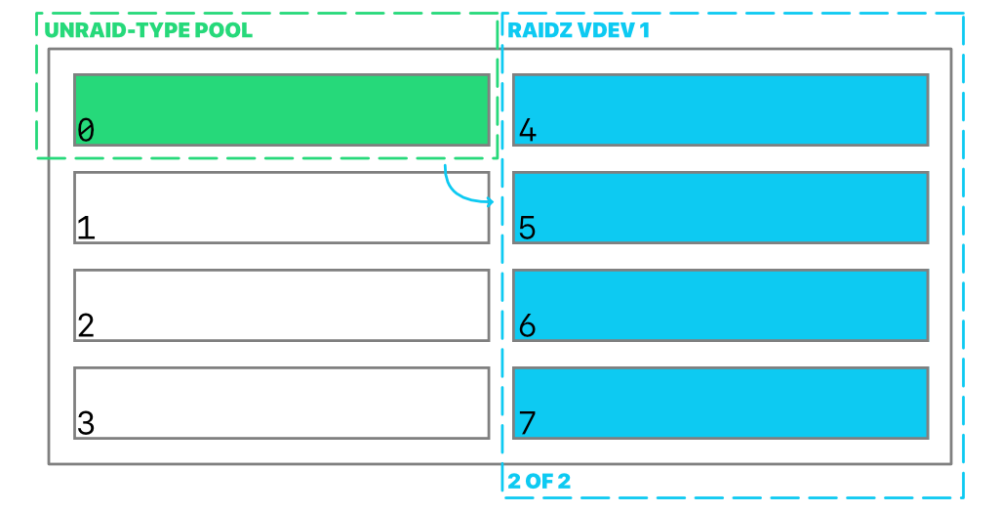
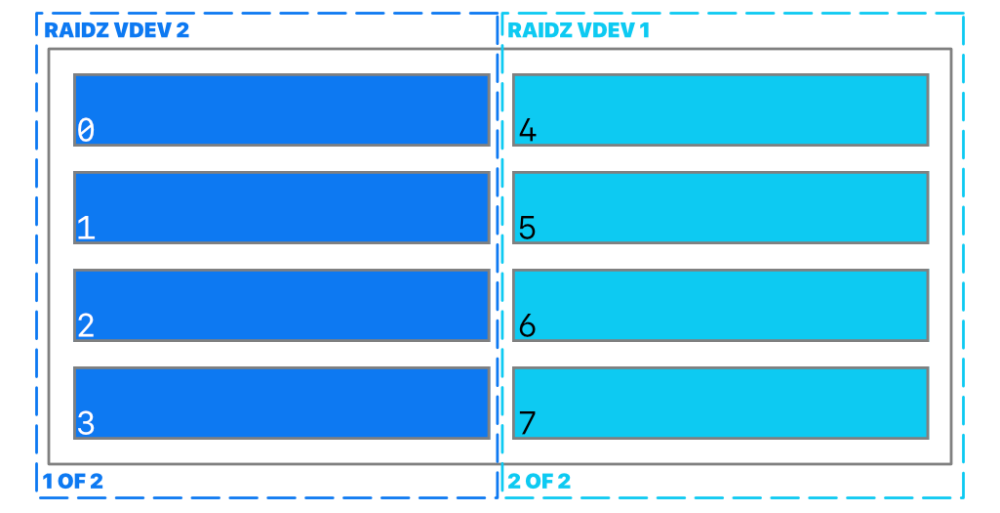
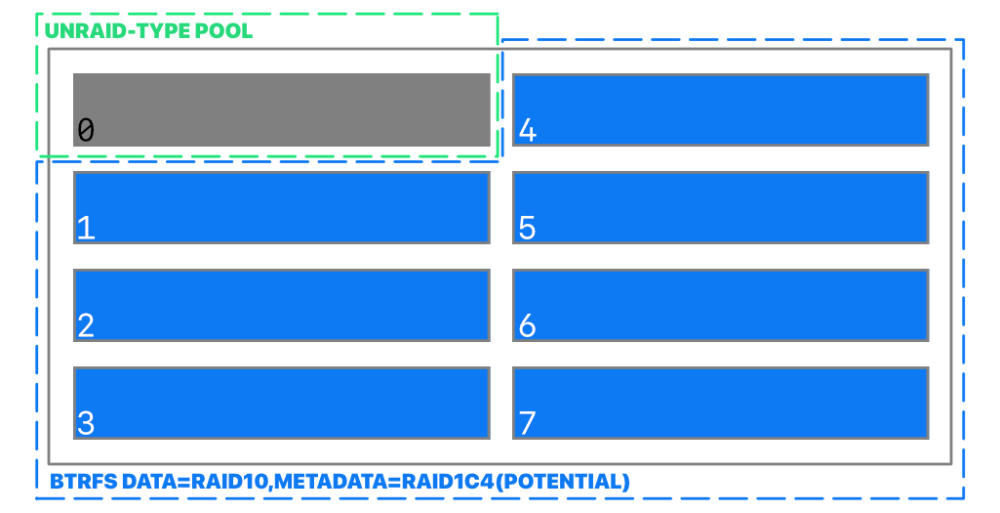
Thanks for answering and sorry for taking this long, Earlier I meant permanently attached storage by the way, not removable storage. The server has an 8-port SAS/SATA controller. By the looks of it, this is only the first release of Unraid with ZFS support, I thought it already had support for a while because after starting using it again, it took a long time to discover it wasn't checking for notifying of updates, and it was very outdated. I just assumed support was already mature. I had been drafting a question over what you mention, for weeks now; the required Unraid array in a pure ZFS setup (I wasn't sure if it was my mistake preventing the start of the pool), so I've been thinking about exploring the pure Btrfs pool angle. My question was about that. RAID5/6 aside, Btrfs is kinda low key superior to ZFS because of its flexibility, but there's nothing about Btrfs metadata/system/data profiles or setting up a pool outside of the context of cache. Just today in the morning, I was still on it, making some drawings (attached) to help me illustrate a post I couldn't get under control and then…power went out. Talk about anticlimactic. It's funny now. The silver lining though, is that I have much less to research now, thank you very very much, seriously.
-
So what does the slave option does again? It was never answered. The closest to an answer was: I'm curious, what is enslaved? The mount on the container? The mount on the host? The [unassigned] device? And also, what makes it enslaved? Why is one of the other options "Shared"—will "slave" make it …not? Is that why is it slave? As in slave to single container?
-
I've set several times a the same username with matching group name, and give them an specific UID and GID to match other servers but this keeps getting lost. Only password changes stick. The user loses(reverts from ) the UID and the group gets completely erased, hence making the user lose the GID as well. How do I make Unraid not ignore these changes? I already left the AD domain because it was too messy; I could never access anything even if set as public and after verifying Kerberos works on every participant system. I confirmed that /etc/passwd and /etc/group get updated after issuing the commands too but somehow both files manage to revert back. Right now I'm not sure when do they revert either: if it's a reboot what triggers it, or what—I've stopped the array a few times make adjustments but it's always up, not down—it shouldn't factor on this, I think. The only warning I get is when things are already failing. Is this supposed to happen? If so, how do I stop it so I can save the data I need to save? Thanks.
-
I tried using Unraid as a datastore for a hypervisor but it's not good. Not good at all. So I flipped it, and made Unraid the hypervisor, and started storing data on it for once. The server I converted only has drive bays for 2.5" drives though. A lot of them but only 2.5". I only have flash drives on that format; they're faster and much cheaper — I checked just now: the most expensive flash drive at a local store is about USD35 sales tax included for a 1TB unit, which is USD70 for the same in magnetic — and according the the docu it's fine using them in the array. I'm not using a cache disk because I don't need it if all the disks are flash already, isn't that the point? That's unless parity is block based rather than file-based; then dual disks might be faster, but there's no indication of that, from what I gather. So that's that. That leaves out parity. As I understand, parity is written in sync (practically and technically or programmatically; as in [mount] sync/async) with the array data, I'm using the fast mode on hybrid ZFS, split-any, most-free, BTW. Additionally, due to TRIM and star alignment or whatever, it can't be a flash drive, which limits my options to 7200RPM magnetic disks because I don't think they make large enough SAS drives or at least not without the enterprise price tag. For an all flash array I think that might be still too slow so I'm thinking, with the help of iSCSI moving it off server and use a RAID 0 or a RAID 10 array for the parity volume. Is that allowed? Does Unraid need a disk or a volume? I don't remember its name but iSCSI has a command to unallocate/vacate or something to that effect, I see it on vSphere all the time. Is that enough for the parity volume? Thanks. _____________________________









