Grant123
Members
-
Joined
-
Last visited
-
I have the container up and running. My gpu is found. I cannot for the life of me figure out how to get it to find my library. It says it scans but nothing happens. I have mapped my media drive correctly it just doesn’t seem to actually scan the drive. Any help would be greatly appreciated.
-
The Nvidia_Driver_Capabilites and the Nvidia_Visable_Devices are no longer included in the docker container. I understand I need the extra variable of --runtime=nvidia, but where do I put my GPU ID if the two Nvida fields are no longer included in the Docker? There is a field where it wants me to map a location of dev/dri I tried inserting my gpu id here, but the installation fails.
-
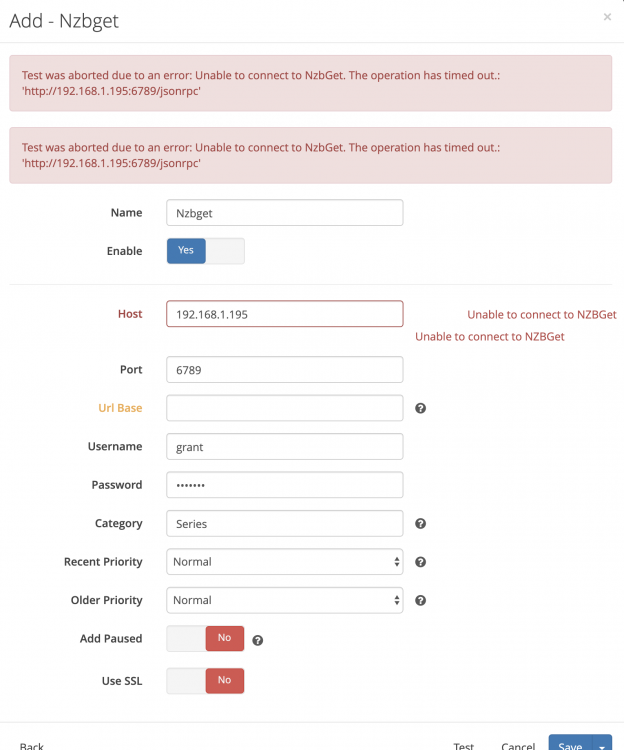
Im trying to switch from Sab (which is consuming a lot of CPU resources) to NZBget. I can not get sonarr to test the connection successfully. It takes a very long time and then I get the error Test was aborted due to an error: Unable to connect to NzbGet. The operation has timed out.: 'http://192.168.1.195:6789/jsonrpc'. It seems to be it is tying to connect to the correct location and port, but it is adding /jsonrpc for no reason. This shows in the hint on the url base line. I do not understand what this line is for, and feel it should be left blank in my case. Any help resolving this would be greatly appreciated.