





Liquidbings
Members
-
Joined
-
Last visited
-
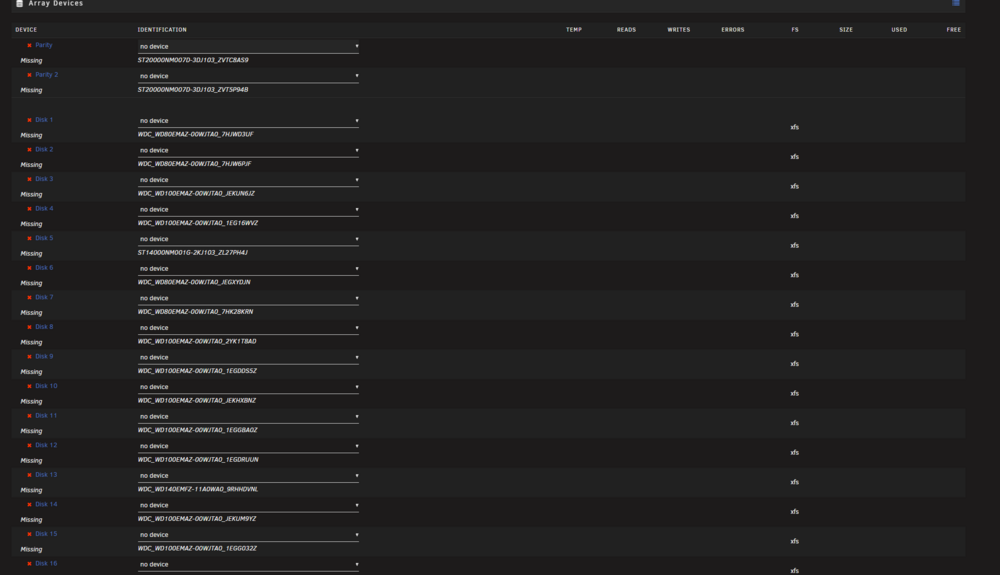
So I updated Unraid 7.0.0 to 7.3.1 and now all the drives are missing in the Array. Been on 7.0 basically since it came out and many version prior without running into this. but I'm currently stumped. The drives just show as missing with no drives available to add. If I downgrade everything is fine. I assume its a resource conflict or driver error or something like that. The suggestion in this post was the only real info I could find so I tried adding the info to the config but didnt seem to help. Thank you kindly for anyone who might be able to help out. Attached a diagnosis log and screenshot EDIT: I updated the BIOS on the Supermicro X11 and it seems to have fixed the issue at hand. I am not sure if it was the update specifically or the CMOS reset I did afterwards changing something that did it. But after updating BIOS and CMOS reset after all is good. I hope this helps anyone else who may run into this issue. towerx2-diagnostics-20260622-1515.zip
-
So I've been having to what I believe to be unrelated issues. I thought I would post them at the same time though in case they are somehow related and I just don't see the connection. My Container updates seem reasonable to download but slow to update and I cannot see anywhere that appdata is not on the cache? And my docker image was filling up at one point. I made it larger temporarily to not run out of space. Some containers have been changed since then and it seems to have stopped growing but also never really went down to a "normal" size so I wanted to try and narrow down that culprit and get everything in line if possible as well. I've included my diag and am great appreciated if anyone is able to help me see the error in my ways. Thank you kindly in advnce towerx2-diagnostics-20240803-1034.zip
-
Good afternoon to all you wonderful folks. I had this issue in the past with slow container installs and updates. I remember in the past/ have read on here its usually when the docker.img or appdata files are on the array not on the cache. But as best I can tell that doesn't seem to be the case for me currently. Both are showing all files on the cache. I am also having a separate/possibly related issue with my docker.img being bigger that I expect it to be but also dont see any mappings that are off as best I can tell in either the Docker apps themselves or in the container settings. Thank you kindly for any and all assistance anyone may be able to provide. towerx2-diagnostics-20240526-1348.zip
-
Been having a heck of a time. I had all of this running smoothly until I lost my cache pool during a power outage. So in the process I upgraded the sytem at the same time and have been trying to get everything back to the way it was. First I was losing User share when attempting to run plex on ram with it setup on the old config. Then it turned out a few of my appdata folders had made it onto the array at one point and needed deleting. Now I cant get any of the containers arr containers to use the vpn any longer. I can get deulge running on the vpn no problem. When I try and run any of the arr containers through it they seem to work as far as being able to use the gui, but can no longer talk with any of the other containers? I went though the logs as best I could and corrected a few of the errors and changing settings including: iptable_mangle was missing ran some commands and no longer get this error. tried changing port to 8119 a couple other things I cannot remember as its been a wild few days of tracking down errors from the move etc. here is my log, I've gone through and exhausted everything I can think of. Thank you kindly for any help anyone can provide. supervisord.log
.thumb.png.17008c073b89822a77d7dd6b3c9337b7.png)
.thumb.png.78746acbdc2572f3cd877f934c38d556.png)
.thumb.png.f424b72f2cd326e5eaff6f252632076b.png)
.thumb.png.4228d7777ae379dda35af53c10240557.png)
-
Not at exactly the same time but around then yes...Thinking about it it may have been after a restart happened so whatever got messed up might have been at the time of changing some of the ports etc on those containers but not actually implemented until the restart took place I just removed those 2 dockers via command line and am rebooting to see if that has any effect Edit: Well that did nothing still not able to access still same issue in log But no welcome to our web server messages now
-
I did have a few containers setup to use a reverse proxy that had stopped working around 6.9.1 that I had been toying around with recently trying to get working again, Swag, ombi I changed a few settings in pihole and swag within the last few days attempting to make swag work
-
Complex bonding has been there since the server was built. Its just the 2 gig ports bonded and has been working fine. I have gotten that warning many times with no issues. The Ip has been always set by to 192.168.1.25 by mac address in the router and I am definitely trying to go directly to that address. Looking through the log with my severe lack of knowledge, would nginx not being able to start because of things already on the port be possibly causing some of the issues?
-
Couldn't figure out how to get it without being able to download through the gui but found it through the flash drive. towerx2-diagnostics-20210921-1756.zip
-
One would think this but I can see the ip address of the server in my router which I have manually configured months ago and im going right to that ip... Also I had been using this same method for months now and use a bookmark so nothing changed there either...Im baffled I can access all my files via network on windows still without issues
-
So the other evening I had a weird issue, I could no longer access the server via My Usual method 192.168.1.xx. Which up until that evening had been working fine. I finally was able to access the server via, "Towerx2/login" for some odd reason. This method had been unworking up until this happened. Then all of a sudden today I am unable to access the server via either of those methods. I can still access via monitor and keyboard hooked up to server but gui seems to be not working with this method as well. Sometimes Im getting this when I try and login and sometimes nothing at all Welcome to our server The website is currently being setup under this address. For help and support, please contact: [email protected]
-
Ok so after some more investigating on my end I tried making another liquidnet with all lowercase and reinstalling the swag container started getting a different error this time around. "Docker: Error response from daemon: driver failed programming external connectivity on endpoint swag (642dd79e56b00d7ad807afeff98f2501afb16cdebe19a2666ed63a74bb2dbe11): Error starting userland proxy: listen tcp4 0.0.0.0:80: bind: address already in use." So I did a netstat lookup on 80 and it shows nginx and nginx workers on there. I wasn't sure if this something that may be causing an issue or is it something I'm unfamiliar with and normal?
-
I tried making another one and using that and I got the same error. Would it be be better to recreate the original or would this accomplish the same thing? The networks show up correctly from the dropdown in edit container. and when I list the networks in terminal they show up as what appears to me to be correct # docker network inspect Liquidnet [ { "Name": "Liquidnet", "Id": "edited out", "Created": "2021-07-17T17:10:47.916206832-04:00", "Scope": "local", "Driver": "bridge", "EnableIPv6": false, "IPAM": { "Driver": "default", "Options": {}, "Config": [ { "Subnet": "172.18.0.0/16", "Gateway": "172.18.0.1" } ] }, "Internal": false, "Attachable": false, "Ingress": false, "ConfigFrom": { "Network": "" }, "ConfigOnly": false, "Containers": {}, "Options": {}, "Labels": {} } ] Thank you for such a quick reply as always
-
Does anyone have a way to fix my containers not being able to use custom network any longer after upgrading? It started with 6.9 but still isnt fixed for me in 6.10. I just get "No such container" error if I click start on anything that uses a a custom network And the error when applying custom network while editing the container is "docker: Error response from daemon: network Mynet not found. The command failed." I had custom networks working for over a year now after following spaceinvaderones video and just cannot figure out what happened or how to fix it. towerx2-diagnostics-20210912-1216.zip
-
Thank you all for alll the help. This post helped me fix my issue. I had to add the adresses/full subnet to the ignored line as the checkbox failed to do its job... Quick fix that just required some deep digging to sort out. What a pain in the pooper lol Thanks everyone for being such a wonderful source of info! ❤️
-
Really appreciate these game servers! I'm having trouble accessing the terraria server from outside the local network. I can connect on the local ip but when friends try to connect from outside the house it never even shows in the logs. I've added the port into the port forwarder on the router. I tried adding the ip into the config file and didnt seem to help. Also tried adding steam and or lobby lines in and neither of those seemed to do anything for me either. Feel like its something simple I'm missing. I poked through the pages here and didn't see any relevant info. Thanks for any help anyone might be able to provide.


.png.1270e6e875710ca969bbf35a95642794.png)
.png.ed4dcd705562a89e3be387c1eaae8ae9.png)
.png.e579eb45d0f16033ab565037892e29b9.png)
.png.545800e45c389f5025485e24e50118ac.png)
