





Killabee44
Members
-
Joined
-
Last visited
Everything posted by Killabee44
-
Ah I didn't realize that Dynamix File Manager was built into Unraid. Ty I removed the appdata folder from Disk1. Looks like it's good to go now. Thanks to everyone that helped me resolve this. Really appreciate it!
-
Thanks. I was not able to find dynamix file manager but I did remove the files from disk1 and ran mover. Here is the diagnostics file:rsunr-diagnostics-20250328-0000.zip
-
Thanks. I get it now. I disabled docker, set the appdata share action to go from array back to cache and ran mover again. After it finished I set the appdata share to Primary:cache; Secondary:none. Here is the latest diagnostic file: rsunr-diagnostics-20250320-2335.zip
-
Ok I will remove them Thanks. I had another question. Whenever I set the appdata share's secondary storage as array I get this error from the fix common problems plugin. Any ideas?

-
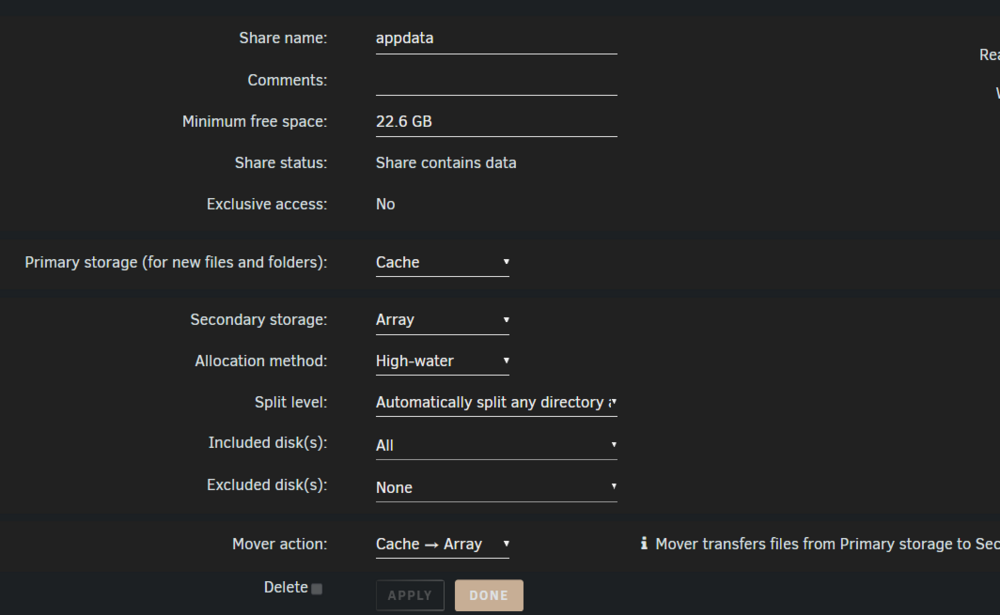
There are definitely files there. Im looking and comparing the files left on the cache vs what is on the array. The files are the same. Not sure why they aren't being moved. Here are my appdata share settings:
-
rsunr-diagnostics-20250318-1053.zip The appdata folder is down to 15gb. Here is one last diagnostic. Do you all have any recommendations as to best practices for my settings? Thank you all so much for the help!
-
Ok I deleted the one on disk1.
-
Here is the output: root@RSUNR:~# ls -lah /mnt/cache/appdata total 297K drwxrwxrwx 57 nobody users 57 Feb 6 21:28 ./ drwxrwxrwx 6 nobody users 7 Mar 15 04:40 ../ drwxr-xr-x 5 nobody users 6 Feb 6 21:29 Czkawka/ drwxrwxrwx 4 nobody users 4 Sep 23 2021 Nginx-Proxy-Manager-Official/ drwxrwxrwx 11 nobody users 16 Mar 15 11:51 NginxProxyManager/ drwxrwxrwx 3 nobody users 3 Aug 18 2023 Plex-Media-Server/ drwx------ 21 999 users 29 Mar 15 11:50 PostgreSQL_Immich/ drwxr-xr-x 4 nobody users 5 Oct 9 17:34 QDirStat/ drwxrwxrwx 6 nobody users 6 Jul 10 2023 Vorta/ drwxrwxrwx 2 nobody users 2 Sep 21 2019 Watcher/ drwxrwxrwx 7 nobody users 10 Sep 20 2019 binhex-couchpotato-git/ drwxrwxrwx 7 nobody users 20 Feb 23 2020 binhex-deluge/ drwxrwxrwx 3 nobody users 5 Apr 17 2020 binhex-delugevpn/ drwxrwxrwx 3 nobody users 10 Oct 27 2023 binhex-jackett/ drwxrwxrwx 4 nobody users 7 Dec 31 2023 binhex-krusader/ drwxrwxrwx 6 nobody users 21 Nov 4 2023 binhex-lidarr/ drwxrwxrwx 3 nobody users 5 Sep 21 2019 binhex-nzbhydra2/ drwxrwxrwx 3 nobody users 10 Mar 6 05:04 binhex-overseerr/ drwxrwxrwx 7 nobody users 9 Jan 8 2020 binhex-plex/ drwxrwxrwx 3 nobody users 5 Nov 17 2023 binhex-prowlarr/ drwxrwxrwx 7 nobody users 21 Feb 2 2024 binhex-radarr_old/ drwxrwxrwx 5 nobody users 14 Jan 20 20:51 binhex-sabnzbd/ drwxrwxrwx 7 nobody users 23 Mar 21 2024 binhex-sonarr/ drwxrwxrwx 3 nobody users 5 Jun 1 2021 binhex-syncthing/ drwxrwxrwx 5 nobody users 5 Dec 28 2022 borgmatic/ drwxrwxrwx 7 nobody users 7 Jul 20 2023 calibre/ drwxrwxrwx 2 nobody users 5 Jun 27 2022 cloudflared/ drwxrwxrwx 2 nobody users 3 Jul 27 2023 cloudflareddns/ drwxrwxrwx 2 nobody users 2 Dec 13 2019 data/ drwxrwxrwx 6 nobody users 14 Sep 21 2019 deluge/ drwxr-xr-x 2 nobody users 3 Feb 29 2024 dozzle/ drwxrwxrwx 5 nobody users 5 Jul 20 2023 dropbox/ drwxrwxrwx 2 nobody users 2 Aug 15 2023 duckdns/ drwxrwxr-x 6 nobody users 11 Oct 9 18:14 duplicacy/ drwxrwxrwx 3 nobody users 3 Jan 1 2024 fenrus/ drwxrwxrwx 2 nobody users 5 Jun 21 2022 filebrowser/ drwxrwxrwx 5 nobody users 5 Oct 30 2021 filerun/ drwxrwxrwx 3 nobody users 3 Oct 29 2021 filerun_OLD/ drwxrwxrwx 3 nobody users 3 Sep 21 2019 hydra/ drwxr-xr-x 3 nobody users 3 Mar 1 2024 immich/ drwxrwxrwx 5 nobody users 5 Feb 23 2020 krusader/ drwxrwxrwx 14 nobody users 15 Jul 5 2021 letsencrypt/ drwxrwxrwx 4 nobody users 12 Sep 21 2019 lidarr/ drwxrwxrwx 4 nobody users 5 Sep 29 2022 mariadb/ drwxrwxrwx 4 nobody users 4 Jul 20 2023 mariadb-official/ drwxrwxrwx 5 nobody users 5 Feb 19 2024 netdata/ drwxrwxrwx 11 nobody users 13 Apr 19 2023 nextcloud/ drwxrwxrwx 4 nobody users 7 Mar 29 2020 ombi/ drwxrwxrwx 10 nobody users 13 Jun 23 2021 openvpn-as/ drwxrwxrwx 6 nobody users 7 Sep 19 2023 overseerr/ drwxrwxrwx 3 nobody users 3 Sep 21 2019 plex/ drwxrwxrwx 7 nobody users 7 May 11 2023 qdirstat/ drwxrwxrwx 8 nobody users 15 Mar 15 18:03 radarr/ drwxrwxrwx 5 nobody users 7 Sep 20 2019 sabnzbd/ drwxrwxr-x 7 nobody users 15 Mar 15 18:03 sonarr/ drwxrwxrwx 14 nobody users 15 Oct 14 2021 swag/ drwxrwxrwx 7 nobody users 11 Dec 29 2023 tautulli/
-
Thanks. Here is the output: root@RSUNR:~# ls -lah /mnt/disk1/appdata total 0 drwxrwxrwx 3 nobody users 27 Feb 6 21:28 ./ drwxrwxrwx 13 nobody users 254 Mar 15 04:40 ../ drwxrwxrwx 3 nobody users 25 Jul 10 2023 Vorta/
-
I'm getting an error with that command: root@RSUNR:~# ls -lah -mnt/disk1/appdata /bin/ls: invalid option -- '/'
-
Done: rsunr-diagnostics-20250314-1729.zip
-
Thanks. Mover cleared out most of the data. Here is the latest log file: rsunr-diagnostics-20250314-1702.zip
-
I only have appdata and system set to be moved from the array to cache. The downloads share is set to move from cache to array.
-
Thanks. I already had logging enabled in Mover. Here is the latest log: rsunr-diagnostics-20250314-1340.zip
-
I uninstalled it and rebooted but mover still will not run.
-
Hi all, I'm dealing with a cache full error. I tried running mover but it doesn't seem to be doing anything. Can someone please take a look at my logs and help me figure out what is going on? Thanks! rsunr-diagnostics-20250314-0023.zip
-
I am also having an issue with Plex isn't able to reach my media. This all happened at the same time so it has to be related.
-
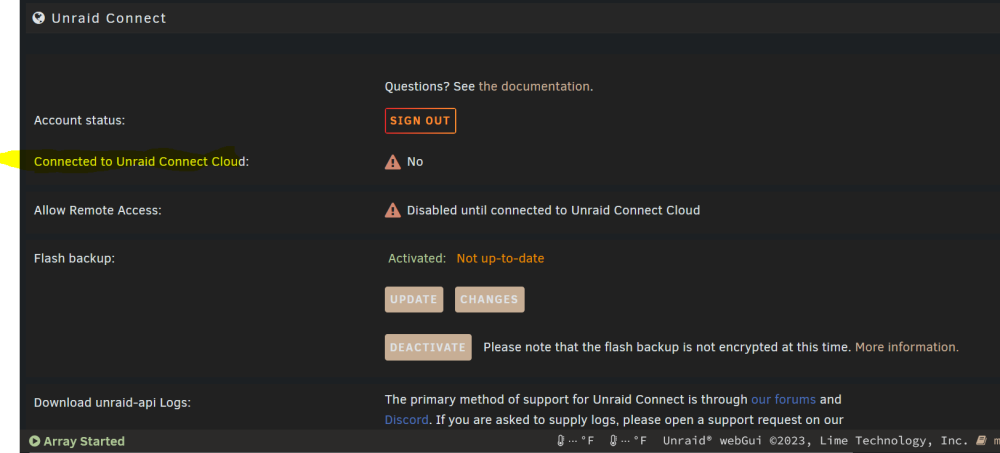
Even though I connected my unraid account to this server it still shows connected to unraid connect cloud as "no":
-
Guys I am having this exact issue as well. A reboot does not resolve it for me though Would appreciate any insight here. Thanks!
-
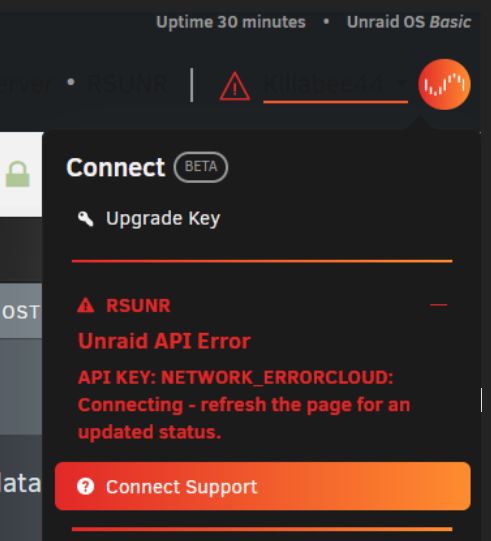
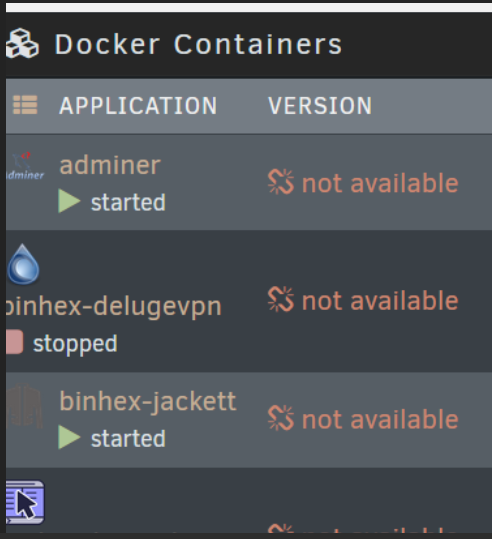
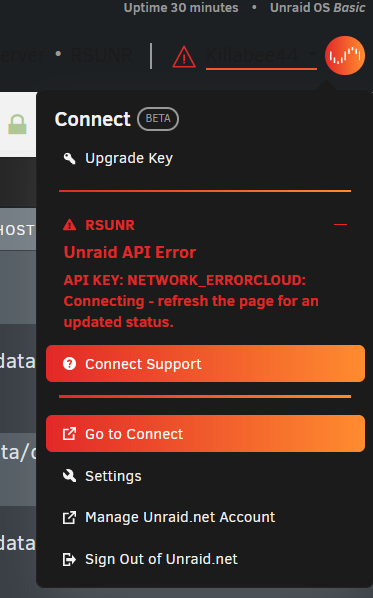
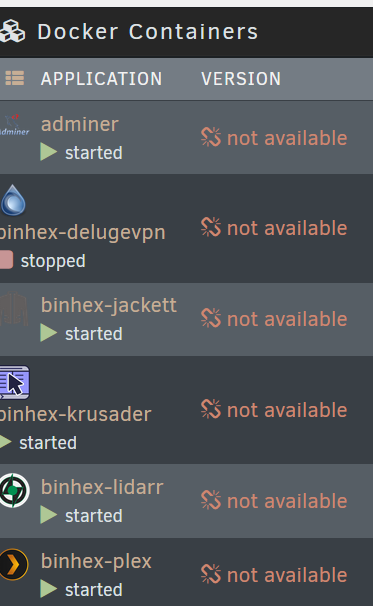
Hi all, This API error started today. I would be grateful for any assistance in diagnosing it: All dockers show a broken link for docker version: unraid-api restart did not help Output of unraid-api report -v: <-----UNRAID-API-REPORT-----> SERVER_NAME: RSUNR ENVIRONMENT: production UNRAID_VERSION: 6.12.3 UNRAID_API_VERSION: 3.1.1 UNRAID_API_STATUS: running API_KEY: NETWORK_ERROR MY_SERVERS: authenticated MY_SERVERS_USERNAME: Myusername CLOUD: STATUS: [ok] IP: [xxx.xx.x.xxx] MINI-GRAPH: STATUS: [PRE_INIT] ERROR: [API Disconnected] SERVERS: ONLINE: OFFLINE: RSUNR[owner="myusername"] ALLOWED_ORIGINS: http://localhost, https://localhost, https://rsunr.local, https://IPV4ADDRESS, https://rsunr, https://IPV4ADDRESS.HASH.myunraid.net, https://IPV4ADDRESS.HASH.myunraid.net, https://connect.myunraid.net, https://staging.connect.myunraid.net, https://dev-my.myunraid.net:4000 </----UNRAID-API-REPORT-----> I tried changing DNS sever addresses but that did not help either: I tried to upload the Server diagnostic here but received an error. Please lmk if there are files within it that would be useful. Thanks! server-diagnostics-20230817-0142.zip

-
Hi all, This API error started today. I would be grateful for any assistance in diagnosing it: All dockers show a broken link for docker version: unraid-api restart did not help Output of unraid-api report -v: <-----UNRAID-API-REPORT-----> SERVER_NAME: RSUNR ENVIRONMENT: production UNRAID_VERSION: 6.12.3 UNRAID_API_VERSION: 3.1.1 UNRAID_API_STATUS: running API_KEY: NETWORK_ERROR MY_SERVERS: authenticated MY_SERVERS_USERNAME: Myusername CLOUD: STATUS: [ok] IP: [xxx.xx.x.xxx] MINI-GRAPH: STATUS: [PRE_INIT] ERROR: [API Disconnected] SERVERS: ONLINE: OFFLINE: RSUNR[owner="myusername"] ALLOWED_ORIGINS: http://localhost, https://localhost, https://rsunr.local, https://IPV4ADDRESS, https://rsunr, https://IPV4ADDRESS.HASH.myunraid.net, https://IPV4ADDRESS.HASH.myunraid.net, https://connect.myunraid.net, https://staging.connect.myunraid.net, https://dev-my.myunraid.net:4000 </----UNRAID-API-REPORT-----> I tried changing DNS sever addresses but that did not help either: I tried to upload the Server diagnostic here but received an error. Please lmk if there are files within it that would be useful. Thanks! server-diagnostics-20230817-0142.zip

-
Hello everyone, Is it possible to allow a peer access to a specific docker only? I didn't see a configuration for this so thought I'd ask. Thanks.
-
Same here guys. I would like to purchase a license and point the docker to the zip file. If anyone knows a way please share the knowledge. Thanks!
-
Hi all, I recently lost all of my containers and had to reinstall them (long story) but now mariadb isn't working and I don't have a .sock file either. I do see my databases in the app folder though. I am getting the following error: ERROR 2002 (HY000): Can't connect to local server through socket '/run/mysqld/mysqld.sock' (2) Thanks!
-
Thanks. Totally understand only supporting this version here. And I think that is what got me into trouble in the first place. A Youtube video I followed. I cannot log into the db to do the dump because of the "can't connect to local server through socket" issue. I will: look for a way to address that first on the linuxserver support first do a dump switch over to the official version use separate Mariadb dockers for each db


