





Killabee44
Members
-
Joined
-
Last visited
Everything posted by Killabee44
-
I am having the same issue. Recently lost all of my containers and had to reinstall (long story) but now mariadb isn't working and I don't have a .sock file either. I do see my databases in the app folder though. Also I was using the linux version but now would like to move to the official one. Is it as easy as copying the database files to the official mariadb appdata folder? Thanks! Edit2: Another layer to this. I have multiple databases in the linuxserver install of Mariadb as well. I know now not to ever do this but is as easy as installing the two official Mariadb containers (with different name and paths) and then copying the different DB folder from the linuxserver into the data folder of each new official Mariadb install?
-
-
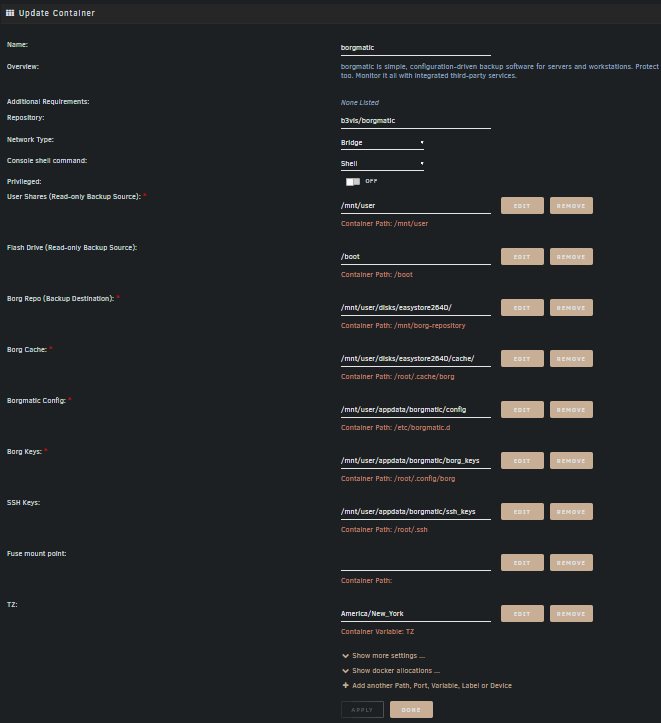
Here it is: My config: location: source_directories: - /boot # - /mnt/user/appdata - /mnt/user/bootbackup - /mnt/user/CommunityApplicationsAppdataBackup - /mnt/user/nextcloud # - /mnt/user/downloads repositories: - /mnt/user/disks/easystore264D # - remote.mydomain.net:/mnt/disks/borg_remote/repo one_file_system: true files_cache: mtime,size patterns: - '- [Tt]rash' - '- [Cc]ache' exclude_if_present: - .nobackup - .NOBACKUP storage: encryption_passphrase: "passphrase" compression: none ssh_command: ssh -i /root/.ssh/id_rsa archive_name_format: 'backup-{now}' retention: keep_hourly: 2 keep_daily: 7 keep_weekly: 4 keep_monthly: 12 keep_yearly: 10 prefix: 'backup-' consistency: checks: - repository - archives prefix: 'backup-' hooks: before_backup: - echo "Starting a backup." after_backup: - echo "Finished a backup." on_error: - echo "Error during prune/create/check." mysql_databases: - name: all hostname: 192.168.1.29 password: "password"
-
Hi all, Can someone please give me a hand in figuring this error out? I take it to mean that borg can't get a lock? I saw a "read only file system" error so I tried changing the permissions to the share: chmod -R 775 /mnt/user/disks/easystore264D But still get the error: summary: /etc/borgmatic.d/config.yml: Loading configuration file /etc/borgmatic.d/config.yml: An error occurred /mnt/user/disks/easystore264D: Error running actions for repository ... ^^^^^^^^^^^^^^^^^^ File "/usr/local/lib/python3.11/site-packages/borg/archiver.py", line 5144, in run return set_ec(func(args)) ^^^^^^^^^^ File "/usr/local/lib/python3.11/site-packages/borg/archiver.py", line 168, in wrapper with repository: File "/usr/local/lib/python3.11/site-packages/borg/repository.py", line 200, in __enter__ self.open(self.path, bool(self.exclusive), lock_wait=self.lock_wait, lock=self.do_lock) File "/usr/local/lib/python3.11/site-packages/borg/repository.py", line 432, in open self.lock = Lock(os.path.join(path, 'lock'), exclusive, timeout=lock_wait).acquire() ^^^^^^^^^^^^^^^^^^^^^^^^^^^^^^^^^^^^^^^^^^^^^^^^^^^^^^^^^^^^^^^^^^^^^^^^ File "/usr/local/lib/python3.11/site-packages/borg/locking.py", line 384, in acquire self._wait_for_readers_finishing(remove, sleep) File "/usr/local/lib/python3.11/site-packages/borg/locking.py", line 397, in _wait_for_readers_finishing self._lock.acquire() File "/usr/local/lib/python3.11/site-packages/borg/locking.py", line 137, in acquire raise LockFailed(self.path, str(err)) from None borg.locking.LockFailed: Failed to create/acquire the lock /mnt/user/disks/easystore264D/lock.exclusive ([Errno 30] Read-only file system: '/mnt/user/disks/easystore264D/lock.exclusive.ofdect2c.tmp'). Platform: Linux 60166bcbb7d8 6.1.34-Unraid #1 SMP PREEMPT_DYNAMIC Fri Jun 16 11:48:38 PDT 2023 x86_64 Linux: Unknown Linux Borg: 1.2.4 Python: CPython 3.11.2 msgpack: 1.0.5 fuse: llfuse 1.4.4 [pyfuse3,llfuse] PID: 67 CWD: / sys.argv: ['/usr/local/bin/borg', 'create', '--patterns-from', '/tmp/tmpvyvh0ei6', '--exclude-if-present', '.nobackup', '--exclude-if-present', '.NOBACKUP', '--compression', 'none', '--one-file-system', '--read-special', '--files-cache', 'mtime,size', '--list', '--filter', 'AMEx-', '/mnt/user/disks/easystore264D::backup-{now}', '--stats', '--debug', '--show-rc'] SSH_ORIGINAL_COMMAND: None terminating with error status, rc 2 Command 'borg create --patterns-from /tmp/tmpvyvh0ei6 --exclude-if-present .nobackup --exclude-if-present .NOBACKUP --compression none --one-file-system --read-special --files-cache mtime,size --list --filter AMEx- /mnt/user/disks/easystore264D::backup-{now} --stats --debug --show-rc' returned non-zero exit status 2. Need some help? https://torsion.org/borgmatic/#issues Thanks!
-
El error ocurre cuando trato de entrar por http://192.168.1.99:8118/ (la direccion interna de mi unraid y el port de filerun). Cuando trato de entrar por la direccion de web que tengo configurada no me abre la pagina de login. Pero ese es otro problema..
-
Hola a todos, Primero muchas gracias @Nelo3D por la guia. Yo fui la persona que originalmente le pidio ayuda con esto y ahora es que he podido meterle mano. Ya tengo todo hecho como indica el guia pero tengo un problema con el login. Trato de hacer el login pero no puedo entrar. He tratado de hacer un reset a el account original de superuser con las instrucciones de la pagina de filerun: cd cron cron> php reset_superuser_pass.php your-site.com newpass y la respuesta es: # cd cron # php reset_superuser_pass.php 192.168.1.99 superuser The password of user "superuser" has been now set to superuser Pero el username y pw de superuser no me trabaja. Solo me sale un popup que dice: "signing in.." Y despues nada. El log de filerun: + id -u www-data + '[' '!' -e /var/www/html/index.php ']' + exec /usr/bin/supervisord -c /supervisord.conf 2021-10-22 21:51:51,596 CRIT Supervisor is running as root. Privileges were not dropped because no user is specified in the config file. If you intend to run as root, you can set user=root in the config file to avoid this message. AH00558: apache2: Could not reliably determine the server's fully qualified domain name, using 172.18.0.5. Set the 'ServerName' directive globally to suppress this message AH00558: apache2: Could not reliably determine the server's fully qualified domain name, using 172.18.0.5. Set the 'ServerName' directive globally to suppress this message [Fri Oct 22 21:51:52.820287 2021] [mpm_prefork:notice] [pid 11] AH00163: Apache/2.4.38 (Debian) configured -- resuming normal operations [Fri Oct 22 21:51:52.820311 2021] [core:notice] [pid 11] AH00094: Command line: 'apache2 -D FOREGROUND' 192.168.1.50 - - [22/Oct/2021:21:51:58 -0400] "GET / HTTP/1.1" 200 1131 "-" "Mozilla/5.0 (Windows NT 10.0; Win64; x64; rv:93.0) Gecko/20100101 Firefox/93.0" 192.168.1.50 - - [22/Oct/2021:21:51:58 -0400] "GET /css/ext.php?v=2021.06.27&theme=blue HTTP/1.1" 200 12959 "http://192.168.1.99:8118/" "Mozilla/5.0 (Windows NT 10.0; Win64; x64; rv:93.0) Gecko/20100101 Firefox/93.0" 192.168.1.50 - - [22/Oct/2021:21:51:58 -0400] "GET /?module=fileman§ion=utils&sec=Login%20Page&lang=english&v=2021.06.27&page=translation.js HTTP/1.1" 200 379 "http://192.168.1.99:8118/" "Mozilla/5.0 (Windows NT 10.0; Win64; x64; rv:93.0) Gecko/20100101 Firefox/93.0" 192.168.1.50 - - [22/Oct/2021:21:51:59 -0400] "GET /css/roboto/normal.woff2 HTTP/1.1" 200 15632 "http://192.168.1.99:8118/css/ext.php?v=2021.06.27&theme=blue" "Mozilla/5.0 (Windows NT 10.0; Win64; x64; rv:93.0) Gecko/20100101 Firefox/93.0" 172.18.0.7 - - [22/Oct/2021:22:11:53 -0400] "\x16\x03\x01" 400 0 "-" "-" 172.18.0.7 - - [22/Oct/2021:22:11:53 -0400] "\x16\x03\x01" 400 0 "-" "-" + id -u www-data + id -u www-data + '[' '!' -e /var/www/html/index.php ']' + exec /usr/bin/supervisord -c /supervisord.conf 2021-10-22 22:38:38,616 CRIT Supervisor is running as root. Privileges were not dropped because no user is specified in the config file. If you intend to run as root, you can set user=root in the config file to avoid this message. AH00558: apache2: Could not reliably determine the server's fully qualified domain name, using 172.18.0.5. Set the 'ServerName' directive globally to suppress this message AH00558: apache2: Could not reliably determine the server's fully qualified domain name, using 172.18.0.5. Set the 'ServerName' directive globally to suppress this message [Fri Oct 22 22:38:39.682682 2021] [mpm_prefork:notice] [pid 11] AH00163: Apache/2.4.38 (Debian) configured -- resuming normal operations [Fri Oct 22 22:38:39.682704 2021] [core:notice] [pid 11] AH00094: Command line: 'apache2 -D FOREGROUND' 192.168.1.50 - - [22/Oct/2021:22:40:27 -0400] "GET / HTTP/1.1" 200 1131 "-" "Mozilla/5.0 (Windows NT 10.0; Win64; x64; rv:93.0) Gecko/20100101 Firefox/93.0" 192.168.1.50 - - [22/Oct/2021:22:40:27 -0400] "GET /css/ext.php?v=2021.06.27&theme=blue HTTP/1.1" 200 12959 "http://192.168.1.99:8118/" "Mozilla/5.0 (Windows NT 10.0; Win64; x64; rv:93.0) Gecko/20100101 Firefox/93.0" 192.168.1.50 - - [22/Oct/2021:22:40:27 -0400] "GET /?module=fileman§ion=utils&sec=Login%20Page&lang=english&v=2021.06.27&page=translation.js HTTP/1.1" 200 379 "http://192.168.1.99:8118/" "Mozilla/5.0 (Windows NT 10.0; Win64; x64; rv:93.0) Gecko/20100101 Firefox/93.0" 192.168.1.50 - - [22/Oct/2021:22:40:28 -0400] "GET /css/roboto/bold.woff2 HTTP/1.1" 200 15724 "http://192.168.1.99:8118/css/ext.php?v=2021.06.27&theme=blue" "Mozilla/5.0 (Windows NT 10.0; Win64; x64; rv:93.0) Gecko/20100101 Firefox/93.0" 192.168.1.50 - - [22/Oct/2021:22:40:28 -0400] "GET /css/roboto/medium.woff2 HTTP/1.1" 304 182 "http://192.168.1.99:8118/css/ext.php?v=2021.06.27&theme=blue" "Mozilla/5.0 (Windows NT 10.0; Win64; x64; rv:93.0) Gecko/20100101 Firefox/93.0" 172.18.0.7 - - [22/Oct/2021:22:40:44 -0400] "\x16\x03\x01" 400 0 "-" "-" 172.18.0.7 - - [22/Oct/2021:22:40:44 -0400] "\x16\x03\x01" 400 0 "-" "-" 172.18.0.7 - - [22/Oct/2021:22:46:28 -0400] "\x16\x03\x01" 400 0 "-" "-" 172.18.0.7 - - [22/Oct/2021:22:46:28 -0400] "\x16\x03\x01" 400 0 "-" "-" 172.18.0.7 - - [22/Oct/2021:22:50:16 -0400] "\x16\x03\x01" 400 0 "-" "-" 172.18.0.7 - - [22/Oct/2021:22:50:16 -0400] "\x16\x03\x01" 400 0 "-" "-" 172.18.0.7 - - [22/Oct/2021:23:01:39 -0400] "\x16\x03\x01" 400 0 "-" "-" 172.18.0.7 - - [22/Oct/2021:23:01:39 -0400] "\x16\x03\x01" 400 0 "-" "-" 172.18.0.7 - - [22/Oct/2021:23:01:39 -0400] "\x16\x03\x01" 400 0 "-" "-" 172.18.0.7 - - [22/Oct/2021:23:01:39 -0400] "\x16\x03\x01" 400 0 "-" "-" 172.18.0.7 - - [22/Oct/2021:23:01:39 -0400] "\x16\x03\x01" 400 0 "-" "-" 172.18.0.7 - - [22/Oct/2021:23:01:39 -0400] "\x16\x03\x01" 400 0 "-" "-" Gracias a todos!
-
@Nelo3D Muchisimas gracias! Todavia no me trabaja pero estoy en eso..
-
Hi, Yes I tried the resetpassword and the error I get is: sudo: unknown user: yourusername sudo: error initializing audit plugin sudoers_audit So I am still at a loss as to what is going on. Thanks!
-
Tried your links but have not been able to reset the pw. Keep getting errors saying that the user does not exist. Edit: I removed the docker and re-installed it with the same settings but still getting the same error. Thanks for your help.
-
Thanks for your reply! The nextcloud web gui does load ok. But gives me "Wrong username or password." Same in the ios and android phone apps. My apologies. I did not post the logs because I wasn't sure which or where they were located (kept looking in the appdata folder but wasn't finding it). So, nextcloud.log is 85.5MB. Kind of ridiculous I think. Ill have to figure out how to limit it later Here is the last portion of the log: {"reqId":"HBiiWGkj4IxW2xZRWOwW","level":2,"time":"2021-06-14T02:37:17+00:00","remoteAddr":"192.168.1.1","user":"--","app":"no app in context","method":"POST","url":"/login","message":"Login failed: lmari87 (Remote IP: 192.168.1.1)","userAgent":"Mozilla/5.0 (iOS) Nextcloud-iOS/3.4.2","version":"18.0.6.0"} {"reqId":"sWOk3fygAaJAlXhDUHCq","level":2,"time":"2021-06-14T02:38:00+00:00","remoteAddr":"192.168.1.1","user":"--","app":"no app in context","method":"POST","url":"/login","message":"Login failed: lmari87 (Remote IP: 192.168.1.1)","userAgent":"Mozilla/5.0 (iOS) Nextcloud-iOS/3.4.2","version":"18.0.6.0"} {"reqId":"iA2BTDeA3y7KgivDp6Cz","level":2,"time":"2021-06-14T02:39:18+00:00","remoteAddr":"192.168.1.1","user":"--","app":"core","method":"POST","url":"/lostpassword/email","message":"Could not send password reset email: Could not find user","userAgent":"Mozilla/5.0 (iOS) Nextcloud-iOS/3.4.2","version":"18.0.6.0"} {"reqId":"6Zt6TNsJAwOdEkByldEa","level":2,"time":"2021-06-14T02:41:43+00:00","remoteAddr":"192.168.1.1","user":"--","app":"no app in context","method":"POST","url":"/login","message":"Login failed: RLogan44 (Remote IP: 192.168.1.1)","userAgent":"Mozilla/5.0 (X11; Ubuntu; Linux x86_64; rv:88.0) Gecko/20100101 Firefox/88.0","version":"18.0.6.0"} {"reqId":"HM0snBZXkRoRJvfn2ES0","level":2,"time":"2021-06-14T02:43:24+00:00","remoteAddr":"192.168.1.1","user":"--","app":"no app in context","method":"POST","url":"/login","message":"Login failed: RLogan44 (Remote IP: 192.168.1.1)","userAgent":"Mozilla/5.0 (X11; Ubuntu; Linux x86_64; rv:88.0) Gecko/20100101 Firefox/88.0","version":"18.0.6.0"} {"reqId":"9YNp3yY9iDM8j9wayWZ8","level":2,"time":"2021-06-14T02:44:50+00:00","remoteAddr":"192.168.1.1","user":"--","app":"no app in context","method":"POST","url":"/login","message":"Login failed: RLogan44 (Remote IP: 192.168.1.1)","userAgent":"Mozilla/5.0 (X11; Ubuntu; Linux x86_64; rv:88.0) Gecko/20100101 Firefox/88.0","version":"18.0.6.0"} {"reqId":"rp8G5XuURuXkDPvG8sUR","level":2,"time":"2021-06-17T05:00:24+00:00","remoteAddr":"","user":"--","app":"appstoreFetcher","method":"","url":"--","message":"Could not connect to appstore: cURL error 28: Operation timed out after 10000 milliseconds with 73738 bytes received (see http://curl.haxx.se/libcurl/c/libcurl-errors.html)","userAgent":"--","version":"18.0.6.0"} {"reqId":"OYIfR8zpEvQ8ij4951vk","level":2,"time":"2021-06-19T05:05:21+00:00","remoteAddr":"","user":"--","app":"appstoreFetcher","method":"","url":"--","message":"Could not connect to appstore: cURL error 28: Operation timed out after 10000 milliseconds with 1385628 bytes received (see http://curl.haxx.se/libcurl/c/libcurl-errors.html)","userAgent":"--","version":"18.0.6.0"} {"reqId":"Ck9PKXhwU8mpfy6nriIK","level":2,"time":"2021-06-23T16:52:22+00:00","remoteAddr":"192.168.1.1","user":"--","app":"no app in context","method":"POST","url":"/login","message":"Login failed: RLogan44 (Remote IP: 192.168.1.1)","userAgent":"Mozilla/5.0 (X11; Ubuntu; Linux x86_64; rv:88.0) Gecko/20100101 Firefox/88.0","version":"18.0.6.0"} I originally set it up using spaceinvaderone's videos. Was using letsencrypt but now using swag. This set up has been working without issues for months until now. Thanks!
-
Hi all, So suddenly neither I or the other Nextcloud admin user with an account on my unraid server cannot login through the browser or android/IOS app. I have seen other threads here with this issue but no posted solutions. Can someone please point me in the right direction to troubleshoot this issue? Thanks!
-
Hi all, How do I restore the settings from a previous binhex-unraid install? I uninstalled, then reinstalled the app (long story) but now have lost my settings. My guess is that they are in the appdata folder but Im not sure where or what file I need to restore. Thanks!
-
Hello everyone, I am having an issue with a certificate that won't renew automatically like it should. I did get notifications but have been too busy to tackle this issue. My cert expired last night. Here is my letsencrypt log: User uid: 99 User gid: 100 ------------------------------------- [cont-init.d] 10-adduser: exited 0. [cont-init.d] 20-config: executing... [cont-init.d] 20-config: exited 0. [cont-init.d] 30-keygen: executing... using keys found in /config/keys [cont-init.d] 30-keygen: exited 0. [cont-init.d] 50-config: executing... Variables set: PUID=99 PGID=100 TZ=America/New_York URL=mydomain.com SUBDOMAINS=server,nextcloud,sonarr EXTRA_DOMAINS= ONLY_SUBDOMAINS=true DHLEVEL=2048 VALIDATION=http DNSPLUGIN= [email protected] STAGING= 2048 bit DH parameters present SUBDOMAINS entered, processing SUBDOMAINS entered, processing Only subdomains, no URL in cert Sub-domains processed are: -d server.mydomain.com -d nextcloud.mydomain.com -d sonarr.mydomain.com E-mail address entered: [email protected] http validation is selected Different validation parameters entered than what was used before. Revoking and deleting existing certificate, and an updated one will be created Generating new certificate Saving debug log to /var/log/letsencrypt/letsencrypt.log Plugins selected: Authenticator standalone, Installer None Obtaining a new certificate Performing the following challenges: http-01 challenge for nextcloud.mydomain.com http-01 challenge for server.mydomain.com http-01 challenge for sonarr.mydomain.com Waiting for verification... Challenge failed for domain sonarr.mydomain.com http-01 challenge for sonarr.mydomain.com Cleaning up challenges Some challenges have failed. IMPORTANT NOTES: - The following errors were reported by the server: Domain: sonarr.mydomain.com Type: dns Detail: DNS problem: NXDOMAIN looking up A for sonarr.mydomain.com - check that a DNS record exists for this - Your account credentials have been saved in your Certbot configuration directory at /etc/letsencrypt. You should make a secure backup of this folder now. This configuration directory will also contain certificates and private keys obtained by Certbot so making regular backups of this folder is ideal. ERROR: Cert does not exist! Please see the validation error above. The issue may be due to incorrect dns or port forwarding settings. Please fix your settings and recreate the container And here is an error I am getting over and over again in my Unraid log : May 24 00:56:23 RSUNR nginx: 2020/05/24 00:56:23 [error] 7100#7100: *146195 connect() to unix:/var/tmp/letsencrypt.sock failed (111: Connection refused) while connecting to upstream, client: 192.168.1.29, server: , request: "GET /dockerterminal/letsencrypt/ws HTTP/1.1", upstream: "http://unix:/var/tmp/letsencrypt.sock:/ws", host: "rsunr" 192.168.1.29 is the address of the desktop I use to access my Unraid server in my home network. Not sure about this error.. I did try to add and remove a subdomain in order to get it to renew the cert. Please let me know if I should upload any other logs that can help troubleshoot this issue. Thanks to anyone that can chime in and help.
-
I had Deluge set to encrypted connections only. All was good for a long time. I just got a notification from my cable company about torrent downloads.. It looks like all of a sudden it started accepting unencrypted connections. Has anyone else had this issue?
