





Nelo3D
Members
-
Joined
-
Last visited
-
@roflcoopter said me to add the LIBVA_DRIVER_NAME variable with i965 value, so I could use the previous driver, which does support my iGPU, and power consumption dropped to 5%. Problem solved!
-
I love this software. I've been playing around with it for a few days now, and it's really great. But there's one issue I can't seem to figure out... With just one camera—a Tapo—it's using up 25% of my CPU. That seems like a lot to me; it's an Intel J4105, which isn't exactly powerful, but it seems excessive for an integrated iGPU. And I can't figure out why. Any ideas? go2rtc: streams: entrada: - rtsp://****@192.168.1.102:554/stream1 entradaLow: - rtsp://****@192.168.1.102:554/stream2 ffmpeg: camera: entrada: name: Entrada host: localhost port: 8554 path: /entrada fps: 10 audio_codec: aac recorder: audio_codec: aac substream: port: 8554 path: /entradaLow mog2: motion_detector: cameras: entrada: fps: 1 darknet: object_detector: half_precision: true cameras: entrada: fps: 1 scan_on_motion_only: true labels: - label: person confidence: 0.8 trigger_event_recording: true zones: - name: Puerta labels: - label: person confidence: 0.8 trigger_event_recording: true coordinates: - x: 20 y: 77 - x: 1219 y: 82 - x: 1091 y: 718 - x: 95 y: 714 nvr: entrada:
-
If you click on the container name you can edit name and icon.
-
Very interesting! Thank you!
-
Just a regular user here. Both use their own explorers, not phone one. The difference is the implementation: one is the web version of the Docker browser and the other is the app’s native version.
-
I got this some time ago, and clearing the credentials helps. In Control Panel, under Credentials, clear everything related to the server.
-
OK, so the array and two pools, one for appdata and another for the cloud SSD. Thank you! PD: I assume that with the new config I will not lose any data. I can stay on xfs filesystem.
-
Currently I have xfs in the pool. The objective is disable parity, and add this disk as data, all disks as data indeed, except the appdata/docker SSD. nuvol-diagnostics-20260506-1755.zip
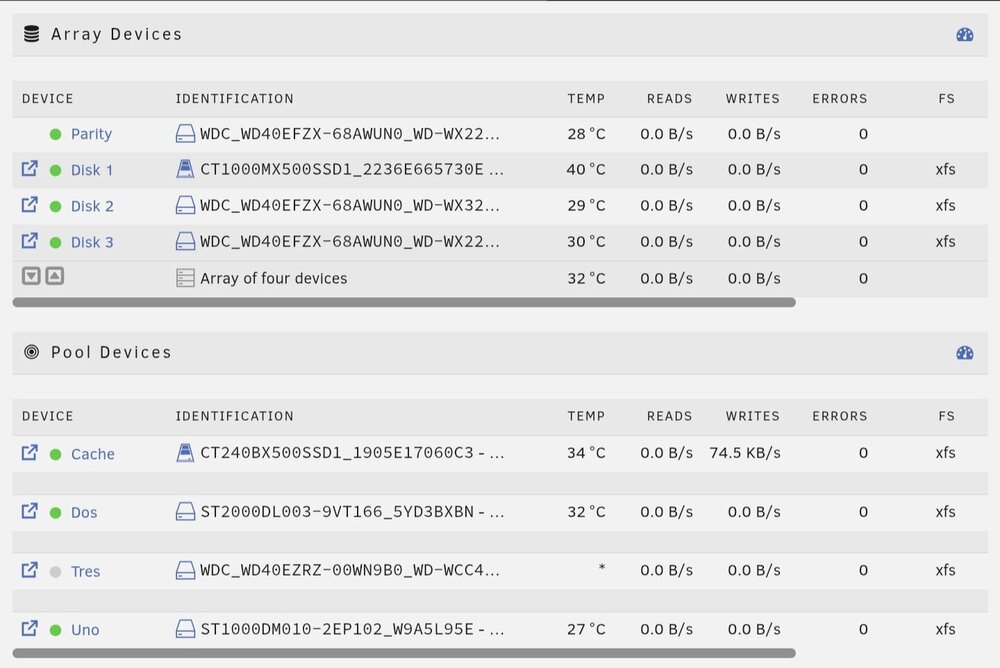
-
I'm confused know. Sorry. So, for my new config, I must put all disks ( without parity ) in the array, HDD and SSD?
-
Wow, I don't know how I have multiple mixed SSD and HDD in one pool. I was very wrong. I have all my disks as xfs, by the way. So, I will go to a new config, with as pools as disks I have. You're great, Jorge, thank you.
-
Ok, but I don't know why... What is the difference for one disc alone in a pool and sharing pool with other discs? So, for my case the best option is n pools of one disk every one, right? Thank you so much!
-
When you say "single pool", you mean multiple pools, any SSD alone in their own pool?
-
I have both, HDD and SSD, in the array and in the pool... I only want a "simple" data storages, in different shares... And one of the SSD for docker. So, from the point of performance and simplicity, all in one pool, HDD and SSD? Thank you.
-
Hi all! I currently have an array with a parity disk, and a pool with an SSD for docker and several hard drives. The shares are on a single disk; the data isn't spread across disks. I want to remove the parity disk, without losing any data, of course. In my new setup, I want to use each disk independently for my shares; I don't want parity or RAID. What's best? Just have one pool with all the disks? Just have the array with all the disks without parity? Have several pools (and no array), each with a single disk? (I don't think this last one is ideal, since I think data can't be moved from one pool to another) I don't want lose any data changing to the new config. Thank you so much.
-
Thanks for your review. I discard the Coral option. So I think I need a powerful iGPU, I don't want to buy a processor and find out it falls short. Thanks for comment!

