





Doug Eubanks
Members
-
Joined
-
Last visited
-
I'm running 7.2.0-beta1, and 4 times in the last 3 days I've had individual disks fill up. Even while I'm deleting files or moving them to another disk, new files are being written to the disk with no or little space as soon as I make new space. This wasn't a problem before 7.2.0-beta. As soon as this move operation finishes, I'm going to reboot to complete the downgrade. Edit: I have a diagnostics file, but I'd prefer not to attach it here and send it directly to someone if they want to look at this issue. Doug
-
My unRAID server froze up overnight. I rebooted and it wouldn't recognize my USB drive. I reformatted the USB drive using the latest unRAID installer. Now the server boots, but my array configuration and all my data seem to be missing. I had dual parity drives and I'm not sure which drives were part of the parity and which were part of the array. Additionally, I had 4 SSDs in a cache configuration and 2 NVME drives in a second NVME only array to use for my Docker storage. I've been running in this configuration for months and just upgraded to 6.12.14 last week. After booting from the new drive, everything is missing, including my root password configuration. It's like this system was never configured to run unRAID. After unlocking my drives through the command line, I collected this information: /dev/mapper/sdb_crypt: LABEL="USBHDBackUp1" UUID="11525295270607461180" UUID_SUB="15904658808295759975" BLOCK_SIZE="4096" TYPE="zfs_member" /dev/mapper/sdc_crypt: LABEL="USBHDBackUp2" UUID="929964079474175012" UUID_SUB="8032658314062076065" BLOCK_SIZE="4096" TYPE="zfs_member" /dev/mapper/sdd_crypt: LABEL="USBBackUp" UUID="12854700900214470867" UUID_SUB="6576465849343896963" BLOCK_SIZE="4096" TYPE="zfs_member" /dev/mapper/sde_crypt: LABEL="nvme" UUID="6824026342761901767" UUID_SUB="890734348413501609" BLOCK_SIZE="4096" TYPE="zfs_member" /dev/mapper/sdf_crypt: LABEL="nvme" UUID="6824026342761901767" UUID_SUB="6103350898280030218" BLOCK_SIZE="4096" TYPE="zfs_member" /dev/mapper/sdg_crypt: LABEL="disk11" UUID="1345808728950327241" UUID_SUB="4342238976627344387" BLOCK_SIZE="4096" TYPE="zfs_member" /dev/mapper/sdh_crypt: LABEL="cache" UUID="5250720459048516885" UUID_SUB="7632638559409651127" BLOCK_SIZE="4096" TYPE="zfs_member" /dev/mapper/sdi_crypt: LABEL="cache" UUID="5250720459048516885" UUID_SUB="4850754309252510584" BLOCK_SIZE="4096" TYPE="zfs_member" /dev/mapper/sdj_crypt: LABEL="cache" UUID="5250720459048516885" UUID_SUB="8958075642769111403" BLOCK_SIZE="4096" TYPE="zfs_member" /dev/mapper/sdk_crypt: LABEL="cache" UUID="5250720459048516885" UUID_SUB="6962897839273237394" BLOCK_SIZE="4096" TYPE="zfs_member" /dev/mapper/sdl_crypt: LABEL="disk8" UUID="8937042589405757781" UUID_SUB="13848434654813648408" BLOCK_SIZE="4096" TYPE="zfs_member" /dev/mapper/sdm_crypt: LABEL="disk9" UUID="14732484752798114098" UUID_SUB="16611396775970686022" BLOCK_SIZE="4096" TYPE="zfs_member" /dev/mapper/sdo_crypt: LABEL="disk10" UUID="18377697557993904195" UUID_SUB="14493959163129204559" BLOCK_SIZE="4096" TYPE="zfs_member" /dev/mapper/sdq_crypt: LABEL="disk2" UUID="14389837395481855125" UUID_SUB="10914146581286836343" BLOCK_SIZE="4096" TYPE="zfs_member" /dev/mapper/sdr_crypt: LABEL="disk1" UUID="9576740049995963878" UUID_SUB="4134871890165616934" BLOCK_SIZE="4096" TYPE="zfs_member" /dev/mapper/sds_crypt: LABEL="disk7" UUID="9166162464674222956" UUID_SUB="2197824458267223079" BLOCK_SIZE="4096" TYPE="zfs_member" /dev/mapper/sdt_crypt: LABEL="disk3" UUID="13028928541799397267" UUID_SUB="2826180337778506722" BLOCK_SIZE="4096" TYPE="zfs_member" /dev/mapper/sdu_crypt: LABEL="disk4" UUID="14078542287389798980" UUID_SUB="6515024141516903819" BLOCK_SIZE="4096" TYPE="zfs_member" /dev/mapper/sdv_crypt: LABEL="disk5" UUID="6083694590957314215" UUID_SUB="14683744169931770476" BLOCK_SIZE="4096" TYPE="zfs_member" /dev/mapper/sdw_crypt: LABEL="disk6" UUID="9550631432841720489" UUID_SUB="6145927400860562969" BLOCK_SIZE="4096" TYPE="zfs_member" root@Tower:~# lsblk -f |grep _crypt └─sdb_crypt zfs_member 5000 USBHDBackUp1 11525295270607461180 └─sdc_crypt zfs_member 5000 USBHDBackUp2 929964079474175012 └─sdd_crypt zfs_member 5000 USBBackUp 12854700900214470867 └─sde_crypt zfs_member 5000 nvme 6824026342761901767 └─sdf_crypt zfs_member 5000 nvme 6824026342761901767 └─sdg_crypt zfs_member 5000 disk11 1345808728950327241 └─sdh_crypt zfs_member 5000 cache 5250720459048516885 └─sdi_crypt zfs_member 5000 cache 5250720459048516885 └─sdj_crypt zfs_member 5000 cache 5250720459048516885 └─sdk_crypt zfs_member 5000 cache 5250720459048516885 └─sdl_crypt zfs_member 5000 disk8 8937042589405757781 └─sdm_crypt zfs_member 5000 disk9 14732484752798114098 └─sdo_crypt zfs_member 5000 disk10 18377697557993904195 └─sdq_crypt zfs_member 5000 disk2 14389837395481855125 └─sdr_crypt zfs_member 5000 disk1 9576740049995963878 └─sds_crypt zfs_member 5000 disk7 9166162464674222956 └─sdt_crypt zfs_member 5000 disk3 13028928541799397267 └─sdu_crypt zfs_member 5000 disk4 14078542287389798980 └─sdv_crypt zfs_member 5000 disk5 6083694590957314215 └─sdw_crypt zfs_member 5000 disk6 9550631432841720489 I recreated my array layout to the best of my ability using that information. How safe am I to start the array at this point? Will I still have my network/docker/etc configuration when I start up again? I have a new ticket open, but I was hoping to get some community guidance. I plan on ordering a new USB drive to replace my SanDisk Cruzer that failed, but I'm just trying to get back up and running for now. Thanks, Doug
.thumb.jpeg.dd8719f1e85f4d447d637961f6eb3e6a.jpeg)
-
I'm having an issue with importing from email. The email is picked up and then a "File not found" error is generated even though the file exists and is readable. I tried mapping the /tmp/paperless folder to a directory on my NVME cache and I still get the same error. I've verified the file exists. Uploading files manually through the GUI works fine, as does dropping files into the consume folder. It's not a problem with the mail configuration as it logs in, finds the email in the folder that's specified, but then it can't import it. I've tried PDFs and TXT files. [2024-07-30 15:26:37,465] [ERROR] [celery.app.trace] Task documents.tasks.consume_file[de32a73d-cd1f-4258-bbb0-e31a48763203] raised unexpected: ConsumerError('HUH721010ALE601_1SG01DEZ-20240729-1328.txt: Cannot consume /tmp/paperless/paperless-mail-9eld5bt0/HUH721010ALE601_1SG01DEZ-20240729-1328.txt: File not found.') Traceback (most recent call last): File "/usr/local/lib/python3.11/site-packages/celery/app/trace.py", line 453, in trace_task R = retval = fun(*args, **kwargs) ^^^^^^^^^^^^^^^^^^^^ File "/usr/local/lib/python3.11/site-packages/celery/app/trace.py", line 736, in __protected_call__ return self.run(*args, **kwargs) ^^^^^^^^^^^^^^^^^^^^^^^^^ File "/usr/local/lib/python3.11/site-packages/asgiref/sync.py", line 327, in main_wrap raise exc_info[1] File "/usr/src/paperless/src/documents/tasks.py", line 151, in consume_file msg = plugin.run() ^^^^^^^^^^^^ File "/usr/src/paperless/src/documents/consumer.py", line 505, in run self.pre_check_file_exists() File "/usr/src/paperless/src/documents/consumer.py", line 309, in pre_check_file_exists self._fail( File "/usr/src/paperless/src/documents/consumer.py", line 302, in _fail raise ConsumerError(f"{self.filename}: {log_message or message}") from exception documents.consumer.ConsumerError: HUH721010ALE601_1SG01DEZ-20240729-1328.txt: Cannot consume /tmp/paperless/paperless-mail-9eld5bt0/HUH721010ALE601_1SG01DEZ-20240729-1328.txt: File not found. root@unRAID:/mnt/nvme/dockerApps/paperless-ngx/tmp/paperless-mail-9eld5bt0# ls -l total 5 -rw-r--r-- 1 root root 208 Jul 30 15:26 HUH721010ALE601_1SG01DEZ-20240729-1328.txt Any suggestions would be appreciated!
-
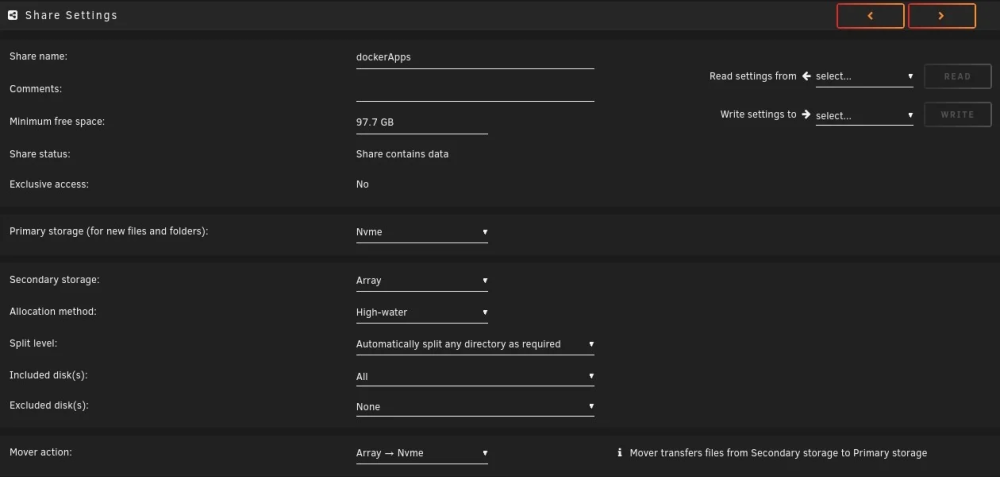
I've seen several posts about this problem, but I haven't seen a clear answer that is confirmed to work. Every time I go to performance maintenance, I realize my mover is still running. It's always running. I stopped it and started it again, it's been running for 6 hours reporting lines like this: /usr/lib/x86_64-linux-gnu/perl-base/unicore/lib/Bpt/O.pl File exists file: /mnt/disk2/system/docker/docker/btrfs/subvolumes/624761d8896971a8f64b96efbb92d017a8567e0942f7dda3416467fcc90737fa/usr/lib/x86_64-linux-gnu/perl-base/unicore/lib/CWU/Y.pl move_object: /mnt/disk2/system/docker/docker/btrfs/subvolumes/624761d8896971a8f64b96efbb92d017a8567e0942f7dda3416467fcc90737fa/usr/lib/x86_64-linux-gnu/perl-base/unicore/lib/CWU/Y.pl File exists file: /mnt/disk2/system/docker/docker/btrfs/subvolumes/624761d8896971a8f64b96efbb92d017a8567e0942f7dda3416467fcc90737fa/usr/lib/x86_64-linux-gnu/perl-base/unicore/lib/Lower/Y.pl move_object: /mnt/disk2/system/docker/docker/btrfs/subvolumes/624761d8896971a8f64b96efbb92d017a8567e0942f7dda3416467fcc90737fa/usr/lib/x86_64-linux-gnu/perl-base/unicore/lib/Lower/Y.pl File exists file: /mnt/disk2/system/docker/docker/btrfs/subvolumes/624761d8896971a8f64b96efbb92d017a8567e0942f7dda3416467fcc90737fa/usr/lib/x86_64-linux-gnu/perl-base/unicore/lib/CWCF/Y.pl move_object: /mnt/disk2/system/docker/docker/btrfs/subvolumes/624761d8896971a8f64b96efbb92d017a8567e0942f7dda3416467fcc90737fa/usr/lib/x86_64-linux-gnu/perl-base/unicore/lib/CWCF/Y.pl File exists file: /mnt/disk2/system/docker/docker/btrfs/subvolumes/624761d8896971a8f64b96efbb92d017a8567e0942f7dda3416467fcc90737fa/usr/lib/x86_64-linux-gnu/perl-base/unicore/lib/CWL/Y.pl move_object: /mnt/disk2/system/docker/docker/btrfs/subvolumes/624761d8896971a8f64b96efbb92d017a8567e0942f7dda3416467fcc90737fa/usr/lib/x86_64-linux-gnu/perl-base/unicore/lib/CWL/Y.pl File exists file: /mnt/disk2/system/docker/docker/btrfs/subvolumes/624761d8896971a8f64b96efbb92d017a8567e0942f7dda3416467fcc90737fa/usr/lib/x86_64-linux-gnu/perl-base/unicore/lib/IDC/Y.pl move_object: /mnt/disk2/system/docker/docker/btrfs/subvolumes/624761d8896971a8f64b96efbb92d017a8567e0942f7dda3416467fcc90737fa/usr/lib/x86_64-linux-gnu/perl-base/unicore/lib/IDC/Y.pl File exists file: /mnt/disk2/system/docker/docker/btrfs/subvolumes/624761d8896971a8f64b96efbb92d017a8567e0942f7dda3416467fcc90737fa/usr/lib/x86_64-linux-gnu/perl-base/unicore/lib/Perl/_PerlCha.pl I have Docker configured to use a directory, not an image. I have Docker configured like this: Docker directory:/mnt/cache/system/docker/docker/ Default appdata storage location:/mnt/nvme/dockerApps/ The share for system and dockerApps are both configured to move to the cache/nvme. The goal is to have system files on the cache and docker application data (and VMs) on the NVME drives. I'm configuring it this way so that the maximum amount of cache is available to the array and the IO on the NVME docker directories doesn't affect the cache. System Share Configuration dockerApps Share Configuration What's the best way to get this back to the correct state? Can I just rsync and delete the data from the disks back to the cache? I'm proficient in bash, so I'm comfortable performing the operations from the shell. I just need to know which files (/mnt/user/disk*/system or /mnt/cache/system) are the ones it's using and which I can dispose of.
-
It's possible that it does have an issue. I don't know if it's a filesystem issue or a hardware issue with the Drobo itself. I have two of them that I inherited from work during the COVID fire sale. Out of all the mounted volumes, I think this is the only one that's giving me a problem. I unmounted the volume from unRAID, mounted it from my Linux workstation and I'm see the same errors. Once I get the data copied back to unRAID, I'll do some testing. I guess now that I'm seeing this error on the workstation as well, you can ignore my report. Thanks for the reply!
-
I'm having a problem with this message repeated over and over. Nov 16 17:44:49 unRAID kernel: sd 16:0:0:0: [sdw] tag#59 UNKNOWN(0x2003) Result: hostbyte=0x00 driverbyte=DRIVER_OK cmd_age=0s Nov 16 17:44:49 unRAID kernel: sd 16:0:0:0: [sdw] tag#59 Sense Key : 0x3 [current] Nov 16 17:44:49 unRAID kernel: sd 16:0:0:0: [sdw] tag#59 ASC=0x11 ASCQ=0x1 Nov 16 17:44:49 unRAID kernel: sd 16:0:0:0: [sdw] tag#59 CDB: opcode=0x88 88 00 00 00 00 05 44 8a 93 08 00 00 08 18 00 00 Nov 16 17:44:49 unRAID kernel: critical medium error, dev sdw, sector 22624768776 op 0x0:(READ) flags 0x84700 phys_seg 259 prio class 2 I'm connecting to an iSCSI Drobo over a local gigabit connection. The connection is slow, but when I'm copying large amounts of data (from the iSCSI device), it eventually fails back to being RO. I'm not able to resolve the issue without rebooting unRAID. It'll run fine copying data for 1-3 days and then fail again. Do you have any suggestions? Thanks!
.jpeg.2f4a3b99787cc6401f6a0dc7e443c206.jpeg)

