





PzrrL
Members
-
Joined
-
Last visited
-
I do have syslog server enabled all the time. Also, I have been using (meaning have it running, but didn't really make any load, until today doing the uploading) OpenCloud for the last 2 weeks. The server has been stable, until today I started to upload things, then few hours later I discovered that the GUi becomes unresponsive, and all Docker containers's GUI are not responding. Also, since I am now stuck at the "diags collection" while trying to reboot, may I know what should be my next step? Should I force another shutdown? thanks
-
Last time that forced me to do force shutdown is [7.2.4] All drives spin up for parity checking, while the progress is always 0%, after unclean shut down - General Support - Unraid. The only thing I can correlate is that earlier today I was doing some files upload/sync from my Win11 PC to the Opencloud instance (details at the bottom of the reply), which is a container on the unRAID. For some reason a few hours later when I was trying to access some Web GUI of the containers, none of them were responding. Also, now that I am stuck at the "diags collection", may I know what should be my next step? force another shutdown? thanks As for the Opencloud thing, I have an Win11 client on my PC, then I upload files by putting files into the Windows Explorer into the Opencloud directory, which sync files into the unRAID instance (I know those files are not directly inside the array, but controlled by Opencloud)
-
Interestingly, the console stuck at this for hours, so end up haven't finish the reboot: So I am able to retrieve the syslog before the "reboot": syslog.txt
-
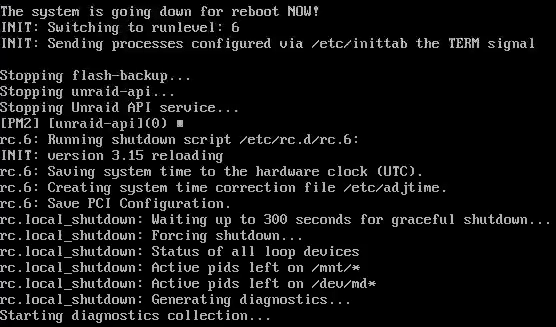
Hi there, I am experencing another GUI unresponiveness, and I was not able to complete the diagnostics download. Only thing I can correlate is that earlier today I was doing file upload/sync from my computer to the Opencloud instance, which is a container on the unRAID. For some reason a few hours later when I was trying to access some Web GUI of the containers, they are not responding. I am lost on what am I actually experencing... Here is the diagnostics log, which stuck at the end (from my understanding it won't take more than 20mins): /boot/logs/uncrate-diagnostics-20260403-1520.zip mkdir -p /boot/logs mkdir -p '/uncrate-diagnostics-20260403-1520/system' '/uncrate-diagnostics-20260403-1520/config' '/uncrate-diagnostics-20260403-1520/logs' '/uncrate-diagnostics-20260403-1520/shares' '/uncrate-diagnostics-20260403-1520/smart' '/uncrate-diagnostics-20260403-1520/qemu' '/uncrate-diagnostics-20260403-1520/xml' top -bn1 -o%CPU 2>/dev/null|todos >'/uncrate-diagnostics-20260403-1520/system/top.txt' tail /boot/bz*.sha256 >> '/uncrate-diagnostics-20260403-1520/unraid-7.2.4.txt' uptime nproc lscpu 2>/dev/null|todos >'/uncrate-diagnostics-20260403-1520/system/lscpu.txt' lsscsi -vgl 2>/dev/null|todos >'/uncrate-diagnostics-20260403-1520/system/lsscsi.txt' lspci -knn 2>/dev/null|todos >'/uncrate-diagnostics-20260403-1520/system/lspci.txt' lspci -vv 2>/dev/null| awk -b '/ASPM/{print $0}' RS=|grep -P '(^[a-z0-9:.]+|ASPM |Disabled;|Enabled;)'|todos >'/uncrate-diagnostics-20260403-1520/system/aspm-status.txt' lsusb -vt 2>/dev/null|todos >'/uncrate-diagnostics-20260403-1520/system/lsusb.txt' free -mth 2>/dev/null|todos >'/uncrate-diagnostics-20260403-1520/system/memory.txt' lsof -Pni 2>/dev/null|todos >'/uncrate-diagnostics-20260403-1520/system/lsof.txt' lsmod|sort 2>/dev/null|todos >'/uncrate-diagnostics-20260403-1520/system/lsmod.txt' df -h 2>/dev/null|todos >'/uncrate-diagnostics-20260403-1520/system/df.txt' ip -br a|awk '/^(eth|bond)[0-9]+ /{print $1}'|sort dmidecode -qt2|awk -F: '/^ Manufacturer:/{m=$2};/^ Product Name:/{p=$2} END{print m" -"p}' 2>/dev/null|todos >'/uncrate-diagnostics-20260403-1520/system/motherboard.txt' dmidecode -qt0 2>/dev/null|todos >>'/uncrate-diagnostics-20260403-1520/system/motherboard.txt' cat /proc/meminfo 2>/dev/null|todos >'/uncrate-diagnostics-20260403-1520/system/meminfo.txt' dmidecode --type 17 2>/dev/null|todos >>'/uncrate-diagnostics-20260403-1520/system/meminfo.txt' sed -ri 's/(["\[ ])(127|10|172\.1[6-9]|172\.2[0-9]|172\.3[0-1]|192\.168)((\.[0-9]{1,3}){2,3}([/" .]|$))/\1@@@\2\3/g; s/(["\[ ][0-9]{1,3}\.)([0-9]{1,3}\.){2}([0-9]{1,3})([/" .]|$)/\1XXX.XXX.\3\4/g; s/@@@//g' '/uncrate-diagnostics-20260403-1520/system/lsof.txt' sed -ri 's/(([0-9a-f]{1,4}:){4})(([0-9a-f]{1,4}:){3}|:)([0-9a-f]{1,4})([ .:/]|$)/\1XXXX:XXXX:XXXX:\5\6/g' '/uncrate-diagnostics-20260403-1520/system/lsof.txt' sed -ri 's/(\[([0-9a-f]{1,4}:){4})(([0-9a-f]{1,4}:){3}|:)([0-9a-f]{1,4})(\])([ .:/]|$)/\1XXXX:XXXX:XXXX:\5\6/g' '/uncrate-diagnostics-20260403-1520/system/lsof.txt' sed -ri 's/(([0-9a-f]{1,4}:){4})(([0-9a-f]{1,4}:){3}|:)([0-9a-f]{1,4})(\/[0-9]{1,3})([ .:/]|$)/\1XXXX:XXXX:XXXX:\5\7/g' '/uncrate-diagnostics-20260403-1520/system/lsof.txt' ethtool 'eth0' 2>/dev/null|todos >>'/uncrate-diagnostics-20260403-1520/system/ethtool.txt' ethtool -i 'eth0' 2>/dev/null|todos >>'/uncrate-diagnostics-20260403-1520/system/ethtool.txt' ip -br a|todos >'/uncrate-diagnostics-20260403-1520/system/ifconfig.txt' sed -ri 's/(["\[ ])(127|10|172\.1[6-9]|172\.2[0-9]|172\.3[0-1]|192\.168)((\.[0-9]{1,3}){2,3}([/" .]|$))/\1@@@\2\3/g; s/(["\[ ][0-9]{1,3}\.)([0-9]{1,3}\.){2}([0-9]{1,3})([/" .]|$)/\1XXX.XXX.\3\4/g; s/@@@//g' '/uncrate-diagnostics-20260403-1520/system/ifconfig.txt' sed -ri 's/(([0-9a-f]{1,4}:){4})(([0-9a-f]{1,4}:){3}|:)([0-9a-f]{1,4})([ .:/]|$)/\1XXXX:XXXX:XXXX:\5\6/g' '/uncrate-diagnostics-20260403-1520/system/ifconfig.txt' sed -ri 's/(\[([0-9a-f]{1,4}:){4})(([0-9a-f]{1,4}:){3}|:)([0-9a-f]{1,4})(\])([ .:/]|$)/\1XXXX:XXXX:XXXX:\5\6/g' '/uncrate-diagnostics-20260403-1520/system/ifconfig.txt' sed -ri 's/(([0-9a-f]{1,4}:){4})(([0-9a-f]{1,4}:){3}|:)([0-9a-f]{1,4})(\/[0-9]{1,3})([ .:/]|$)/\1XXXX:XXXX:XXXX:\5\7/g' '/uncrate-diagnostics-20260403-1520/system/ifconfig.txt' find /sys/kernel/iommu_groups/ -type l 2>/dev/null|sort -V|todos >'/uncrate-diagnostics-20260403-1520/system/iommu_groups.txt' todos '/uncrate-diagnostics-20260403-1520/system/cmdline.txt' echo -ne ' /boot ' >>'/uncrate-diagnostics-20260403-1520/system/folders.txt';ls -l '/boot'|todos >>'/uncrate-diagnostics-20260403-1520/system/folders.txt' echo -ne ' /boot/config ' >>'/uncrate-diagnostics-20260403-1520/system/folders.txt';ls -l '/boot/config'|todos >>'/uncrate-diagnostics-20260403-1520/system/folders.txt' echo -ne ' /boot/config/plugins ' >>'/uncrate-diagnostics-20260403-1520/system/folders.txt';ls -l '/boot/config/plugins'|todos >>'/uncrate-diagnostics-20260403-1520/system/folders.txt' echo -ne ' /boot/config/firmware folder does not exist ' >>'/uncrate-diagnostics-20260403-1520/system/folders.txt' echo -ne ' /boot/syslinux ' >>'/uncrate-diagnostics-20260403-1520/system/folders.txt';ls -l '/boot/syslinux'|todos >>'/uncrate-diagnostics-20260403-1520/system/folders.txt' echo -ne ' /var/log ' >>'/uncrate-diagnostics-20260403-1520/system/folders.txt';ls -l '/var/log'|todos >>'/uncrate-diagnostics-20260403-1520/system/folders.txt' echo -ne ' /var/log/plugins ' >>'/uncrate-diagnostics-20260403-1520/system/folders.txt';ls -l '/var/log/plugins'|todos >>'/uncrate-diagnostics-20260403-1520/system/folders.txt' echo -ne ' /boot/extra ' >>'/uncrate-diagnostics-20260403-1520/system/folders.txt';ls -l '/boot/extra'|todos >>'/uncrate-diagnostics-20260403-1520/system/folders.txt' echo -ne ' /var/log/packages ' >>'/uncrate-diagnostics-20260403-1520/system/folders.txt';ls -l '/var/log/packages'|todos >>'/uncrate-diagnostics-20260403-1520/system/folders.txt' echo -ne ' /var/lib/pkgtools/packages ' >>'/uncrate-diagnostics-20260403-1520/system/folders.txt';ls -l '/var/lib/pkgtools/packages'|todos >>'/uncrate-diagnostics-20260403-1520/system/folders.txt' echo -ne ' /tmp ' >>'/uncrate-diagnostics-20260403-1520/system/folders.txt';ls -l '/tmp'|todos >>'/uncrate-diagnostics-20260403-1520/system/folders.txt' cp -- /boot/config/*.cfg '/uncrate-diagnostics-20260403-1520/config' cp -- /boot/config/*.conf '/uncrate-diagnostics-20260403-1520/config' cp -- /boot/config/*.dat '/uncrate-diagnostics-20260403-1520/config' cp '/boot/config/go' '/uncrate-diagnostics-20260403-1520/config/go.txt' sed -i -e '/password/c ***line removed***' -e '/user/c ***line removed***' -e '/pass/c ***line removed***' '/uncrate-diagnostics-20260403-1520/config/go.txt' find '/uncrate-diagnostics-20260403-1520/config' -name '*.cfg' -exec sed -ri 's/^((disk|flash)(Read|Write)List.*=")[^"]+/\1.../' {} \; sed -ri 's/(["\[ ])(127|10|172\.1[6-9]|172\.2[0-9]|172\.3[0-1]|192\.168)((\.[0-9]{1,3}){2,3}([/" .]|$))/\1@@@\2\3/g; s/(["\[ ][0-9]{1,3}\.)([0-9]{1,3}\.){2}([0-9]{1,3})([/" .]|$)/\1XXX.XXX.\3\4/g; s/@@@//g' '/uncrate-diagnostics-20260403-1520/config/network.cfg' sed -ri 's/(([0-9a-f]{1,4}:){4})(([0-9a-f]{1,4}:){3}|:)([0-9a-f]{1,4})([ .:/]|$)/\1XXXX:XXXX:XXXX:\5\6/g' '/uncrate-diagnostics-20260403-1520/config/network.cfg' sed -ri 's/(\[([0-9a-f]{1,4}:){4})(([0-9a-f]{1,4}:){3}|:)([0-9a-f]{1,4})(\])([ .:/]|$)/\1XXXX:XXXX:XXXX:\5\6/g' '/uncrate-diagnostics-20260403-1520/config/network.cfg' sed -ri 's/(([0-9a-f]{1,4}:){4})(([0-9a-f]{1,4}:){3}|:)([0-9a-f]{1,4})(\/[0-9]{1,3})([ .:/]|$)/\1XXXX:XXXX:XXXX:\5\7/g' '/uncrate-diagnostics-20260403-1520/config/network.cfg' /usr/local/emhttp/webGui/scripts/show_interfaces ip|tr ',' ' ' >'/uncrate-diagnostics-20260403-1520/config/listen.txt' /usr/local/emhttp/webGui/scripts/error_interfaces|sed 's///' >>'/uncrate-diagnostics-20260403-1520/config/listen.txt' sed -ri 's/(["\[ ])(127|10|172\.1[6-9]|172\.2[0-9]|172\.3[0-1]|192\.168)((\.[0-9]{1,3}){2,3}([/" .]|$))/\1@@@\2\3/g; s/(["\[ ][0-9]{1,3}\.)([0-9]{1,3}\.){2}([0-9]{1,3})([/" .]|$)/\1XXX.XXX.\3\4/g; s/@@@//g' '/uncrate-diagnostics-20260403-1520/config/listen.txt' sed -ri 's/(([0-9a-f]{1,4}:){4})(([0-9a-f]{1,4}:){3}|:)([0-9a-f]{1,4})([ .:/]|$)/\1XXXX:XXXX:XXXX:\5\6/g' '/uncrate-diagnostics-20260403-1520/config/listen.txt' sed -ri 's/(\[([0-9a-f]{1,4}:){4})(([0-9a-f]{1,4}:){3}|:)([0-9a-f]{1,4})(\])([ .:/]|$)/\1XXXX:XXXX:XXXX:\5\6/g' '/uncrate-diagnostics-20260403-1520/config/listen.txt' sed -ri 's/(([0-9a-f]{1,4}:){4})(([0-9a-f]{1,4}:){3}|:)([0-9a-f]{1,4})(\/[0-9]{1,3})([ .:/]|$)/\1XXXX:XXXX:XXXX:\5\7/g' '/uncrate-diagnostics-20260403-1520/config/listen.txt' sed -ri 's/^(share(Comment|ReadList|WriteList)=")[^"]+/\1.../' '/uncrate-diagnostics-20260403-1520/shares/2-----------------------------------------------e.cfg' The GUI is partially responsive: - Dashboard loading is fine - infinite loading on the Docker tabs, and all the Web GUI for the containers are not responding - able to click the reboot button from GUI Here is the photo of the console when reboot button is clicked: I am on unRAID 7.2.4, and have updated all the plugins, and remove those deprecated.
-
Thanks JorgeB! I went through all the plugins one by one, and managed to find some deprecated one, which I was not aware of until explicitly looking in the support thread. While I am not sure if I am stable enough now, I will call it a day, thanks again!
-
Thanks, sorry for being dumb, but what kind of customization are we talking about? Can you name some examples?
-
There is no freezes in safe mode, even with docker and VM enabled. The parity check is completed successfully with 0 error too.
-
Actually the parity itself didn't crash. The reason why I need to do unclean shutdown is that the GUI becomes unresponsive after I shared the use of Opencloud to my dad. The subsequent parity freeze is just some consequences. Do you see any possible reason why the GUI/server becomes unresponsive in the first hand?
-
Thanks for the reply. It boots, it is just when I auto-start the array once boot up, the infinite parity checking goes on. The parity checking in safe mode is fine though (I got into the safe mode to enable the array to take my syslog back). Attached please fine the syslog, thanks if I remember correctly, the first crash started around after 18th March. btw it is weird that I can no longer drag and drop a file to here for uploading the file. (i can only add it through reply edit) syslog.zip
-
Thanks, however, I now dont have a working server (meaning it is not possible to go on to the next crash), as after the unclean shutdown, it just do the parity check, which always stuck at 0% even though all drives spun up
-
My server has been stable for like 20-30days on 7.0.1. Someday, I decided to create a user under Docker Opencloud for my dad. Shortly after he starts using it, especially uploading files, the server becomes unresponsive to the point that I have to force shutdown as the GUI is no longer responding. Not long after the restart, I believe my dad is playing around with Opencloud (accessing it via Traefik + Cloudflare setup), then again leads to a crash again (this is highly related as I was away and not playing around with the stable server for a week). Every unclean restart/force shutdown results in a parity-check. However, although all drives spun up, the checking stays on 0%, and I even cannot cancel such operation. The GUI is somewhat responive, but not fully, e.g. cannot download diagnostics, cannot cancel parity check. After that I decided to just do an upgrade to 7.2.4, the situation still exists. Any help would be appreciated, thanks a lot.
-
Hi @ich777 , they have replied: This seems to me it is not always the case that they will include those setup files as assets in each release, but the start sever script assumed there must be one. Is there any workaround as currently I am not able to init PP due to the version checking. Thanks a lot
-
Thanks for the quick reply, will get back when there is an update from their side.
-
Hi there, Thanks for maintaining all these! I am having issue when installing portfolio-performance. After installing the app, this is shown in my log, and the Web GUI cannot be accessed: ---Something went wrong, can't get latest version of Portfolio-Performance, putting container into sleep mode--- I saw this happened before, but doing a force-update did not help. May you please help a look please? Thanks.
-
Access this link after you have logged in: https://account.unraid.net/settings/mfa
