




Skip to content
View in the app

A better way to browse. Learn more.

Unraid

A full-screen app on your home screen with push notifications, badges and more.

To install this app on iOS and iPadOS
  1. Tap the Share icon in Safari
  2. Scroll the menu and tap Add to Home Screen.
  3. Tap Add in the top-right corner.
To install this app on Android
  1. Tap the 3-dot menu (⋮) in the top-right corner of the browser.
  2. Tap Add to Home screen or Install app.
  3. Confirm by tapping Install.

txpenguin

Members
  • Joined

  • Last visited

  1. Brilliant - never noticed that option. Thank you - that did it.
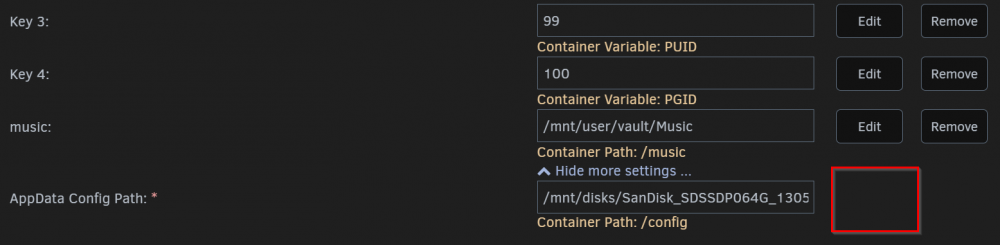
  2. Recently migrated my Plex configs, DBs, and meta data to another dedicated SSD as it was taking up all my cache space. Next came this same warning from FixCommonProblems plugin "...has volumes being passed that are mounted by Unassigned Devices, but they are not mounted with the slave option". Problem is, the path in question is defined by AppData Config Path in the Docker Template ... and there does not appear to be a way to add the RW/Slave option (see screenshot). How can I resolve this?
Account

Navigation

Search

Search

Configure browser push notifications

Chrome (Android)
  1. Tap the lock icon next to the address bar.
  2. Tap Permissions → Notifications.
  3. Adjust your preference.
Chrome (Desktop)
  1. Click the padlock icon in the address bar.
  2. Select Site settings.
  3. Find Notifications and adjust your preference.