





Coque
Members
-
Joined
-
Last visited
Everything posted by Coque
-
It is very strange what happened to me. But it was all due to a server restart and, maybe, the cache disk of the rocinante pool disappeared. I understand that the steps that you indicate to me would have to be done from the CLI and not from the GUI. I am not very familiar with ZFS management from the CLI (I added the cache disk to test and see if it was worth using an old SSD to speed up disk access following a guide in the forum). How would you remove the cache disk from the rocinante pool first? "zpool detach rocinante sdc"? Would I have to do the rest of the steps you indicate from the CLI or could I do it from the unRAID interface using the ZFS Master plugin? Thank you very much for the support you are giving me, JorgeB.
-
Good morning again. The resilvering process is finished. Inside the GUI of unRAID I keep on marking the pool as DEGRADED. I attach the diagnostic files again. What should I do now? Thank you very much. midiam.local-diagnostics-20240904-0829.zip
-
Now that I look in detail that cache drive that FAULTED, it is an SSD disk that on reboot has been disconnected. Maybe the whole problem comes from there. When I finish resilvering, I will check the data and power connection to see why it was not detected during the boot process. I will report the progress.
-
OMG! Well, it was all due to a server reboot... I'll wait for the Scrub process to finish and I'll post again the diagnosis.
-
Here it is. Thank you! midiam.local-diagnostics-20240903-1148.zip
-
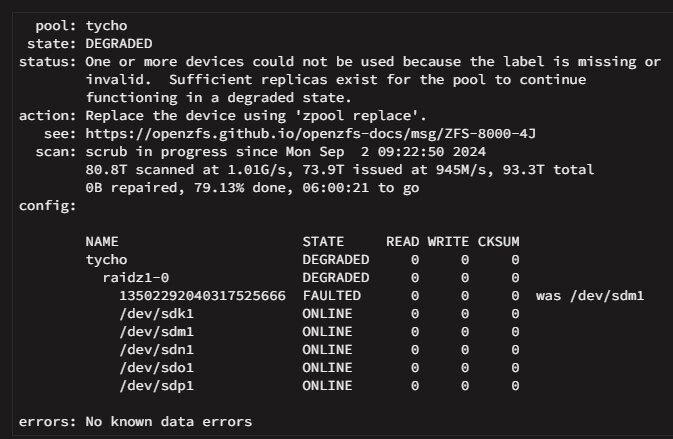
Hello everyone. I have restarted my server and found that one of my ZFS pools is marked as degraded. I have looked at the pool detail, and although Scrub is running (no apparent errors), one of the disks has a message stating “was /dev/sdm1”. Because of all this, the pool is marked as DEGRADED. How can I solve this problem? This is the first time I have had such an error using ZFS. Thank you very much.

-
The controller is an HP P822 and I do not have it configured in RAID mode. It is configured in HBA mode. Each disk is detected individually. That's what I find strange. midiam.local-diagnostics-20240530-1501.zip
-
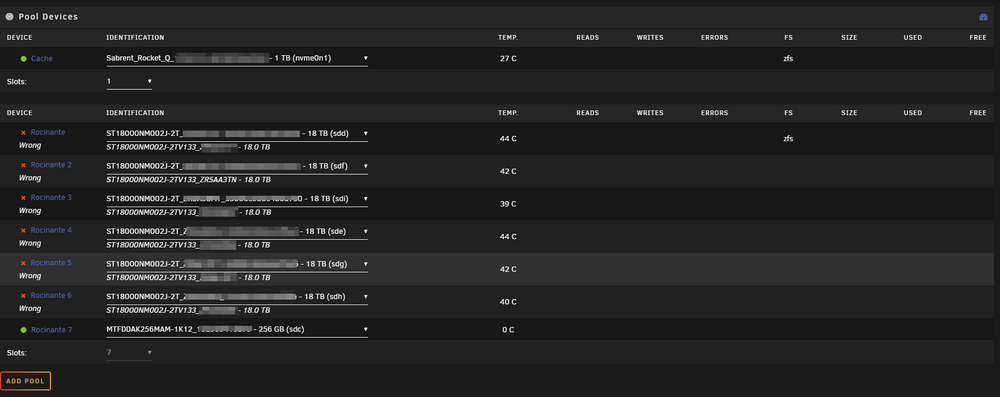
Hello everyone. I have upgraded my server and added a new SAS hard disk controller. When I restart the server, the pool I had previously running and connected to the SATA ports on the motherboard. I have assigned the disks through the GUI, but it marks them as WRONG. How could I remount the Zpool without losing the data? Thanks. PS: I haven't exported the zpool
-
Hello everyone. Does anyone have a working DC++? I would love to be able to run this on my unRAID server to download an share files with my family. Is it possible? Thanks.

