





nettech_gt
Members
-
Joined
-
Last visited
Everything posted by nettech_gt
-
Thank you for your help!
-
Great. So to confirm it would be: kernel /bzimage append pcie_acs_override=downstream,multifunction initrd=/bzroot,/bzroot-gui nvme_core.default_ps_max_latency_us=0 pcie_aspm=off
-
I want to set GUI boot as default. This is what I have selected right now. After selecting Unraid OS GUI mode. Would I need to add nvme_core.default_ps_max_latency_us=0 pcie_aspm=off to match what I currently have for Unraid OS? Thanks!

-
Ok, I finally got everything moved from system off the array. Dynamix File Manger was very helpful. Thanks! unraid-diagnostics-20250309-2007.zip
-
At the moment my server is doing a parity check, so I can't test it right now. However I found this: Should I select "UNRAID OS GUI mode" on the right (blue dot) and then would I need to add anything else to get my cache pool to boot? I didn't know this was an option. I would prefer to boot to GUI mode by default rather then console. Thanks.
-
To clarify, when I say GUI I mean accessing UNRAID via a web browser. Yes, I have a screen and keyboard connected but I can't seem to get to a bash prompt. What is displayed on the screen is all the boot commands that have run to load the system. If I hard reboot the server I'll see all the boot up commands running and eventually I'll see a bash prompt and the IP address.
-
As I mentioned my router is pfSense which runs as a VM. Once I disable the VM manager I loose GUI access to UNRAID without doing a hard reboot. After the reboot the server gets a 169.x.x.x address and I can get to the GUI. Is there a way to "refresh" the IP of the server after my pfSense VM has gone down with out needing to reboot the server? Thanks!
-
Thank you for explaining this. It make more sense now.
-
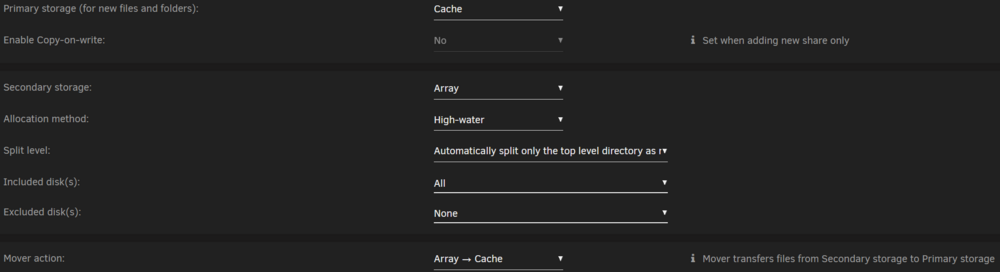
Ok. Would you recommend I keep this for my system share config? Or is there no need for the secondary storage to be set for the Array? Thanks.
-
I checked the Users Share page, this is what is on the array from system. I set up my server many years ago so I can't remember exactly my reasoning for configuring everything. Can you explain why I shouldn't leave it how it is. Is it best practice to have everything from system running on the cache only? Why? Thanks!

-
Ok. What system files are on the array? Once the Docker and VMs are down what do I need to do to put the files in the correct place? Thanks.
-
Updated to 6.12.15 yesterday. Everything looks good. Attached diagnostic. Thanks! unraid-diagnostics-20250223-2209.zip
-
For both 6.12.15. and 7? Thanks.
-
My Dockers and VMs are running again! THANKS!!! From my understanding it seems when I attempted to upgrade to 6.12.15 This caused the cache drives to not load. kernel /bzimage append pcie_acs_override=downstream,multifunction initrd=/bzroot nvme_core.default_ps_max_latency_us=0 I don't understand what changing it to this did... kernel /bzimage append pcie_acs_override=downstream,multifunction initrd=/bzroot nvme_core.default_ps_max_latency_us=0 pcie_aspm=off pcie_port_pm=off From the other post I mentioned, I set the syslinux command (mentioned above) to fix a NVMe drive issue. At the time it was needed for an issue with the Samsung 980 and the currently used kernel. (if I remember correctly) That was a year ago and I forgot that I made that change. I read all the change logs and known issues before upgrading and didn't see anything mentioned that was related to my current situation. What I would like to know is, if I attempt to upgrade again will this be a problem? Is there anything I can do before I upgrade (presently) or in the future to prevent this from being an issue?
-
My cache pool seems to be running now. I have attached the new diags. Is it time to start my Dockers an VMs? Thanks. unraid-diagnostics-20250219-0610.zip
-
Ok, now I see my cache drives under unassigned disk devices. Now what should I do? Thanks!

-
I found and old post of mine where it was suggested I make the change to address an issue with one my cache drives overheating. Do I just need to add pcie_aspm=off pcie_port_pm=off On the end of what I changed in my previous post? So the full line will be: kernel /bzimage append pcie_acs_override=downstream,multifunction initrd= /bzroot nvme_core.default_ps_max_latency_us=0 pcie_aspm=off pcie_port_pm=off
-
Would I replace the entire line after "nvme_core:" `0,acpi_enforce_resources=lax' invalid for parameter `default_ps_max_latency_us' with nvme_core.default_ps_max_latency_us=0 pcie_aspm=off pcie_port_pm=off Where would I do that? Thanks!
-
Yes, I still see both NVMe drives in the BIOS.
-
Unfortunately, no. My router is pfSense. Which runs in a docker on UNRAID...
-
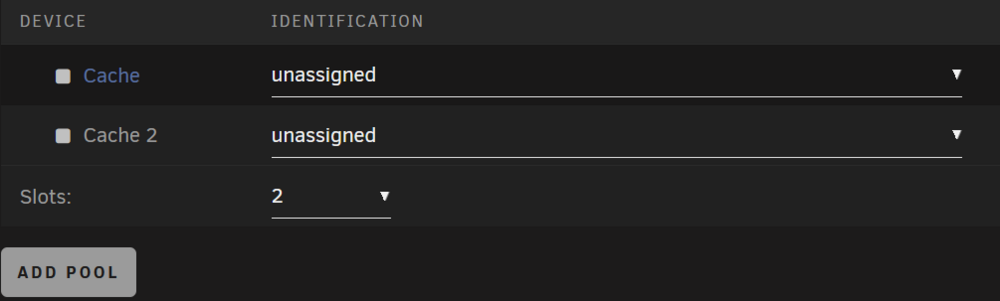
I was on 6.12.8 and tried upgrading to 6.12.15... after 15 minutes the GUI did not load. Eventually, I was able to connect to the UNRAID GUI by changing the IP of another computer to 169.x.x.x. since the UNRAID server now has a 169.x.x.x IP. I'm not really sure what went wrong. I no longer have any of my Dockers (most importantly pfSense) or VMs and my cache drive pool is not mounted. I have since downgraded back to 6.12.8 but that did not help. I have not done much with UNRAID for about a year so I'm lost on what to do next. This what I see on the "Pooled Devices" tab. Any help would be greatly appreciated. Thanks! unraid-diagnostics-20250217-1322.zip
-
Thanks. I'll test the changes.
-
Hello, Thanks for sharing this script! I configured it with the MIN_PMW=100 the LOW_PMW=200 and the HIGH_PMW=225. When the highest temp disk is between the high and low temps shouldn't the PMW get set to something between 200 and 225 and not the MIN_PMW? Thanks! Hottest disk is cache at 44°C Temperature of 44°C is between LOW_TEMP (43°C) and HIGH_TEMP (45°C), setting fans to 100 PWM (39%) Script Finished Aug 04, 2024 16:10.26 Fan Script.txt
-
Thanks! That did the trick.
-


