





droyster
Members
-
Joined
-
Last visited
Everything posted by droyster
-
Has anyone gotten nvidia drivers working on this? I'm not an arch user and haven't been able to get nvidia drivers going. I'd like to do some ML stuff from this container. The normal flags aren't workign for me NVIDIA_VISIBLE_DEVICES=GPU-0db5fc02-ac0d-fb2a-e9b2-539cd10d7d89 NVIDIA_DRIVER_CAPABILITIES=all
-
@GavinCampbell sorry to revive this, but is it possible to have multiple GPUS used by 1 docker container? I'm trying to run ollama https://github.com/ollama/ollama/issues/2672#issuecomment-1959505845 which does support multiple GPUs, but don't want to buy another GPU if I can't support it in unraid with nvidia plugin and docker
-
How do i do that? I didn’t see an option in the docker settings advanced mode. It’s not clear either what share it’s going to
-
I have a custom docker image that I pushed to a private registry hosted on my unraid. When I try to pull it to run it, it fails root@Tower:~# docker pull 192.168.68.66:5000/custom-api Using default tag: latest latest: Pulling from custom-api 7a2c55901189: Pull complete 755e535b54a3: Pull complete 24ff69e0a1e4: Pull complete 76a627ca5e65: Pull complete 35817692a87e: Pull complete 84b6a42e847a: Pull complete 4639b7cd68e5: Pull complete a7bc10701a5b: Pull complete 7d32a9230f8f: Pull complete 8c35a1861813: Extracting [==================================================>] 2.49GB/2.49GB e3f63d7242f5: Download complete afa75cca3a04: Download complete 8f0ccef32324: Download complete 469f02edddbd: Download complete 79888f2914bd: Download complete b32a369a63d3: Download complete 5792e3e68184: Download complete 97e61a288a0d: Download complete f31987ceea11: Download complete 8d286a1efb00: Download complete 4f4fb700ef54: Download complete 0c9c63757e0c: Download complete 26c8e2ec5849: Download complete 51acd6a0318c: Download complete c1c3b8501831: Download complete 693e0da3f716: Download complete 7356c1f4dd44: Download complete 845c3f80ac94: Download complete 840d8b935722: Download complete 1097ac656e1a: Download complete dc8b1a2cb224: Download complete 838559668292: Download complete f2e1c73d8a4a: Download complete 92ce1d577cd7: Download complete failed to register layer: write /usr/local/cuda-12.1/targets/x86_64-linux/lib/libcublas_static.a: no space left on device It's 22GB image based on nvidia/runtime with extra inference libraries. It's a RAG app I'm building. I want to try to make it smaller, but for now I just want to get it to run at all. It also complained once about not having room in a folder /mnt/user/system/docker/... get image blobs (I think) Thanks Tower Diagnostics 20240513.zip
-
Okay so I figured it all out. Not unraid problem at all. Each stick of ram worked on any slot individually, but it wouldn't work with all 4 installed. After some research it looks like my AMD 3700x chip sometimes has issues with 4 sticks of ram. It would consistently fail with all 4. Now I actually put 64 GB in 2 x 32GB and everything is working fine. Might have to become an intel guy after all this... Thanks for the support
-
I sucessfully ran memtest and it's got a bunch of failures. Does that mean the bzfirmware failures are because it offloaded the firmware to ram and because of hardware issues the checksums don't match because of missing/bad addresses?
-
Will try that and report back. thanks! Can I copy the config folder over across minor releases? I believe this config folder is from 6.12.4 and I'm upgrading to 6.12.10 could that cause issues or has that been pretty stable?
-
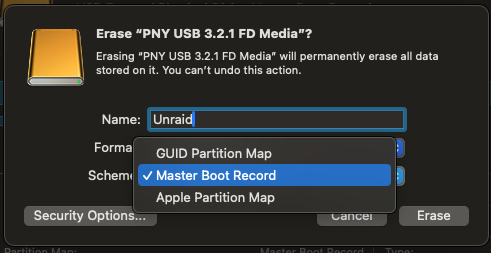
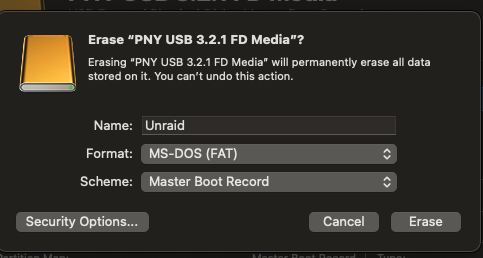
MS-DOS (FAT) is an option for Format, but I also have these scheme options. What should scheme be?
-
when formatting on a mac do you know what scheme to use?
-
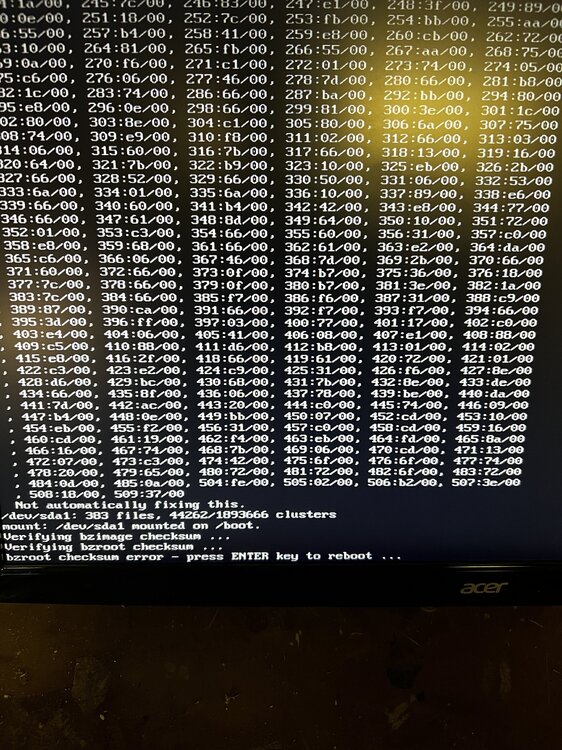
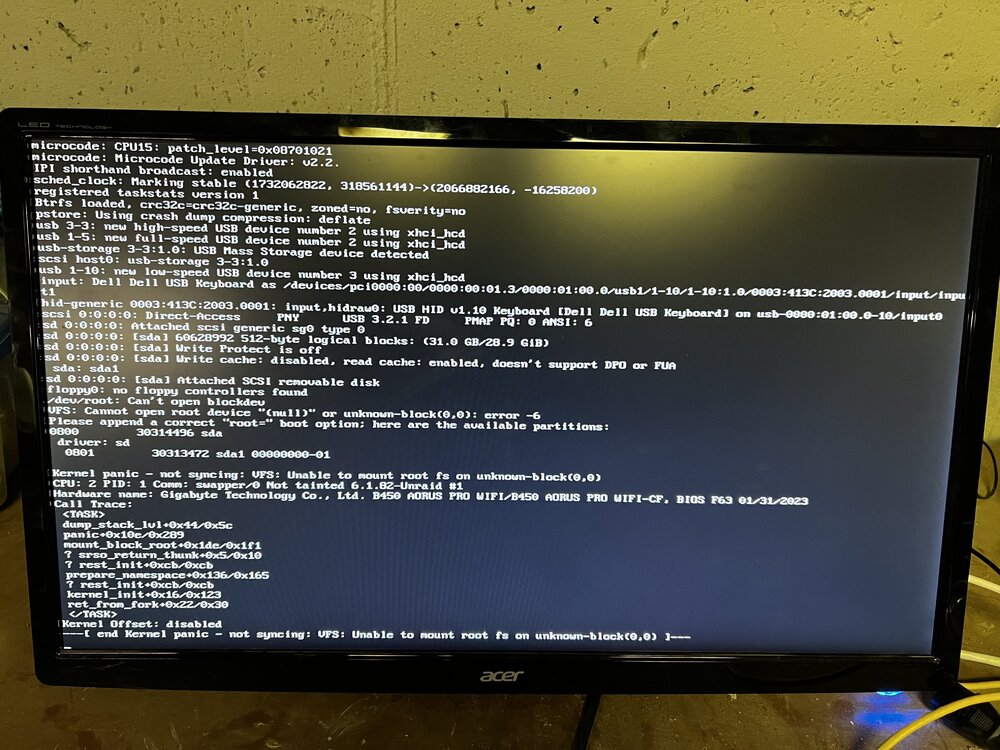
that worked! I think the issue is that my server was trying to boot from the flash drive not the Partition 1, hence the bad root path error. By selecting the right partition I got past the kernel crash, but failed on the bz errors. I copied my config folder into the flash drive and then selected the correct partition and got these bz errors. My research says I need to just recreate the USB stick using the tool again and then copy the config over? Is that right?
-
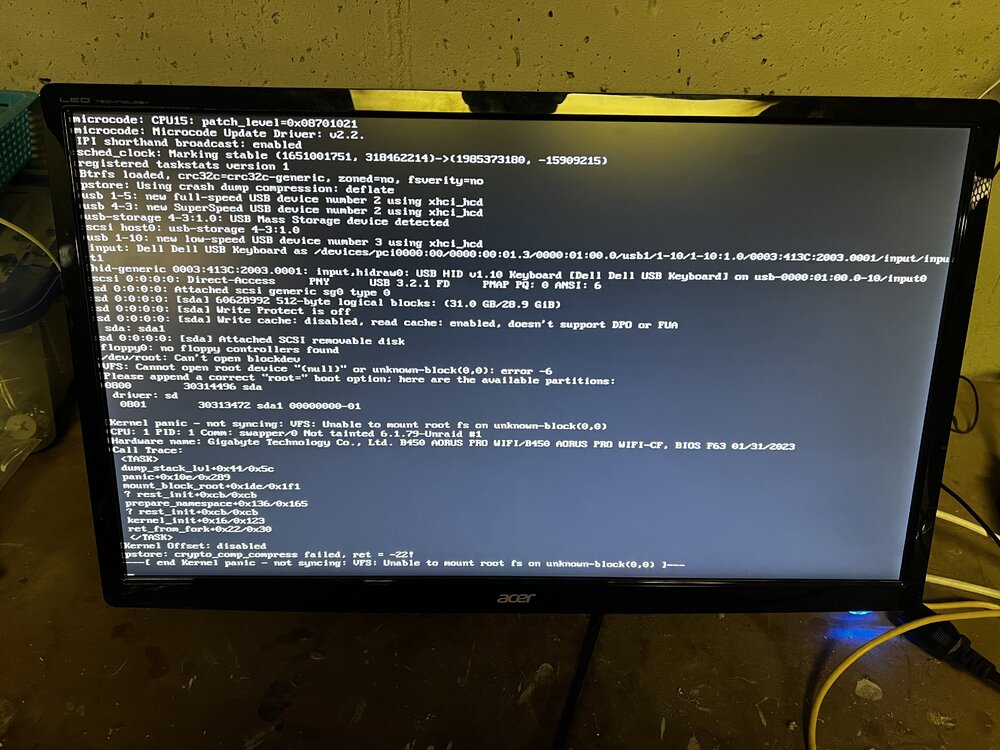
I bought a new stick and installed the newest unraid on it and I'm getting the same error. i am using one of these after reading someone saying they had success with them. I used the mac unraid creation tool and made sure to select the write drive. I don't see any error lights on my MOBO when booting. I unplugged all of my drives for now. All i have plugged in is my GPU, CPU and RAM. What should I try next? Thanks again
-
I installed an RTX 4060 ti. I have a 750 watt PSU so I don't know if that's the issue. I had to move some drives with everything powered down. Then I tried to boot and got a kernel panic. I made a backup of my drive and then installed 6.12.10 and copied config over Worked briefly. Woke up next morning and everything had crashed Made 6.12.9 clean install (didn't copy config this time) Still kernel panic Any help greatly appreciated. It didn't produce more logs to my flash drive this time because I can't get far enough to enable it
-
try seeing if your server will run without panicking with all docker containers shut down, then turn them on one by one and wait a day between each to give it time to panic
-
server has been running consistently for days now. Not positive what fixed it, but I changed my drive storage to `auto` and I turned off every docker container, but my plex one. I did see some errors in the docker logs. Since doing those 2 steps things seem fine
-
i have logs here of when docker crashed again. anything stand out here? I'm going to try replacing the ram, but I'm wondering if these logs have anything useful syslog_crash.zip
-
memtest isn't working choosing it as an option just puts me in a reboot cycle. I ran diagnostics. not sure if this helps. tower-diagnostics-20231016-1105.zip
-
thanks just enabled. In the meantime my docker service crashed again (in the UI) and i'm seeing these logs Oct 15 08:35:45 Tower kernel: CPU: 4 PID: 5955 Comm: smartctl_type Tainted: P D O 6.1.49-Unraid #1 Oct 15 08:35:45 Tower kernel: Hardware name: Gigabyte Technology Co., Ltd. B450 AORUS PRO WIFI/B450 AORUS PRO WIFI-CF, BIOS F63 01/31/2023 Oct 15 08:35:45 Tower kernel: Call Trace: Oct 15 08:35:45 Tower kernel: <TASK> Oct 15 08:35:45 Tower kernel: dump_stack_lvl+0x44/0x5c Oct 15 08:35:45 Tower kernel: __schedule_bug+0x9a/0xac Oct 15 08:35:45 Tower kernel: __schedule+0x59/0x612 Oct 15 08:35:45 Tower kernel: ? _printk+0x58/0x73 Oct 15 08:35:45 Tower kernel: do_task_dead+0x3f/0x41 Oct 15 08:35:45 Tower kernel: make_task_dead+0x114/0x11c Oct 15 08:35:45 Tower kernel: rewind_stack_and_make_dead+0x17/0x17 Oct 15 08:35:45 Tower kernel: RIP: 0033:0x14e5daff1425 Oct 15 08:35:45 Tower kernel: Code: Unable to access opcode bytes at 0x14e5daff13fb. Oct 15 08:35:45 Tower kernel: RSP: 002b:00007ffccf9867b8 EFLAGS: 00000206 ORIG_RAX: 00000000000000e7 Oct 15 08:35:45 Tower kernel: RAX: ffffffffffffffda RBX: 000014e5db1002e8 RCX: 000014e5daff1425 Oct 15 08:35:45 Tower kernel: RDX: 00000000000000e7 RSI: ffffffffffffff78 RDI: 0000000000000000 Oct 15 08:35:45 Tower kernel: RBP: 0000000000000000 R08: 00007ffccf986760 R09: 0000000001643370 Oct 15 08:35:45 Tower kernel: R10: 000014e5daf27b10 R11: 0000000000000206 R12: 0000000000000000 Oct 15 08:35:45 Tower kernel: R13: 000014e5db0fe840 R14: 0000000000000000 R15: 000014e5db100300 Oct 15 08:35:45 Tower kernel: </TASK> Oct 15 09:14:02 Tower kernel: nvidia_uvm: module uses symbols nvUvmInterfaceDisableAccessCntr from proprietary module nvidia, inheriting taint. Oct 15 09:14:02 Tower kernel: nvidia-uvm: Loaded the UVM driver, major device number 241. Oct 15 09:36:07 Tower kernel: traps: PMS HttpClient[23279] general protection fault ip:1469b13b8658 sp:1469ac1f7880 error:0 in ld-musl-x86_64.so.1[1469b13a8000+53000] Oct 15 10:52:28 Tower kernel: traps: unraid-api[14073] trap int3 ip:ebf052 sp:154b6912b6c0 error:0 in unraid-api[91c000+167b000] Oct 15 11:57:58 Tower kernel: Scheduler frequency invariance went wobbly, disabling! Oct 15 13:39:12 Tower kernel: BTRFS warning (device sdc1): csum failed root 5 ino 21223 off 118784 csum 0xc834b506 expected csum 0xc2b739ab mirror 1 Oct 15 13:39:12 Tower kernel: BTRFS warning (device sdc1): csum failed root 5 ino 21223 off 524288 csum 0x2c64439a expected csum 0xd7bd1fd5 mirror 1 Oct 15 13:39:12 Tower kernel: BTRFS error (device sdc1): bdev /dev/sdc1 errs: wr 0, rd 0, flush 0, corrupt 1, gen 0 Oct 15 13:39:12 Tower kernel: BTRFS warning (device sdc1): csum failed root 5 ino 21223 off 118784 csum 0xc834b506 expected csum 0xc2b739ab mirror 1 Oct 15 13:39:12 Tower kernel: BTRFS error (device sdc1): bdev /dev/sdc1 errs: wr 0, rd 0, flush 0, corrupt 2, gen 0 Oct 15 13:39:12 Tower kernel: BTRFS error (device sdc1): bdev /dev/sdc1 errs: wr 0, rd 0, flush 0, corrupt 3, gen 0 Oct 15 13:39:12 Tower kernel: BTRFS warning (device sdc1): csum failed root 5 ino 21223 off 798720 csum 0xe5785487 expected csum 0x0196ed0f mirror 1 Oct 15 13:39:12 Tower kernel: BTRFS error (device sdc1): bdev /dev/sdc1 errs: wr 0, rd 0, flush 0, corrupt 4, gen 0 Oct 15 13:39:12 Tower kernel: BTRFS warning (device sdc1): csum failed root 5 ino 21223 off 524288 csum 0x2c64439a expected csum 0xd7bd1fd5 mirror 1 Oct 15 13:39:12 Tower kernel: BTRFS error (device sdc1): bdev /dev/sdc1 errs: wr 0, rd 0, flush 0, corrupt 5, gen 0 Oct 15 13:52:42 Tower kernel: traps: unraid-api[24897] trap int3 ip:ebf052 sp:14d53245e6c0 error:0 in unraid-api[91c000+167b000] Oct 15 14:15:37 Tower webGUI: Successful login user root from 192.168.86.25 Oct 15 14:35:00 Tower kernel: traps: php[4252] general protection fault ip:14ae625e9a7c sp:7ffe723ce640 error:0 in ld-musl-x86_64.so.1[14ae625d8000+4c000] Oct 15 14:54:59 Tower monitor: Stop running nchan processes Oct 15 22:13:04 Tower monitor: Stop running nchan processes Oct 16 04:23:49 Tower kernel: traps: unraid-api[5904] trap int3 ip:ebf052 sp:148d2ecf76c0 error:0 in unraid-api[91c000+167b000]
-
My unraid server has been crashing after running normally for a while. I cannot see all the logs, but what I did see said kernel panic. Previous to this I was having docker issues where the docker service would crash. I saw someone say on the forums to switch to ipvlan instead of macvlan and that resolved the docker service issues, but now I'm getting random kernel panics. Has anyone else seen this? Unraid was working great for me for years, but seems like there are some issues with 6.12. Here's my diagnostics, but they don't seem to have the kernel panic log, but maybe someone with more knowledge will know what to do with it. Thanks! tower-diagnostics-20231014-1628.zip


