




Scaled(81).jpg.f79c9a766b9b55b272cb8d4d32cdb9ac.jpg)
FaminedWarrior
Members
-
Joined
-
Last visited
Everything posted by FaminedWarrior
-
For future users, if this happens to you on an Asus Motherboard. If you have nvme_1 in use be sure that sata 1 is not. The same if nvme_2 is used be sure sata 2 is not. I found that I was getting long post times and then did some more digging and found that these ports can cause conflict.
-
A format fixed it, it must have been the way the disk was formatted or something. Before formatting Windows had 4 partitions, this time around it only created 3. Everything seems to be running smoothly now. Thank you @ghost82 for the help.
-
Sorry missed this, nvme install is UEFI.
-
Thanks for the advice, I created a new VM and the installer saw it so I am in the process of data recovery and then I will try a fresh install. The whole situation is rather bizarre. I will update when I have more information.
-
Thanks for taking a look, it does the same loop reset loop without any GPU being passed through. Do you thinking doing a fresh install on the nvme would help? Ideally I would like to only passthrough the GPU but I am having this issue so I added VNC to troubleshoot.
-
As requested, I appreciate the help. obsidian-diagnostics-20220514-0839.zip
-
Windows seems fine, will still boot to baremetal. KVM is what is resetting constantly. I didn't really modify anything other than the few lines of code within the XML file, I tried to recreate VM a couple times just in case something is corrupting. The other thought I am having is that because all the PCI lanes are used it maybe doing something strange? Motherboard is Crosshair VII and I have 2 GPUs + an HBA + 2 nvme drives.
-
Tried this but now it just reset loops.
-
Hey all, so I was having a similar issue but when I tried to apply the recommended fix I get the following error. I have attached my XML file, am I missing something? VM creation error unsupported configuration: per-device boot elements cannot be used together with os/boot elements
-
You are right, I can't believe I didn't think of that.
-
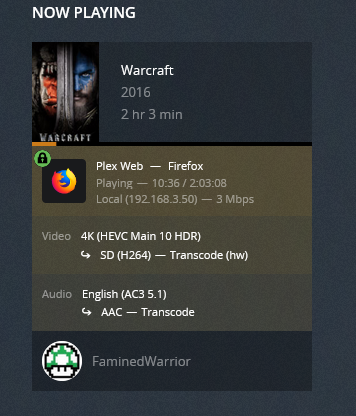
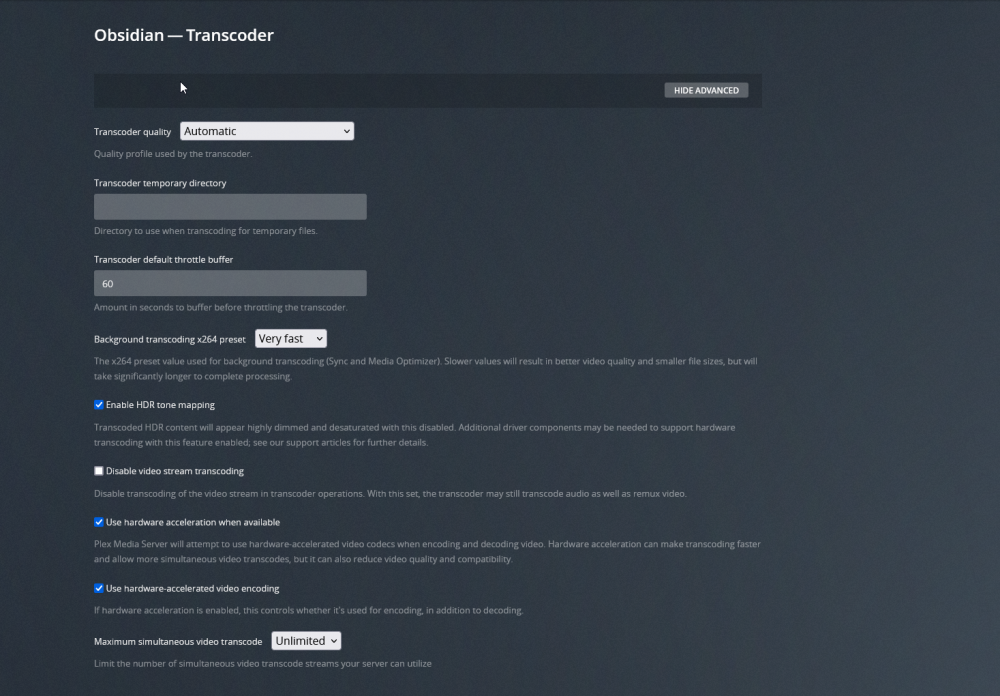
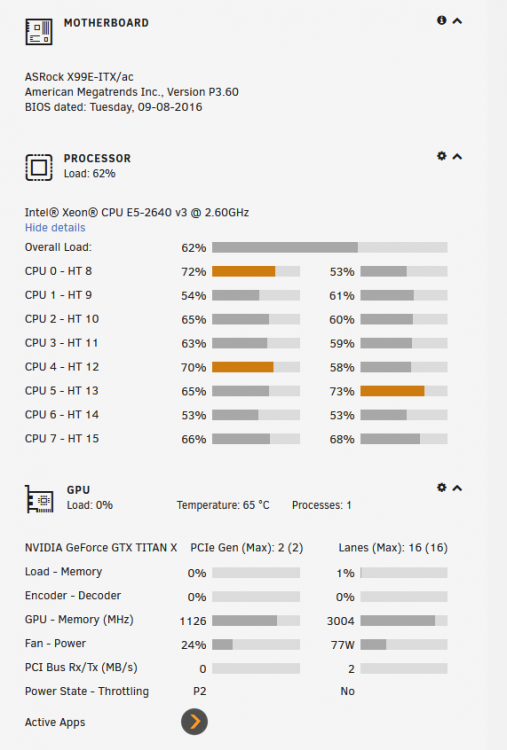
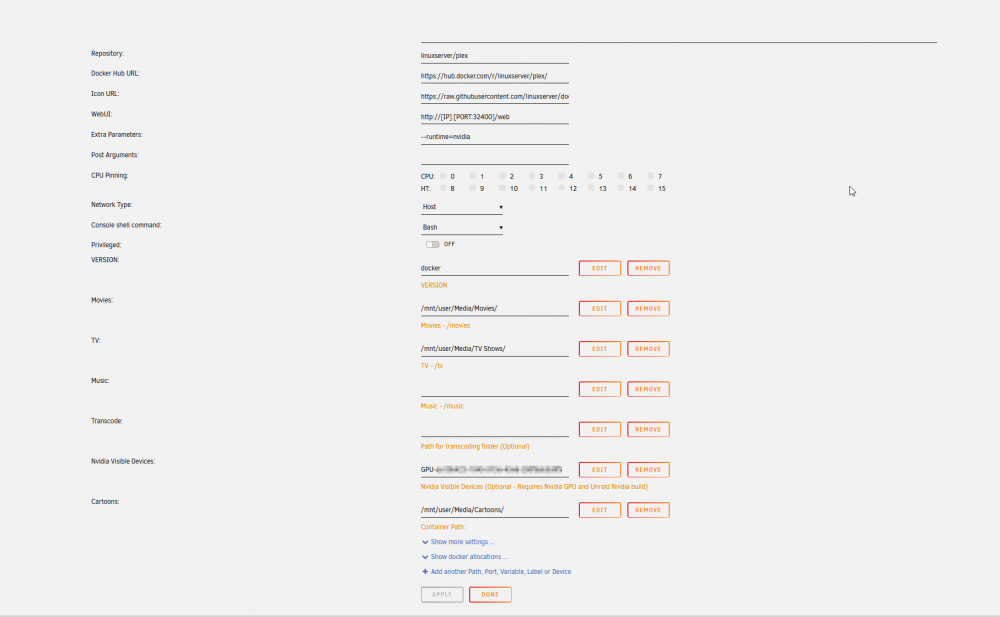
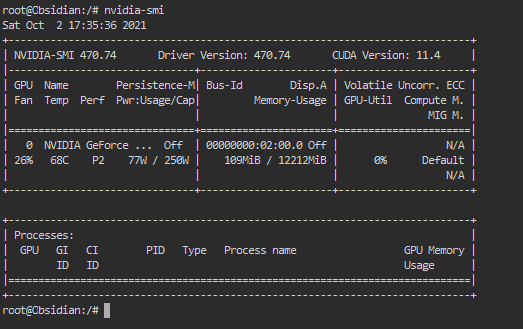
Hi All, I am having issues with getting encoding to work on my plex container, decoding seems to work fine. Any idea why? Did I do something wrong? Thanks.
-
Hi Everyone, I'm having trouble booting with both VNC and my R9 280X. I seem to hang 33% of the way on boot and get the following error. Any help would be appreciated. "2019-11-29 21:26:02.031+0000: Domain id=14 is tainted: high-privileges 2019-11-29 21:26:02.031+0000: Domain id=14 is tainted: custom-argv 2019-11-29 21:26:02.031+0000: Domain id=14 is tainted: host-cpu char device redirected to /dev/pts/0 (label charserial0) usb_desc_get_descriptor: 1 unknown type 33 (len 10)" <?xml version='1.0' encoding='UTF-8'?> <domain type='kvm' xmlns:qemu='http://libvirt.org/schemas/domain/qemu/1.0'> <name>MacinaboxCatalina</name> <uuid>b56f0da5-277c-4c7c-8340-2b5168fd56d3</uuid> <description>MacOS Catalina</description> <metadata> <vmtemplate xmlns="unraid" name="MacOS" icon="/mnt/user/domains/MacinaboxCatalina/icon/catalina.png" os="Catalina"/> </metadata> <memory unit='KiB'>8388608</memory> <currentMemory unit='KiB'>8388608</currentMemory> <memoryBacking> <nosharepages/> </memoryBacking> <vcpu placement='static'>4</vcpu> <cputune> <vcpupin vcpu='0' cpuset='0'/> <vcpupin vcpu='1' cpuset='8'/> <vcpupin vcpu='2' cpuset='1'/> <vcpupin vcpu='3' cpuset='9'/> </cputune> <os> <type arch='x86_64' machine='pc-q35-3.1'>hvm</type> <loader readonly='yes' type='pflash'>/mnt/user/domains/MacinaboxCatalina/ovmf/OVMF_CODE.fd</loader> <nvram>/mnt/user/domains/MacinaboxCatalina/ovmf/OVMF_VARS.fd</nvram> </os> <features> <acpi/> <apic/> </features> <cpu mode='host-passthrough' check='none'> <topology sockets='1' cores='2' threads='2'/> </cpu> <clock offset='utc'> <timer name='rtc' tickpolicy='catchup'/> <timer name='pit' tickpolicy='delay'/> <timer name='hpet' present='no'/> </clock> <on_poweroff>destroy</on_poweroff> <on_reboot>restart</on_reboot> <on_crash>restart</on_crash> <devices> <emulator>/usr/local/sbin/qemu</emulator> <disk type='file' device='disk'> <driver name='qemu' type='qcow2' cache='writeback'/> <source file='/mnt/user/domains/MacinaboxCatalina/Clover.qcow2'/> <target dev='hdc' bus='sata'/> <boot order='1'/> <address type='drive' controller='0' bus='0' target='0' unit='2'/> </disk> <disk type='file' device='disk'> <driver name='qemu' type='raw' cache='writeback'/> <source file='/mnt/user/domains/MacinaboxCatalina/Catalina-install.img'/> <target dev='hdd' bus='sata'/> <address type='drive' controller='0' bus='0' target='0' unit='3'/> </disk> <disk type='file' device='disk'> <driver name='qemu' type='raw' cache='writeback'/> <source file='/mnt/user/domains/MacinaboxCatalina/macos_disk.img'/> <target dev='hde' bus='sata'/> <address type='drive' controller='0' bus='0' target='0' unit='4'/> </disk> <controller type='pci' index='0' model='pcie-root'/> <controller type='pci' index='1' model='pcie-root-port'> <model name='pcie-root-port'/> <target chassis='1' port='0x10'/> <address type='pci' domain='0x0000' bus='0x00' slot='0x02' function='0x0' multifunction='on'/> </controller> <controller type='pci' index='2' model='pcie-root-port'> <model name='pcie-root-port'/> <target chassis='2' port='0x11'/> <address type='pci' domain='0x0000' bus='0x00' slot='0x02' function='0x1'/> </controller> <controller type='pci' index='3' model='pcie-root-port'> <model name='pcie-root-port'/> <target chassis='3' port='0x12'/> <address type='pci' domain='0x0000' bus='0x00' slot='0x02' function='0x2'/> </controller> <controller type='pci' index='4' model='pcie-root-port'> <model name='pcie-root-port'/> <target chassis='4' port='0x13'/> <address type='pci' domain='0x0000' bus='0x00' slot='0x02' function='0x3'/> </controller> <controller type='pci' index='5' model='pcie-root-port'> <model name='pcie-root-port'/> <target chassis='5' port='0x14'/> <address type='pci' domain='0x0000' bus='0x00' slot='0x02' function='0x4'/> </controller> <controller type='virtio-serial' index='0'> <address type='pci' domain='0x0000' bus='0x02' slot='0x00' function='0x0'/> </controller> <controller type='sata' index='0'> <address type='pci' domain='0x0000' bus='0x00' slot='0x1f' function='0x2'/> </controller> <controller type='usb' index='0' model='qemu-xhci' ports='15'> <address type='pci' domain='0x0000' bus='0x00' slot='0x07' function='0x0'/> </controller> <interface type='bridge'> <mac address='52:54:00:52:23:57'/> <source bridge='br0'/> <model type='vmxnet3'/> <address type='pci' domain='0x0000' bus='0x01' slot='0x00' function='0x0'/> </interface> <serial type='pty'> <target type='isa-serial' port='0'> <model name='isa-serial'/> </target> </serial> <console type='pty'> <target type='serial' port='0'/> </console> <channel type='unix'> <target type='virtio' name='org.qemu.guest_agent.0'/> <address type='virtio-serial' controller='0' bus='0' port='1'/> </channel> <input type='tablet' bus='usb'> <address type='usb' bus='0' port='1'/> </input> <input type='mouse' bus='ps2'/> <input type='keyboard' bus='ps2'/> <graphics type='vnc' port='-1' autoport='yes' websocket='-1' listen='0.0.0.0' keymap='en-us'> <listen type='address' address='0.0.0.0'/> </graphics> <video> <model type='qxl' ram='65536' vram='65536' vgamem='16384' heads='1' primary='yes'/> <address type='pci' domain='0x0000' bus='0x00' slot='0x01' function='0x0'/> </video> <hostdev mode='subsystem' type='pci' managed='yes'> <driver name='vfio'/> <source> <address domain='0x0000' bus='0x02' slot='0x00' function='0x0'/> </source> <address type='pci' domain='0x0000' bus='0x03' slot='0x00' function='0x0'/> </hostdev> <hostdev mode='subsystem' type='pci' managed='yes'> <driver name='vfio'/> <source> <address domain='0x0000' bus='0x02' slot='0x00' function='0x1'/> </source> <address type='pci' domain='0x0000' bus='0x04' slot='0x00' function='0x0'/> </hostdev> <memballoon model='none'/> </devices> <qemu:commandline> <qemu:arg value='-usb'/> <qemu:arg value='-device'/> <qemu:arg value='usb-kbd,bus=usb-bus.0'/> <qemu:arg value='-device'/> <qemu:arg value=REMOVED <qemu:arg value='-smbios'/> <qemu:arg value='type=2'/> <qemu:arg value='-cpu'/> <qemu:arg value='Penryn,kvm=on,vendor=GenuineIntel,+invtsc,vmware-cpuid-freq=on,+pcid,+ssse3,+sse4.2,+popcnt,+avx,+aes,+xsave,+xsaveopt,check'/> </qemu:commandline> </domain>
Scaled(81).thumb.jpg.d62aaaee67afb2f62e10822a8f658661.jpg)



