






tompapajr
Members
-
Joined
-
Last visited
-
Thank you JorgeB -- ❤️ All good now.
-
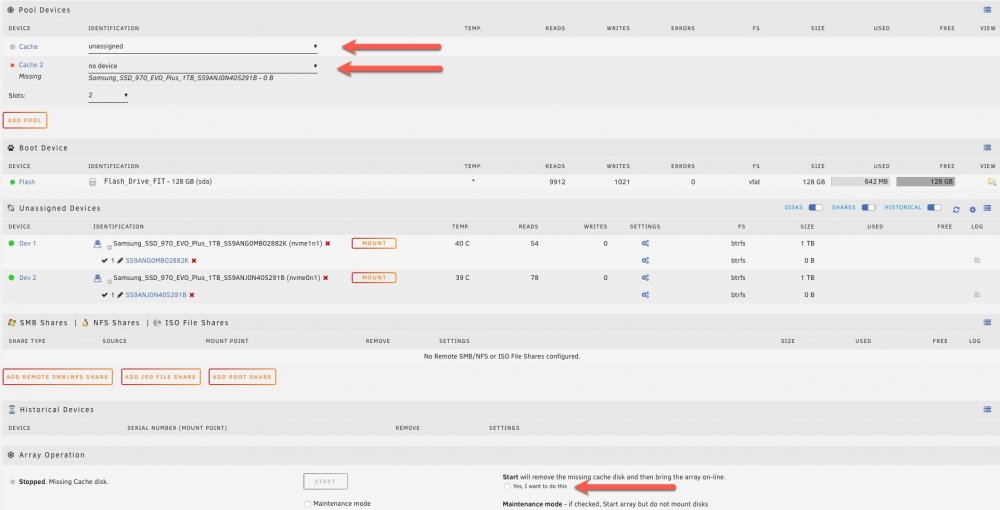
Thanks JorgeB -- Wanted to check in with you first. I disabled both Docker and VM services entirely in settings. Removed that Cache 2 drive. Need to check that box and start right?
-
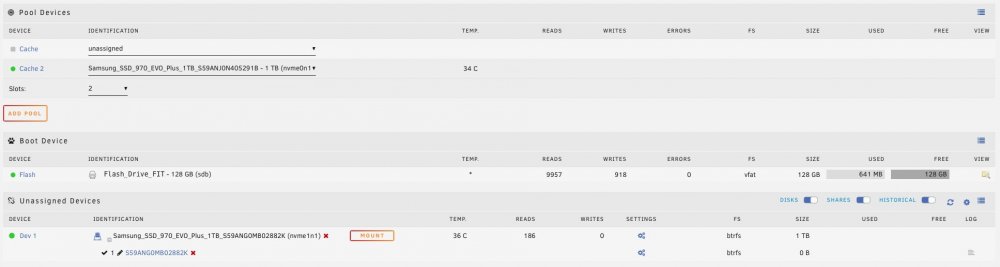
Hello unraid community! I'm in need of some help. I had two identical 1TB SSDs as my BTFS cache (raid0...iknow stupid - kicking myself was trying to maximize the storage and ease of use). I had to reboot the server to do a BIOS update, and my PCI NVME controller card upon reboot was not setup in the BIOS for bifurcation mode and one of those SSDs did not appear during unraid start up. I immediately shutdown and realized the problem, fixed the bifurcation so both SSDs appeared, however the pool stopped recognizing that other drive in the pool. Its lets me add it back in, but i says its going to be wiped (see attached screenshots). Any suggestions? After this I'll definitely be setting up two separate single cache pools with these drives.. Unraid 6.9.2 Supermicro X10DRL-i Xeon E5-2620v3 Supermicro AOC-SLG3-2M2 PCIe Add-On Card hyperion-diagnostics-20220616-0817.zip

-
Good point -- If i specify a location, yes it seems to go to the specified location. Ideally, I'd like the unpacked data to reside in the torrent's folder.
-
DelugeVPN has been amazing so far. Scratching my head on this one. I have tried both the native Extractor and the SimpleExtractor-1.3 plugins with the intent of having torrents needing automatic extraction (rar, zip etc) to unpack into the torrent's download folder. However I'm finding that the extracted file not matter what I do ends up in the /config directory </mnt/user/appdata/binhex-delugevpn> For the Extractor Plugin Configuration: I have left it blank as per the instructions. This is supposed to unpack to the torrent's own directory. For the SimpleExtractor Plugin Configuration: I set it to "In-Place" for the same behavior as above. For example torrent downloaded in data/complete/EXAMPLETORR/Example.zip should unpack to data/complete/EXAMPLETORR/example.unpackedfile but ends up in /config/example.unpackedfile It seems the plugins are not aware of anything outside of the /config mount and ignore the /data mount. Hopefully I'm doing something wrong 🙂 . Keep up the great work!
-
tompapajr changed their profile photo
-
Really appreciate the hard work on this plugin. I ran into an issue on two drives I was clearing. They both got hung up at "Zeroing 99%", been sitting there for a few hours now. I had 2 additional drives complete without issue all started around at the same time. The last log entries I see from those two drives is below. Running Unraid 6.8.1 and Preclear Plugin 2020.01.17b Jan 22 13:00:34 preclear_disk_R6G9R8HY_32737: Zeroing: dd output: 8000423067648 bytes (8.0 TB, 7.3 TiB) copied, 48210.5 s, 166 MB/s Jan 22 13:00:34 preclear_disk_R6G9R8HY_32737: dd process hung at 8000425164800, killing.... Jan 22 13:00:34 preclear_disk_R6G9R8HY_32737: Continuing disk write on byte 8000423067648 Jan 22 13:00:34 preclear_disk_R6G9R8HY_32737: Zeroing: dd if=/dev/zero of=/dev/sdd bs=2097152 seek=8000423067648 count=1140154368 conv=notrunc iflag=count_bytes,nocache,fullblock oflag=seek_bytes Jan 22 13:00:34 preclear_disk_R6G9R8HY_32737: Zeroing: dd pid [1759] Jan 22 13:01:43 preclear_disk_R6G9R8HY_32737: Zeroing: dd - wrote 8001563222016 of 8001563222016. Jan 22 12:52:20 preclear_disk_VLK6324Y_14584: Zeroing: dd output: 3815324+0 records out Jan 22 12:52:20 preclear_disk_VLK6324Y_14584: Zeroing: dd output: 8001314357248 bytes (8.0 TB, 7.3 TiB) copied, 47930.3 s, 167 MB/s Jan 22 12:52:20 preclear_disk_VLK6324Y_14584: dd process hung at 8001316454400, killing.... Jan 22 12:52:20 preclear_disk_VLK6324Y_14584: Continuing disk write on byte 8001314357248 Jan 22 12:52:20 preclear_disk_VLK6324Y_14584: Zeroing: dd if=/dev/zero of=/dev/sdf bs=2097152 seek=8001314357248 count=248864768 conv=notrunc iflag=count_bytes,nocache,fullblock oflag=seek_bytes Jan 22 12:52:20 preclear_disk_VLK6324Y_14584: Zeroing: dd pid [14515] Jan 22 12:52:22 preclear_disk_VLK6324Y_14584: Zeroing: dd - wrote 8001563222016 of 8001563222016.




