





skois
Members
-
Joined
-
Last visited
Everything posted by skois
-
https://hub.docker.com/r/linuxserver/nextcloud/tags?page=1&ordering=last_updated Here is the tags. you can search this thread, I remember couple of people doing the same thing. They have listed exactly the tags they used in the process
-
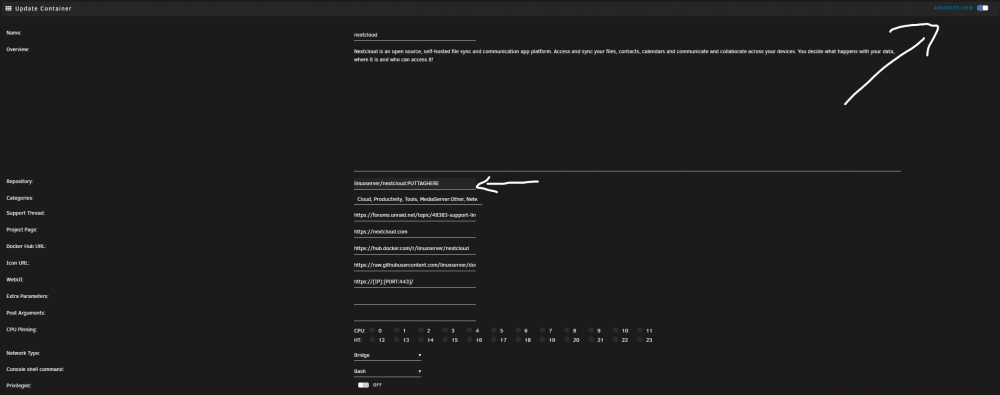
You need to downgrade the docker to a version with php 7.3 (using the tags) Update to NC 17, nc18 nc19 If it asks for php7. 4 update again the docker with the latest tag And update to nc20 and nc21 if it's available Sent from my Mi 10 Pro using Tapatalk
-
Happy that you are up and running again!! Cheers Sent from my Mi 10 Pro using Tapatalk
-
It's from the Talk app, if you don't use it, you can remove it. If you using it. It's a known bug. https://github.com/nextcloud/spreed/issues/5336 They linked a fix there, so check it. I don't have the app to test.
-
Deleting dockers, don't affect your data (in normal scenarios), And when reinstalling they should be back like they was before!
-
So the other solution is. Make a screenshot of all your dockers. Go Settings -> Docker, Stop docker, delete docker image. Start docker. Go to docker tab, click add container, and select from the dropdown one by one your dockers. and hit apply to install. will take some time, but you will be back and running.
-
I suspect corrupted docker image, but let's try. Go Settings -> Docker -> select correct errors and hit scrub. Try the above again.
-
FIRST go to your nextcloud docker, make a screeshot of the template, then Ok now do "docker rm nextcloud" After that try to force update the docker again. If docker isn't in the list after running the above command, dont panic. Just go to the bottom of docker tab, click add container, click the dropdown list and select the nextcloud template. (check that all is correct) and hit apply.
-
open console (top right) and do "docker ps -a", post results please
-
Open advanced in docker tab (top right) And do force update on nextcloud. Might help Sent from my Mi 10 Pro using Tapatalk
-
It's 4 posts above. Sent from my Mi 10 Pro using Tapatalk
-
Did this ever worked? In order to access nextcloud from inside the network and outside you need a router that supports NAT Hairpining
-
https://forums.unraid.net/topic/48383-support-linuxserverio-nextcloud/?do=findComment&comment=956767
-
I'd suggest starting a thread on https://help.nextcloud.com/ . Maybe a file got corrupted during update? I don't know.
-
run "updater.phar" after it is done withour errors do "occ upgrade" I'd suggest a backup of nextcloud and db appdata before updating. You are several major releases behind, and things have more chances to go wrong.
-
Can you please run occ integrity:check-core ? Does it report anything?
-
You can't access Settings > System or Settings in General? Does the rest of the instance working ok? If you can access Settings > Logging. Do this. Reproduce the error you getting and then grab a screeshot of the logging. (so the error will be recent) If you can't access Settings > Logging, Do this Reproduce the error you getting and then post the "nextcloud.log" which is located in your /data folder. Also open the docker console on nextcloud and do * occ status * occ check * occ maintenance:repair * occ upgrade * updater.phar And post the results. Please before posting anything, check if there is any personal info and deduct them.
-
Check this, might be your cache https://github.com/linuxserver/docker-nextcloud/issues/189
-
I'm not the one that applied the patch, I was planning to do it today maybe. It should be as easy as overwriting the mentioned file from github to the container. But since this is merged, wait a couple of days, it will be a release i believe Sent from my Mi 10 Pro using Tapatalk
-
for now i just disabled the app, as i only have couple of users, but they are using only webui, not client apps. Also because the app blocks ".lock" files i had some problem syncing some files from my repo which i was doing some Helm Charts (they included a Chart.lock). I'll soon use a truenas as a storage device, so with snapshots i wont have any problems with ransom.
-
Its from the ransomware protection app, i have simillar errors, There is a open issue on github https://github.com/nextcloud/ransomware_protection/issues/88
-
Check if they are on the same docker network eg. bridge. Check in appdata/nextcloud/www/nextcloud/config/config.php that ip and port number for db is correct. Check mariadb docker logs if the db is running correctly Check nextcloud docker logs if there is anything there. You can download a db viewer/editor like dbeaver and try to connect to the mariadb and see if you can see your data there. This way you can confirm that mariadb can read the actual db. Without any logs/ configs can't say much
-
I get this error usually if nextcloud have trouble connecting to database.
-
Right now this link is dead. I'll check it later. here is the new issue i created. If you want you can do a comment there with your steps. and if you have the error still. https://github.com/linuxserver/docker-nextcloud/issues/189 Edit* Check the issue for the solution. TL?DR? Update docker, delete /config/nginx/site-confs/default, restart docker, Go to Settings > Overview, (for chrome) Press F12 and while having dev tools open right click refresh button and click emtpy cache and hard reload.
-
https://github.com/linuxserver/docker-nextcloud/pull/188#issuecomment-786447953 I'll open a new one when I get home Sent from my Mi 10 Pro using Tapatalk


