





skois
Members
-
Joined
-
Last visited
Everything posted by skois
-
I was using namecheap (which worked fine, but moved to cloudflare for the dns challenge on the cert) Does each of your cnames have its own certificate? I have completely missed that you couldn't access nextcloud.domain.com internally. From your local lan what does your "tracert cloud.domain.com" shows ? or "traceroute cloud.domain.com" for linux
-
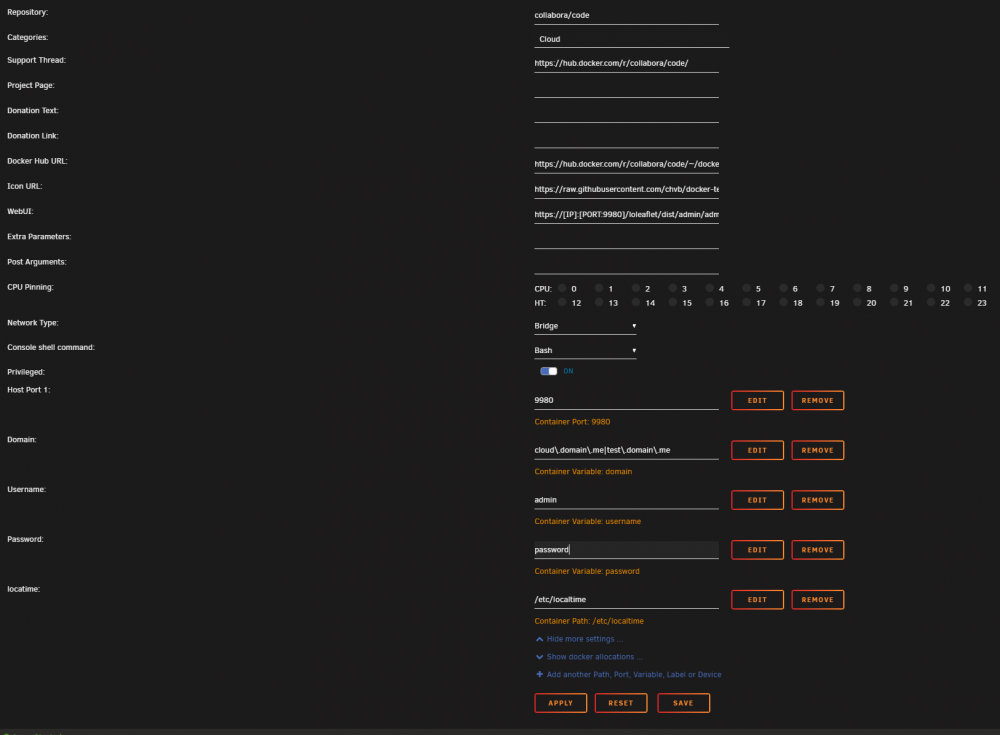
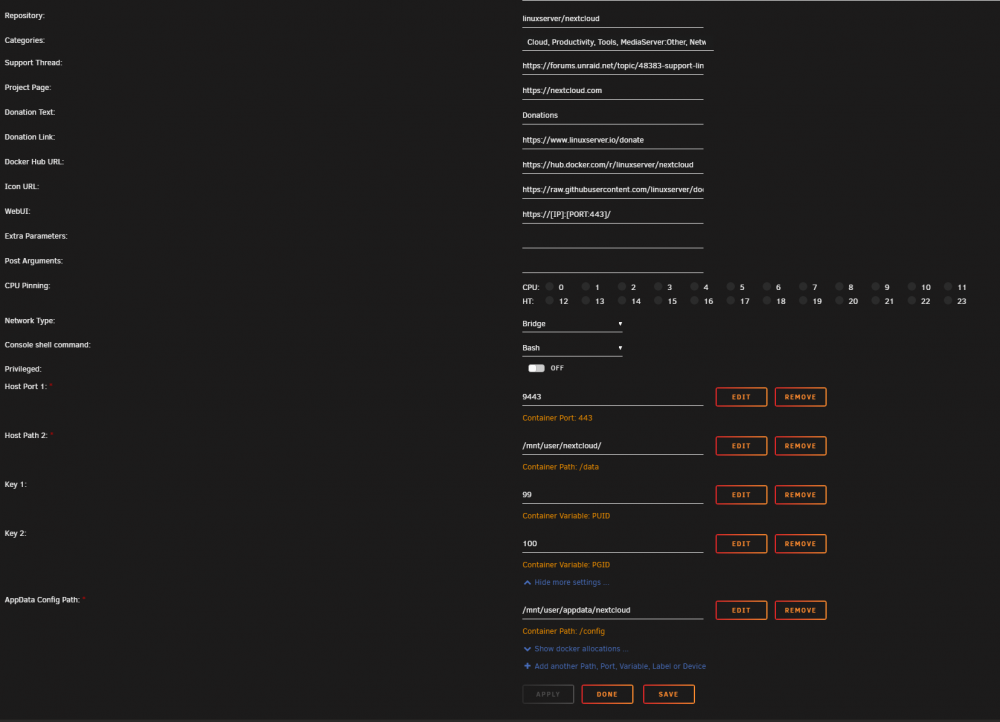
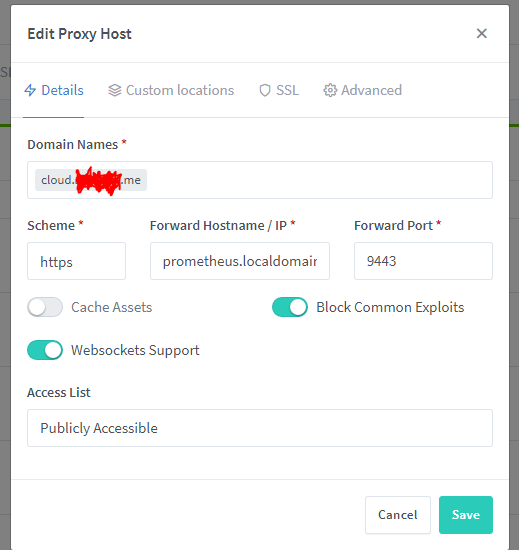
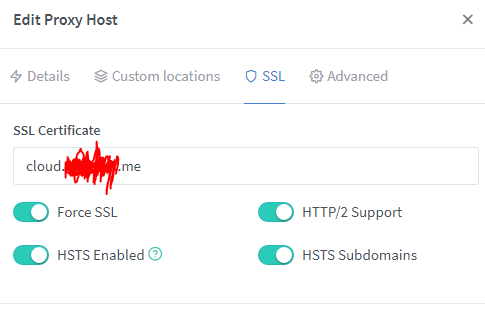
Ok here you go. Nextcloud config.php <?php $CONFIG = array ( 'memcache.local' => '\\OC\\Memcache\\APCu', 'memcache.distributed' => '\\OC\\Memcache\\Redis', 'memcache.locking' => '\\OC\\Memcache\\Redis', 'redis' => array ( 'host' => '10.10.10.254', 'port' => 6379, ), 'datadirectory' => '/data', 'instanceid' => 'randomid', 'passwordsalt' => 'randomsalt', 'secret' => 'randomsecret', 'trusted_domains' => array ( 0 => '10.10.10.254:9443', 1 => 'cloud.domain.me', ), 'trusted_proxies' => array ( 0 => 'NginxProxyManager', ), 'overwrite.cli.url' => 'https://10.10.10.254:9443', 'overwriteprotocol' => 'https', 'overwritehost' => 'cloud.domain.me', 'dbtype' => 'pgsql', 'version' => '20.0.5.2', 'dbname' => 'nextcloud', 'dbhost' => '10.10.10.254:5432', 'dbport' => '', 'dbtableprefix' => 'oc_', 'mysql.utf8mb4' => true, 'dbuser' => 'dbuser', 'dbpassword' => 'dbpassword', 'installed' => true, 'updater.release.channel' => 'stable', 'maintenance' => false, 'theme' => '', 'loglevel' => 2, 'app_install_overwrite' => array ( 0 => 'spreed', 1 => 'documentserver_community', 2 => 'sharerenamer', ), 'encryption.legacy_format_support' => false, 'encryption.key_storage_migrated' => false, 'data-fingerprint' => 'randomfingerprint', 'mail_smtpmode' => 'smtp', 'mail_smtpauthtype' => 'LOGIN', 'mail_sendmailmode' => 'pipe', 'mail_smtpauth' => 1, 'mail_smtpsecure' => 'tls', 'mail_from_address' => 'cloud', 'mail_domain' => 'domain.me', 'mail_smtphost' => 'smtp.provider.eu', 'mail_smtpport' => '587', 'mail_smtpname' => '[email protected]', 'mail_smtppassword' => 'randompassword', 'trashbin_retention_obligation' => '60,auto', 'versions_retention_obligation' => '60,auto', 'enable_previews' => true, 'preview_max_x' => '2048', 'preview_max_y' => '2048', 'jpeg_quality' => '60', ); Docker Templates I use collabora for 2 domains, remove after the "|". Also note the "\" before every ".". You need them. NginxProxyManager Nextcloud NginxProxyManager Collabora Nextcloud Collabora App ("Collabora Online") Hope this helps you. If you have any questions please ask. prometheus.localdomain == 10.10.10.254 (my servers ip, just an alternative way to write it inside my lan)
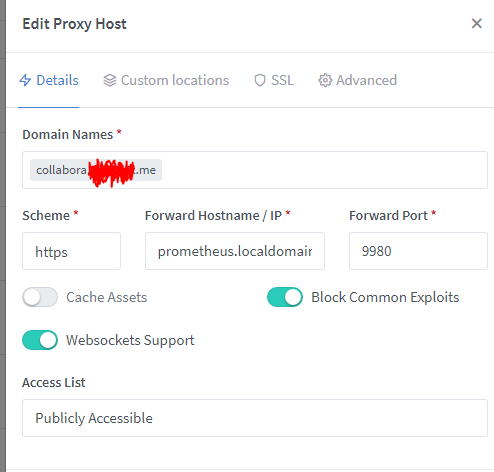
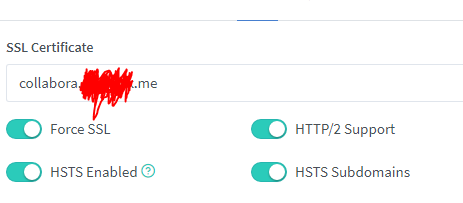
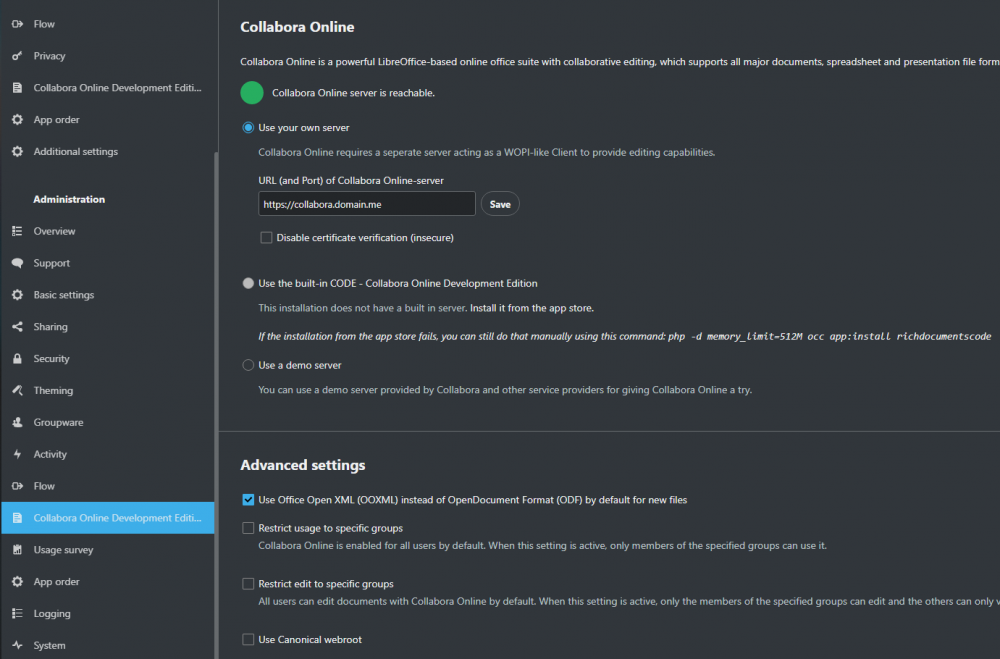
-
Hmm, I'll send you my settings, maybe I'm missing something here also! I'll be home in about 6 hours Sent from my Mi 10 Pro using Tapatalk
-
Try to change the network on all dockers to bridge, just to be sure. When I get home in about 6-7 hours, I'll post all my settings for collabora, which I would say it works very nice (had OO and didn't like it). Sent from my Mi 10 Pro using Tapatalk
-
1st thing i noticed and i think some other people had some problem with it is on your NC config.php. On "'overwrite.cli.url' => " you have your domain now. Try changing it to your ip on of your server. 'overwrite.cli.url' => 'https://serverip:444', Even if this is not the problem here might save you a research later. Also if you are using nginxproxymanager still try checking the toggle for Force https (just to be sure there isn't any redirection problem). That is the things i would try 1st! Also if you like collabora more, i can try to help with that!
-
I won't pretend i can understand any of the logs (i'm not so deep yet lol) Please post config.php of nextcloud (/mnt/user/appdata/nextcloud/www/nextcloud/config/config.php) photos of the docker templates (OO and NC) swag configs for OO and NC and if OO has any config file. this too. I'll try to see if there is anything obvious that i can catch, otherwise someone here with better knowledge will help with all this info. Just to recap. You can access onlyoffice.domain.com and nextcloud.domain.com (not those exactly but your cnames and domain) right? Also you can open nextcloud console (right click on docker while you are in dashboard) and try "ping onlyoffice.domain.com" If it can ping it, swag confs and cnames should be fine.
-
I don't have OO right now, i use collabora which works fine. The crazy thing is before 10 minutes i was casually checking my logs. And saw this errors Error internet_connection_check GuzzleHttp\Exception\RequestException: cURL error 56: Recv failure: Connection reset by peer (see https://curl.haxx.se/libcurl/c/libcurl-errors.html) 2021-01-19T18:23:34+0200 Error internet_connection_check GuzzleHttp\Exception\RequestException: cURL error 56: Recv failure: Connection reset by peer (see https://curl.haxx.se/libcurl/c/libcurl-errors.html) 2021-01-19T18:07:57+0200 But collabora still working fine. I haven't checked what this is yet. You see the bad healthcheck status on NC? Does it have any other info there?
-
Only if you fork the lsio docker container and create an image that includes it already.. Sent from my Mi 10 Pro using Tapatalk
-
Access the console of the nextcloud docker. Try running. "updater.phar" If this errors out, do "occ maintenance:mode --off" and try accessing nextcloud webui, go to Settings->Overview and see if there is any errors, (probably should be) errors will probably be about missing things on DB. there you will also see the commands you need to run to fix them. (run them on the nextcloud docker console. Then try again to update either from WebUI or from console with "updater.phar"
-
I would suggest also looking on this also. Letsncrypt docker was moved to SWAG. It have some small changes to note. But can't tell you more, because i don't use it. You might wanna take a look on NginxProxyManager, is a GUI for letsncrypt and nginx. I'm happy with it!
-
I was able to reproduce, something after the install is messing up the trusted domains. So lets do it all over again. go to - /mnt/user/appdata/nextcloud - delete everything there. - /mnt/user/appdata/mariadb - delete everything there. - /mnt/user/nextcloud - delete everything there *if you have DATA there, back them up first*(this is the /data folder, i suggest cleaning because i saw before you created a bunch of admins and there will be a lot of files assosiated with them there that you wont need.) Ok, now delete both dockers - mariadb - nextcloud * Go to Apps. * Install mariadb (check that is on bridge network for now) * Open console mysql -uroot -p password create user 'dbusernextcloud' identified by 'mypassword'; create database if not exists nextclouddb; grant all privileges on nextclouddb.* to 'dbusernextcloud' identified by 'mypassword'; * Close console. * Go to Apps * Install nextcloud (check that is on bridge network for now) * Open WebUI (if it opens, do the initial setup) - database user: dbusernextcloud - database password: mypassword - database name: nextclouddb - localhost: unraidip:portofmariadb fill also username and password for admin. *Click Finish Setup. (DONT CLOSE PAGE on 504 error) *With the page still displaying 504 error, go to /mnt/user/appdata/nextcloud/www/nextcloud/config/ and edit the config.php truested_domain section should look like this (dont forget the comma after each entry). ofc change the ips according to yours. You should only need to add the line 1, 0 should be there. 'trusted_domains' => array ( 0 => '10.0.0.72:444', 1 => '10.0.0.*', ), *After saving the config.php. Go back to your browser and refresh the page. It should now ask you to log in. In case still shows 504 error. Try restarting docker WITHOUT CLOSING the page. and when docker restarts, refresh the page once more. Hopefully this will get you started!
-
Correct! Actually /mnt/user contains both data cache and array, depending on the share configuration Sent from my Mi 10 Pro using Tapatalk
-
If this is a new installation and you don't have any data, i would suggest delete appdata from both database and nextcloud and force update both dockers (open advanced view on docker tab). and start fresh. That means you have to recreate the databases (check spaceinvaders video for the commands). Something wasn't completed correctly on the 1st install and now it seems to fail every time. Also before starting the initial setup (after wiping appdata and forcing update the dockers) Add the trusted domain. 'trusted_domains' => array ( 0 => '10.0.0.72:444', 1 => '10.0.0.*', ),
-
Try changing 'overwrite.cli.url' => 'https://internal_ip:webui_port and also on your config i see you have two 'overwritehost', delete one and comment the other.
-
Your photos seems to either be deleted on not shared publicly! Probably on your config you have an 'overwritehost' => nc.example.com This rewrites every request even from a local ip to the public domain. Remove this line and add your local ip subnet or pc specific to your trusted domains. (see the previous post)
-
If we assume your lan pc is on the same subnet and your subnet is 10.0.0.0/24, then on your config.php on nc add this on the trusted domains. It should work now 'trusted_domains' => array ( 0 => '10.0.0.72:444', 1 => '10.0.0.*', ),
-
Yes! And i can say i see some speed improvement!
-
Until 6.4.2.2 domains needed "//" (two) before every "." on 6.4.3.1 needs only "/" (one). So if you update to 6.4.3.1 remember to remove the extra "/"
-
Oh sorry that you think I have an attitude. Yes Karen is not right. More like entitled. Hopefully someone here will help you. I won't. Good luck and be healthy. Sent from my Mi 10 Pro using Tapatalk
-
Note to everyone.. DO NOT UPDATE collabora docker. For some reason it does not work when updated. Poked a bit in the xml config file, and saw some changes in the domains. Instead of the domains i had in docker template it was listing "localhost". Tried to copy the config from the previous docker version but still didn't work. In case you updated and now it doesn't work for you. Open docker template and change repository field from "collabora/code" to "collabora/code:6.4.2.2"
-
Here was my first response after you replied to me that you didn't know how to get them. But instead of providing them, you was being a Karen. You ask us to read all your previous comments but you don't bother to see our replies.
-
Thats a good question But i dont have the answer! I don't know if there is a way to manually install the Settings app for a version 16 or where to find it to donwload. I'm not near a pc right now, so i can't search.
-
Check your config.php in appdata/nextcloud/www/nextcloud/config And confirm that the version it mentions is the correct. Sent from my Mi 10 Pro using Tapatalk
-
Try putting only few small files in windows client, see if it syncs fine. Then add more, mostly to narrow down if its problem on file size, quantity size. Is there any files with weird characters? like chinese? Any file paths bigger than 255 characters?
-
I haven't experienced anything like that, but it might be cause from the older version of docker engine, that unraid is using in 6.5.0. Is there a reason you haven't updated?




