skois
Members
-
Joined
-
Last visited
Everything posted by skois
-
Please post a screenshot of your docker template Sent from my Mi 10 Pro using Tapatalk
-
With which app you trying to map? Android or iOS?
-
Now I remember In newer images of NC the rest is not needed Try 'occ maintenance:mode --off' Sent from my Mi 10 Pro using Tapatalk
-
Try without the sudo -u abc If not working try su abc Then execute the rest of command. Not near a computer to test Sent from my Mi 10 Pro using Tapatalk
-
Instead of mapping the smb share to your phone. Map webdav folder. Sent from my Mi 10 Pro using Tapatalk
-
You can to go Tools > New Permissions and run it on nextcloud share. But after you delete the files. you have to initiate a scan from nextcloud's console. But nextcloud docs say that should be avoided. Do you want to do it for one time? Or part of a workflow? If its one timer, ok. But not as a workflow. Look for other solutions
-
After looking for almost a month how to install Face Recognition App on Nextcloud. I had found the install instructions but never was able to complete them. Because apt install wasn't working. But i was too stupid and today realised it was alpine underneath. So.. googled what package manager alpine uses and managed to get Face Rec working (ill have some results in some hours!). For anyone wanna install pdlib and try the Face Rec app, here is what i did to install it. First, DO IT ON TESTING DOCKER NOT ON THE PRODUCTION DOCKER! Have some photos on your nextcloud (not on external storages, it won't work, been there) Now the installation. 1 - Go to Dockers, Open console on your test nextcloud docker Insert the following commands one line at a time. Hopefully you won't have any errors. apk add make cmake gcc g++ php7-dev libx11-dev openblas-dev **RESTART DOCKER AFTER THE PREVIOUS LINE, open console on docker again and continue** git clone https://github.com/davisking/dlib.git cd dlib/dlib mkdir build cd build cmake -DBUILD_SHARED_LIBS=ON .. make sudo make install cd / git clone https://github.com/goodspb/pdlib.git cd pdlib phpize PKG_CONFIG_PATH=/usr/local/lib64/pkgconfig ./configure make sudo make install * Now to go appdata folder /php/phplocal.ini and add on the end [pdlib] extension="pdlib.so" 2 - Restart NC Docker once again. 3 - Go to Apps and install/enable Face Recognition App 4 - Go to NC Docker console again and do "occ face:setup -m 1" 5 - Go to Settings > Face Recognition (on the lower menu) 6 - I don't know if its supposed to start automatically, mine was saying Analysis started but didn't seem to process any photo until i open the docker console again and do "occ face:background_job" EDIT* This command justs forces to start, if you want you can let it start automaticly via cron job 7 - Wait for results ( i'm also waiting. so i can't really tell you how it works yet) *For more info for fine tuning check here https://github.com/matiasdelellis/facerecognition/wiki/Usage *This is all info gathered around, so I can't be sure that i haven't messed any other module of NC while installing those packages. DO IT AT YOUR OWN RISK! PS. As you can see i'm just good at googling! Not an expert. Hehe
-
Just be careful on rollback, not sure but I read in the notes that you have to do some things before roll back. 6.9 got some major changes. Check notes before proceeding. Not around the server to check atm
-
For anyone having the same questions. I used the postgres11 from app store, changed tag to 13 I used official redis docker Added the redis config posted from @CorneliousJD and changed to my server ip Restarted Nextcloud, bashed into it and run the db convert replacing it with my ip, user and db names. It asked for my postgres db password. I got a warning that some DBs wont convert, this is a normal warning that is documented. This DBs is old dbs from apps that are not used anymore or apps you have removed completely. After that i just waited to finish the conversion. It took like 10minutes. I have a small instance. (I did not had to create any db in postgres, just filled the template with username and db name and a password)
-
Which docker did you used? Did you instal from cli? On Community apps i can see up to v11. Also which redis docker. Thanks! EDIT* Nevermind about version, didn't think to check for tags! EDIT2* If you could share how you created the database in postgres it would be very helpful. Thanks!
-
Good day to everyone, i'm trying to install face recognition app and it needs pdlib installed. I checked the documentation for installing pdlib. But the easy way wont work on docker and the docker way is a bit complicated for my level. I checked lsio, that they provide some kind of easy docker-mod implementation. But again my level isn't that good.. So i'm here to ask if anyone have successfully installed pdlib in this docker! Thanks!!
-
I gave up, hopefully will work from the ui at later versions.. Sent from my Mi 10 Pro using Tapatalk
-
if you stub the device, unraid won't be able to use it. i THINK i saw something a way to split it. But i do not reccomend it at all. It may have very bad results. Maybe some other gurus here can confirm or elaborate more.
-
You welcome! Hopefully it will run stable! I haven't had the chance to test it. By the time i figured how to make it work, my dedicated mini pc have arrived and did the whole pfsense on this one PS. Running rock solid for 4 months now. (the minibox)
-
I have the same problem as the OP, but i only have it on ONE share! I have like 10 mounted shares, but only 1 have this problem. This share is the one that i have mapped to Handbrake. This is a cached share, only using smb. I umounted the share and remounted. Run mover. I can still access the share. It seems most likely to disconnect only after handbrake runs a scan on the watched folder inside the share, but not always
-
Have you installed the nvidia kernel version on unraid?
-
Hello, is anyone managed to get Face Recognition app installed on this docker? I'm trying to follow the app's installation instructions but sure enough nothing work, cause it needs to have a package manager to install some things. How i can do it manually? https://github.com/matiasdelellis/facerecognition/wiki/Installation
-
Np😉
-
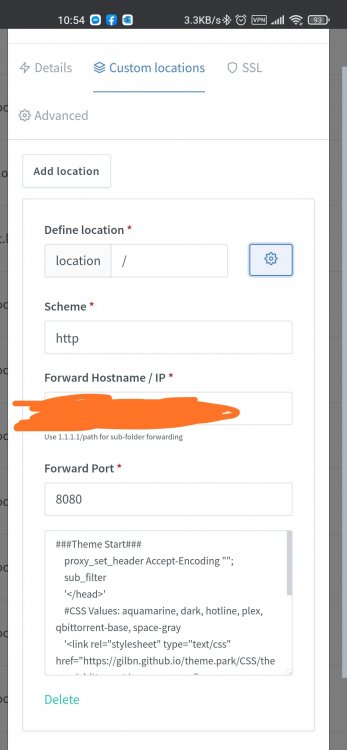
Go to custom location, for path put "/" without quotes and edit this location with this code Sent from my Mi 10 Pro using Tapatalk
-
I use NGINX Proxy Manager so i can access my qbit from "torrent.domain.me" so on the proxy config i added the lines ###Theme Start### proxy_set_header Accept-Encoding ""; sub_filter '</head>' #CSS Values: aquamarine, dark, hotline, plex, qbittorrent-base, space-gray '<link rel="stylesheet" type="text/css" href="https://gilbn.github.io/theme.park/CSS/themes/qbittorrent/space-gray.css"> </head>'; sub_filter_once on; #As Qbittorrent will block the theme with its content security policy you need to change or remove the CSP header. proxy_hide_header "x-webkit-csp"; proxy_hide_header "content-security-policy"; ###Theme End### If i access the qbit from local ip its still on the old theme. But on torrent.domain.me have the theme applied. This is the theme pack i used https://github.com/gilbN/theme.park
-
I access it through a domain, with let's encrypt I'll try to remember to send you some config when I get home Sent from my Mi 10 Pro using Tapatalk
-
I ended up injecting it on the reverse proxy file Sent from my Mi 10 Pro using Tapatalk
-
Anyone found a solution for the timelapse download error?
-
This is the error i get when i click Download on a timelapse. 2020-06-20T18:21:30+03:00 Shinobi is ready. Error: write EPIPE at WriteWrap.onWriteComplete [as oncomplete] (internal/stream_base_commons.js:87:16) { errno: 'EPIPE', code: 'EPIPE', syscall: 'write' } Uncaught Exception occured! Error: write EPIPE at WriteWrap.onWriteComplete [as oncomplete] (internal/stream_base_commons.js:87:16) Error: ENOENT: no such file or directory, stat '/opt/shinobi/fileBin/SGDYZkDnwt/Eisodos/2020-06-16T17-20-00_2020-06-20T18-06-13-30fps.mp4' at Object.statSync (fs.js:915:3) at ChildProcess.<anonymous> (/opt/shinobi/libs/videos.js:488:44) at ChildProcess.emit (events.js:223:5) at Process.ChildProcess._handle.onexit (internal/child_process.js:272:12) { errno: -2, syscall: 'stat', code: 'ENOENT', path: '/opt/shinobi/fileBin/SGDYZkDnwt/Eisodos/2020-06-16T17-20-00_2020-06-20T18-06-13-30fps.mp4' } Uncaught Exception occured! Error: ENOENT: no such file or directory, stat '/opt/shinobi/fileBin/SGDYZkDnwt/Eisodos/2020-06-16T17-20-00_2020-06-20T18-06-13-30fps.mp4' at Object.statSync (fs.js:915:3) at ChildProcess.<anonymous> (/opt/shinobi/libs/videos.js:488:44) at ChildProcess.emit (events.js:223:5) at Process.ChildProcess._handle.onexit (internal/child_process.js:272:12) Error [ERR_STREAM_DESTROYED]: Cannot call write after a stream was destroyed at doWrite (_stream_writable.js:431:19) at writeOrBuffer (_stream_writable.js:419:5) at Socket.Writable.write (_stream_writable.js:309:11) at /opt/shinobi/libs/videos.js:501:61 at FSReqCallback.readFileAfterClose [as oncomplete] (internal/fs/read_file_context.js:61:3) { code: 'ERR_STREAM_DESTROYED' } Uncaught Exception occured! Error [ERR_STREAM_DESTROYED]: Cannot call write after a stream was destroyed at doWrite (_stream_writable.js:431:19) at writeOrBuffer (_stream_writable.js:419:5) at Socket.Writable.write (_stream_writable.js:309:11) at /opt/shinobi/libs/videos.js:501:61 at FSReqCallback.readFileAfterClose [as oncomplete] (internal/fs/read_file_context.js:61:3)
-
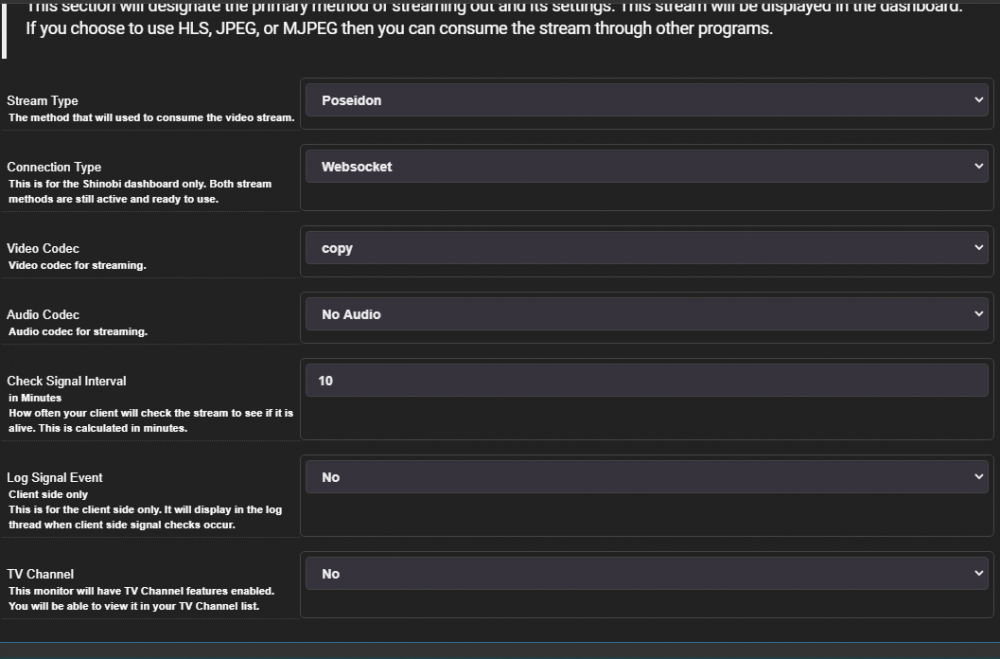
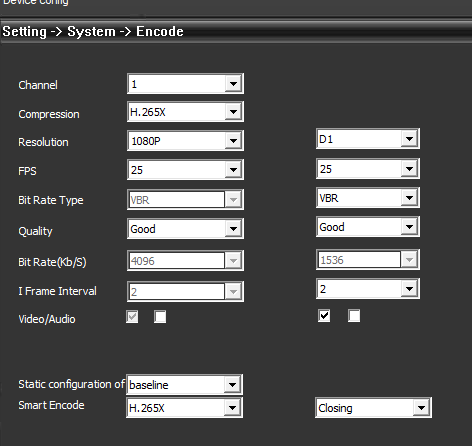
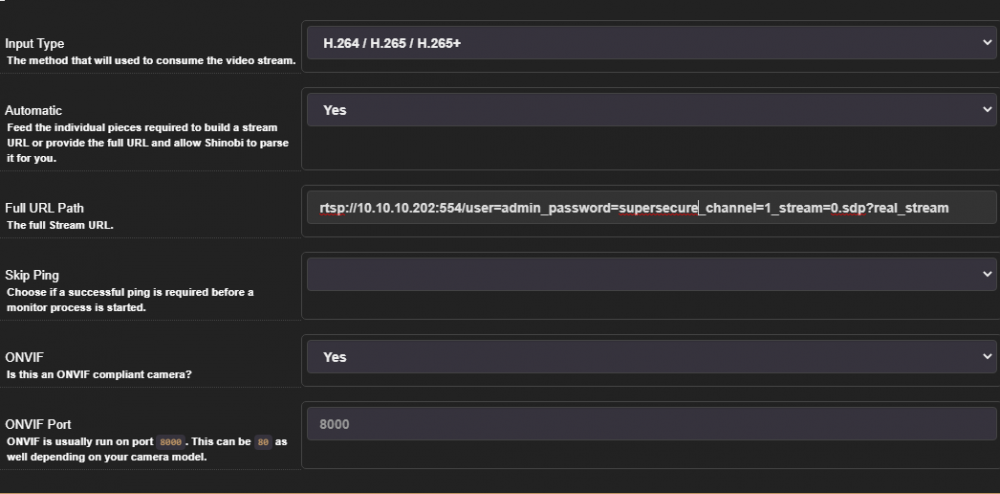
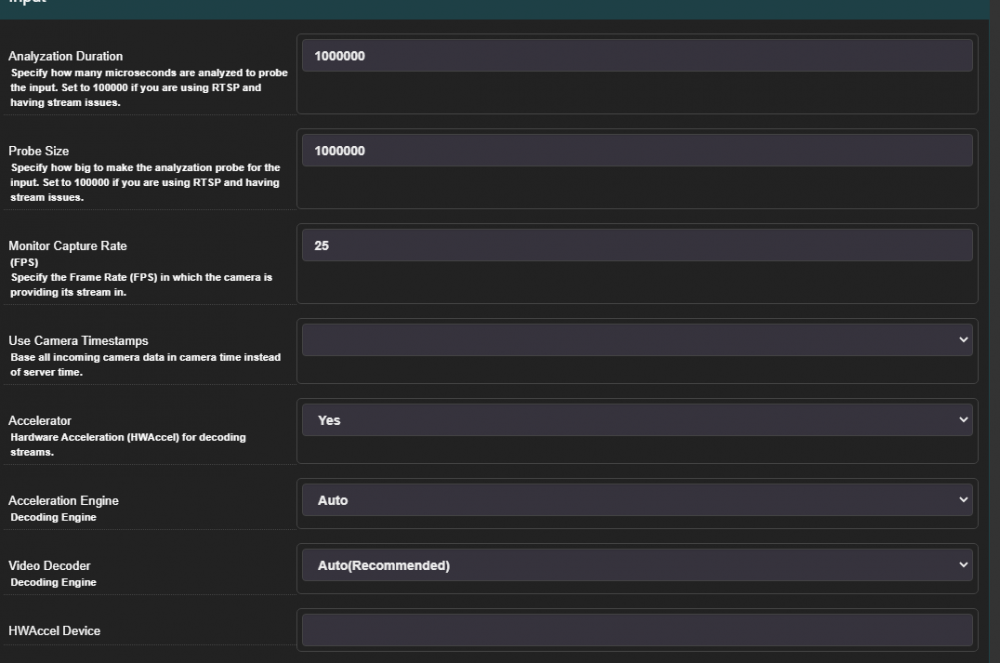
Hello, i'm setting up Shinobi but i'm having some delay issues. I have 3 ip cameras. which i have added to shinobi with an rtsp link They are outputing 1080p - 25fps - 4mbit bitrate - h265x (dont know what x means, probably +?) On shinobi i have Analyzation Duration and Probe Size at 1000000 (changing them doesn't affect the delay) Right now i have about 30sec delay. And streams some times freeze for 10 sec or so. I use Poseidon - Websocket - copy codec on stream settings. All 3 cameras are on the same local network (gigabit) and accessing shinobi webui locally (not through reverse proxy or anything). if i use the same rtsp url on vlc. i get less than a second delay. (almost realtime) Also changing cameras even to 15 fps makes little to no difference in delay... Is this something that i can fix? Thanks! Please let me know if you need more info...