





squishee
Members
-
Joined
-
Last visited
-
Sorry, disregard. It was an issue with my home network
-
Sometime between last night and this morning my server disconnected from the network and I'm unable to access the web UI. Looking at my router settings, it doesn't seem to be connected to the network either. In the years I've had Unraid, I haven't experienced this and I'm unsure what to do. I'm able to boot and access it from my monitor. ifconfig eth0 returns the following: eth0: flags=6147<UP,BROADCAST,RUNNING,SLAVE,MULTICAST> mtu 1500 ether XXXXXXXXXXXX txqueuelen 1000 (Ethernet) RX packets 0 bytes 0 (0.0 B) RX errors 0 dropped 0 overruns 0 frame 0 TX packets 0 bytes 0 (0.0 B) TX errors 0 dropped 0 overruns 0 carrier 0 collisions 0 device memory 0xa3300000-a331ffff Any help or recommendations on how to troubleshoot further would be greatly appreciated.
-
Hello, After I went to reboot a VM this morning, my webUI was frozen for about 3-5 minutes. Once it came back up, I received a message saying: "Your flash drive is corrupted or offline. Post your diagnostics in the forum for help." If I try and make a flash backup via the UI, I get a 404 Not Found error. This is the first time this has happened and I'm not sure the best way to proceed. The last flash backup I have locally is from November of last year and I'm not sure how close that would be to my current setup. Hoping for advice on next steps. Diagnostics attached. server-diagnostics-20230314-0927.zip
-
Figured out I could do this in Apps > Previous apps. Thanks again
-
Thank you so much! I still have one issue that I'm trying to resolve - my Docker containers are missing. I do see my appdata folder and subfolders on the cache drive. How would I go about restoring them?
-
Thanks Jorge. I'm not completely clear on what to do next. Here's the output: root@server:~# xfs_repair -v /dev/sdf1 Phase 1 - find and verify superblock... bad primary superblock - bad magic number !!! attempting to find secondary superblock... .found candidate secondary superblock... verified secondary superblock... writing modified primary superblock - block cache size set to 1530184 entries sb realtime bitmap inode value 18446744073709551615 (NULLFSINO) inconsistent with calculated value 129 resetting superblock realtime bitmap inode pointer to 129 sb realtime summary inode value 18446744073709551615 (NULLFSINO) inconsistent with calculated value 130 resetting superblock realtime summary inode pointer to 130 Phase 2 - using internal log - zero log... zero_log: head block 232788 tail block 232788 - scan filesystem freespace and inode maps... sb_icount 0, counted 254528 sb_ifree 0, counted 146 sb_fdblocks 122036749, counted 3811959 - found root inode chunk Phase 3 - for each AG... - scan and clear agi unlinked lists... - process known inodes and perform inode discovery... - agno = 0 - agno = 1 - agno = 2 - agno = 3 - process newly discovered inodes... Phase 4 - check for duplicate blocks... - setting up duplicate extent list... - check for inodes claiming duplicate blocks... - agno = 0 - agno = 1 - agno = 3 - agno = 2 Phase 5 - rebuild AG headers and trees... - agno = 0 - agno = 1 - agno = 2 - agno = 3 - reset superblock... Phase 6 - check inode connectivity... - resetting contents of realtime bitmap and summary inodes - traversing filesystem ... - agno = 0 - agno = 1 - agno = 2 - agno = 3 - traversal finished ... - moving disconnected inodes to lost+found ... Phase 7 - verify and correct link counts... Note - stripe unit (0) and width (0) were copied from a backup superblock. Please reset with mount -o sunit=<value>,swidth=<value> if necessary XFS_REPAIR Summary Thu Feb 2 05:27:55 2023 Phase Start End Duration Phase 1: 02/02 05:27:54 02/02 05:27:54 Phase 2: 02/02 05:27:54 02/02 05:27:54 Phase 3: 02/02 05:27:54 02/02 05:27:55 1 second Phase 4: 02/02 05:27:55 02/02 05:27:55 Phase 5: 02/02 05:27:55 02/02 05:27:55 Phase 6: 02/02 05:27:55 02/02 05:27:55 Phase 7: 02/02 05:27:55 02/02 05:27:55 Total run time: 1 second done
-
I screwed up and unintentionally added nvme0n1 to my cache pool when it should only be a single drive - sdf. I removed the nvme drive and set the pool back to 1, however, I get the message "Unmountable: Unsupported or no file system" and can't proceed without it asking me to format. Is there any way around this without losing the data on that drive? server-diagnostics-20230201-1958.zip
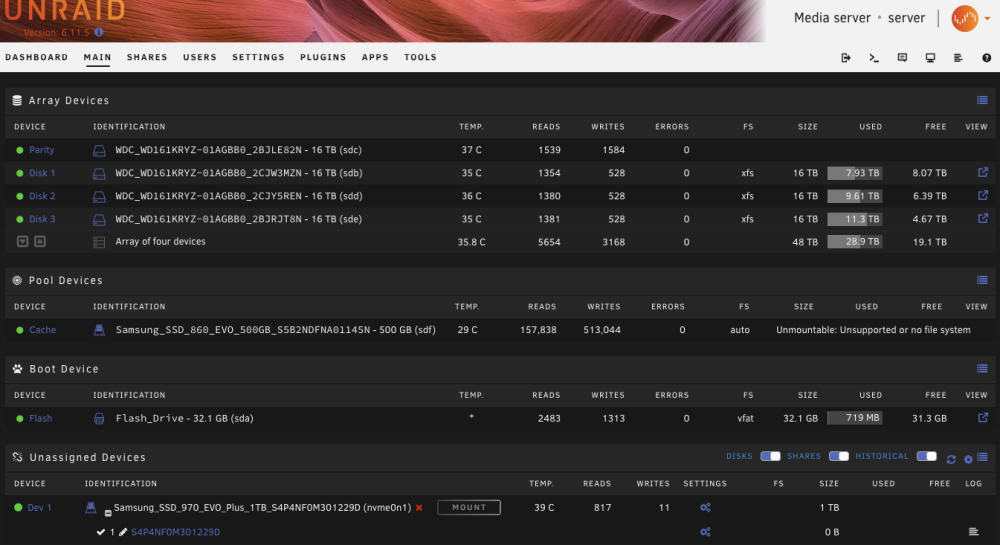
-
Thanks, that did the trick!
-
Also having this issue as well after upgrading to 6.10.0-rc2 last night. I upgraded from 6.9 and had Bluetooth passthru working via USB device: Intel Corp. (8087:0029), similar to what I see in TCMapes' XML.
-
So I went and checked 20 minutes later and it worked. Fix Common Problems was showing this error: I had a suspicion my network config was bad so I deleted network.cfg and voila, I was able to access the web GUI immediately after boot.
-
I recently started using my Unraid server as my daily driver and gaming PC after successfully setting up a Windows VM with GPU passthrough. Wanting more horsepower, I just installed upgraded my CPU and Motherboard (Ryzen 5900x and Asus ROG Strix x570-e). After booting, I see the Lime Technology menu with the various boot options. If I let the automatic boot counter run down, I see loading bzrootimgage...ok and bzroot...ok and the screen just stays the same (this happened prior to my hardware upgrade). If I select unRAID OS GUI Mode, I see the lines of code but once complete, all of the code disappears and I get a black screen with a flashing underscore. If I hit the power button on my case, I see the shutcode code and it does a clean power down. In all scenarios, I cannot connect with the Web UI. I checked my router and I see my server connected (different IP from before the hardware upgrades) - I just can't access it. Please let me know if there are any other details I can provide.
-
New to using a VPN but I've used SAB for years. Full disclosure: I moved recently and I'm under a strong suspicion my ISP throttles usenet downloads and I was trying to use a VPN to avoid this. I'm on a gigabit connection and I can't even come close to hitting those speeds (when I used to max out my connection prior to moving on a 600Mbps connection) So update: I can access the web UI now. I didn't change anything, it just somehow worked. I completed the rest of the steps in DoItMyselfToo's post modifying wg0.conf and I'm getting super slow speeds. They'll start at 35Mb/s and drop down to between 10-18Mb/s. I'm on a gigabit connection as I mentioned above. Any recommendations on how to improve this?
-
Unfortunately I took those steps and I'm still seeing an empty folder and I can confirm that the privileged toggle is on. I checked the log again and I see this error constantly repeating now: 2020-12-06 22:00:20,262 DEBG 'start-script' stdout output: [warn] Unable to successfully download PIA json to generate token from URL 'https://212.102.35.130/authv3/generateToken' [info] Retrying in 10 secs... 2020-12-06 22:00:30,292 DEBG 'start-script' stderr output: parse error: Invalid numeric literal at line 4, column 0
-
Unfortunately steps 1-6 didn't work. I'm trying to switch to wireguard but I don't see this file: /appdata/binhex-sabnzbdvpn/wireguard/wg0.conf Any idea how I'd get that in the wireguard folder? It's completely empty.
-
Longtime SABnzbd user but new using a VPN. I signed up for PIA and I can't seem to get this running. If I disable the VPN in the container settings, everything works fine, but when it's enabled, I can't access the web UI. I tried to self-troubleshoot by trying different things in a FAQ but I'm failing miserably. I see a bunch of AUTH_FAILED errors in log but I can't seem to figure out why. Any help is appreciated! supervisord.txt


