




Skip to content
View in the app

A better way to browse. Learn more.

Unraid

A full-screen app on your home screen with push notifications, badges and more.

To install this app on iOS and iPadOS
  1. Tap the Share icon in Safari
  2. Scroll the menu and tap Add to Home Screen.
  3. Tap Add in the top-right corner.
To install this app on Android
  1. Tap the 3-dot menu (⋮) in the top-right corner of the browser.
  2. Tap Add to Home screen or Install app.
  3. Confirm by tapping Install.

JaseNZ

Members
  • Joined

  • Last visited

Everything posted by JaseNZ

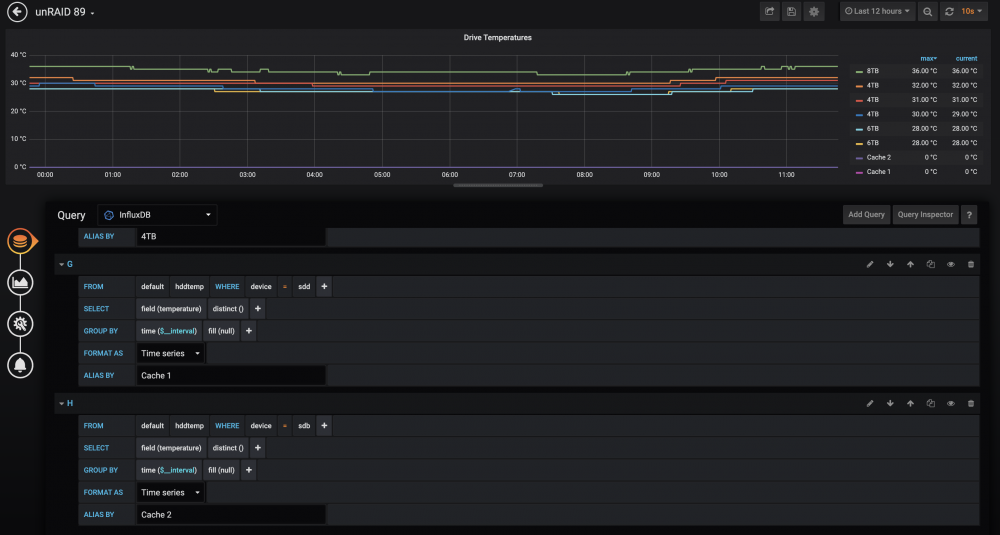
  1. Hey guys have had this running for about a month now with zero issues and love it to bits. Unfortunately I have run into an issue with my cache ssd's. I had a 1TB Samsung ssd which reported temp just fine but since I added a second ssd cache of the same drive all I get is zero reported from either drive. Any help on where to look would be most helpfull. I know its not a deal breaker but just helps my ocd lol.

Account

Navigation

Search

Search

Configure browser push notifications

Chrome (Android)
  1. Tap the lock icon next to the address bar.
  2. Tap Permissions → Notifications.
  3. Adjust your preference.
Chrome (Desktop)
  1. Click the padlock icon in the address bar.
  2. Select Site settings.
  3. Find Notifications and adjust your preference.