





JaseNZ
Members
-
Joined
-
Last visited
Everything posted by JaseNZ
-
Is there any current solution that is reasonably easy to setup for a ubuntu system. I am looking for the same cache setup as unraid. I have say a 6tb spinning drive that I want to pull data from my network to store on it but that is the bottle neck in the data transfer. Boot and working drive is a 1tb nvme that I would like to also act as a cache so that transfers from the network get sucked onto the cache drive then like mover on unraid move that data to the spinning drive at some stage. Is there anything like that out there that exists ??
-
Awesome thanks for your help.
-
Ahh right fair enough
-
I don't know if this helps you and I have not read back to see what the issue is, I have this in my post arguments for the telegraf container and have no issue's with it. /bin/sh -c 'apt-get update && apt-get -y upgrade && apt-get -y install smartmontools && apt-get -y install lm-sensors && apt-get -y install nvme-cli && telegraf'
-
My unraid motherboard has 2 network ports one a 2.5 and the other standard 1 gigabit. Is it possible to have a direct connection from the 2.5 port to a pc with a 2.5 card that also gives net access via the unraid connection?? The gigabit port of unraid is to general home network.
-
Yup sorry I didn't mention that they are running as seperate containers. Not too worried somebody is dropping me off 3 other sata dvd drives so will have a play and see if I can get them all running. I have a box set of tv series I want to preserve that spans around 75 discs lol
-
Just a question re ripper. Have installed this via docker , not using it on my unraid system it's just installed in a linux distro. I have two dvd drives, One is an old sata one and the other is out of a laptop with the adapter to change it to usb Sata shows as /dev/sr0 and the usb one as /dev/sr1 The sata one works great drop a dvd in and wham its doing its thing. It does not seem to pickup the usb one though even though its showing as a dvd drive. No drama about it was just wondering if there would be anything stopping it from seeing the usb one or where else I could look for clues. Both are mapped fine in the container
-
This is what I posted in the discord channel if anybody else comes across this issue. Is fixed now but really strange never had anything like this happen before. box-diagnostics-20211103-1057.zip
-
Yeah i set mine to telegraf:1.20.2 I guess unless there is really something specific thats new that's extra you want to gather metrics on there is not really any point in upgrading.
-
You could consider adding unmanic app detection it is also a very popular gpu encoder.
-
Has moved forward a little but is now hanging at 21:21:06 Optimizing images.. Error in log is. "ERROR","http-apr-8888-exec-2","03/12/2021","21:21:06","",";key [Unknown] doesn't exist;lucee.runtime.exp.ExpressionException: key [Unknown] doesn't exist
-
hwinfo_storage.txt.zip I don't have that file does this one help ?? Yeah its because of the two nvme drives that are the same. They are my cache drives.

-
Updated mine to the 2.9.1 and it stops with the following error. 13:19:02 Found controller P1 NVMe PCIe SSD 13:19:02 Found drive CT1000P1SSD8 Rev: P3CR013 Serial: 2001E231D126 (nvme1n1), 1 partition 13:19:02 Fetching drive images Lucee 5.2.9.31 Error (expression) Message key [CT1000P1SSD8] doesn't exist Stacktrace The Error Occurred in /var/www/GetInitialDriveImage.cfm: line 47 45: <!--- <CFOUTPUT><img src="data:image/png;base64, #Info[i].Image#" /><br></CFOUTPUT> ---> 46: 47: <CFSET UpdateList=Ref.Vendor[Info[i].Vendor][Info[i].Model]> 48: 49: <CFLOOP index="CurrDrive" list="#UpdateList#"> called from /var/www/ScanControllers.cfm: line 1989 1987: </CFLOOP> 1988: <CFIF NeedImage NEQ ""> 1989: <CFINCLUDE TEMPLATE="GetInitialDriveImage.cfm"> 1990: </CFIF> 1991: <CFIF NeedPlatter NEQ ""> called from /var/www/ScanControllers.cfm: line 1949 1947: </CFIF> 1948: </CFIF> 1949: </CFLOOP> 1950: <CFIF IsStruct(OldHW)> 1951: <!--- Restore other variables ---> Java Stacktrace lucee.runtime.exp.ExpressionException: key [CT1000P1SSD8] doesn't exist at lucee.runtime.type.util.StructSupport.invalidKey(StructSupport.java:69) at lucee.runtime.type.StructImpl.get(StructImpl.java:135) at lucee.runtime.type.util.StructSupport.get(StructSupport.java:244) at lucee.runtime.util.VariableUtilImpl.get(VariableUtilImpl.java:263) at lucee.runtime.util.VariableUtilImpl.getCollection(VariableUtilImpl.java:257) at lucee.runtime.PageContextImpl.getCollection(PageContextImpl.java:1496) at getinitialdriveimage_cfm$cf.call(/GetInitialDriveImage.cfm:47) at lucee.runtime.PageContextImpl._doInclude(PageContextImpl.java:933) at lucee.runtime.PageContextImpl._doInclude(PageContextImpl.java:823) at lucee.runtime.PageContextImpl.doInclude(PageContextImpl.java:805) at scancontrollers_cfm$cf.call_000171(/ScanControllers.cfm:1989) at scancontrollers_cfm$cf.call(/ScanControllers.cfm:1949) at lucee.runtime.PageContextImpl._doInclude(PageContextImpl.java:933) at lucee.runtime.PageContextImpl._doInclude(PageContextImpl.java:823) at lucee.runtime.listener.ClassicAppListener._onRequest(ClassicAppListener.java:66) at lucee.runtime.listener.MixedAppListener.onRequest(MixedAppListener.java:45) at lucee.runtime.PageContextImpl.execute(PageContextImpl.java:2464) at lucee.runtime.PageContextImpl._execute(PageContextImpl.java:2454) at lucee.runtime.PageContextImpl.executeCFML(PageContextImpl.java:2427) at lucee.runtime.engine.Request.exe(Request.java:44) at lucee.runtime.engine.CFMLEngineImpl._service(CFMLEngineImpl.java:1090) at lucee.runtime.engine.CFMLEngineImpl.serviceCFML(CFMLEngineImpl.java:1038) at lucee.loader.engine.CFMLEngineWrapper.serviceCFML(CFMLEngineWrapper.java:102) at lucee.loader.servlet.CFMLServlet.service(CFMLServlet.java:51) at javax.servlet.http.HttpServlet.service(HttpServlet.java:729) at org.apache.catalina.core.ApplicationFilterChain.internalDoFilter(ApplicationFilterChain.java:292) at org.apache.catalina.core.ApplicationFilterChain.doFilter(ApplicationFilterChain.java:207) at org.apache.tomcat.websocket.server.WsFilter.doFilter(WsFilter.java:52) at org.apache.catalina.core.ApplicationFilterChain.internalDoFilter(ApplicationFilterChain.java:240) at org.apache.catalina.core.ApplicationFilterChain.doFilter(ApplicationFilterChain.java:207) at org.apache.catalina.core.StandardWrapperValve.invoke(StandardWrapperValve.java:212) at org.apache.catalina.core.StandardContextValve.invoke(StandardContextValve.java:94) at org.apache.catalina.authenticator.AuthenticatorBase.invoke(AuthenticatorBase.java:492) at org.apache.catalina.core.StandardHostValve.invoke(StandardHostValve.java:141) at org.apache.catalina.valves.ErrorReportValve.invoke(ErrorReportValve.java:80) at org.apache.catalina.valves.AbstractAccessLogValve.invoke(AbstractAccessLogValve.java:620) at org.apache.catalina.valves.RemoteIpValve.invoke(RemoteIpValve.java:684) at org.apache.catalina.core.StandardEngineValve.invoke(StandardEngineValve.java:88) at org.apache.catalina.connector.CoyoteAdapter.service(CoyoteAdapter.java:502) at org.apache.coyote.http11.AbstractHttp11Processor.process(AbstractHttp11Processor.java:1152) at org.apache.coyote.AbstractProtocol$AbstractConnectionHandler.process(AbstractProtocol.java:684) at org.apache.tomcat.util.net.AprEndpoint$SocketWithOptionsProcessor.run(AprEndpoint.java:2464) at java.util.concurrent.ThreadPoolExecutor.runWorker(ThreadPoolExecutor.java:1149) at java.util.concurrent.ThreadPoolExecutor$Worker.run(ThreadPoolExecutor.java:624) at org.apache.tomcat.util.threads.TaskThread$WrappingRunnable.run(TaskThread.java:61) at java.lang.Thread.run(Thread.java:748) Timestamp 3/12/21 1:19:03 PM NZDT
-
Yeah they use buckets now instead of database's and although I am sure you could upgrade everything as I mentioned I don't see the point as a 1.x version works just fine for graphing our metrics.
-
You would need to change telegraf. https://docs.influxdata.com/influxdb/v2.0/write-data/no-code/use-telegraf/manual-config/ then this https://docs.influxdata.com/influxdb/v2.0/tools/grafana/ For myself I don't see the need as I am only graphing all the metrics so would make no difference to me.
-
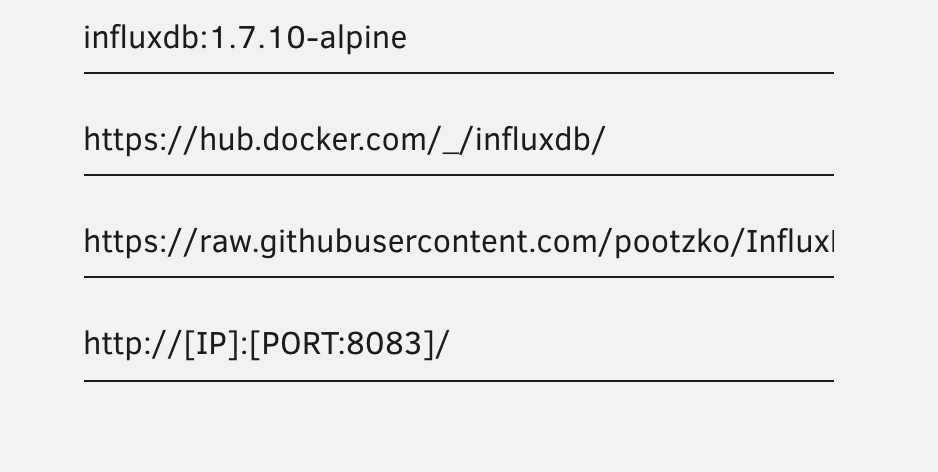
The update changed it to influx 2.0 you need to go back to the 1.X version. I changed mine from latest to influxdb:1.7.10-alpine Everything started back up and and all is good with the world again.
-
Curious to the 3 session limit. Is this hard coded via nvidia. I have a 1070 in the server and anything over 3 sessions (workers) will fail any encoding. Not worried about it but was just curious.
-
Try putting this into the post arguments. but first remove the reference /rootfs/usr/sbin/smartctl file in the docker container. /bin/sh -c 'apt-get update && apt-get -y upgrade && apt-get -y install smartmontools && apt-get -y install lm-sensors && apt-get -y install nvme-cli && telegraf'

-
Yeah sorry kids were yelling and screaming and I just noticed the RC2 and well yeah sorry again.
-
Thank you for the update this has seemed to resolve the issue with my container not being able to see smartctl. My temps are showing again however the Telegraf log is showing a different error now but the temps are in fact showing. 2020-12-19T22:22:49Z W! [inputs.smart] nvme not found: verify that nvme is installed and it is in your PATH (or specified in config) to gather vendor specific attributes: provided path does not exist: []
-
It appears the upgrade to RC2 has resolved this issue and I now have temps back. There is still one error persisting though although I do not see it affecting anything. 2020-12-19T22:22:49Z W! [inputs.smart] nvme not found: verify that nvme is installed and it is in your PATH (or specified in config) to gather vendor specific attributes: provided path does not exist: []
-
Seems the last upgrade to rc1 has broken the disk temps with the logs for telegraf showing cannot find smartctrl , any info on how to resolve this anybody. [telegraf] Error running agent: could not initialize input inputs.smart: smartctl not found: verify that smartctl is installed and it is in your PATH (or specified in config): provided path does not
-
Yeah its something to do with the upgrade, I have not been able to find a solution yet.
-
Yeah I did that quite some time ago to resolve that same issue and have been on latest for ages now. Seems something has changed with the upgrade to RC1
-
Just upgraded to Version: 6.9.0-rc1 and Telegraf has broken with the following error. Everything was working fine before hand Anybody else found this has happened or perhaps has a solution ??


