





eribob
Members
-
Joined
-
Last visited
Everything posted by eribob
-
Yeah, I have experienced that before, dont know why I did not think of it. Thanks for pointing me in the right direction!
-
Yep it looks like that was the problem, thanks! My GPU used to be on address 0e:00.0 and bound to the workstation VM like this: <hostdev mode='subsystem' type='pci' managed='yes'> <driver name='vfio'/> <source> <address domain='0x0000' bus='0x0e' slot='0x00' function='0x0'/> </source> <address type='pci' domain='0x0000' bus='0x04' slot='0x00' function='0x0'/> </hostdev> <hostdev mode='subsystem' type='pci' managed='yes'> <driver name='vfio'/> <source> <address domain='0x0000' bus='0x0e' slot='0x00' function='0x1'/> </source> <address type='pci' domain='0x0000' bus='0x05' slot='0x00' function='0x0'/> </hostdev> When I installed the new NVMe the addresses changed so that the enterprise NVMe instead got that address: IOMMU group 28: [8086:0a54] 0e:00.0 Non-Volatile memory controller: Intel Corporation NVMe Datacenter SSD [3DNAND, Beta Rock Controller] [N:1:0:1] disk INTEL SSDPE2KX080T8__1 /dev/nvme1n1 8.00TB Since I did not check that, the VM probably tried to bind the enterprise NVMe to it when it started and that caused it to become disconnected? I changed the address in the VM xml to 0f:00.0, and now it works as normal. IOMMU group 29: [10de:1b82] 0f:00.0 VGA compatible controller: NVIDIA Corporation GP104 [GeForce GTX 1070 Ti] (rev a1) [10de:10f0] 0f:00.1 Audio device: NVIDIA Corporation GP104 High Definition Audio Controller (rev a1) Again thanks for the hint! I am just sorry I did not find the source of the problem that this thread was originally about though...
-
OOOHHHH thanks! Now I need to test something: When I installed the new NVMe drive the vfio binding for my GPU disappeared and I had to rebind it at boot. Maybe the enterprise NVMe was somehow accidentally bound to the workstation VM instead of the GPU? And since the workstation VM is on autostart it would bind the enterprise NVMe... I will test and post back!
-
OK, I am sorry but that comment is not really helpful to me. What happened was that when I installed the new NVMe, the old one "enterprise" stopped working. In the "main" tab I could no longer see used/available space. Since all dockers and VMs are on that drive, none of them were working. This happened immediately when I started the array. I tried rebooting the server and the same thing happened again. So I shut down the server and took the new NVMe drive out and now the old one ("enterprise") is working as normal again. The "enterprise" NVMe is attached to a PCI-e → SFF 8643 card with a SFF 8643 → SFF 8639 cable. The new NVMe was attached to the first M.2 slot on the motherboard.
-
Hi again! Sorry for the long delay, and for not marking this as solved despite your excellent efforts JorgeB. Maybe I got closer to the solution today. I installed a new NVME drive in the server (one of the M.2 slots) and suddenly my enterprise M.2 SSD that has zfs stopped working. I got the following in the system log (could not run diagnostics): Jun 7 17:14:13 MONSTERSERVERN kernel: WARNING: Pool 'enterprise' has encountered an uncorrectable I/O failure and has been suspended. Jun 7 17:14:13 MONSTERSERVERN kernel: Jun 7 17:14:13 MONSTERSERVERN kernel: WARNING: Pool 'enterprise' has encountered an uncorrectable I/O failure and has been suspended. Jun 7 17:14:13 MONSTERSERVERN kernel: Jun 7 17:14:13 MONSTERSERVERN kernel: WARNING: Pool 'enterprise' has encountered an uncorrectable I/O failure and has been suspended. Jun 7 17:30:43 MONSTERSERVERN kernel: zio pool=enterprise vdev=/dev/nvme1n1p1 error=5 type=1 offset=1768154103808 size=102400 flags=180880 Jun 7 17:30:43 MONSTERSERVERN kernel: WARNING: Pool 'enterprise' has encountered an uncorrectable I/O failure and has been suspended. Jun 7 17:30:43 MONSTERSERVERN kernel: Jun 7 17:30:43 MONSTERSERVERN kernel: WARNING: Pool 'enterprise' has encountered an uncorrectable I/O failure and has been suspended. This happened immediately on boot and the drive was unusable. I tried simply removing the NVME drive and now it works again. Another thing I recently did was enabling autostart on my workstation VM (Fedora 40) with GPU passthrough. I am now suspecting that this is power issue, perhaps my powersupply is old or too small? It is a 750W unit. Corsair, pretty good quality, but 5 years old now. Perhaps it gets overloaded during boot if all dockers are starting in addition to the VM with the GPU etc? Or do you have any other suggestions? Why would installing one NVME drive cause another (U.2 drive) to fail? /Erik syslog 2.txt syslog.txt
-
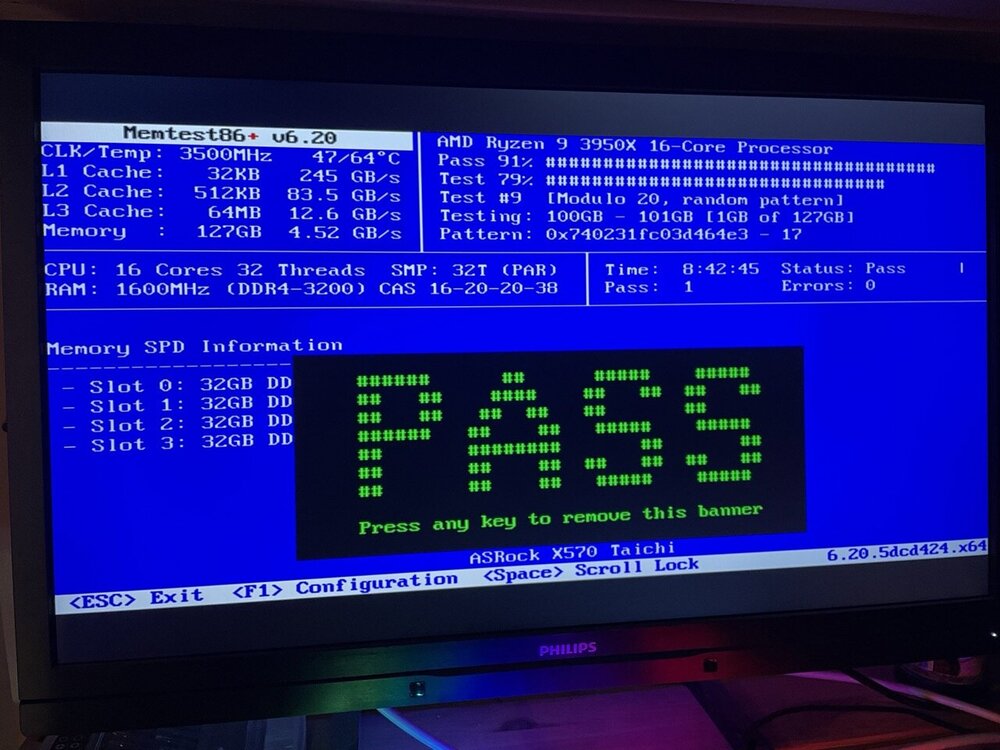
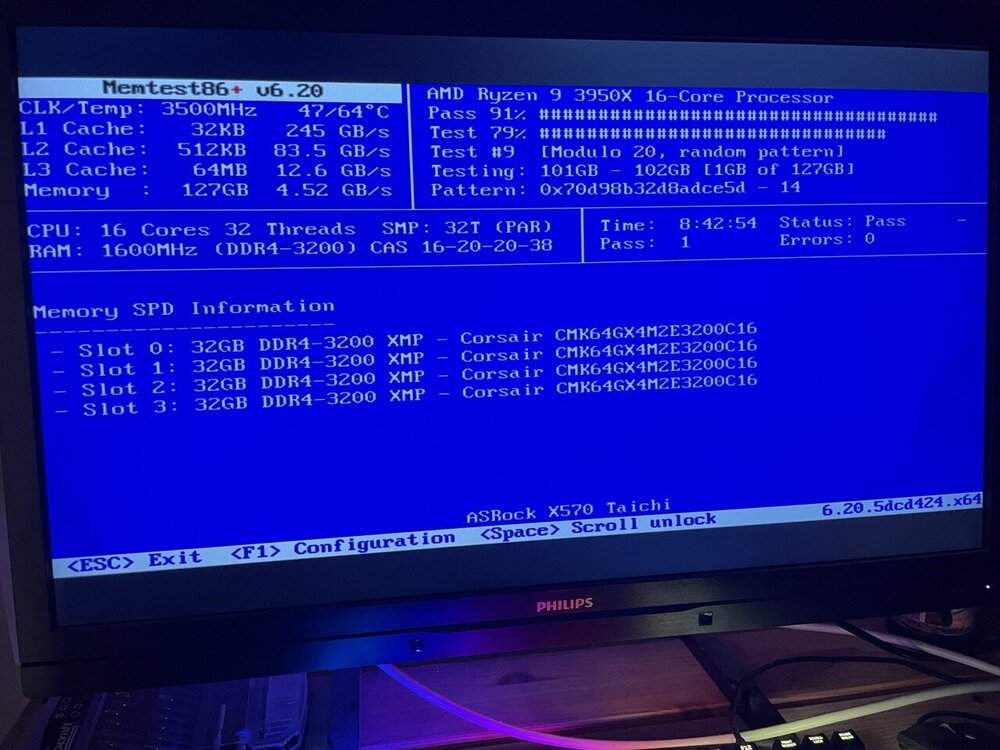
An update: Ran memtest, no errors after 8 hours, see attached images. I am using this PCI-e to SFF-8643 adapter to connect the U.2 drive: https://www.amazon.se/dp/B0B6CJ889T/ref=pe_24982401_506182521_TE_item Do you think that may cause these issues? /Erik
-
OK, will start by running memtest tonight. Should I performe a zfs scrub on the pools? Can that detect this kind of errors? I have also seen some wierdness since moving to zfs. I have made each of my appdata folders a separate zfs pool (spaceinvader one video...) and some of them are not accessible in krusader. It says "cannot open the folder" when I try. Is this a permission issue or normal behaviour when trying to access zfs pools from krusader? The folders are accessible thorugh the unraid gui and I can cd into them in the terminal. BTW, the reason I am hesitant to recreate the file system is that I do not have any redundancy in my pools. I have one on the NVME and one on one of the array drives. I backup the nvme to the array every night with ZFS snapshots and replication. I can wipe the nvme and restore from backup but it will take some time...
-
OK that's unfortunate. The U.2 NVME was probably more heavily utilised, but I find it hard to believe that a brand new enterprise nvme would fail. Is there a way to test a zfs pool for errors?
-
Thank you for spotting this. Does it give any information about where the problem might lie? I have 2 drives with ZFS, one U.2 Intel P4510 that is bran new and has a very good endurance rating, and one HDD that is also quite new, no smart errors reported so far. Or could it be a RAM issue? I do not have ECC. How do I recreate the zfs file system? Do I need to format? Does it say which zfs pool is causing the issue?
-
I have had the same issue twice during the last weeks now. The unraid web gui suddenly becomes unresponsive and some of my docker services are no longer reachable. If I open the webgui in a incognito window I get to the login prompt, and when I enter "root" and my password the unraid GUI becomes blank and loads forever without giving me a 404 or a 503 or any error. The server is still reachable through ssh, and some docker services can be accessed. My windows 11 VM was still working normally. I tried to get the diagnostics through the terminal with the "diagnostics" command but it never finished. I instead copied the syslog to the USB and attach it here. I tried to both restart `/etc/rc.d/rc.nginx restart` and kill the nginx process but it did not work. ps -aux | grep nginx gave me a list of processes, and after trying to kill them with kill -9 [PID] a list of 4 processes with `D` status (uninterruptable) remained. I tried to restart the server with `reboot -n` but nothing happened. Finally I had to pull the plug on the server. After rebooting, everything is back to normal (except for complaints about unclean restart). Attaching diagnostics that I took once the server was back up again. Since this has happened twice now I would appreciate any help you guys can give me on what might be the issue. Best regards Erik monsterservern-diagnostics-20240519-2203.zip syslog_240519.txt
-
I have the exact same problem. Followed SpaceinvaderOne's guide to setup appdata folders as ZFS datasets. Then tried to remove old folders containing data for apps that I do not use anymore. I tried first using the "ZFS master" plugin in destructive mode, but got "Operation not permitted" error. The same when using the command line: `zfs destroy -fr [DATASET]`. It worked when I first use your command `zfs set mountpoint=none [DATASET]`. Why is this necessary? Is there a way to automate this so that I can remove pools using the GUI?
-
thanks, did not read carefully before buying. Placed an order for that cable now.
-
Hi again! Finally got around to buying an M.2 drive! I ended up with an intel p4510 8TB drive instead. It is PCI-e 3.0 but I figure that is enough and the IOPS are great. Anyway, it works fine, but I am getting slower read/write speeds than expected. I tested writing a large file from the drive to a RAM disk and got around 1.2GB/s (expected around 3GB/s). I am wondering if the cable is the issue? I bought this cable: https://www.amazon.se/dp/B097BDG3TX/ref=pe_24982401_503747021_TE_SCE_dp_1 It says SAS 12G or internal NVMe, could it be that it is limited to 1.2GB/s? Perhaps 100cm is too long to allow for max speeds? In that case I will buy the same cable you bought and try again. The PCI-e card I bought is this one: https://www.amazon.se/dp/B0B6CJ889T/ref=pe_24982401_503747021_TE_SCE_dp_1 - could it be the problem? However, it should just be a dumb link from the PCI-e slot to SFF-8643 ports so perhaps it should be fine? /Erik
-
Thanks, I think the problem was actually that I updated the BIOS today and that reset the IOMMU setting so It was suddenly off and no PCI passthrough was working, when I enabled that again the warning messages about the flash drive disappeared. I think I will run a memtest as well though, had some other problems with BTRFS today.
-
Hi! Several problems at once today... Suddenly I started getting messages that my flash drive is corrupted. Attached diagnostics. I can however browse the contents in the Unraid GUI and I managed to create a flash backup. Do I need to replace the flash drive? /Erik monsterservern-diagnostics-20240130-1543.zip
-
Thank you for the reply! So that would mean that my NVMe slot on the motherboard suddenly stopped working? The drive has been in it for 1-2 years without issues. Sounds more likely that it is an issue with the drive in that case? Moving the NVMe drive is not trivial hehe I have to disassemble the server... I also tried another suggetstion from another thread: append initrd=/bzroot nvme_core.default_ps_max_latency_us=0 pcie_aspm=off But this did not help, rather I got even more problems afterwards. Maybe just a coincidence though. But can this code make things worse in some circumstances?
-
Hi! One of my NVMe drives has suddenly started giving me a lot of BTRFS errors. Se attached syslog. Jan 30 07:35:27 MONSTERSERVERN kernel: I/O error, dev loop2, sector 37325840 op 0x1:(WRITE) flags 0x100000 phys_seg 4 prio class 2 Jan 30 07:35:27 MONSTERSERVERN kernel: I/O error, dev loop2, sector 37300584 op 0x1:(WRITE) flags 0x100000 phys_seg 1 prio class 2 Jan 30 07:35:27 MONSTERSERVERN kernel: loop: Write error at byte offset 16593756160, length 4096. Jan 30 07:35:27 MONSTERSERVERN kernel: I/O error, dev loop2, sector 32409680 op 0x1:(WRITE) flags 0x100000 phys_seg 1 prio class 2 Jan 30 07:35:27 MONSTERSERVERN kernel: loop: Write error at byte offset 19110830080, length 4096. Jan 30 07:35:27 MONSTERSERVERN kernel: I/O error, dev loop2, sector 37325840 op 0x1:(WRITE) flags 0x100000 phys_seg 4 prio class 2 Jan 30 07:35:30 MONSTERSERVERN kernel: btrfs_dev_stat_inc_and_print: 330006 callbacks suppressed [...] Jan 30 07:35:30 MONSTERSERVERN kernel: BTRFS error (device nvme0n1p1: state EA): bdev /dev/nvme0n1p1 errs: wr 172, rd 2403805, flush 0, corrupt 0, gen 0 Jan 30 07:35:30 MONSTERSERVERN kernel: BTRFS error (device nvme0n1p1: state EA): bdev /dev/nvme0n1p1 errs: wr 172, rd 2403807, flush 0, corrupt 0, gen 0 Jan 30 07:35:30 MONSTERSERVERN kernel: BTRFS error (device nvme0n1p1: state EA): bdev /dev/nvme0n1p1 errs: wr 172, rd 2403809, flush 0, corrupt 0, gen 0 [...] Jan 30 07:35:37 MONSTERSERVERN kernel: I/O error, dev loop2, sector 37430928 op 0x0:(READ) flags 0x80700 phys_seg 4 prio class 2 [...] Jan 30 09:28:14 MONSTERSERVERN kernel: nvme0n1: I/O Cmd(0x2) @ LBA 1066408400, 8 blocks, I/O Error (sct 0x3 / sc 0x71) Jan 30 09:28:14 MONSTERSERVERN kernel: I/O error, dev nvme0n1, sector 1178887112 op 0x0:(READ) flags 0x80700 phys_seg 2 prio class 2 [...] Jan 30 09:28:14 MONSTERSERVERN kernel: BTRFS error (device nvme0n1p1): bdev /dev/nvme0n1p1 errs: wr 0, rd 1, flush 0, corrupt 0, gen 0 Jan 30 09:28:14 MONSTERSERVERN kernel: BTRFS error (device nvme0n1p1): bdev /dev/nvme0n1p1 errs: wr 0, rd 3, flush 0, corrupt 0, gen 0 Jan 30 09:28:14 MONSTERSERVERN kernel: BTRFS error (device nvme0n1p1): bdev /dev/nvme0n1p1 errs: wr 0, rd 4, flush 0, corrupt 0, gen 0 Jan 30 09:28:14 MONSTERSERVERN kernel: BTRFS error (device nvme0n1p1): bdev /dev/nvme0n1p1 errs: wr 1, rd 4, flush 0, corrupt 0, gen 0 Jan 30 09:28:14 MONSTERSERVERN kernel: BTRFS error (device nvme0n1p1): bdev /dev/nvme0n1p1 errs: wr 2, rd 4, flush 0, corrupt 0, gen 0 Jan 30 09:28:14 MONSTERSERVERN kernel: BTRFS error (device nvme0n1p1): bdev /dev/nvme0n1p1 errs: wr 3, rd 4, flush 0, corrupt 0, gen 0 Jan 30 09:28:14 MONSTERSERVERN kernel: BTRFS error (device loop2): bdev /dev/loop2 errs: wr 0, rd 1, flush 0, corrupt 0, gen 0 Jan 30 09:28:14 MONSTERSERVERN kernel: BTRFS error (device nvme0n1p1): bdev /dev/nvme0n1p1 errs: wr 3, rd 6, flush 0, corrupt 0, gen 0 Do you think this means that the drive has gone bad or are the errors caused by a problem with my RAM? I have non-ECC DDR4, and recently applied an XMP profile to run it at its native speed (3200MHz). Maybe that was too stressful for the RAM? Previously I ran it at 2133MHz for stability. My cache pool and another NVMe drive are also using BTRFS so I want to know whether there is a risk that they might fail as well. Is there a way to recover data on the drive or should I just format it? Thank you in advance! monsterservern-syslog-20240130-0635.zip monsterservern-diagnostics-20240130-0938.zip
-
Big thank you for the quick reply. I will make a new config and cross my fingers that the brand new seagate exos drive does not fail! I have cloud backup… /Erik
-
Hi! I wonder if there is a quick way to achieve the following: - I had an array of 3x4TB disks + 1x2TB. The parity was 8TB. - I bought 2x18TB disks with the idea to transform the array to be 18TB parity and 18+8TB for data (to increase space from 14 to 26TB and reduce the number of drives from 5 to 3, as this allows me to remove my HBA card to free up a pci-e slot). I already replaced the parity drive with an 18TB drive and added the second 18TB drive to the array. I am now using the unbalance plugin to move all data on the array to the 18TB drive so that the three 4TB and the 2TB drives will be empty. When all data is moved, do I need to remove the smaller drives one by one, or can I remove all 4 of them at once and create a new config? Or will removing more than one drive at a time increase the risk of data loss? All the drives that I am removing will be empty. Thank you! Erik
-
Thanks alot! Especially for the ebay seller tip. That is how I was planning to do it as well.
-
cool! can you link the adapter you used? raid0 like a boss :) thanks! /Erik
-
Hi all! I found these listings on ebay (several similar ones are there, all from china): https://www.ebay.com/itm/374341484174?mkcid=16&mkevt=1&mkrid=711-127632-2357-0&ssspo=OxLNCOGvR0q&sssrc=2047675&ssuid=6Vb57j3CRuK&widget_ver=artemis&media=COPY They sell Kioxia NVME U.2 drives 7.68TB that are PCIE gen 4 capable as far as I understand. Great read and write speeds and extremely durable. Price around 500USD. I am hooked and would like to put 2 of them in my unraid server but I do not want to fall into some loophole that I did not think about, since it is still a lot of money. So I have some questions for you pros! 1. Have anyone bought these from the chinese sellers? Are they scamming you or are they for real? The price seems very (too?) good and they claim that the drives are brand new... At the same time the sellers are top rated with good reviews. 2. A PCI-E adapter: I have an Asrock Taichi X570 motherboard with a ryzen 3950x processor, so not a lot of PCIE lanes but enough for 2 more drives. I think the board should be capable of PCIE bifurcation (hard to confirm online though) and therefore wanted to buy something like this: https://www.ebay.com/itm/304837578258?mkcid=16&mkevt=1&mkrid=711-127632-2357-0&ssspo=u0r4ab5cr6-&sssrc=2047675&ssuid=6Vb57j3CRuK&widget_ver=artemis&media=COPY with proper cables. The motherboard has 3 slots that are x16 size but they are running at x8 x8 x4 speeds unless you only populate one of them. I will have a GPU (GTX1070Ti) as well in the x8 first slot and a network card in the x4 slot. An x8 slot should still have enough bandwidth to run 2 drives at full speed, and maybe 4 drives at half speed if I buy more later on? Or how would that work with the bifurcation? - The alternative is to buy a card with a PCI-E switch on it but they are more expensive and I have not found them in PCI-E 4.0. 3. What about airflow? Will the drives or the adapter become very hot? I have a normal non-server chassi with quiet fans... 4. Software configuration: I was thinking to use zfs and run them in the equivalent of raid 0. Backups will be regularly made to the hard drive array that has parity. They have awsome endurance and are expensive so I do not want to waste space by running them in raid 1. 5. Networking: To utilise the drives I want to add a 10GbE NIC to the final x4 slot. I have CAT6a wired at home so I want to use RJ45. Except for the price (especially on switches... man they are expensive!), are there disadvantages of using RJ45 over SFP+ for 10GbE? 6. CPU and RAM requirements: I have 128Gb of RAM and the CPU have high single thread performance. I was planning not to use zfs cache in the RAM since the drives are so fast anyway, does that make sense? I need the RAM for VM:s including my workstation/gaming VM that I use regularly with the GPU passed through. Looking forward to responses!
-
Sure will. Both carrot and stick needed to make my monster perform.
-
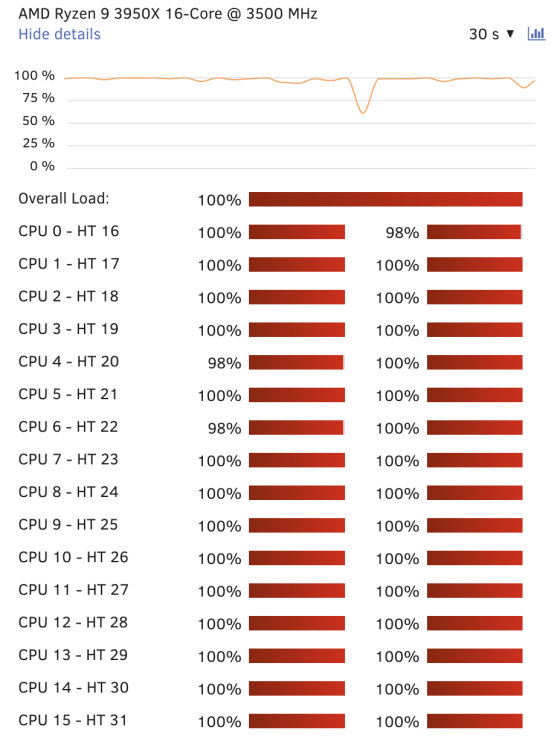
Finally made my 3950x sweat today when rendering vector tiles for the entire world map.
-
I have 2 identical VM:s running because that way, me and someone else can game at the same time, for example me and my brother. We both connect to the server using parsec. I have 2 GPU:s, one for each VM. I am well aware of how vdisks work, I have several VM:s running already. I would like to avoid copying the vdisks because it will use twice the space and all updates and new game installs need to be done on all disks.



