





skyking376
Members
-
Joined
-
Last visited
Everything posted by skyking376
-
I thought for sure there would be parity errors with all the on/off cycles. Parity came back normal! Should I be worried about the "76% used"? What is this by the way? Attached is diagnostics AFTER normal power up and parity check complete. Thank you for inputs. deathstar-diagnostics-20250325-1543.zip
-
So i'm the tech support for my father-in-law and he is getting old and crap at telling me when things need fixing. Unraid box "wasn't working" for almost a year and he just told me now! WTF dude? Anyway... The symptoms from him were "I'd turn box on, and then about a minute later it would shut itself off". Turned out the bracket holding the cpu fan broke and cpu fan was disconnected from cpu = too warm and shutdown in ~1-2 min after power on. Since this happened for 6-12 months I'm SURE there are probably some disc parity errors and maybe other things? We'll see. I'm currently running a parity check on 4TB system (1 4TB data disc and 1 4TB parity drive). However I looked in syslogs and scrolled just to look at any "red" items. Next to a few red items (unable to write to disk1) is a yellow warning "Rootfs is getting full (currently 76% used)". 1) What does this mean? 2) How to fix/clean/empty whatever is causing this? 3) Any other obvious problems that I may encounter in the coming months? Thank you for your help deathstar-syslog-20250324-2111.zip
-
Ok, So if I remove this drive from my array (so I can test it on another machine) do I have to rebuild parity when I start array back up? Different question, I know in past versions of unraid there as a "preclear" to write zeros to every part of drive. Does this still exist somewhere so I can get disk 5 tested, precleared, and then I just plug it in (outside of array)? Thank you for help.
-
I'll try different power and data cables but is there any chance this drive's power issues are from the drive side of things? Meaning drive is faulty or dead?
-
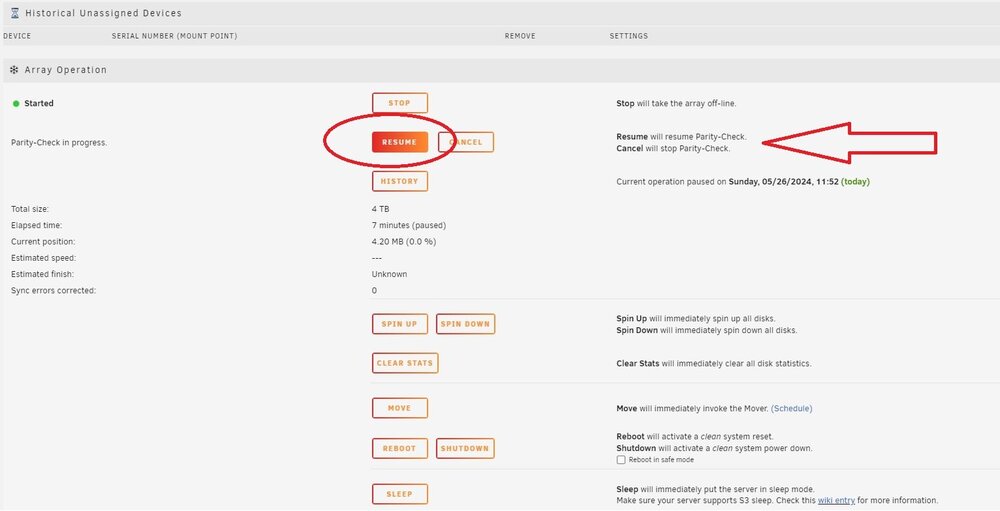
So after "2nd" parity check finished this morning I did clean shutdown, changed SATA power cables and data cables like instructed. I just powered on and array not started as it detected a new disk (where you can use dropdown to pick which you want to assign). Disk 5 is a "blue square" instead of a green circle like all other drives and it was already preselected in proper spot and on far right in red it say "all data will be overwritten when array started". Ok, I start array and it is going through same process of parity check again! In previous parity checks as array was started parity check was immediately "paused" and in both times I had to click either "resume" or "cancel". I picked "resume" in both cases. So just now it is same thing?!?!? So do I click on "resume" again? I'm in same "loop" as previous...what do I do to add new drive? New diagnostics (as parity process is currently paused) and screen cap. deathstar-diagnostics-20240526-1158.zip
-
Followed directions from this link: https://docs.unraid.net/unraid-os/manual/storage-management/#adding-disks Got all the way through step 7 and it completed. Expecting to see step 8, but I didn't see any option to "format disk". So I stopped array thinking maybe I after the clear if you stop array, then restart array it would see "new cleared disk". Nope, it is now going through step 7 again with parity check (like it did earlier). Maybe I'm incorrectly thinking "parity check" is same as "preclearing". I never saw any message saying "clearing disk before enter into array" but I am following steps to the letter so....???? Here is screenshot and diagnostics. It's maybe 10 min into "2nd" parity/clear phase and I plan to let it finish (1st one had no errors). What am I doing wrong, and what should I do? deathstar-diagnostics-20240525-2350.zip
.thumb.jpg.16274627d9ba32dc426e305b57e45f5f.jpg)
-
Many on this forum have help this noob with very basics. In previous posts I had failing cables and failing drives. After getting everything working normal again I have 2 drives that show up in "Historical Unassigned Devices" section. The 2 drives listed in that section were at some point "not recognized and unmounted", but given instrutions on this forum got those 2 drives to work properly again and Unraid is working great. Does this mean what it's title says "in the past these were detected as unassigned"? Meaning can I click on the little red "X" to remove them from this list? What if any repercussions dose removing them have? Thank you
-
Ok, wasn't sure if starting array was safe with red "X" or not as I didn't want to get a parity check to run and possibly start messing up data on disk 4. So just started array, same thing "Device disabled, contents emulated". I don't fully understand what you mean when you say "mounting". I can see disk 4 in UNRAID GUI either when array is started or stopped. When array is stopped (via unraid GUI) I then go to folder and can't see any of my movies/TV shows in folder structures they are normally in (Movies/Kids/TV/etc). It says "folder is empty" at the top network level of "Tower". When array is started I CAN see Movies/Kids/TV/etc in their folder structures below that top level "Tower" folder. Does "mounted" = I can see all my movies/kids/tv data? If that is true then I would say disk is disabled (as it says in GUI with red "X") but mounted (if I understand defintion of mounted is). I still error on side of caution and wait for futher instructions before I do anything. Thank you for helping a noob! deathstar-diagnostics-20240404-1410.zip
-
So delayed thread, but still an issue. Just had ALL sata cables replaced and new (more wattage compared to old) power supply. PC tech did see fluctuations on old power supply but not enough to “need” a new one but I opted to do it anyway just to eliminate those as a cause. So same thing, array is stopped, I can see the correct hard drive serial number in drop down, and disk 4 has red “X” that says when hovering over red x “device disabled, contents emulated”. Does this mean “mounted” like you said previously? Can I start array? I'm too afraid to do anything so I don't lose data (again). what do I do now? (Edit: added diagnostics file) deathstar-diagnostics-20240403-1641.zip
-
Just happened to look at server and noticed disk 4 "device is disabled, contents emulated". Before I did anything I downloaded diagnostics before I reboot, shutdown, etc. It is currently running as we speak. This is the youngest of my drives (almost 2 years old). Others are 5-9 years old. I haven't touched unraid in weeks, didn't physically move computer case unraid is in, nobody bumped into it, etc. What does it mean, and what to do? deathstar-diagnostics-20240322-2314.zip
-
Ran parity check, came back no errors (still attached diagnostics and server has been running since Jan 1st through both parity checks). Any idea why errors show up on 1 parity check but not on 2nd parity check or just mysterious fluke? Thank you for help. deathstar-diagnostics-20240117-2001.zip
-
OK, will run parity and report back with diagnostics again. Thank you
-
Parity check runs first day of the month. Only checked it today and noticed "335 errors". No power outages (since Jan 1st) and server has been on whole time (before / after Jan 1st parity check). Followed directions to attach diagnostics file. 1) what are the errors? 2) what do I do? Thank you for help deathstar-diagnostics-20240112-0018.zip
-
I keep reading "convert" from REISERFS to XFS but nothing for new blank drive and adding to size of array. It has also been many years since I added anything new (instead of going from 2TB -> 4TB) so i don't know where in process to select filesystem? Current setup: 4TB Parity Disk 1 2TB reiserfs DIsk 2 2TB reiserfs Disk 3 2TB reiserfs Disk 4 4TB reiserfs What I want to do: 4TB Parity Disk 1 2TB reiserfs DIsk 2 2TB reiserfs Disk 3 2TB reiserfs Disk 4 4TB reiserfs Disk 5 4TB XFS How do I go about this? I assume: 1) plug in new drive and select new drive in config (since unraid will detect drive change) 2) let new disk 5 drive preclear 3) Is this where you pick filesystem? 4) don't know 5) don't know 6) etc
-
Ok, I did "new config" and it is rebuilding parity. I "think" this means that data from drives 1-4 (poor disk 5 is lost) are being checked and building parity for future protection (during parity process nothing is safeguarded until parity is complete). So then it is an Easter egg hunt when I try to watch a movie/TV and Kodi says "This file is missing, would you like to delete from Kodi" is when I realize that movie/TV was on failed Disk 5. So then looking ahead to prevent for next time: 1) have backups (in addition to parity drive safety) Yes/No? 2) 2nd parity drive? Yes/No? 3) Since I saw something about updated file system ( REISERFS file system is going away 2025) Can I add new drive and have it with XFS file system with others having older reiserfs system? Meaning a mix of file systems? Yes/No? I really appreciate all the help from a non-tech noob. I try to read a lot but lots of this is over my head, but I try.
-
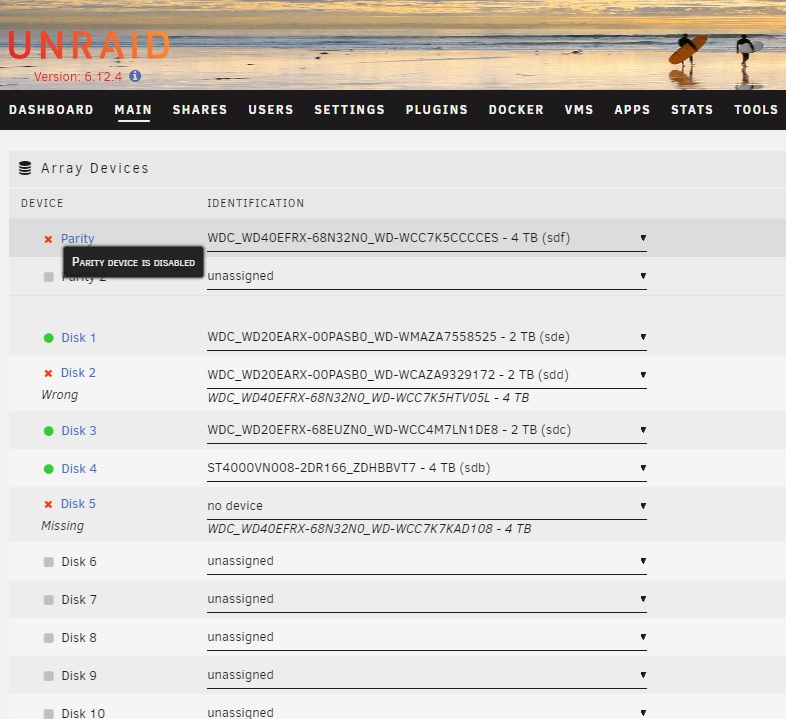
I am open to more suggestions but from all that is being said it looks like disc 5 is dead/unresponsive or possibly on my motherboard that SATA slot to disk 5 is also dead? So in order to recover data on 4 out of 5 disks above it said "you can do a new config to recover dat from remaining disks". How the heck do I do that? Again I really appreciate all the help for a noob.
-
So I tried a "known good disk" from another computer and plugged it in even if it were to say "wrong disk" but it still shows "missing" in Disk 5 slot. So I also tried with different power AND SATA data cables in the Disk 5 position. Is it the SATA connector to the motherboard that is dead? Not sure if this is related issue but when I have been troubleshooting this issue It takes ~2 min for Unraid server to boot up where on second PC I can "192.168.x.x" into the Unraid GUI. Sounds weird but I can only access GUI when Unraid PC is "cold" (meaning first 2 reboots or so...~10 min) before it appears to warm up and then no GUI access at all and no command prompt ping (pinged google then my 192.168.x.x Unraid server). I keep peeling back this onion which is why it is days between my responses because I am extremely frustrated and life happens in middle where I have consecutive hours to troubleshoot.
-
Ok...I have changed power and data cables to Disc 5 twice. It is still showing up as "missing" where last time (before I was out of town for weeks) disc 5 showed up just fine. The rest same as above (parity is "disabled" with red "x" and disc 2 says "wrong", which is expected). So.....if we think parity might be dead, and now possibly disc 5 might be dead? I have no clue. How screwed am I? I'll attach another diagnostics but I think it is 99% of the same as about 2 hours ago? Please advise what's going on and what my options are. Thank you everyone for assistance! deathstar-diagnostics-20231015-1843.zip
-
So bit of Schrodinger's cat (If I don't look its still fine) and I was out of town for weeks. Following "dboonthego" 8 steps above. Now I have Disc 2 showing as "wrong" (since I put back original 2TB drive in. And this is to be expected). But also Disc 5 shows as "missing". Parity disc still shows red "X" as before. I am thinking it is bad/loose cable on disc 5 so will try to check all connections again. deathstar-diagnostics-20231015-1642.zip
-
So I did clean shutdown, checked all cables, powered back on and screen where you can select which drives are "assigned" to which slots (meaning before you start array). All looked ok (and new 4TB disk 2 had the "V05L" drive correctly selected in correct replacement slot). So parity drive still has red "X" (and says "parity device disabled, click to spin down device"). At bottom it looks like it was doing a rebuild (where earlier today I freaked and paused it and wrote here first) but then at very bottom left of page it said "Array started" in green and "rebuilding" in yellow (it took about 5 min instead of the normal ~11 hours). After those 5 minutes disc 2 shows green circle instead of orange triangle, but still on far right at top of webGUI it says "Unmountable: unsupported or no file system". Parity still shows red x. I added brand new diagnostics attached. Having NO CLUE what is going on and only looking at green circles and red x colors is my parity drive failed? Or did I do something out of order and it is "disabled" (but still fine) because I am a noob? Still too afraid to click around like a rookie without further guidance. As a rookie I will need very specific instructions please. I try reading a lot on forums but some of this is over my head as I only replace a drive every 5 years or so (when needed). Thank you for your time. deathstar-diagnostics-20230924-2349.zip
-
yes the V05L is the "new" 4TB disk 2 to replace an old 2TB disk 2 position. I did NOT do any "format" on the new disk. So it says "unmountable: unsupported or no file system" for the new 4TB disk (V05L) on top right side of webGUI on "main" page where you can see "size", "used", "free". I wasn't sure what I was supposed to do related to "format"? So is the "error" ON the parity? Or is the "error" because I was supposed to do a format on disk 2? or...what? I will do clean shutdown, check all drive connections/cables/etc and then boot up to see what happens. Will report back if I get same thing.
-
Was there a step I missed? I am not sure if I am/was supposed to "format unmountable disk" first? I am WAY too afraid to do anything further until someone lets me know how to proceed. Please help. Thank you.
-
6 total disks (1 parity, 5 data). Parity is 4TB and others are mix of 2TB or 4TB. I was planning to update old 2TB to new drive I bought, 4TB. Unraid 6.12.4 and I added diagnostic info like forums say. Followed these steps: 1) Stop array/clean unraid shutdown. 2) Take out old 2TB drive (not precleared since it will be overwritten), put in new 4TB drive in same spot using same cables, etc 3) Power up unraid and it will detect that "wrong" drive in array (meaning I can pick new serial number of 4TB drive). 4) Using unraid webGUI assign new 4TB drive to old 2TB slot 5) Then "Start array" (with side message that says "Parity sync or data rebuild"). I clicked "Start" Then I got message on Unraid GUI saying "Unraid parity disk error". The web interface showed the animated "wave" logo when a background process is running. It ran for about 30 seconds when I opened a new window to GUI to see red "X" for parity drive and (Parity is disabled). I scrolled down to bottom and immediate hit PAUSE on parity check/rebuild cause I freaked out! At the top of webGUI the new 4TB drive says "Unmountable: Unsupported or no file system". At the bottom of webGUI where you can watch status of my monthly parity checks it says "Unmountable disk present". I think it ran for less than 1 min...how bad did I mess up? I am not clicking ANYTHING till I hear from you experts. Thank you deathstar-diagnostics-20230924-1345.zip
-
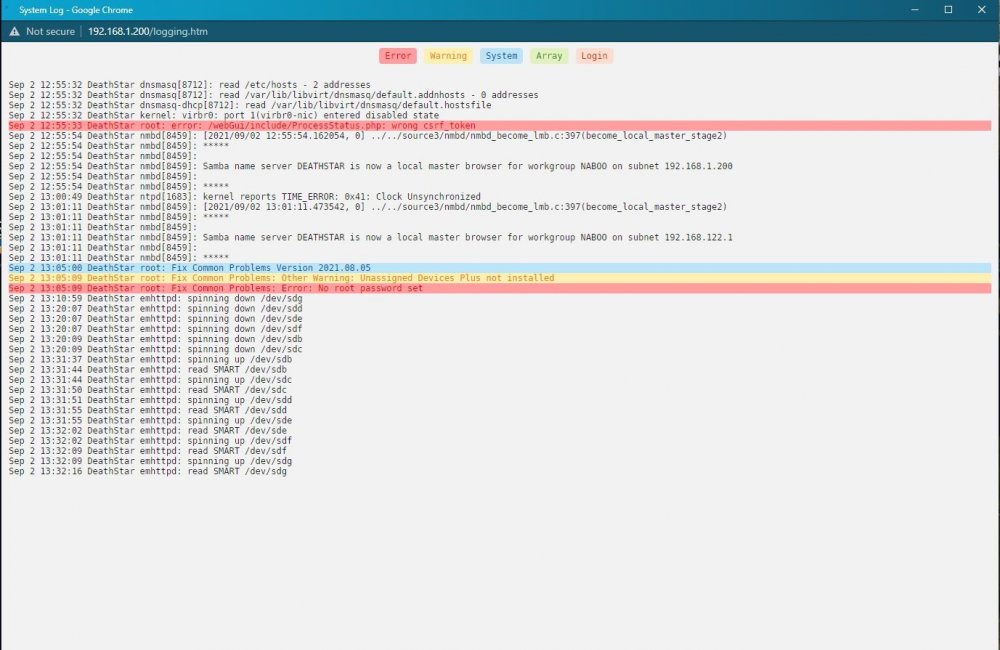
I am not sure about time (12:55) of when I started what? I think this is AFTER I did the hard reset. I am not a tech person so I don't know what "csrf_token" is or why I got error. I think at 13:05 I started updating plugins and such. would "clock unsynchronized" cause any of my issues? I am at complete loss why after 3-6 months my Unraid server just "disconnects" even though it is always powered on.
-
I have Unraid OS 6.83. I have monthly parity checks. I have a MINIX-U9 box for pretty stuff with kodi and Unraid box for all Movies/TV/etc. They are on a completely closed system (on purpose with no internet) and network cable goes from back of MINIX box to back of Unraid box, this has worked fine for years. There have been no power outages or any abnormal things that I can think of to cause my issue. I leave my media center on 24/7 except for this issue. Issue is about every 3-6 months randomly I go to watch movie/TV show and it says "this file is not here, do you want to delete it". This translates to the unraid box effectively "not connected" as if I were to unplug the CAT 5 cable (which I didn't). Since it is a "closed system" the only way to see the unraid dashboard is if I unplug CAT 5 cable (between MINIX box and Unraid box) and string different CAT 5 cable from Unraid box to my personal PC to access the web GUI dashboard. I am unable to see web GUI dashboard and using windows 10 "cmd" on my PC to ping, it says destination host unreachable (aka as if it was unplugged). The ONLY way I solve this issue is to do a hard shutdown (which sucks and shouldn't be the way to do it) thereby upon restart a parity check starts (which takes ~ 11 hours). I used to let parity check run but after last 3 or 4 times I decided to stop it and things behave fine...for about 3 or 4 months till I start again. The chicken/egg is I can't get diagnostics file since I can't access or see unraid box. Only way is to do hard shutdown, restart, stop default parity check, download diagnostics file, and post to you guys. If I recall diagnostics file is kinda useless if unraid has been shutdown (aka you can't see what happened in past)? I included one anyways after I was able to restart, cancel parity, download diagnostic file, and post to you. Any ideas why after about 3-4 months unraid just decides to "disconnect" without obvious reason? deathstar-diagnostics-20210902-1221.zip

.jpg.75b7b459256611c031717d3ccd8aa8b6.jpg)
