






xxDeadbolt
Members
-
Joined
-
Last visited
Everything posted by xxDeadbolt
-
Just updated to latest, connected straight away on nextgen. Awesome work!
-
Sounds like similar thing to me - I'm getting those speeds as well (I should be roughly 10-13MB/s) - Probably not the router itself, I use the Asus RT-AC86U, but I don't get those ping results, though.
-
Just tried your rTorrent container & tested a radarr addition, got speeds at the level I'd expect when downloading (roughly 8-10Mib/s, which is a far cry from the 600Kib/s I was getting in Deluge😂). I'll have a look at setting that up properly to use for the time being, & keep Deluge on for nextgen testing for now. Edit: spoke too soon - seem to have gone back to having a global DL rate of ~600Kib/s. Must be PIA, but still annoying why others are showing much faster rates in line with their connection speed than I seem to be able to achieve when it's specifically through unraid torrent dockers 😕
-
Not so sure mine is strictly on the PIA end - I was only getting around the 600Kib/s mark on the old gen as well... but only in delugevpn. I'd expect to see some different between using my Windows rig and using unraid - but not going from 600Kib/s > 13Mb/s lol
-
Connected now, after a bunch of retries, to Frankfurt. Seemed to have a few logs of this; am I right in thinking this is when PIA aren't permitting a reallocation? [warn] Unable to successfully download PIA json to generate token from URL 'https://212.102.57.65/authv3/generateToken' [info] 2 retries left [info] Retrying in 10 secs... This is the one I seen most, not sure what it is, or refers to, but most people seem to be seeing it: 2020-09-25 10:07:16,021 DEBG 'start-script' stdout output: parse error: Invalid numeric literal at line 4, column 0 Tested using an Ubuntu image download... and I'm still getting only around 600-800Kib/s in download speed. Cannot for the life of me figure out why I'm not getting any faster than that. Same image, connected with PIA Windows app (same location endpoint on nextgen) on gaming rig is getting ~12-13Mb/s 😧
-
Remember and change the 'Repository' part to show':test:, too: I'm struggling to get connected. Tried Berlin for the last 90mins or so (let it cycle for about 30mins, stopped, gave it 20mins or so before another attempt) & about to try another endpoint, so will update when I've tried that.

-
Just updated, working fine now. I did have to remove Montreal from the config code, as in the logs it seemed to stick at the "attempting to get a dynamically assigned port" part, but not sure what that would be down to (I assume PIA or me!). After that, I reordered them to try Spain first, which failed, then Berlin which worked. Appreciate the work, binhex!
-
The past few mornings, I've had 2 errors showing in the system health. One is about not being able to connect to Deluge, but there's been nothing wrong with it & Radarr hasn't had any errors with it. The other is below, not sure if this is something on my end or within Sonarr. Proxy Health Check failed: Error getting response stream (ReadDoneAsync2): ReceiveFailure: 'http://services.sonarr.tv/v1/ping' System.Net.WebException: Error getting response stream (ReadDoneAsync2): ReceiveFailure: 'http://services.sonarr.tv/v1/ping' ---> System.Net.WebException: Error getting response stream (ReadDoneAsync2): ReceiveFailure at System.Net.WebResponseStream.InitReadAsync (System.Threading.CancellationToken cancellationToken) [0x000e6] in /build/mono/src/mono/mcs/class/System/System.Net/WebResponseStream.cs:458 at System.Net.WebOperation.Run () [0x0018f] in /build/mono/src/mono/mcs/class/System/System.Net/WebOperation.cs:283 at System.Net.WebCompletionSource`1[T].WaitForCompletion () [0x0008e] in /build/mono/src/mono/mcs/class/System/System.Net/WebCompletionSource.cs:111 at System.Net.HttpWebRequest.RunWithTimeoutWorker[T] (System.Threading.Tasks.Task`1[TResult] workerTask, System.Int32 timeout, System.Action abort, System.Func`1[TResult] aborted, System.Threading.CancellationTokenSource cts) [0x000e8] in /build/mono/src/mono/mcs/class/System/System.Net/HttpWebRequest.cs:956 at System.Net.HttpWebRequest.GetResponse () [0x0000f] in /build/mono/src/mono/mcs/class/System/System.Net/HttpWebRequest.cs:1218 at NzbDrone.Common.Http.Dispatchers.ManagedHttpDispatcher.GetResponse (NzbDrone.Common.Http.HttpRequest request, System.Net.CookieContainer cookies) [0x0011b] in C:\BuildAgent\work\5d7581516c0ee5b3\src\NzbDrone.Common\Http\Dispatchers\ManagedHttpDispatcher.cs:82 --- End of inner exception stack trace --- at NzbDrone.Common.Http.Dispatchers.ManagedHttpDispatcher.GetResponse (NzbDrone.Common.Http.HttpRequest request, System.Net.CookieContainer cookies) [0x001ca] in C:\BuildAgent\work\5d7581516c0ee5b3\src\NzbDrone.Common\Http\Dispatchers\ManagedHttpDispatcher.cs:113 at NzbDrone.Common.Http.Dispatchers.FallbackHttpDispatcher.GetResponse (NzbDrone.Common.Http.HttpRequest request, System.Net.CookieContainer cookies) [0x000b5] in C:\BuildAgent\work\5d7581516c0ee5b3\src\NzbDrone.Common\Http\Dispatchers\FallbackHttpDispatcher.cs:53 at NzbDrone.Common.Http.HttpClient.ExecuteRequest (NzbDrone.Common.Http.HttpRequest request, System.Net.CookieContainer cookieContainer) [0x0007e] in C:\BuildAgent\work\5d7581516c0ee5b3\src\NzbDrone.Common\Http\HttpClient.cs:121 at NzbDrone.Common.Http.HttpClient.Execute (NzbDrone.Common.Http.HttpRequest request) [0x00008] in C:\BuildAgent\work\5d7581516c0ee5b3\src\NzbDrone.Common\Http\HttpClient.cs:57 at NzbDrone.Core.HealthCheck.Checks.ProxyCheck.Check () [0x00065] in C:\BuildAgent\work\5d7581516c0ee5b3\src\NzbDrone.Core\HealthCheck\Checks\ProxyCheck.cs:46
-
That's fair enough, no point doing that when it'll only cause stability issues with this. Would hope longer term, PIA sort the issues and continue to support port forwarding on OpenVPN with the 'nextgen' side of things.
-
I'm the first to admit that I have no idea the complexity that would be involved (other than VERY) in you doing this, but is it a possibility to change from OpenVPN to Wireguard for this docker container? Obviously, I know it wouldn't be any time soon, just wondering how much of a pain it'd be.
-
Yeah, got Berlin working again too, but I expect it'll go down again at some point 😆
-
Ah I just assumed openvpn/wireguard would be included.
-
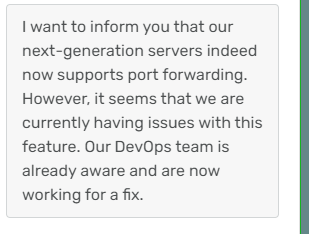
I was also told by their chat support that port forwarding would be fully supported on next gen 😕 Edit:
-
Had issues again during the night, like the above - turned port forwarding off for now & it'as been fine. I've not noticed any slower speeds, I seem to be capped at around 600 or 700KiB/s in total. Not sure why, but this is the same speed I was getting before, so I'll keep it disabled. Edited for clarity: My connection shouldn't reflect those download speeds, should be way higher.
-
Cheers, @binhex! I've found PIA's support to be somewhat useless, but I've not been anywhere near as helpful in the info I gave them, so that may be a reflection on the questions asked & limited details I've been able to provide!😂
-
I'm using CA Vancouver just now & don't have any issues with port forwarding. I think with PIA doing their 'next gen' changes, as a few people here have mentioned, it's causing some instability over a bunch of locations.
-
On this variable, should it be left at default with all the name servers listed already in it? Or can you select one or two to use? Think there are 7 or 8 by default, wondering if this would potentially be the cause of my slow download speeds. EDIT: Nevermind, I've just realised what the NS addresses all are
-
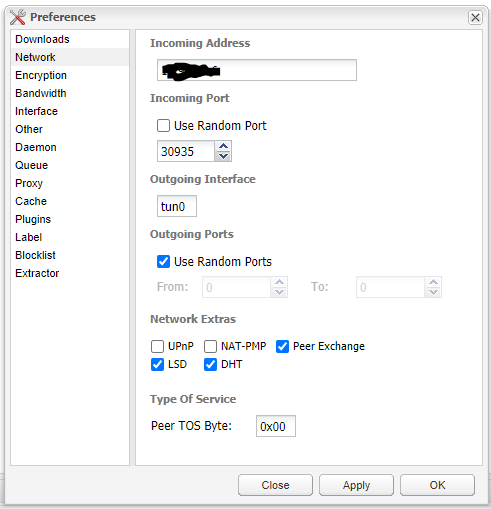
In the DelugeVPN webui, click 'Preferences' > 'Network'. The incoming port here should match the forwarded port number you've been assigned by AirVPN. If you're configured for PIA, I believe this is automatically done for you. (I'm not sure if the incoming address was specific to me, so I obscured it🤣)
-
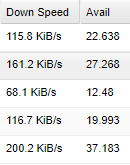
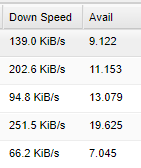
OK, so small example - 5 active torrents, this is availability & speed on PIA: & the same 5 files on AirVPN Difference, to me, is fairly nominal on availability - but the speed is horrendous, considering I am getting well over 10Mbps on my main rig, through both VPNs on the same torrents. This would suggest the endpoint issues I, & other people, was having were temporary; however, this opens up a new query for me: why are my DelugeVPN speeds so bad?
-
Yeah, I've used an Ubuntu torrent to test, no issues with availability. Speeds greatly differ between this container, my main rig with VPN both on and off (going from ~12mbps w/ VPN enabled on my main rig, to ~500kbps in DelugeVPN, using same server location). Haven't tested with AirVPN as yet, but some private trackers don't show me seeding with PIA when it's been active in Deluge for days. Strange.
-
I think some still work, @rikdegraaff I was using CA Vancouver earlier today without a major issue, other than it being slow.
-
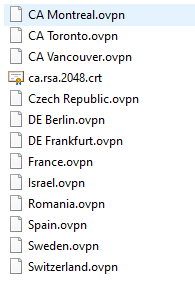
The below image *was* the list of servers that supported port forwarding, but I don't know if it's still the case. It's one of the reasons I'm trying out AirVPN - I was having a similar issue in that the trackers weren't showing I had seeded some torrents, but they'd been in Deluge for days. I assume this is due to the VPN endpoint.
-
Yeah, I had been doing that. I've now generated a different port & used a Frankfurt server & somehow it's passed the tcp check. The IP I've been given now shows the proper server location on whatismyipaddress.com. Is there a way I can do a speed test in the console? Difficult to compare... I'm getting 13-15Mbps download without the VPN on my main rig, 11-12Mbps with the VPN on & about 500Kbps in DelugeVPN, all with the same torrent (Ubuntu iso, plenty of seeds).
-
Given all the issues I've been having with PIA, I'm trying out AirVPN... However, I'm having some issues getting it set up 😕 My problem is with the OpenVPN generator, I'm not sure if I'm choosing the correct options. In the 'Protocols' part, I'm choosing OpenVPN UDP 443; I assume this part is correct, but do I need to choose any proxy settings? I haven't at the moment, & chosen the server location as just 'Netherlands'. I've also set up a port for forwarding, but it doesn't pass the tcp test (the light is always red). DelugeVPN is connecting, giving me an IP address which shows as Netherlands in AirVPN client area, but not on whatismyipaddress.com (shows UK, but not my actual location). Am I doing something wrong, or choosing the wrong options on the generator?
-
I've just had my connection flake out on me again, not the same error as I mentioned before but just wasn't connecting but also wasn't timing out. Strange. I've downloaded the PIA OpenVPN zip file again, used the same end point as before (Sweden) & it's connected. Either it was a coincidence on my end or lucky timing or something like that for me replacing the end point, but seems to have done the trick. Maybe something has changed in those files, although I'm not sure what could/would have changed? (I'm not knowledgeable on what exactly is contained in these files, so apologies if that's a bit of a nub suggestion). Strange thing is, when I check the IP address of the new end point on https://whatismyipaddress.com/, it's not Sweden it shows as, it's China 😕



