Wolfe1979
Members
-
Joined
-
Last visited
-
it must have errored out. I went in and changed the file name of the current version and then it downloaded the current version and ran. My guess is that there was an error on the download and didn't update properly. thank you.
-
minecraft bedrock is now 1.14.60. I am using this docker for a creative copy of my main server which is the Binhex one. That one updated around 2 hours after the game updated. I have others that join my servers so I run the current version to make things easier for others.
-
when will the minecraft bedrock docker get updated? It is unusable at the moment.
-
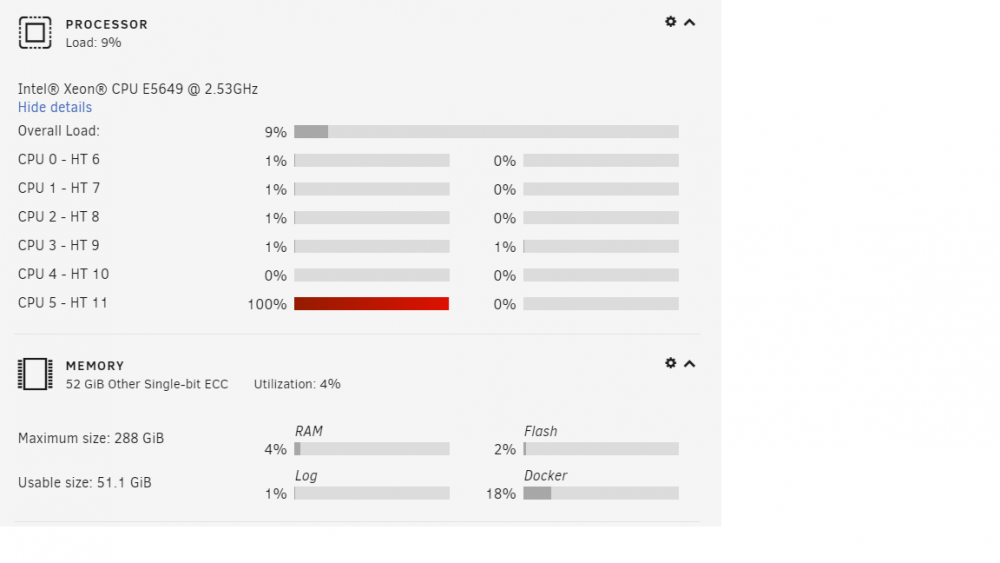
ok thank you. I was debating if i needed a faster processor and I think i will. This is running on an IBM x3650 m3 with 1 intel xeon 5649 2.53ghz. I think I will try upgrading the processer to a faster one to help out. they are cheap now. I can get 2 x5680 3.33ghz for $85. that should help with minecraft well. Thank you for the info and it helped me decide what to do.
-
I am wondering as to the threads this uses. I put in the settings 0 so it should be able to use as many threads is it needs but I keep seeing 1 thread maxed out at 100% and all the other threads very low. is there a way to make this use multiple threads to it's not maxing out just one?