





noraa
Members
-
Joined
-
Last visited
Everything posted by noraa
-
@QuarantineDrive Sorry I am just seeing this as I actually just started to get them again... I am not entirely sure what is causing them either 😧, I had swapped the cables and everything has been fine for 2+ months and now all of a sudden they are back. I am again worried about losing data and wondering if I should just get rid of the drive at this point. I really am stuck on what to do here haha.. I am curious though, have you found a solution to the problem? Would really appreciate it if you could share the solution if so. Sorry again for not seeing this reply originally 😧
-
Ok I think I am going to try to swap the cables positions and if the errors come up on the drives that I swapped to its safe to say its a cable issue? The errors are back again (on the same drives) and seem to be climbing slowly. Checked syslog and there is this, but don't think it really tells me anything I didn't already know. md: disk4 read error, sector=4571643616 I don't have a spare PSU at the moment, although if I suspect that is the issue I have no problems grabbing a new one, just don't want to lose any data. Thank you for the suggestions JorgeB, I appreciate it!
-
Hmm ok, what would be the best way to diagnose a power problem? I haven't made any changes to my setup. although I assume the power supply could be going bad or something along those lines? not too sure. I took out my GPU a few months ago and installed the MediaSonic Probox with an eSata card, I doubt that's causing any issues as the drives are powered by the Probox and the impacted drives aren't in the Probox, but thought I'd mention it. I was thinking about running xfs_repair on the impacted drives and seeing what it returns but not too sure if that is worth doing or not, Pretty lost at this point haha.. Thank you for the help JorgeB, I appreciate it!
-
Hello JorgeB, So the UDMA CRC errors as far as I know were caused by a faulty SFF -> SATA Cable, I had picked up an HBA a couple years ago now I wanna say and one of the cables I had grabbed wasn't working properly and would spit out the UDMA errors. I replaced the cable back then and as far as I know, the errors haven't gone up. I have been keeping an eye on the numbers as well. I can try replacing the cable and see if that solves the issue if you suspect that it is causing the issues, Just thought i'd mention that I did in fact have issues with the cable at one point but replaced it back when I first installed the HBA. Thanks again!
-
Hello as the title says, I am wondering / worried that I have some discs that are corrupt / failing in my array. The following errors are the ones in question. Aug 23 16:04:55 Tower kernel: I/O error, dev sdc, sector 406173464 op 0x0:(READ) flags 0x0 phys_seg 1 prio class 2 And Aug 27 14:16:53 Tower kernel: I/O error, dev sdb, sector 1169562704 op 0x0:(READ) flags 0x0 phys_seg 32 prio class 2 I ran a SMART extended test on /dev/sdc and it completed with no errors, although these errors keep appearing. Not too sure what additional information is required. I have attached my diagnostics as well. I appreciate any help / feedback. Thank you! tower-diagnostics-20240827-1850.zip
-
Not too sure if anyone else is having this issue however, the broadcast command for RCON seems to not be working.. I am able to do everything else (save, showplayers, info etc) with no issues but am getting an "unknown command" return when trying to broadcast a message using "timeout 1 rcon -a 192.168.20.5:25576 -p password broadcast Saving..." Any help would be greatly appreciated i'm sure it is something silly. Thanks in advance.
-
Possibly NAT Reflection? I am not 100% sure tho and am just spitballing but it could be you don't have it enabled for Port Forwarding under Firewall->NAT (At least on OPNSense). However, If you have other stuff forwarded with no issues then I am very wrong. Good luck!
-
Here you are sorry about that, I deleted all folders except Pal and started the container up and it is running v0.1.4.0 now. Any reason you suggest to skip pi hole for unraid? i’ve never had any issues with it but if it is known to cause issues then i’ll gladly disable it. Thanks for your help!
-
Hey thanks for the fast reply! I ran the above command and attached what it returned. I do have PiHole running i’ll watch the logs to see if it’s blocking anything. Thanks again Edit - Deleted everything but Backups and Pal folder, everything updated and seems to be good now. I would like to update the container properly by restarting it but I’m really not sure what the issue could be.
-
Hello, I am having issues trying to update the server to the latest version. Currently I've tried restarting the container, deleting steamapps folder as well as restarting without my steam credentials. None of which seemed to work Here is a screenshot of my paths if that helps at all, any help would be appreciated. Thank you!
-
I am stuck on getting RCON enabled even with the steps above, I haven't touched the default template at all, I have enabled RCON in my config etc. and typing rcon -H machine ip -P 25575 -p password doesn't work it just hangs. Just wondering if there is a step I am missing? Will provide whatever info is needed. Thanks in advance.
-
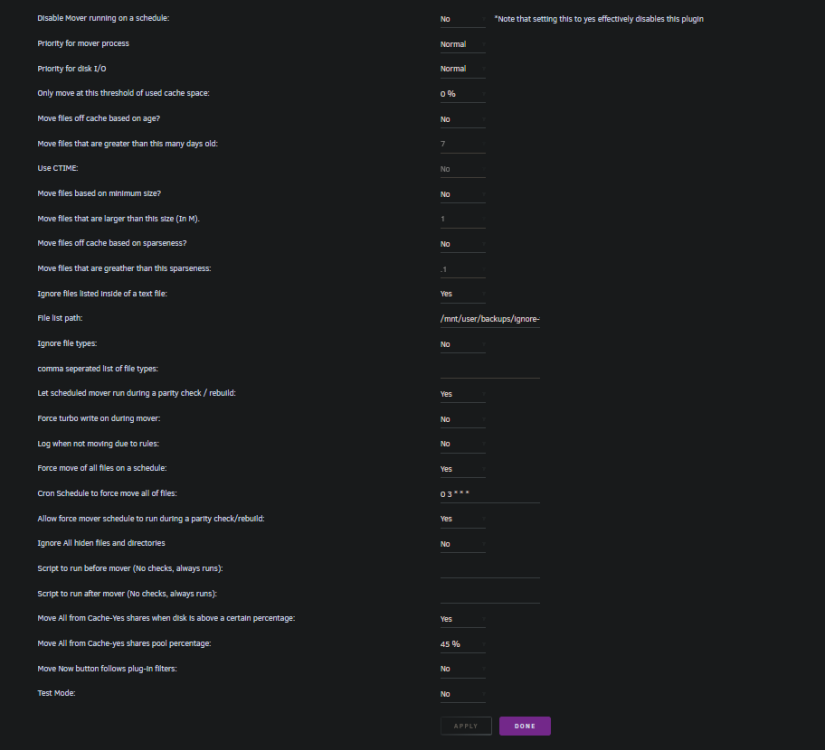
So I put a file container the folders / paths I would like to exclude from the 'Mover' process My ignore-files.txt is located in '/mnt/user/backups/' inside of the file I have the directories / folders listed like so /mnt/cache_downloads/data/usenet /mnt/cache_downloads/data/usenet/incomplete and so on, unfortunately it doesn't seem to be working, any help would be greatly appreciated. Thank you! Attached picture of my 'Mover' Settings.
-
As the title says I am having issues with my Plex docker container, I checked the logs and I get the error "Connection timed out" multiple times, and the media then becomes unavailable on Plex until the container is Restarted. I post.d another issue I am having over in the General Forums, where none of my container are pulling updates. I am not too sure if the 2 are related, Plex works perfectly fine once the container restarted, until the error happens again which at least once a day at this point. Any help would be greatly appreciated. Thank you!
-
Hey, I used to run this Docker with no issues but have recently re-installed it and am getting the following error "No profiles are available; check internet connectivity and refresh the profile list." I do have a pfsense Box but can't seem to find any information on why it wouldn't work? I have tried updated the WebUI and re installing the Node packages etc. Any help would be appreciated, thank you!
-
I am also getting this error. I have disabled my autodl for now. I think the git repo might have changed their URL?, not too sure but I think this is an issue with autodl in general not just you or your setup but I am talking out of pure speculation.
-
Sorry for the bump was just wondering if anyone might know what is causing this issue. Any help is appreciated. Thank you.
-
Whenever I docker exec into the deluge container and enter 'deluge-console' I am getting a lot of errors. I've checked and /usr/bin/deluge-console doesn't exist. Is it installed in another location? Or am I missing something entirely. The goal is to have ruTorrent execute the deluge-console to add torrents to deluge via autodl-irssi using the following command Command: /usr/bin/deluge-console Arguments: connect localhost:port ; add -p /path/to/downloads $(TorrentPathName) ; quit Any help is appreciated. Thanks
-
I haven't really got it to work yet.. I am still getting this "ERROR Closing Link: user_autodl[141.98.102.227] services.tracker.org (NickServ (GHOST command used by user_au1odl)" and on the trackers that I don't get this error I get this one "K-Lined: Don't IRC as root!". I'm glad the PGID/PUID is correct so that can be eliminated but, how do I solve the issue of getting K-Lined? I also can't seem to find anything in the other error. Like @Cat_Seeder said it is probably and IRC issue that can be solved with /NickServ but I have "/msg NickServ REGISTER Password Email" in the irssi settings and that doesn't seem to work either.
-
I will definitely do that once I get this up and running for now I am just running it on my lower tier trackers and they don't seem to mind as much thanklfully. I admit I am not at all familiar with the IRC side of this have never used and IRC client before getting into Trackers so my experience lacks. but I did have the following " /msg NickServ REGISTER Password Email" setup in the Invite Command for the irssi plugin.
-
Ha odd thing is it actually does work on the other trackers... I have no clue why it doesn't on the others but they are actually the more important ones that I would be putting autodl-irssi to use. I guess I can start tweaking it though. Thank you! Edit - Scratch that it connects to the IRC chat and will monitor it for a few minutes on the other tracks but eventually drops out "ERROR Closing Link: user_autodl[141.98.102.227] services.tracker.org (NickServ (GHOST command used by user_au1odl)" with this error. I really don't know what to do to get it working.
-
Yup here you go! supervisord.log
-
Hey, thanks for the reply Binhex! I am loving all of your Products. If I execute the command "cat /etc/passwd" I get a list of users the user I am attempting to use for this container is "autodl" if I do "id autodl" I get UID=1000(autodl) gid=100(users) theres also groups=100(users).281(docker). I then input the UID/GID into the Environment Variables after stopping the container and deleting perms.txt. I relaunch the container and everything works fine EXCEPT for autodl-irssi. I get the following error "K-Lined: Don't IRC as root!". I'm almost certain this is because the container is being run as root but why? I created the user in the unRAID gui and i've also tried creating users with "useradd" in the CLI as root with no luck. I'm certainly stuck on what to do at this point and would love to get this up and running but I have no clue what to do at this point. I appreciate the help! I will paste logs when I am home and able to. Thanks again!
-
Issue is still there I am obviously doing something wrong. I've deleted the Containers and the Folders/Files that were contained in their paths. I just keep getting [K-Lined: Don't IRC as root!] I honestly don't know what to do.. I've created new users put that user in the same group as "nobody" assigned the PGID/PUID with no luck... Assigned the docker group GID with a non root user UID etc.
-
Ya my fault that was a copy paste error the paths are -v /mnt/user/appdata/binhex-irssi:/config \ -v /mnt/user/Downloads/autodl:/data \ I created a new user doing "useradd -u 1002 -g 214 autodl" and assigned those to the Environment Variables deleted the perms.txt and started the container everything except for perms.txt belongs to the "autodl" user. I've been trying to get this to work for a while now with no luck.. I've created new users and groups within unRAID as root and assigned the PGID/PUID to the Environment Variables with no luck I am still getting the same error. Does the PGID/PUID matter? Or can I assign any random number? Also when I docker exec into the container it says my nick and user_name is "root". I honestly have no idea what to do. I have 2 instances of rTorrent running 1 with the VPN and the 2nd one without and autodl-irssi enabled. The goal was to have this instance throw everything into a watch Folder for the main instance to Download. I would love to get it working. That being said I have to be doing something wrong so hopefully I can get it working in time. Thanks for all the help I appreciate it!
-
Correct it was done in the Unraid Box and not the container using "useradd -u 500 autodl" I have a mounting points for my Downloads and Config -v /mnt/user/Downloads/autodl:/config \ -v /mnt/user/appdata/binhex-rtorrentirssi:/config \ Inputting the ls -l /mnt/user/appdata/binhex-rtorrentirssi I get the following https://pastebin.com/68prCuAe It looks like every folder is going to the correct User/Group except for the perms.txt? I have tried deleting the Folder and relaunching with no success. Thanks for your patience and help. Edit: So I managed to change the permission of the folders and now when I execute the ls -l command all of the directories are owned by the autodl user/group, however the error is still there. I noticed when launching the irssi it's giving me a user_name of root and a nick of root. Then this error Closing link: ([email protected]) [K-Lined: Don't IRC as root!] I'm out of ideas..
