





mrkwkns
Members
-
Joined
-
Last visited
Everything posted by mrkwkns
-
Solved my problem in 2025. Thanks 👍🏻
-
Thank you for your response. I believe I have everything working correctly now. The P4000 is installed in PCI slot one, and the 5070Ti is in slot two. The P4000 is being recognized by the production branch of the Nvidia driver and is functional within Docker. The 5070Ti is operational within a Windows 11 VM. server-diagnostics-20250522-1007.zip IMG_0330 - kopie.HEIC
-
I've successfully got the 5070Ti working within a Windows 11 VM, without encountering error 43, and I'm able to stream games via Steam. While I'm using the production branch of the Nvidia driver, it doesn't recognize my Quadro P4000, which I intend to use in my Plex Docker. How can I get the Quadro to work? I'm not entirely sure what else to attempt. server-diagnostics-20250521-1020.zip
-
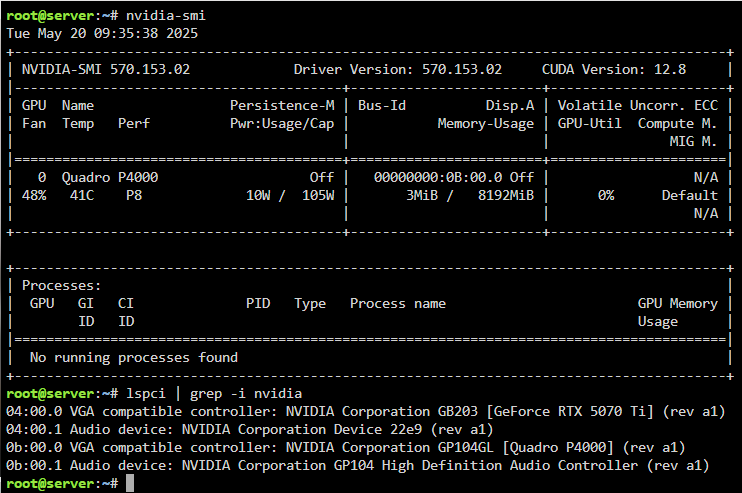
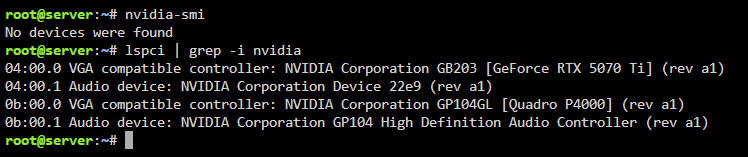
I did turn on 4g and rebar in the bios. When i'm using production branch my P4000 is detected but the 5070Ti is not. When i'm using open source brance non of the GPUs is detected. I've attached screenshots and diagnostics. server-diagnostics-20250520-0946.zip
.thumb.PNG.40df99938b40f7db65baf8efbfa918c2.PNG)
.thumb.PNG.784e500e6773df952fb09b2a42f60469.PNG)
-
Ok, thanks for your reply. I'd either like to use a vm for gaming or Steam headless. What do i need to do if decide to use Steam headless?
-
I'm experiencing the same issue as @Maximo101 I have an Inno3D RTX 5070Ti and a Quadro P4000 installed in an Asus Pro-WS-X570-ACE motherboard with an AMD 5950 CPU. My Quadro P4000 is recognized with Nvidia driver v570.144, but my 5070Ti is not. Both GPUs are visible in the system devices. The Quadro P4000 is currently used for transcoding, and I would like to utilize the 5070Ti in a Windows 11 VM. I'm unsure what BIOS settings need to be changed to make this work. server-diagnostics-20250519-1624.zip
.PNG.9f2b150e4a868e2b0e4f4e30c43f298c.PNG)
.PNG.218a40f72bfaaa55e26809a511780372.PNG)
