






Pauven
Members
-
Joined
-
Last visited
Everything posted by Pauven
-
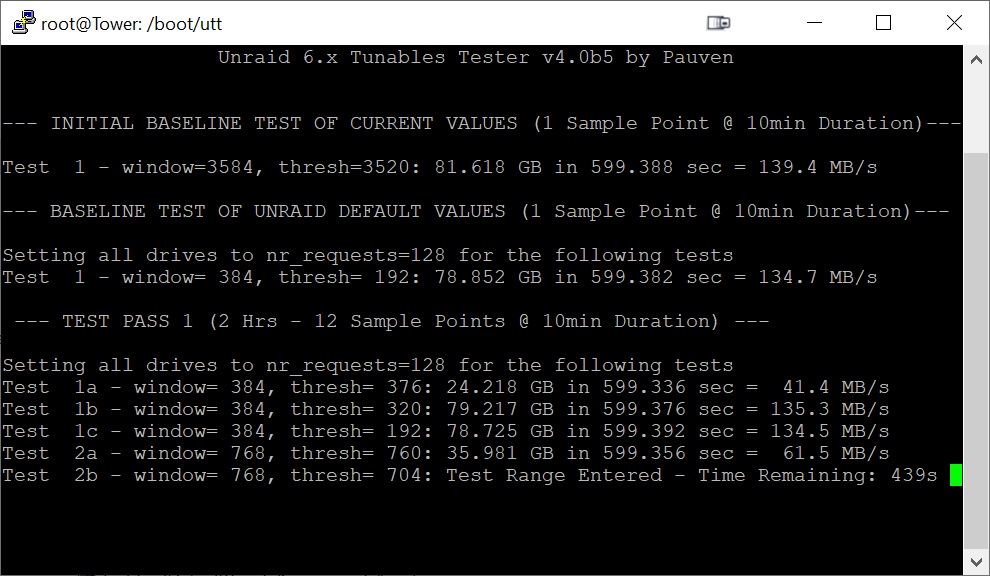
Thought I would share something interesting. In the screenshot below, the very first test is with my current values (which came from using UTT to find them), and that produces a peak speed of almost 140 MB/s, which is pretty much maxing out my 3TB WD Red drives. The second set of results are using the Unraid stock settings. Interestingly, they provide almost 135 MB/s peak speeds, which is really really good for stock values. Had my system performed this way under Unraid 5.2, I never would have written this tool. Unraid 6.6+ has come a long way. But also notice 'Test 1a'. This is using settings that are close to stock Unraid, but slightly different (smaller Stripes, larger Thresh) and the peak speeds tanked to less than 42 MB/s. I think my stock speeds on Unraid 5.2 were a little better than this, but not by much. My point here is to show how the wrong combination of values can dramatically hurt performance. Every server is different, and for some servers, the stock Unraid values are slow like Test 1a. But also, stock Unraid 6.x is so much better than stock Unraid 5.x, at least on my hardware. Paul
-
I found a couple things I didn't like, so I tweaked the code and I am running another 16 hour test.
-
Thanks. That's the same that I get. It didn't look like the script was installing it anymore, but I appreciate the confirmation. I'm running a 15 hour test now. If all goes well, I'll publish the new Unraid 6.x Tunables Tester v4 tomorrow. 🤞
-
Does Unraid 6.x now ship with lshw installed? I use it in the script, and back on Unraid 6.2 I had to download and install it. Now I can't tell if my installation is from me installing it, or if it is now included in current Unraid versions. I'm running 6.6.6. You can run lshw -version from the command line to see if it is installed.
-
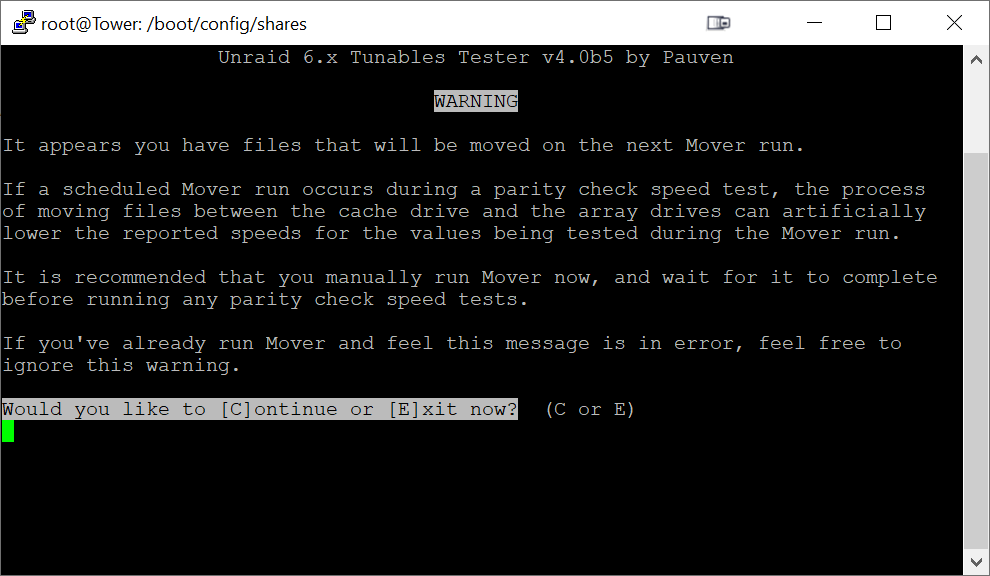
I don't think the warning will cause too much trouble:
-
Here's what I came up with. Seems okay in my limited testing, but let me know if you see any issues. I didn't bother checking available cache disk space for the "prefer" option, since worst case it shows a Mover warning that might be unnecessary. CheckMover() { MoverWarning=false if [ -d "/mnt/user0" ]; then for f in /boot/config/shares/*.cfg do shareUseCache="" s=${f##*/} s=${s%.cfg} CacheDir="/mnt/cache/$s" ArrayDir="/mnt/user0/$s" eval $(egrep 'shareUseCache' "$f" | tr -d '\r') if [ $shareUseCache == "yes" ]; then if [ -d "$CacheDir" ]; then MoverWarning=true fi elif [ $shareUseCache == "prefer" ]; then if [ -d "$ArrayDir" ]; then MoverWarning=true fi fi done fi if [ $MoverWarning == true ]; then ShowMoverWarning fi }
-
Thanks! Great tip too!
-
Finding if any shares with shareUseCache=yes and data on the cache drive was easy. But I'm having trouble with an efficient way to check if data exists in the array for shareUseCache=prefer. How do I tell if something is in the array but not the cache? EDIT: Do I look at /mnt/user0 ?
-
I've already included this advisory. But it occurred to me recently that someone might forget that the Mover is scheduled to run overnight when they start up a 20+ hour test, so I want to warn about Mover too.
-
On second thought, I think trying to disable Mover is crossing a line I don't want to cross. I simply want to warn users that they should run Mover first. I'll play around with your original suggestion, and see if I can make the warning smart enough to only show if there might be work to do. Otherwise, I can default to showing the warning to all users.
-
That sounds relatively easy. Anyone know how? For the "use cache prefer" and files exist on the array, I think this is dependent upon available space on the cache drive, right? So it might look like there is work to be done, but no files would move if there was insufficient cache drive space. This approach sounds more challenging in general, lot's of variables to consider.
-
I'm very close to releasing UTT v4 for Unraid 6.x. I've got one final feature I'd like to add, and need some help. If the Mover kicks in during a test, it will obviously slow down any currently running parity check speed tests, and adversely affect the results. I'd like to show a warning to users to run Mover first, before running any tests. But I only want to show this warning if Mover has work to do. Otherwise, I want to skip the warning if there's nothing to Move. How do I check if Mover has work to do?
-
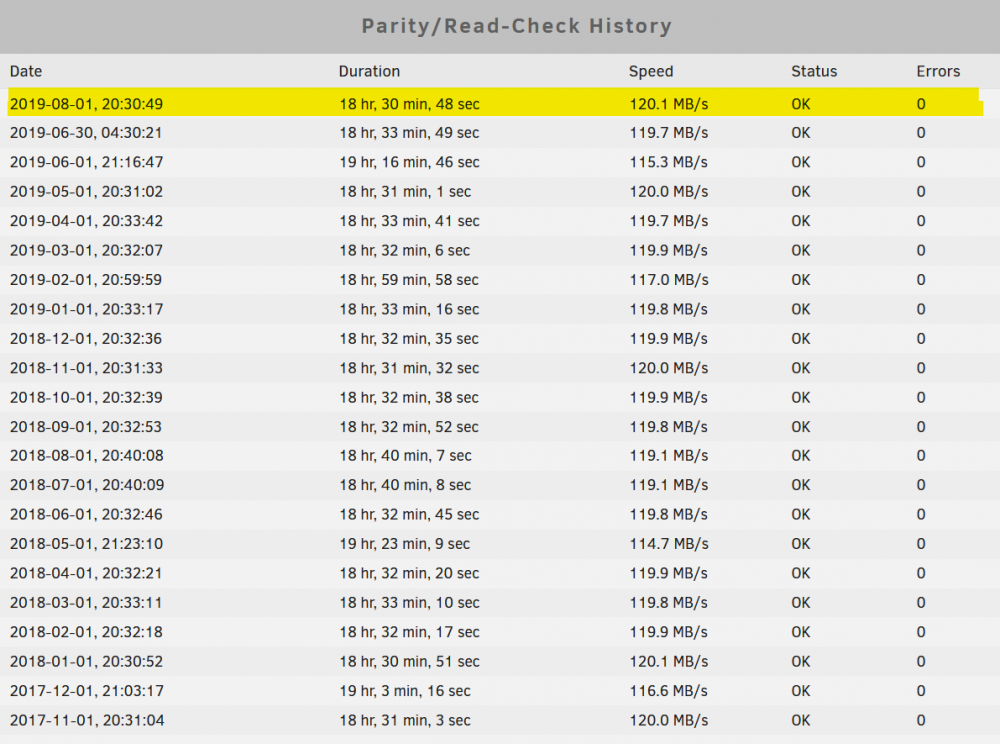
Progress update. With the first of August approaching, I knew I wanted to see the impact of my new tunable tester results. Yesterday my monthly parity check completed in record time - well, a record by about 3 seconds. Of course, my system was already tuned from a few years ago, so I wasn't expecting any miracles. What's noteworthy about the result below is that my new settings consume 23 MB less than my previous settings (600 MB previously, 577 MB with the new settings). So the new version of UTT is producing very usable results, at least on my system. I'm still tweaking the new options a bit. In the last beta a few years ago, I tested nr_requests first before tuning the other variables, and found that lower nr_requests values improve performance when other settings are bad, but also prevent reaching maximum speeds when the other settings are tuned. For this new version, I moved the nr_requests test to the end, after all the other settings are already tuned, and find that testing lower nr_requests values only hurts my performance as I expected. I'm thinking I need to keep the nr_requests test in there, as it might help some users, but make it optional as it takes a lot of time to run and for many systems like mine it is a pure waste of time. I've also still got to work out some of the report formatting. Pass 3 actually tests 18 different values for md_sync_thresh, but the report is only showing 3 of them (the three "thresh" columns, while the three rows are showing different nr_requests values). I probably just need to rotate the output so that the rows show different thresh values instead of trying to fit 41 columns of data. Also noteworthy in my report below is that both tests of md_sync_window=3072 + md_sync_thresh=3008 (Pass 1 Test 4, Pass 2 Test 25) both returned exactly 139.6 MB/s. This is incredibly consistent. This was running 5 minute tests for each combo of values. If I make the nr_requests optional, this would be about an 8 hour duration to complete all the tests. Unraid 6.x Tunables Tester v4.0b5 by Pauven Tunables Report produced Sun Jul 28 22:07:21 EDT 2019 Run on server: Tower Normal Automatic Parity Sync Test Current Values: md_num_stripes=6784, md_sync_window=3392, md_sync_thresh=3328 Global nr_requests=128 Disk Specific nr_requests Values: sdg=128, sdh=128, sdi=128, sdj=128, sdk=128, sdl=128, sdm=128, sdn=128, sdo=128, sdp=128, sdq=128, sdr=128, sds=128, sdt=128, sdu=128, sdv=128, sdw=128, sdb=128, sdc=128, sdd=128, sde=128, sdf=128, --- INITIAL BASELINE TEST OF CURRENT VALUES (1 Sample Point @ 5min Duration)--- Tst | RAM | stri | win | req | thresh | MB/s --------------------------------------------------- 1 | 600 | 6784 | 3392 | 128 | 3328 | 139.5 --- TEST PASS 1 (60 Min - 12 Sample Points @ 5min Duration) --- Tst | RAM | stri | win | req | thresh | MB/s | thresh | MB/s | thresh | MB/s -------------------------------------------------------------------------------- 1 | 67 | 768 | 384 | 128 | 376 | 41.4 | 320 | 135.4 | 192 | 135.1 2 | 135 | 1536 | 768 | 128 | 760 | 59.7 | 704 | 136.5 | 384 | 135.9 3 | 271 | 3072 | 1536 | 128 | 1528 | 85.2 | 1472 | 137.8 | 768 | 129.2 4 | 543 | 6144 | 3072 | 128 | 3064 | 115.9 | 3008 | 139.6 | 1536 | 138.2 --- TEST PASS 1_HIGH (15 Min - 3 Sample Points @ 5min Duration)--- Tst | RAM | stri | win | req | thresh | MB/s | thresh | MB/s | thresh | MB/s -------------------------------------------------------------------------------- 1 |1086 |12288 | 6144 | 128 | 6136 | 134.8 | 6080 | 139.6 | 3072 | 139.6 --- TEST PASS 1_VERYHIGH (15 Min - 3 Sample Points @ 5min Duration)--- Tst | RAM | stri | win | req | thresh | MB/s | thresh | MB/s | thresh | MB/s -------------------------------------------------------------------------------- 1 |1630 |18432 | 9216 | 128 | 9208 | 134.0 | 9152 | 130.5 | 4608 | 130.5 --- Using fastest result of window=3072 & thresh=window-64 for Pass 2 --- --- TEST PASS 2 (4.1 Hrs - 49 Sample Points @ 5min Duration) --- Tst | RAM | stri | win | req | thresh | MB/s ----------------------------------------------- 1 | 271 | 3072 | 1536 | 128 | 1472 | 135.7 2 | 283 | 3200 | 1600 | 128 | 1536 | 135.1 3 | 294 | 3328 | 1664 | 128 | 1600 | 137.6 4 | 305 | 3456 | 1728 | 128 | 1664 | 138.3 5 | 317 | 3584 | 1792 | 128 | 1728 | 138.4 6 | 328 | 3712 | 1856 | 128 | 1792 | 138.2 7 | 339 | 3840 | 1920 | 128 | 1856 | 138.4 8 | 350 | 3968 | 1984 | 128 | 1920 | 138.6 9 | 362 | 4096 | 2048 | 128 | 1984 | 138.6 10 | 373 | 4224 | 2112 | 128 | 2048 | 138.9 11 | 384 | 4352 | 2176 | 128 | 2112 | 138.9 12 | 396 | 4480 | 2240 | 128 | 2176 | 133.8 13 | 407 | 4608 | 2304 | 128 | 2240 | 137.7 14 | 418 | 4736 | 2368 | 128 | 2304 | 139.1 15 | 430 | 4864 | 2432 | 128 | 2368 | 139.1 16 | 441 | 4992 | 2496 | 128 | 2432 | 139.2 17 | 452 | 5120 | 2560 | 128 | 2496 | 139.0 18 | 464 | 5248 | 2624 | 128 | 2560 | 139.2 19 | 475 | 5376 | 2688 | 128 | 2624 | 139.4 20 | 486 | 5504 | 2752 | 128 | 2688 | 139.4 21 | 498 | 5632 | 2816 | 128 | 2752 | 139.5 22 | 509 | 5760 | 2880 | 128 | 2816 | 139.6 23 | 520 | 5888 | 2944 | 128 | 2880 | 135.3 24 | 532 | 6016 | 3008 | 128 | 2944 | 138.7 25 | 543 | 6144 | 3072 | 128 | 3008 | 139.6 26 | 554 | 6272 | 3136 | 128 | 3072 | 139.6 27 | 566 | 6400 | 3200 | 128 | 3136 | 139.6 28 | 577 | 6528 | 3264 | 128 | 3200 | 139.7 29 | 588 | 6656 | 3328 | 128 | 3264 | 139.5 30 | 600 | 6784 | 3392 | 128 | 3328 | 139.6 31 | 611 | 6912 | 3456 | 128 | 3392 | 139.5 32 | 622 | 7040 | 3520 | 128 | 3456 | 139.6 33 | 634 | 7168 | 3584 | 128 | 3520 | 139.7 34 | 645 | 7296 | 3648 | 128 | 3584 | 135.4 35 | 656 | 7424 | 3712 | 128 | 3648 | 138.7 36 | 668 | 7552 | 3776 | 128 | 3712 | 139.6 37 | 679 | 7680 | 3840 | 128 | 3776 | 139.5 38 | 690 | 7808 | 3904 | 128 | 3840 | 139.7 39 | 701 | 7936 | 3968 | 128 | 3904 | 139.6 40 | 713 | 8064 | 4032 | 128 | 3968 | 139.3 41 | 724 | 8192 | 4096 | 128 | 4032 | 139.6 42 | 735 | 8320 | 4160 | 128 | 4096 | 139.6 43 | 747 | 8448 | 4224 | 128 | 4160 | 139.6 44 | 758 | 8576 | 4288 | 128 | 4224 | 139.7 45 | 769 | 8704 | 4352 | 128 | 4288 | 136.5 46 | 781 | 8832 | 4416 | 128 | 4352 | 139.6 47 | 792 | 8960 | 4480 | 128 | 4416 | 139.6 48 | 803 | 9088 | 4544 | 128 | 4480 | 139.6 49 | 815 | 9216 | 4608 | 128 | 4544 | 139.6 --- Using fastest result of md_sync_window=3264 for Pass 3 --- --- TEST PASS 3 (4.5 Hrs - 54 Sample Points @ 5min Duration) --- Tst | RAM | stri | win | req | thresh | MB/s | thresh | MB/s | thresh | MB/s -------------------------------------------------------------------------------- 1 | 577 | 6528 | 3264 | 128 | 3263 | 128.0 | 3260 | 132.4 | 3256 | 133.0 2 | 577 | 6528 | 3264 | 16 | 3263 | 138.2 | 3260 | 138.7 | 3256 | 138.8 3 | 577 | 6528 | 3264 | 8 | 3263 | 137.3 | 3260 | 137.0 | 3256 | 135.1 The results below do NOT include the Baseline test of current values. The Fastest settings tested give a peak speed of 139.7 MB/s md_sync_window: 3264 md_num_stripes: 6528 md_sync_thresh: 3232 nr_requests: 128 This will consume 577 MB (23 MB less than your current utilization of 600 MB) The Thriftiest settings (95% of Fastest) give a peak speed of 135.4 MB/s md_sync_window: 384 md_num_stripes: 768 md_sync_thresh: 320 nr_requests: 128 This will consume 67 MB (533 MB less than your current utilization of 600 MB) The Recommended settings (99% of Fastest) give a peak speed of 138.4 MB/s md_sync_window: 1792 md_num_stripes: 3584 md_sync_thresh: 1728 nr_requests: 128 This will consume 317 MB (283 MB less than your current utilization of 600 MB) NOTE: Adding additional drives will increase memory consumption. In unRAID, go to Settings > Disk Settings to set your chosen parameter values. Completed: 11 Hrs 19 Min 3 Sec. NOTE: Use the smallest set of values that produce good results. Larger values increase server memory use, and may cause stability issues with unRAID, especially if you have any add-ons or plug-ins installed. System Info: Tower unRAID version 6.6.6 md_num_stripes=6784 md_sync_window=3392 md_sync_thresh=3328 nr_requests=128 (Global Setting) sbNumDisks=22 CPU: AMD Ryzen 7 1800X Eight-Core Processor RAM: 64GiB System Memory Outputting free low memory information... total used free shared buff/cache available Mem: 65906560 1740348 63225564 848372 940648 62745464 Low: 65906560 2680996 63225564 High: 0 0 0 Swap: 0 0 0 SCSI Host Controllers and Connected Drives -------------------------------------------------- [0] scsi0 usb-storage - [0:0:0:0] flash sda 4.00GB Patriot Memory [1] scsi1 ahci - [2] scsi2 ahci - [3] scsi3 ahci - [4] scsi4 ahci - [5] scsi5 ahci - [6] scsi6 ahci - [7] scsi7 ahci - [8] scsi8 ahci - [9] scsi9 ahci - [10] scsi10 ahci - [11] scsi11 ahci - [12] scsi12 mvsas - HighPoint Technologies, Inc. [12:0:0:0] disk17 sdb 3.00TB WDC WD30EFRX-68A [12:0:1:0] disk18 sdc 3.00TB WDC WD30EFRX-68A [12:0:2:0] disk19 sdd 3.00TB WDC WD30EFRX-68E [12:0:3:0] disk20 sde 3.00TB WDC WD30EFRX-68E [12:0:4:0] parity2 sdf 8.00TB HGST HUH728080AL [12:0:5:0] parity sdg 8.00TB HGST HUH728080AL [13] scsi13 mvsas - HighPoint Technologies, Inc. [13:0:0:0] disk1 sdh 8.00TB HGST HUH728080AL [13:0:1:0] disk2 sdi 3.00TB WDC WD30EFRX-68A [13:0:2:0] disk3 sdj 3.00TB WDC WD30EFRX-68E [13:0:3:0] disk4 sdk 3.00TB WDC WD30EFRX-68A [13:0:4:0] disk5 sdl 3.00TB WDC WD30EFRX-68A [13:0:5:0] disk6 sdm 3.00TB WDC WD30EFRX-68A [13:0:6:0] disk7 sdn 3.00TB WDC WD30EFRX-68A [13:0:7:0] disk8 sdo 3.00TB WDC WD30EFRX-68A [14] scsi14 mvsas - HighPoint Technologies, Inc. [14:0:0:0] disk9 sdp 3.00TB WDC WD30EFRX-68A [14:0:1:0] disk10 sdq 3.00TB WDC WD30EFRX-68A [14:0:2:0] disk11 sdr 3.00TB WDC WD30EFRX-68A [14:0:3:0] disk12 sds 3.00TB WDC WD30EFRX-68A [14:0:4:0] disk13 sdt 3.00TB WDC WD30EFRX-68A [14:0:5:0] disk14 sdu 3.00TB WDC WD30EFRX-68E [14:0:6:0] disk15 sdv 4.00TB ST4000VN000-1H41 [14:0:7:0] disk16 sdw 4.00TB ST4000VN000-1H41 *** END OF REPORT *** Paul
-
That's a super sweet tip, thanks!
-
Thanks Daniel Coffey, like the drink, just not spelled the same.
-
Does anyone know what the current stock tunable values are these days? I think md_sync_window is 384, but wasn't sure about md_num_stripes, or md_sync_thresh. I think nr_requests is 128.
-
The trap routine is working, thanks again! I did find that I had to add the exit command to the end of my cleanup routine, otherwise the trap executed the command then returned back to executing the script where it left off.
-
Very cool! I did not know this was possible. I was curious if it would handle early termination by CTRL+C, and a quick Google search later I found the answer was yes. Here's the sample I found: # trap ctrl-c and call ctrl_c() trap ctrl_c INT function ctrl_c() { echo "** Trapped CTRL-C" } I will definitely be adding a trap initiated cleanup routine. And from what I gather, I wouldn't have to place the trap line immediately following the creation of a file, I could place it earlier in the code, and then make my cleanup routine smart enough to only do what is necessary. Thanks for sharing! Paul
-
Done. Thanks for the suggestion and guidance.
-
Technically, UTT is not [yet] a plugin, just a script. There is no plugin installation logic to run automatically at boot. While I have thought about turning UTT into a plugin, I'm not there yet. What's the path to store the file in RAM?
-
I do want to give a special credit to @itimpi for this solution. He showed me how to safely block these notifications. Also, my original concept was to block them for 24 hours (since a full-scale UTT test cycle can be around 20 hours), and he challenged me on this, and came up with the awesome methodology to block them for only a minute. Paul
-
The end-user notification system just controls emails and the on-screen popups informing you of events. Whether or not you receive these notifications, the underlying events still occur. The solution I've implemented defaults to allowing all notifications, and if a flag file is present, it omits the notifications for 'Unraid Parity check' events only, and it does this for a maximum of 60 seconds after the timestamp of the flag file, before reverting back to allowing all notifications. But just because you aren't notified that a parity check is running doesn't mean Unraid can't do a parity check. After all, the Unraid Tunables Tester starts and stops over a hundred partial parity checks while the parity check notifications are blocked. UTT actually has to update the flag file hundreds of times during a test (right before every parity check start or stop) to set the current timestamp in order to block the Unraid notification that a parity check has started/stopped. Whether or not the notifications are shown or blocked, normal system events like Unraid starting a parity check after a power failure will simply not be affected. I would also expect that if there was a power failure a split second after the flag file was updated to the current timestamp, that the time for the power to return and for the server to reboot and for Unraid to automatically begin a parity check would exceed 1 minute, so not only would the auto parity check begin but the flag file would have expired and you would receive the notifications too. Oh, and no I haven't tested a power failure on my server. Never have and never will. Sorry for the long answer. I presume many users may be concerned over the prospect of having any notifications blocked, so I thought it best to explain in a bit more detail how the safeguards work. I will also be making the notification blocking feature optional in UTT, so if a user is uncomfortable with this feature they can avoid it. Paul
-
Thought I would give a status update on the development of UTT v4. @itimpi provided some great information, and I now have parity check notifications blocked for the duration of the tests. The blocking function has safeguards built-in, so even if the script is aborted, within one minute parity check notifications are unblocked (I'm doing this with a flag file that expires after 1 minute). I'm also preventing most of the parity checks from being logged in the parity check history. I say most, because Unraid forcibly rewrites the status of the very last parity check to the log if you remove it. Still, much better to have just a single entry instead of hundreds. This next beta is pretty close to a full-rewrite, at least as compared to the last v2.2 for Unraid v5. Tons of new functionality. UTT v2.2 essentially used a one-dimensional array of test values - that's all that was needed. For Unraid v6 and the new md_sync_thresh and nr_requests, the test results are now being logged in a psuedo-three-dimensional array. This is much more complicated, but I finally have it working. I'm still fleshing out some of the new tests and options, and hope to have something for public release next week. Fingers crossed that all this new logic will actually provide accurate tuning parameters for all types of machines... Paul
-
Hi @itimpi, I sent you a PM yesterday, not sure if you're around.
-
The new logic is performing over 100 parity check start/stops. Nothing really new there, but with Unraid v6 there is the adverse effect that these actions are logged in the parity check history, and you get separate on-screen notifications for each of these events. Does anyone know of any way to temporarily disable the logging of these events to the parity check history, and/or temporarily disable the on-screen notifications? If you don't know the answer, but know who might, can you help bring them into this conversation? Paul



