





rvcjew
Members
-
Joined
-
Last visited
Everything posted by rvcjew
-
I stopped the array, which paused the preclear of the other disk I'm going to add. Added the cleared disk and started the array. The preclearing disk resumed, the cleared disk added and asked to be formatted. I did that and it added to the array with no issues and skipped the clear phase. So seems to be working as intended.
-
The clear state is what I was asking about as I read before 7.2.3 you had to reboot for unraid to see the flag. Perhaps I did format the last one though. I'll check this and see what happens. Thanks for the info.
-
7.2.3, ran the preclear plug-in and it finished successfully. If I add these disks to the array it will still do a normal clear (20h+), can I skip this step somehow and just go straight to adding them to the array, my shares and then building parity? These will be new disks to an existing array. I saw a post saying 7.2.3 should see these as cleared already but that doesn't seem to be the case with the last one I precleared then added.
-
Update, rebuilt parity with old disks all back in the 5-8 bays and it's fine. Jonsbo is indeed sending me a new backplane. Thanks for the advice.
-
They all are off a HBA H310 Perc in IT mode to a jonsbo n3 backplane. 8x sata I now think this stems back to the issue I had earlier in the year. I supposedly fried an older h310 and one set of breakouts. But I got it all working at the time with the 4 disks I had at the time by moving them to the other set of breakouts vs using them spread out across 8 of them. Fast forward to today and I think perhaps the old hba might have fried the left side of my backplane (or it just went bad) it self as I have all new cables and another H310 with a fan on it which make it stay cool and still it seems that side is not very stable. As it started throwing pre read errors for the other disks I was preclearing as well after typing the OP. So now I have it all back on the last 4 bays and pulled the disks I was trying to add out to just get my main parity drive rebuilt as it got screwed up. When trying to make my parity bigger and swap it I noticed odd stuff like the main tab said disk X was named X and S/N X but in the identity tab for it was labeled as all the info of another disk Y that was supposedly unassigned at the time. And the unassigned area showed disks having capacity they don't have After all of that I removed the preclear plugin as I read it's not actually needed anymore as the os will just do it for you when you add it to the array. Though I did want to test them before spending the time to do that on the array. But at moment I just need to keep it all as simple as possible to figure out the issues. My 16TB drive might very well be doa though as it got read errors in the last 4 bays as well. But also I had all 7 disks in there and found yet another possible issue that I need to use all of the backplanes power areas to use more than 6 disks but idk about that, I'm currently using 2x molex. EDIT: I have zero idea why I cannot remove the quote things below that are duplicated and cant type below the links. Thread 'Jonsbo N3 - ITX NAS CASE BACKPLANE' https://smallformfactor.net/forum/threads/jonsbo-n3-itx-nas-case-backplane.18942/ https://forums.unraid.net/topic/192609-one-disk-disabled-suddenly-and-it-shows-no-shares-even-though-its-emulated/#comment-157230
-
I have a new 16TB and then some older 14TB and 10TB disks that were NTFS before putting them in unassigned and choosing to blank them then preclear them with the plugin. After a bit the 14TB disc failed with a I/O error and I just want to clarify if perhaps I have a bad cable or the disk is going (it had no issues while in the windows desktop I pulled it from for years. Here are my Logs pertaining to the Issue I believe, all disks but the Cache are on the H310 HBA. Thanks. preclear_disk_9RGT42JC_1726734.txtrvc-nas-diagnostics-20251106-0309.zip
-
Failed in the 10th hour: I swapped everything to bays 5-8 to use the other set of breakouts and then it all went fine and the rebuild was good and I'm back up and running and have ordered new cables. Thanks for everyone's time.
-
Update: solved? Spoke to some people and was able to determine it was a fried hba that I had not cooled properly during it's life (whoops). Had a spare and that one has a temp fan cooling it to 32c and will get a fan bracket. The new hba allowed me to boot as normal with data intact just emulated, was able to backup all that wasn't already backed up. Dropped to maintenance mode and passed a file system check and had 0 errors, did an extended smart test (18h) and passed so am now rebuilding to that same disk per the documentation. Should be resolved in 10 hours hopefully. Thanks and I'll report back.
-
Will do and report back, TY for your time. We had some small earthquakes the other day so maybe some stuff got loose. I also recently set spin down delay to never, I wonder if it had anything to do with it. It was 30 minutes.
-
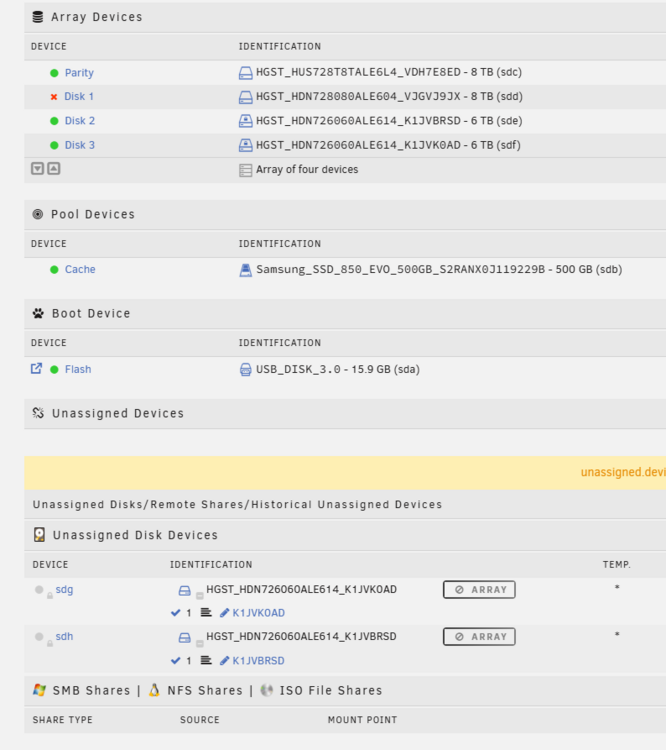
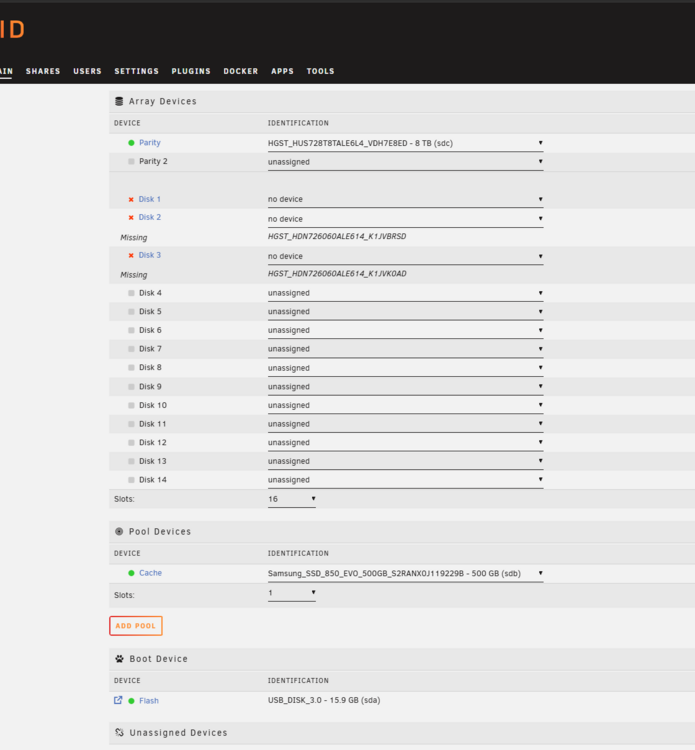
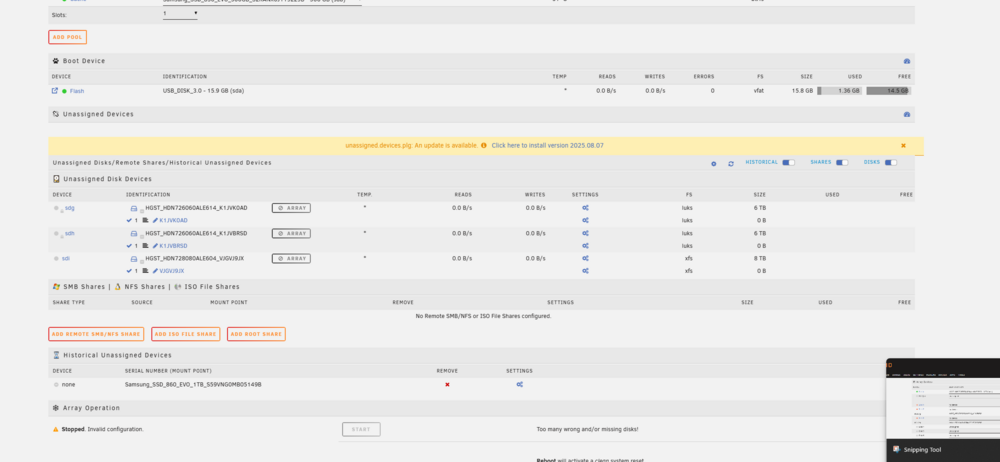
TLDR: was a bad set of breakout cables caused buy a perhaps fried HBA (keeping the spare HBA in for now). I just updated to 7.1.4 from v6 a few days ago in case this matters. I got a message that multiple drives had errors suddenly and that one had been disabled. I went into the gui and saw Disk 1 was disabled and being emulated. I went to Shares to see if anything was there and 0 shares showed up, even the ones my others disk use. I stopped the array and then in the disk listing it now said it was missing a bunch of them and they were at the bottom as unassigned. I thought this was all odd so I rebooted the whole machine and when it came back up the gui showed all my disks fine except for the Disk 1 disabled still. I started the array in Maintenance Mode and ran a File System (file system is xfs) check and everything it tried failed with: xfs_repair: read failed: Input/output error. All the drives are attached to a H310 PERC with a Jonsbo backplane. Has my HBA just suddenly like kicked the bucket? The contents of my emails: Event: Unraid array errors Subject: Warning [RVC-NAS] - array has errors Description: Array has 3 disks with read errors Importance: warning Disk 1 - HGST_HDN728080ALE604_VJGVJ9JX (sdd) (errors 2) Disk 2 - HGST_HDN726060ALE614_K1JVBRSD (sde) (errors 1) Disk 3 - HGST_HDN726060ALE614_K1JVK0AD (sdf) (errors 1) Event: Unraid Disk 1 error Subject: Alert [RVC-NAS] - Disk 1 in error state (disk dsbl) Description: HGST_HDN728080ALE604_VJGVJ9JX (sdd) Importance: alert In Maintenance Mode AFTER I Stopped the ARRAY the first time. Before the REBOOT.
-
Any update on this, it is still an issue with 6.12.10 and recycle bin would be great if it could monitor and delete stuff immediately but it can't so I either have to wait an hour or go in the web UI to run it manually.
-
OMG so I went down a rabbit hole and for anyone who had this issue this is what I got. I had to end up going to dashboard/settings/management access/ then provision my ssl cert on unraid's lets encrypt dns thing and it made my own dns cert and then I had to turn off the plugin and turn it back on and now it works and now i'm down to just working out the normal permission stuff (sys at the moment I have files attached to nobody). The plugin and webui is now pointed to the huge long cert url unraid uses for https then my port for reference. EDIT: Thanks again for the quick help. I got all my stuff moved over then encrypted my other drives and got my shares set how I want them.
-
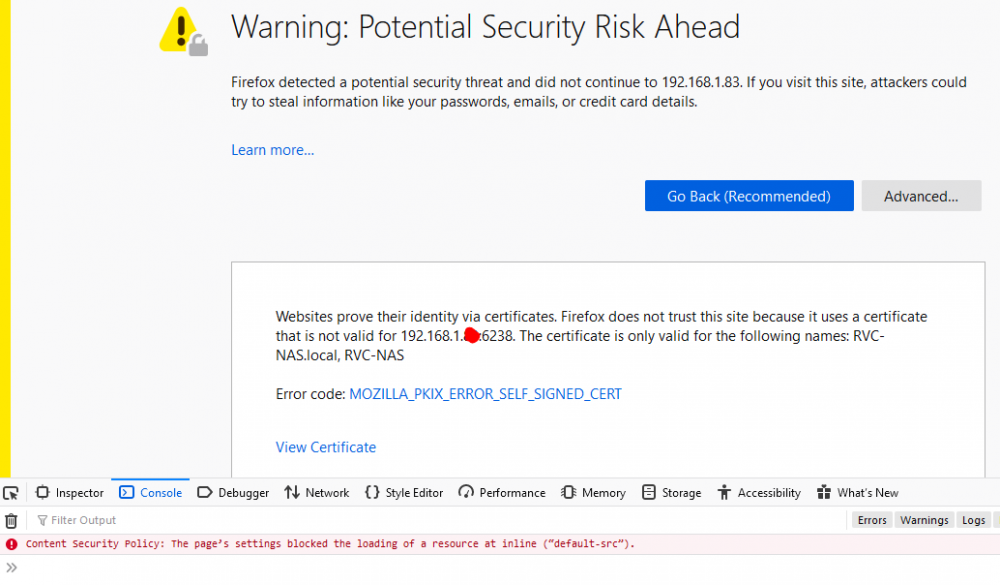
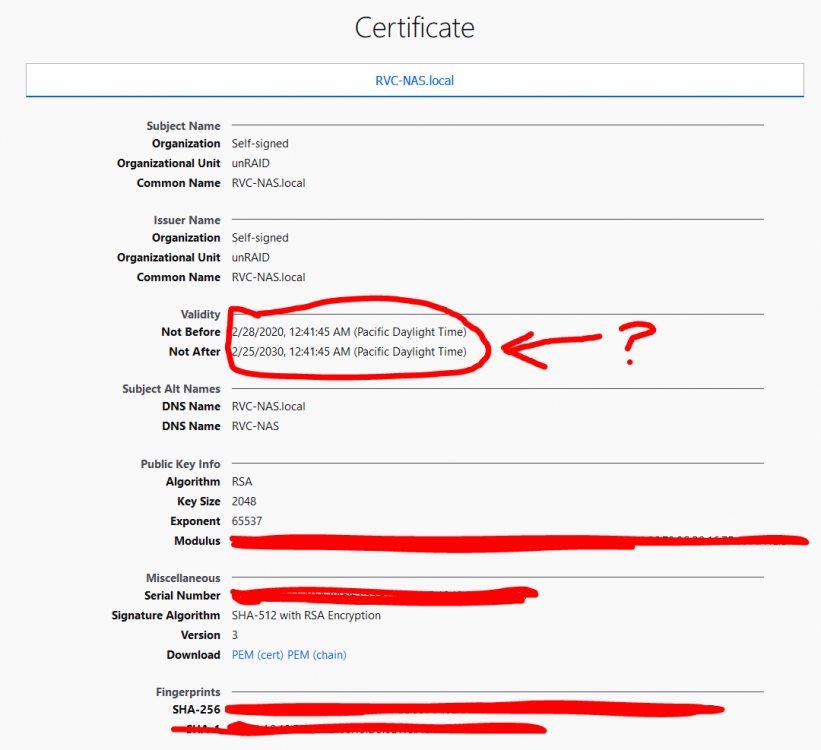
I just updated to 6.8.3 from 6.8.2 and downloaded firefox to test and get the same issue and it does say that it is trying to load a self cert that is only good for the name of what I named my NAS in the unraid info menu. I do not know how to check if there is a self cert setting or something somewhere. I also noticed that the cert it is making is I guess invalid as it seems to have the wrong date completely on it. My unraid does have the right UTC ect. Realized it shows 2030 as the end date so I guess the date is not the issue. Thanks for the help so far.
-
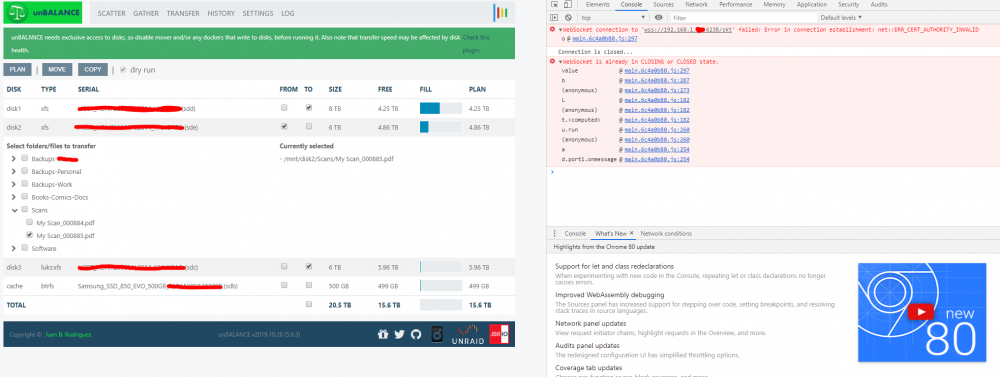
This is what I get, I think it is all because of a cert issue? That is after clicking plan.
-
Okay I don't know what is wrong, first time using this and I want to move all data from disk 2 to disk 3 which is Luks:xfs and then later I will make disk 2 also encrypted and then set the shares to use both disks. I select what I want and I get the plan button, click it and only get the animation in top right no log window lowering, and the ui just becomes unresponsive after that unless you refresh and that just makes it start all over as if nothing has happened. If I click on Log at the top it does the same thing and none of the buttons up top are clickable anymore. I have tried doing this in Chrome, Chrome Incognito, Edge. All get the same thing and first complain that the sites not secure but I just tell it load it anyways as it just has no cert (is it supposed to?). Any advice? EDIT: attached log that shows it is writing to it but only on like load up of the web ui and refresh of the ui. unbalance.log
-
Hi all, I ran this plugin a week ago and cleared a HGST 6TB it ran fine and passed the preclear (took 32 hours). So then I quit the docker, stopped the array, and added the new disk and it cleared it anyways. Then I came here and found I guess there is a bug and it needs to be like read only at the end now, but also saw today that the plugin was updated so this has this bug resolved for future use? Again thanks for the hard work to put this great plugin and docker together for us.



