





NotHere
Members
-
Joined
-
Last visited
Everything posted by NotHere
-
Hi hi. :) back for another request :)... Is there any way we can download all the course files at once?
-
Ahhh. Thanks for getting back to me :) Yeah, I understand all about time and the family, so I am just grateful for the app itself ;) I don't know anything about IO or whatever that means, but I assume is just something that slows down the system. I also may not have explained myself 100% correctly so that's on me :/. I like the SQLite, if things are saved in there, that is great. I would assume the structure? I assume the JSON file is no longer needed or is it actually needed? I really didn't understand what it was for other than for the category and thumbnail options. I understand there are a whole lot of file extensions and I don't know what it takes regarding what you mentioned above, but it seems it's not easy :(. I just want a way to go into a Course and if there are IMAGES or ZIP files in the folder, then the user can download them. The only suggestion I can think of without having the IMG and ZIP file downloads is a user base. I would love to see the users and see what courses they are interacting with and maybe their progress. That might be fun... but now it just seems like it might be a lot of work.... Oh well, just thinking outlaid. Thanks a lot.
-
Just installed.... I LOVE IT!. I have been reading the documentation and since I am not the brightest, have some questions if you don't mind :) 1. I know you mention to create a JSON file for each course, but I see you can also edit the course category and thumbnail in the application. Would there be a way to generate the JSON file when the user uses the EDIT feature and saves it? 2. I uploaded a thumbnail for one of the courses, but I did not see it in the folder when I clicked on upload. Where does the thumbnail get saved? It would be great if the application uploaded the thumbnail into the course folder along with generating the JSON file. 3. I noticed only video files show up in the course page. What if there are ZIP files for the user to download or IMAGE files? Can you implement that as well? Might have more feedback if you get back to me and this is something you are thinking of working on. Just have to say again, I love it. Thanks.
-
If I understand correctly, you want the GhostCMS default admin login? From my understanding, there is NONE. When you first install GhostCMS, you can go to "YourGhostUrlWhateverItMayBe.com/ghost" and it will prompt you to create a new user. That will be the admin user.
-
NP at all. I don't know anything about templates, and I always love all the stuff you create :). So thank you. Also, if realized that after I changed the permission on `appdata/scratch_map` , I went back to the template and changed PUID to 99 and PGID to 100 (got this numbers from other templates) and the error disappeared in the logs. So now all works and there is no more error. Just wanted to share that as well.
-
Good day "grtgbln". Just got your template for "scratch-map" and I can't seem to install it at all. I have tried changing everything I could think of but still get the same error. Anything you can think that I might be doing wrong? node:fs:596 handleErrorFromBinding(ctx); ^ Error: EACCES: permission denied, open '/data/.db.json.tmp' at Object.openSync (node:fs:596:3) at Object.writeFileSync (node:fs:2322:35) at TextFileSync.write (file:///app/node_modules/lowdb/lib/adapters/TextFileSync.js:36:12) at JSONFileSync.write (file:///app/node_modules/lowdb/lib/adapters/JSONFileSync.js:29:66) at LowSync.write (file:///app/node_modules/lowdb/lib/LowSync.js:28:26) at createConnection (file:///app/utils/database.js:42:6) at file:///app/server.js:44:7 at ModuleJob.run (node:internal/modules/esm/module_job:195:25) at async ModuleLoader.import (node:internal/modules/esm/loader:337:24) at async loadESM (node:internal/process/esm_loader:34:7) { errno: -13, syscall: 'open', code: 'EACCES', path: '/data/.db.json.tmp' } Node.js v18.20.4 ** Press ANY KEY to close this window ** EDIT: I was able to get this working by changing the permissions in the `appdata/scratch_map` folder to RW for every option. I don't know if that is something that can be done via the template itself, but since I do not know, I did it manually. That seemed to have worked perfectly.
-
Thanks so much for the reply SimonF. User error :(. Having issues with both GPUs in Unraid but now they are both showing :).
-
Good day all. Would this plugin show 2 GPUs? I have a second one connected but I don't see it in the dropdown where you select the GPU you want to show. Maybe I did something wrong, so want to ask if that's the case.
-
It seems to have been fixed :). I didn't do anything except change IP in the docker template. THanks :)!
-
Hi. I just installed "plex-rewind" and it was all going great. Added the file to the /config/ folder and launched the WebUI. Added the required fields and seemed to have worked. However, when I clicked on login with Plex, I got this error. I have done everything I can think of and still same issues. I assume it's because I have 2Fa?

-
Thanks so much. I will give it a try for sure. Let's see how it comes out
-
Good day grtgbln. Would you be willing to create a template for : https://github.com/karlomikus/bar-assistant I Googled and found some instructions but could never get it working. It uses like 3 other dependencies and I can't understand it.
-
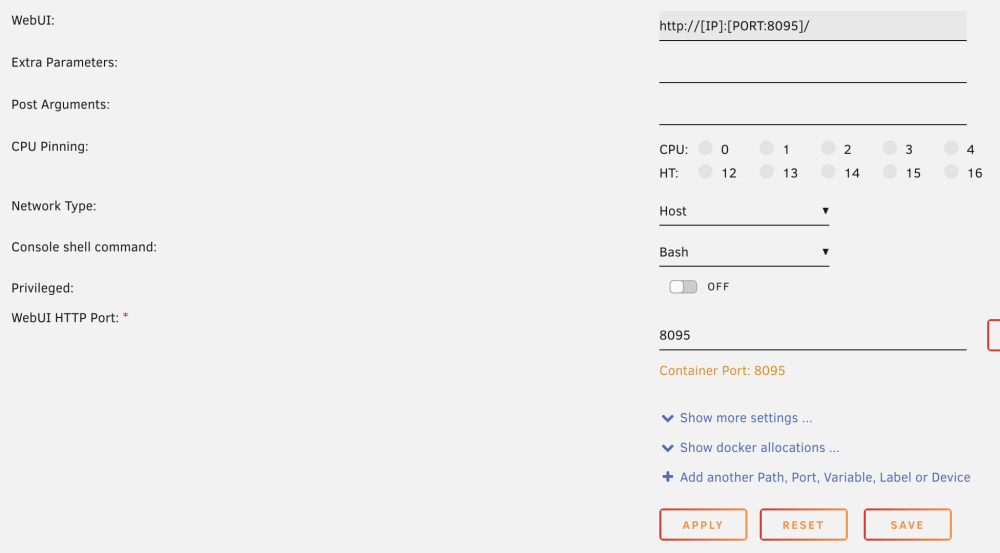
Thanks so much for the information. Sucks that I just couldn't figure it out :(. Is there a way to change the port from 8080 to anything else? No matter that i do I just cant change the port. Could be a me problem of course, I just have changed ports to containers before without issues, but this one wont do it.
-
Hello there. I just installed your "LocalAI". It seemed quick and easy. My issue is that I cant change the port from 8080 to anything else. I have tried to change it at the "WebUI HTTP Port:" variable you added to the templet and that did not do it. I know it works cause I was able to go into the WebUI from the docker and it shows the installed modules. However, I have no clue how to use them :/. Any more information on how to use the modules? I looked at the documentation, "https://localai.io/" but that was no much help for someone like me who does not understand anything from there. Any help on how I can use the modules I would be greatly appreciated.
-
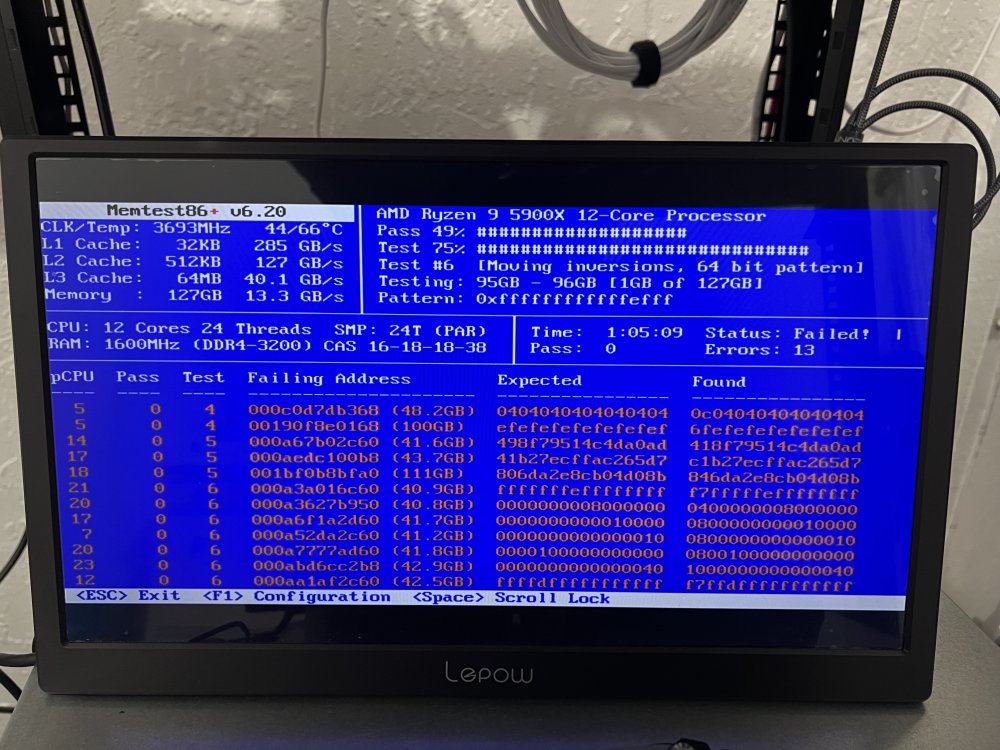
So now that I know I have a bad stick, I tested each of the 4 sticks alone, and found the bad seed. I can change that and I should not have any more weekly crashes?
-
Understood. I am going to try tested each stick 1 by 1 and see what comes out of it. I guess this is the reason for all my crashes
-
I was not able to get memtest running from USB. I downloaded it, used their flashing program and followed the instructions. However, it did not work, nothing would happen when I tried to boot from the USB. However, Unraid has memtest built in, so I used that. I assume my memory is dead? I was told to reseat the sticks and try again. I am going to do that. This is what I got at almost 50% done.
-
I did NOT. I don't think I know how. However, I can always Google, and after a quick Google, I would assume I need to load a separate SSD with windows installed on it to run a program like MemTest86?
-
HI HI. Its been a while, just wanted to capture as much as I could. From the time I figured out how to get the logs to actually populate, I have had like 3 crashes. I consider a crash when I cant access the GUI or when I cant access a docker instance. Let me know if you see anything. I will keep it going as I just keep having issues over and over that I never had before the last major update. It could always be user error, I am a noob, I know, but its just insane how I never had issues before the last major update. Yes, I have added more HDD, more DATA, and more dockers, that might have a lot to do with it, but I honestly have no clue syslog-192.168.1.10.log
-
Honestly, I have not. I am not sure how to get that done, but I will Google it for sure. THanks for the advice.
-
Good day all. Looking for some help please. I have noticed that recently, my Unraid becomes unresponsive. The GUI does not load. 25% of the time I can access the server via SSH and a reboot commend fixes it. However, 75% of the time, like it just happened now, nothing work, not even SSH, so I have to power cycle it myself by holding down the power button. Can someone please tell me if you can see why this keeps happening? I have uploaded the diagnostics see if anyone can see something in there. haberworld-diagnostics-20240111-1534.zip
-
Sadly I never did :(. I just changed my docker to folders and never looked back.
-
This thread was useful to me as well. I never turned on SSH as I thought it was automatically ON. Thanks for the information.
-
That was insanly easy.. WOW, thanks so much for this information that worked perfectly!
-
Good day all. I have installed Ghost CMS with the help of https://technicalramblings.com/blog/how-to-setup-a-ghost-site-with-letsencrypt-and-mariadb-on-unraid/#ghost So now that I have it installed, I dont know how to login. I do not know what the admin login info is. On top of that, when I try to create an account, it says "Failed to send magic link email". Any idea how I can 1. login to the admin account? 2. create new accounts? Thanks so much





