phrozen087
Members
-
Joined
-
Last visited
-
Just wanted to post a quick followup for anyone who stumbles on this after me with some observations. My drive had 4kb physical sectors with 8 logical sectors in it. I initially did a full pre-clear and then a parity swap procedure. It looks like during the swap procedure the unused portion of the parity array had 1/8 logical sectors that wasn't zeroed. So I'm guessing the bug is something related to a certain bit not being properly zeroed during a rebuild if that portion of the parity disk is unused. I did some math on it and also was able to confirm from where the parity corrections were made that it was only the unused portions. On following parity checks everything has been smoothly since as well, so the advice in this thread is good also A bit scary for me since I'd had some disk issues, but it seems to just be a quirk/bug when doing a larger parity swap procedure.
-
@JorgeB Just wanted to come here and say thanks so much for this thread. I recently did a parity swap from a 6TB to a 12TB parity array. The first 6TB ran perfectly smoothly with 0 errors and I was excited for the process to speed up once it was over 6TB since all the data was done checking. Started getting a ton of `Sync errors corrected` a little ways into that and after all the other disks had shut down. I ended up freaking out and canceling the parity check, but after reading this I'm going to just let it run to completion now. It might be worth considering if this should be documented in the FAQ here? https://docs.unraid.net/legacy/FAQ/parity-swap-procedure/ For record I had a disk 1 failure so I did the following: My old parity was a 6TB drive, so all the disks were 6TB or less Bought a new 12TB disk and ran it through the full pre-clear + zeroing with no issues. Did the parity swap procedure, the old parity copied fine over to the new parity drive. The new disk 1 (the old parity) rebuilt fine and all the CRCs for the files checked on the rebuilt disk correctly. I decided to run a parity check to just be confident everything was ok (it mentions its a good confidence builder at the end) The first 6TB of the rebuild went smoothly with 0 `Sync Errors Corrected` Around 6.1/6.2 TB into the parity (at this point all the array drives had spun down since all the data drives were < 6TB) I started accumulating a huge number of `Sync Errors Corrected`. I would have assumed this part would have been quick with no errors after the pre-clear/swap procedure? EDIT: Just wanted to add I checked and none of the drives had any SMART errors or any issues during the parity check. I was only seeing this on the unused (supposedly zeroed) portion of the parity drive. Just wanted to post this if anyone else has a similar experience. I'm on Unraid `6.12.11` when I did all this. I'm going to assume these corrections are basically just that the upper unused 6TB of parity wasn't zeroed out properly?
-
Thanks for the response! Just having the Intel one is huge for me, as that one has always been a bit "hidden" since it's mainly only used for Plex transcoding and stuff. I can always monitor the Nvidia GPU from the windows VM when its on, and when the VM is off it seems to completely turn off the graphics card. Again, great plugin and thanks so much for making it!
-
Amazing job on this! I saw the post on reddit this morning about the Intel GPU, so I commented out the modprobe in my go file, installed the Intel GPU Top plugin, rebooted and installed GPU statistics, setup the plugin and everything worked great! It's really nice to be able to see some visualizations and stats of life in the Intel GPU if it's doing some transcoding or something else. Quick question I was wondering, is if it is possibly to poll more than a single graphics card? I have an i9700k as the main CPU and use the Intel GPU for the dockers that benefit from it, but I also have a GTX 1080 installed for the gaming VM, and was wondering if its possible to have the Nvidia card polled by Unraid. My gut thought was that since the VM has control of this card than it might not be possible for unraid to see it unless I do the bios patch to the vm, but I was curious if there was a way to select a second card to poll within the plugin itself?
-
Were you able to get this to work? I have 2 Samsung 970 NVME drives that consistently run in the 40-45C range as Unassigned Devices to hold my VM images, so I manually went in and set all of my spinning disks to have have 40C warning/ 45C critical and then changed my global disk setting (Settings->Disk Settings-> Default warning disk temp and Default critical disk temp) to 65C warning and 70C critical. I still see warnings whenever I log into my server that one of the NVMEs was running in the 45-50C range, which is pretty common during VM disk images backups. I've tried changing this up and down thinking maybe its not sticking, but it seems like the temps for my unassigned devices are stuck at the default temperatures from when unraid installed and aren't observing the values in this setting. Wasn't sure if I was doing something wrong here, or if there was an easy fix I was just missing?
-
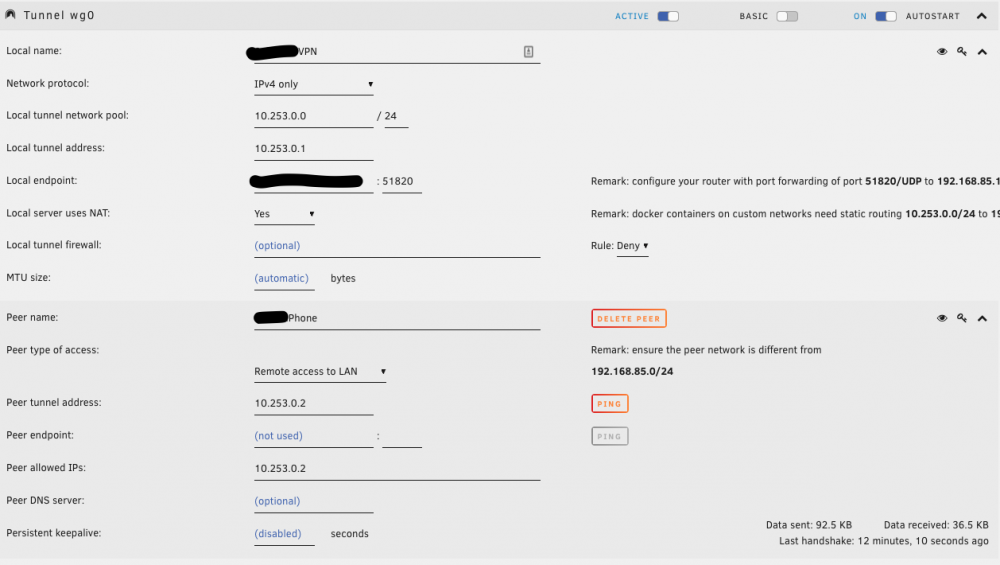
Small followup to my last post. It seems that with the Remote Access to LAN setting I am not actually able to access anything on the LAN. I checked that bridging is enabled and I can ping the server on both 10.253.0.1 and 192.168.85.111, but I can't seem to ping any other devices on the network. I downgraded back to 6.8.2 hoping that might help, but it doesn't seem like it changed anything. EDIT: So I reinstalled the OpenVPN AS docker container just to see if that would work, and connecting through that gives me full access to the whole LAN, so the issue is only occurring with wireguard on my server. I guess OpenVPN isn't a bad backup option, but I liked how lightweight wireguard is.
-
Ran into a weird issue after upgrading to 6.8.3 and was hoping someone might know what went bad. When I connect to Wireguard from my phone or laptop outside of my network I am unable to access my VMs with RDP or Splashtop that are inside the network. My main VM is located at 192.168.85.112 and the unraid server is located at 192.168.85.111. It seems like the NAT isn't working properly. Initially I had a lot of networking issues after upgrading so I deleted by network config and rebuilt it, and this fixed most of my issues. It seems like the RDP applications aren't making the link from the 10.253.0 subnet to the 192.168.85 subnet. This was working without any issues before I upgraded to 6.8.3, so I'm not totally sure what could have happened. Thanks for any help!
-
Right after I posted this I finally found a post that said to rename the `/boot/config/network.cfg` to `/boot/config/network.cfg.bak` and it looks like that has restored the `br0` and all the other missing settings! EDIT: As a side piece of information this has also fixed my Steam Link issues. I was having the connection fail at anything above 20 MB/s on the virbr0 connection, but now that the VM is back on br0 my Apple TV devices can connect to Steam Link at the full 100 MB/s rates! EDIT 2: This also fixed all of the issues I was having with the Wireguard Remote Tunneled Access not being able to browse anything outside of my local network. I'm not sure exactly what happened to corrupt the network file, but I'm glad its fixed now.
-
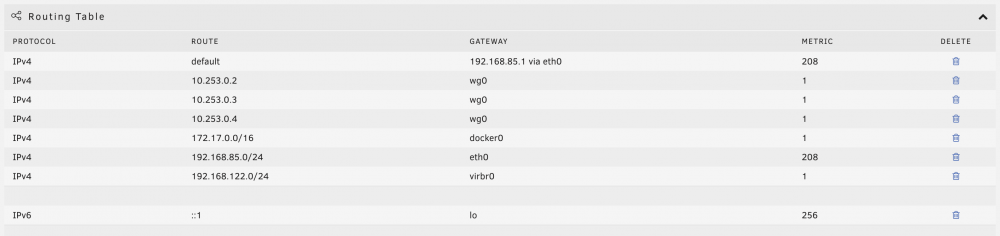
I installed the 6.8.3 update and all of my VMs were showing the error `Cannot get interface MTU on 'br0': No such device`, so I opened the configs and resaved them and things started partially working, but all of my VMs are now connected to `virbr0` and `br0` no longer exists. I looked around in the forums and tried running: - `rm /var/lib/docker/network/files/local-kv.db` followed by `/etc/rc.d/rc.docker restart` - I deleted the docker image and reinstalled all of the dockers - I tried looking the in system network settings, but br0 is just completely gone. When I run `docker network list` I get: NETWORK ID NAME DRIVER SCOPE e29e59559969 bridge bridge local bfbd871c4e0f host host local 77fc2a1fcd1f none null local And my routing table also no longer has a br0. I was having some other issues, but it seems like all my VMs are now in the 192.168.122.xxx range which is causing a lot of other issues. Any help on how to get br0 back so that the VMs go back into the 192.168.85.xxx range would be really appreciated.