





wilsonhomelab
Members
-
Joined
-
Last visited
-
I remembered Spaceinvader one in his channel said SSD cannot be used for parity in array. Sent from my VOG-L29 using Tapatalk
-
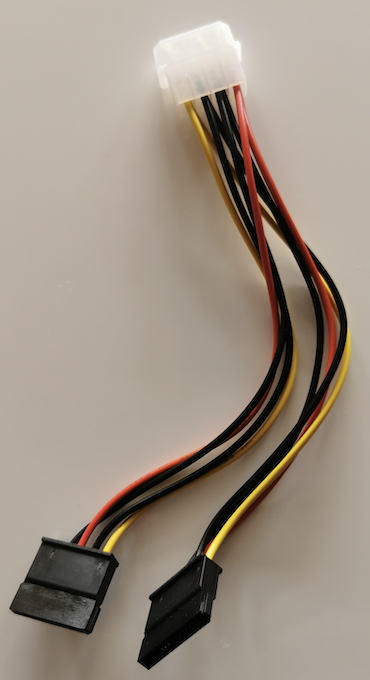
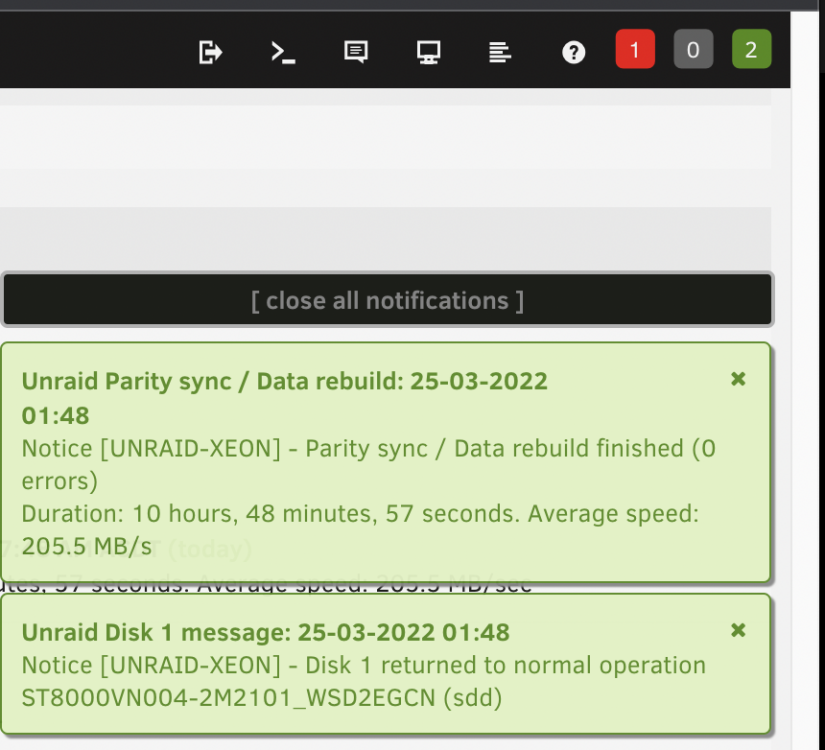
I think I finnally found the culprit. The I/O errors actually came from, I believe, the insufficient sata power. I used a molex-to-2x-15-pin-sata cable to power the silverstone 5HDD hot-swag cage due to the clerance problem. And I never ran into problems untill I populated all 5 HDD into a single cage (I have two of the cages). I found a simular issue, which prompted me to try power the cage with two dedicated sata cable straigh from the PSU. THE end result is that the disk 1 was pre-clear at double of data rate at 200+MB/s instead of 90MB/s . The rebuild process was done in 10 hrs with average 202MB/s. I wish the system log could be more precise about the I/O error (" hard resetting link") , or the drive itself should have reported under-power issue. I hope this will be helpful for someelse.
-
In case someone has trouble to look for this KB article. The URL is now here Just to clarify, LSI 1086E will support SAS drives greater than 2TB, but not SATA drives. Confirmed this in my Dell R410 with SAS 6/iR HBA. All 4 x 3TB SAS drives are recognised.
-
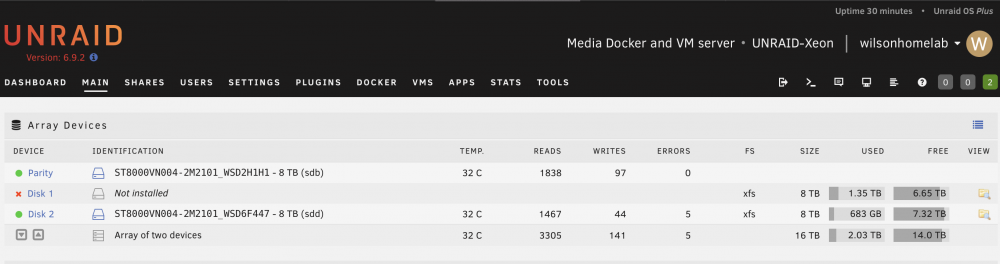
While disk 1 is performing pre-clear, disk 2 came up 5 errors🤨. Should I repeat the same procedure? start as maintenance mode and do check-and-repair xfs file system again? I think I am still not getting the cause of the disk error problems. unraid-xeon-diagnostics-20220322-0936.zip
-
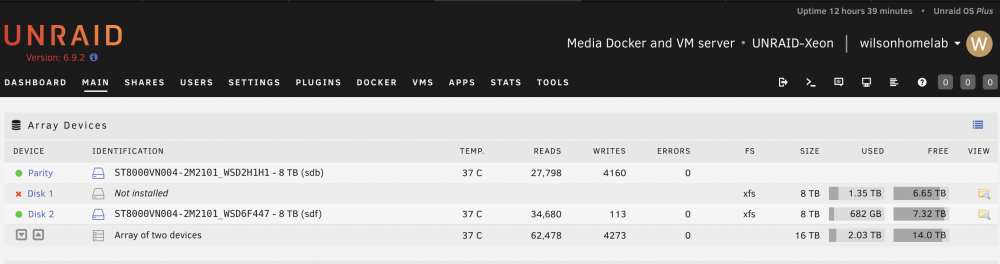
I went ahead with the -L option. Now I can see the disk 1 content!😀 If I understand correctly, will the parity start rebuilding the physical disk 1 once I restart the array with disk 1 plugged in? I also want to make sure whether this issue is an indication of a failing drive. May I perform a pre-clear of disk 1 first to see if it can withstand the heavy read / write process? If it is good, I put it back to the array for rebuild. root@UNRAID-Xeon:~# xfs_repair /dev/md1 -L Phase 1 - find and verify superblock... - reporting progress in intervals of 15 minutes Phase 2 - using internal log - zero log... ALERT: The filesystem has valuable metadata changes in a log which is being destroyed because the -L option was used. - 04:55:12: zeroing log - 119233 of 119233 blocks done - scan filesystem freespace and inode maps... - 04:55:13: scanning filesystem freespace - 32 of 32 allocation groups done - found root inode chunk Phase 3 - for each AG... - scan and clear agi unlinked lists... - 04:55:13: scanning agi unlinked lists - 32 of 32 allocation groups done - process known inodes and perform inode discovery... - agno = 0 - agno = 15 - agno = 30 - agno = 16 - agno = 17 - agno = 1 - agno = 31 - agno = 18 - agno = 2 - agno = 19 - agno = 20 - agno = 21 - agno = 22 - agno = 3 - agno = 23 - agno = 24 - agno = 25 - agno = 26 - agno = 27 - agno = 28 - agno = 4 - agno = 5 - agno = 29 - agno = 6 - agno = 7 - agno = 8 - agno = 9 - agno = 10 - agno = 11 - agno = 12 - agno = 13 - agno = 14 - 04:55:24: process known inodes and inode discovery - 148992 of 148992 inodes done - process newly discovered inodes... - 04:55:24: process newly discovered inodes - 32 of 32 allocation groups done Phase 4 - check for duplicate blocks... - setting up duplicate extent list... - 04:55:24: setting up duplicate extent list - 32 of 32 allocation groups done - check for inodes claiming duplicate blocks... - agno = 0 - agno = 3 - agno = 2 - agno = 7 - agno = 9 - agno = 11 - agno = 12 - agno = 21 - agno = 22 - agno = 23 - agno = 13 - agno = 28 - agno = 5 - agno = 1 - agno = 8 - agno = 19 - agno = 17 - agno = 6 - agno = 18 - agno = 20 - agno = 4 - agno = 15 - agno = 24 - agno = 25 - agno = 26 - agno = 10 - agno = 27 - agno = 16 - agno = 29 - agno = 30 - agno = 14 - agno = 31 - 04:55:24: check for inodes claiming duplicate blocks - 148992 of 148992 inodes done Phase 5 - rebuild AG headers and trees... - 04:55:25: rebuild AG headers and trees - 32 of 32 allocation groups done - reset superblock... Phase 6 - check inode connectivity... - resetting contents of realtime bitmap and summary inodes - traversing filesystem ... - traversal finished ... - moving disconnected inodes to lost+found ... Phase 7 - verify and correct link counts... - 04:55:31: verify and correct link counts - 32 of 32 allocation groups done Maximum metadata LSN (6:909635) is ahead of log (1:2). Format log to cycle 9. done
-
I click the "CHECK" button under "disk1 setting", and nothing happen. So I typed the command as follow root@UNRAID-Xeon:~# xfs_repair /dev/md1 Phase 1 - find and verify superblock... - reporting progress in intervals of 15 minutes Phase 2 - using internal log - zero log... ERROR: The filesystem has valuable metadata changes in a log which needs to be replayed. Mount the filesystem to replay the log, and unmount it before re-running xfs_repair. If you are unable to mount the filesystem, then use the -L option to destroy the log and attempt a repair. Note that destroying the log may cause corruption -- please attempt a mount of the filesystem before doing this. Could you please explain what the "ERROR" session ? Thanks
-
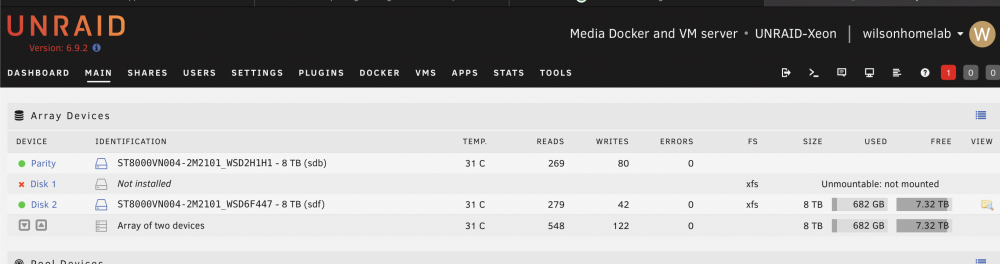
I removed the disk 1, and restarted Unraid. As I expected, the parity drive doesn't emulate the missing drive. Please help! My priority will be recovering the missing data from parity. I hope it will be still possible. Then test the problem drive as it is still under warranty.
-
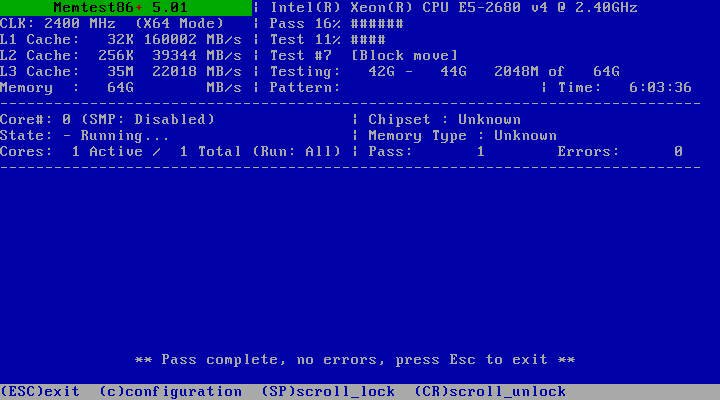
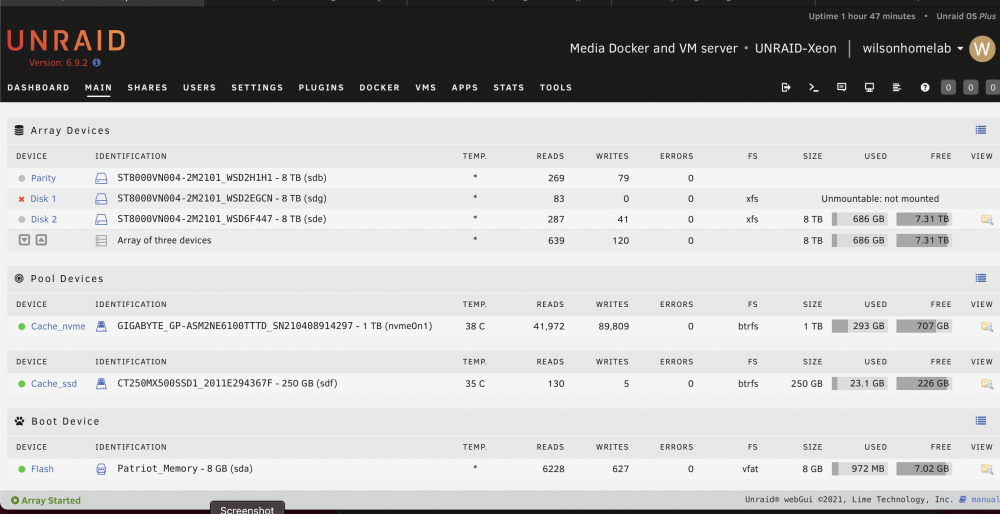
A month ago, I transferred my array (Ironwolf 8tb x2, 8 months old) from desktop hardwares to server hardwares (dual Xeon E5-2680 v4, 64GB Samsung ecc memory, Supermicro X10DRL-i server mobo ). Unraid recognised all drives (parity, disk 1) in the array and ran smoothly for couple of weeks. 10 day ago, I purchased an additional Ironwolf 8tb (disk2) and added to the array after preclear. I ran parity check without any problem with 220MB/s average speed. Last week, the disk 1 started showing errors after I transferred some media files from unassigned drives using Krusader (docker container). So I tried swapping SATA cable / SATA ports, but the disk errors only seemed worse (from 4 errors to 80 errors). Then I tried parity check which only gave me KB/s speed (I paused it). I knew something was wrong. I quickly checked the diagnostic and showing "ata6: hard resetting link", "ata6: link is slow to respond, please be patient (ready=0)" unraid-xeon-diagnostics-20220312-1735.zip Last night, I saw the accumulated disk 1 errors as high as 800 (after a week), so in order to rule out the potential problems from the mobo SATA ports and the SATA calbles I used, I installed a working reliable LSI SAS2008 with a working reliable SFF8087-to-4-SATA cable. After booting up Unraid, all disks were recognised, but disk1 and disk 2 were both "unmountable" with option to format. unraid-xeon-diagnostics-20220321-0240.zip I then upgraded the mobo BIOS to the latest and ran 6 hrs of Memtest86+ without error. This morning, I restarted Unraid and saw disk 1 "unmountable"; parity and disk 2 are working. Shares stored in disk 1 is not showing up (not emulated at all). I just wonder why emulation is not working with only one disk down? unraid-xeon-diagnostics-20220321-0909.zip Could you please also advise what should I do now? repair the xfs file system? Please help~
-
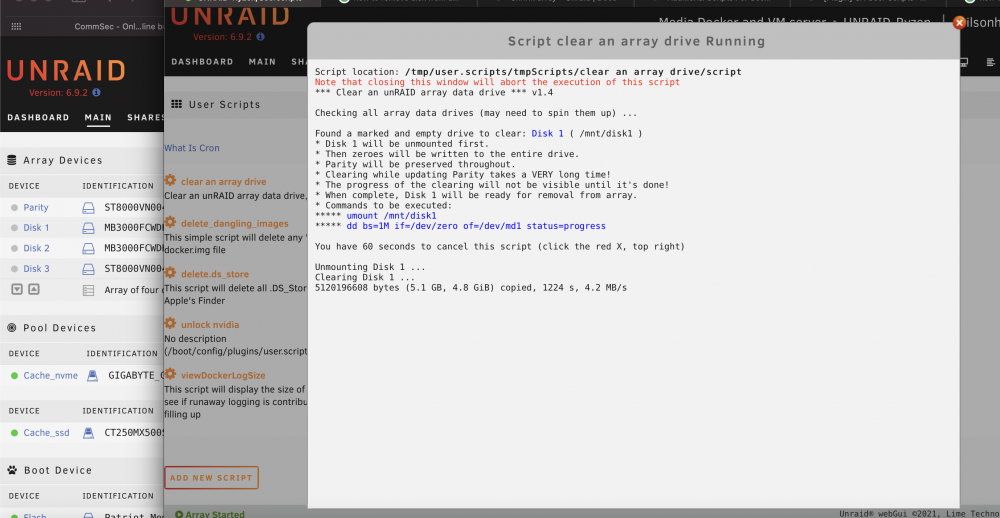
I was trying to shrink my array. I followed the instructions here. I started "clear_an_array" script, and kept the window open for more than 24hrs now. There is no progress showing anymore, and all disks in the array sprung down already. Am I safe to close the script window and proceed to the next step ("Go to Tools then New Config")?
-
我Array有两个SAS 硬盘,两个SATA硬盘,6.9.2下确实不能spindown. GOOGLE了一下,我的解决方案 - 安装SAS Spindown插件, 好像是必须,unraid用了sata代码,SAS drives不能spin down - 安装cache drive, 把appdata的cache选项prefer, 然后启动mover, 把folder移到cache drive。注,appdata在cache drive没有parity保护。 Sent from my VOG-L29 using Tapatalk
-
Thank everyone. I stop all dockers and vms, then rsync those folders to the nvme cache. It seems to work. When I rename the appdata folder to "appdata_" in the cache_ssd, for the sake of keeping a backup, a new share "appdata_" appears. Sent from my VOG-L29 using Tapatalk
-
I know this is an old thread. But I have encountered this exactly same issue and couldn't figure out why. This happened after I had a potentially bad mini sas cable and force me to rebuild disable disk, and (after swapping another cable) also upgraded to a higher capacity parity drive, as well as adding an extra 1TB ssd nvme cache drive (on top of an existing 240GB sata SSD cache drive). All of a sudden, when I used noVNC to connect to any VM or docker GUI, I had this annoying red window of message error "noVNC encountered an error: script error". Here is a diagnostic file. unraid-ryzen-diagnostics-20210830-1222.zip I noticed that under logs folder, libvirt.txt 2021-08-30 02:39:11.351+0000: 11053: info : libvirt version: 6.5.0 2021-08-30 02:39:11.351+0000: 11053: info : hostname: UNRAID-Ryzen 2021-08-30 02:39:11.351+0000: 11053: warning : networkNetworkObjTaint:5292 : Network name='default' uuid=28cda2d7-3c5e-4367-8d0e-b710f66e1910 is tainted: hook-script 2021-08-30 02:39:15.395+0000: 11037: error : virNetSocketReadWire:1826 : End of file while reading data: Input/output error 2021-08-30 02:39:17.377+0000: 11037: error : virNetSocketReadWire:1826 : End of file while reading data: Input/output error 2021-08-30 02:39:20.654+0000: 11037: error : virNetSocketReadWire:1826 : End of file while reading data: Input/output error 2021-08-30 02:46:03.365+0000: 11038: warning : qemuDomainObjTaint:6075 : Domain id=1 name='Windows 10 Lite' uuid=82d34170-e0fd-6590-b65e-1fa1ecd5a2de is tainted: high-privileges 2021-08-30 02:46:03.365+0000: 11038: warning : qemuDomainObjTaint:6075 : Domain id=1 name='Windows 10 Lite' uuid=82d34170-e0fd-6590-b65e-1fa1ecd5a2de is tainted: host-cpu 2021-08-30 02:47:49.286+0000: 19530: error : qemuMonitorIO:578 : internal error: End of file from qemu monitor I think it might be the error related to noVNC?! not sure Any suggestion is appreciated!
-
I tried to set appdata, domains, system "yes" of "use cache pool", then invoked mover, but nothing happened. Files are not moved and still sitting in both cache pool. Please help Can I manually move files between cache pools? Sent from my VOG-L29 using Tapatalk
-
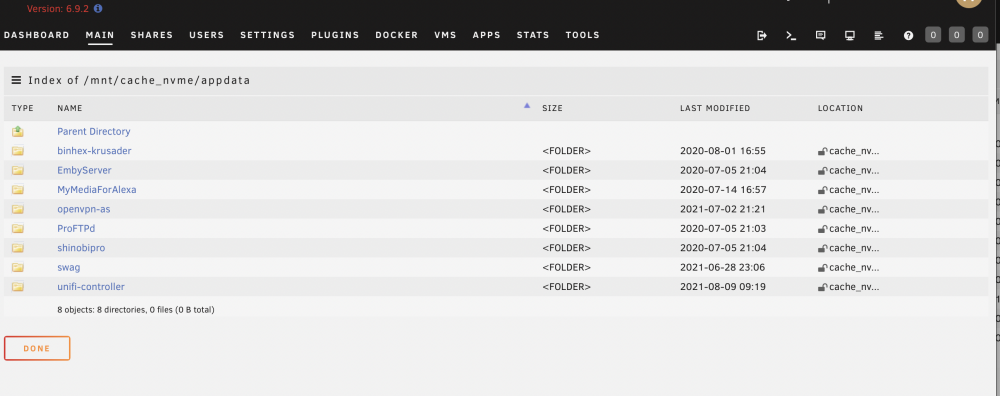
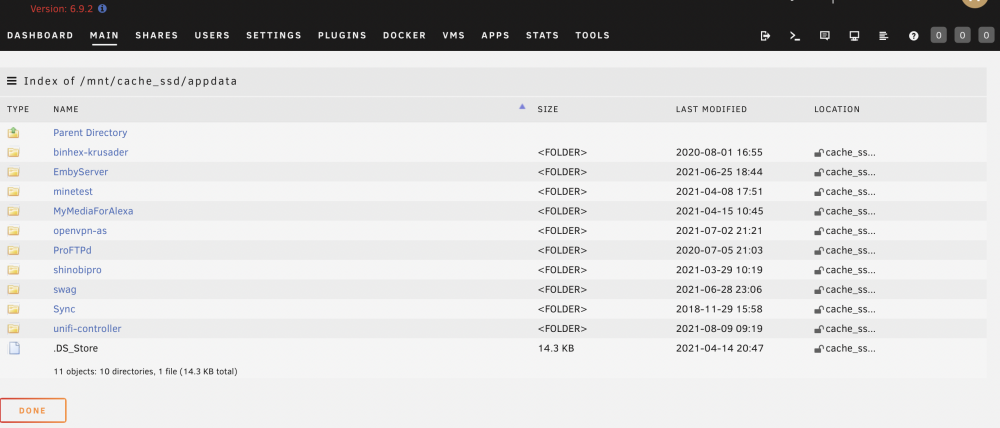
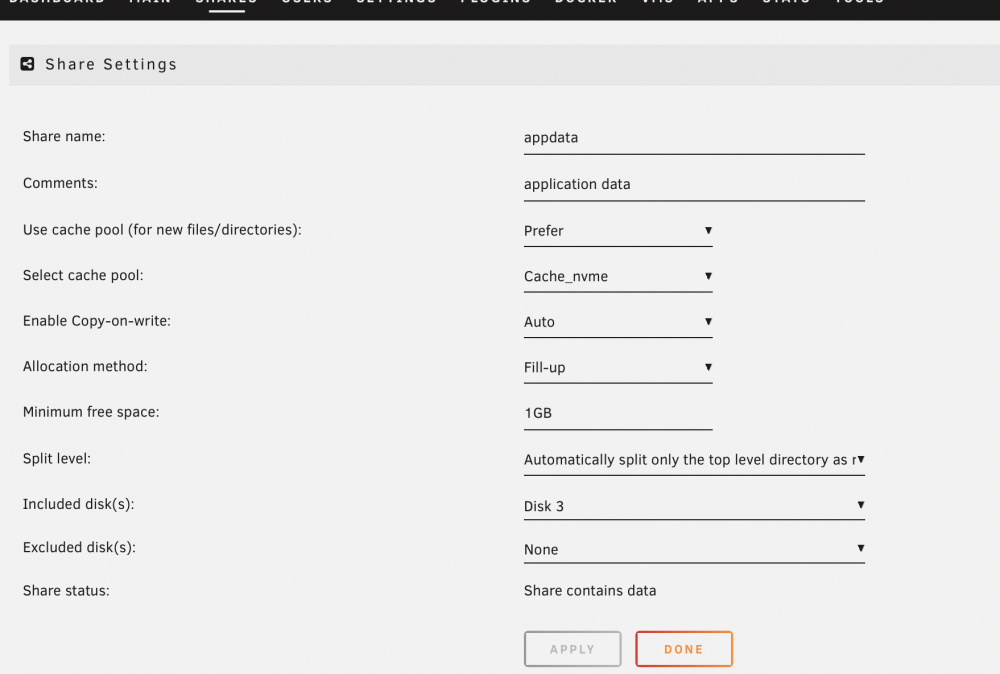
I recently purchase a 1TB NVME drive for cache in Unraid (6.9.2) along with an existing 250GB SATA SSD cache drive. I setup two cache drives. like this My plan is that Cache_nvme is reserved for appdata, system, domains shares, while Cache_ssd is for cacheing SMB copy via 10 GBE (then mover will move data off Cache_ssd later to array). I setup appdata share as this. Somehow mover moved most of appdata to Cache_nvme. Now I've got two (almost) duplicate appdata share in both cache drives. I can't remember how this happen. I think I need to use "Yes" option to let mover move appdata back to array first, then change to "prefer" -> invoke mover to move it again to cache (in this case, new cache_nvme). I am pretty sure that I didn't do this step, but now I have duplicate appdata in both cache drives. (I did invoke mover a few times to shift other shares) So my questions How do I consolidate appdata share to cache_nvme only? Can I manually delete appdata share in cache_ssd? (command line or Krusader) If I write data to "appdata" share, will it update to both cache drives? Thanks

-
The UnRaid behaves as normal. I just backup a few important folders onto my desktop and went ahead the parity drive upgrade. (reported 19hrs at 113MB/s). RE the suspected faulty mini SAS cable, what should I do to test it after the parity drive upgrade? It could be a faulty SAS controller port (port A) it connected to.




