





parazit
Members
-
Joined
-
Last visited
Everything posted by parazit
-
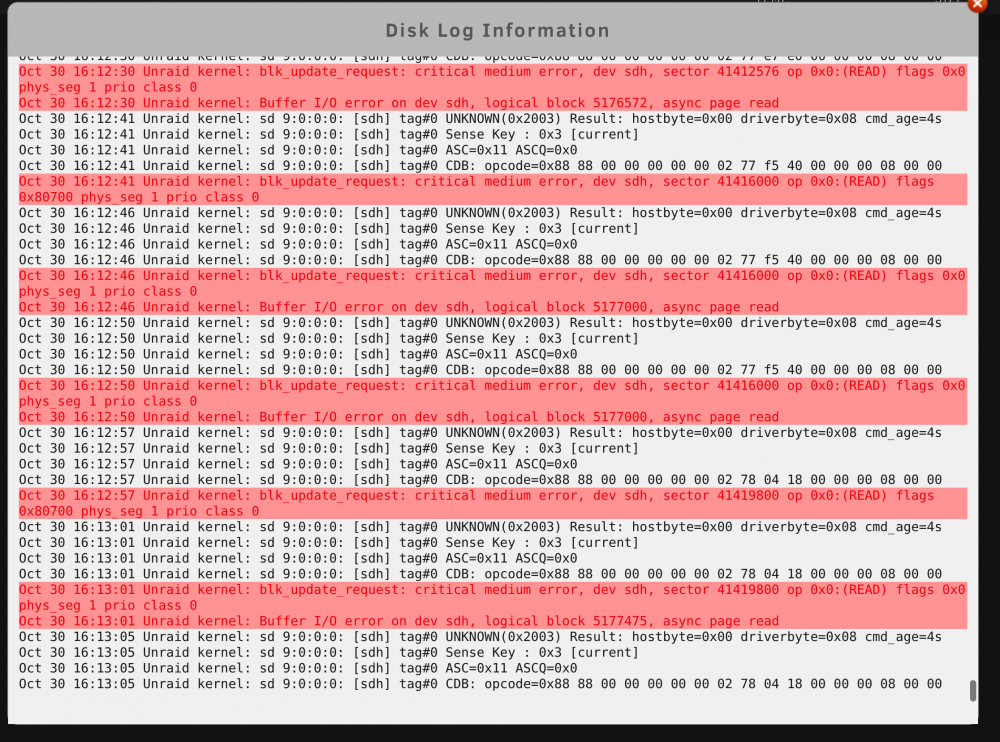
Hello guys! I have just purchased a new WD Red Pro 6TB and i am seeing a lot of "blk_update_request: critical medium error" in the pre-clear log. The disk is connected through a USB Adapter instead of SATA at the moment, because all SATA ports are in use. Is that a normal behavior?
-
Thank you so much! I kinda manage it now without creating a new config and re-sync. But i am not sure what the issue was. Solution: I replaced the current "super.dat" with one from a recent backup and suddenly the array booted up normally, just disk1 was unmountable. I ran a filesystem check and repair, started the array and all disks are back with all data. Running a parity check now to be sure everything works. Thanks again for all the help, because it pushed me into the right direction!
-
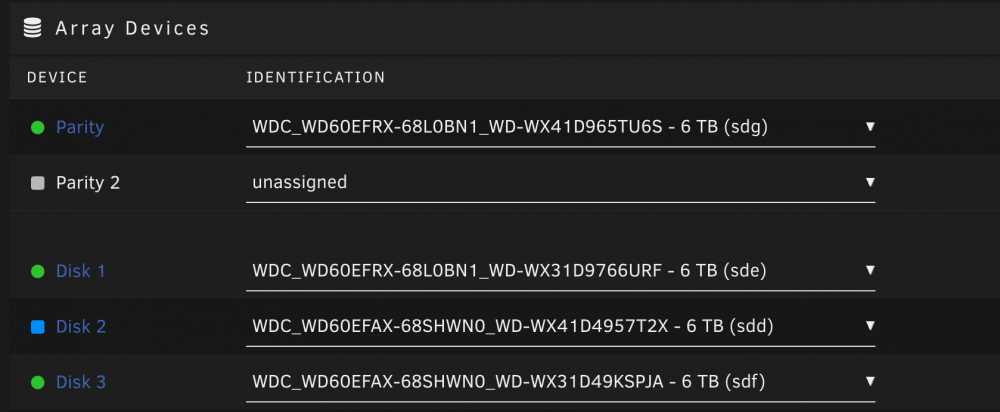
Thank you for your answer! I have also another question/idea: Since i replaced disk2 because i thought it's the failed disk and because i didn't erase the old disk yet, i would like to put it back in. Is Unraid going to erase all data on this disk and rebuild it or is it going to sync parity only when i start the array? The reason i want to do this, is to get back the old hdd setup and perform tour solution mentioned above or maybe there is a way to enable disk2 and replace disk1 without any data loss.

-
Thank you very much, i will try that! But i still have some questions. Is there maybe a way to point out the files that are corrupted, so i will know which files i have lost?
-
Hello guys! I am having a problem, that one disk in my array is disabled and showing a red x. That problem appeared last friday out of nowhere. Suddenly there were two disks missing and i restarted Unraid. Unraid booted up only one disk was disabled/missing. So i did a filesysystem check and repair but it didn't help. I bought a new 6 TB WD Red and replaced the old drive. Parity rebuild started, but after around 20h there were some errors again. I started the process again and it finished successfully but the disk still remains disabled. I checked the logs to try find the error but i didn't find a solution. What i did so far is... ...replacing the cable of the disabled disk > didn't help ...turn off the chassis fans to see if maybe the power consumption is too high (my nas is powered with a 120w power brick) > didn't help ...checked the drive assignment from a usb flash backup > assignment is correct I have a attached several diag logs, because i restarted Unraid many times and there were different errors. Maybe it's also the disk1? Why i think it's maybe disk1, because i saw some errors on disk1 in the logs and when i tried to repair the filesystem, i got this error xfs_repair: read failed: Input/output error cannot read inode 2149022848, disk block 2149022840, cnt 32 Would be awesome, if anybody of you has some suggestions. Cheers unraid-diagnostics-20211022-1319.zip unraid-diagnostics-20211022-1919.zip unraid-diagnostics-20211023-1858.zip unraid-diagnostics-20211024-1909.zip unraid-diagnostics-20211024-2024.zip
-
Thank you, i will give it a try.
-
Hi guys, i performed an updated from v21.0.3 to v22.1.0 RC1 and when i wanted to finish the update with the web based updater, i got this message and i can't access NC anymore. Does anybody have an idea?

-
Hi guys, today i updated the nextcloud docker and my added SMB-Shares stopped working. When i try to open a share, i get an Internal Server Error. Is anyone experiencing the same issue or maybe knows a solution? Solution: 1. Download version 18.0.3 from the official Nextcloud Website 2. Replace apps/files_external/3rdparty/icewind with apps/files_external/3rdparty/icewind - from Nextcloud 18.0.3 3. Restart Docker This solution worked for me.

-
Hello guys! I am facing two issues with my nextcloud and i have no clue how to solve them. They probably don't have a connection, but who knows, maybe they do. 1. Everytime i upload a file through the nextcloud webgui, the speed is 10-30mb/s. After ~1,2Gb have been uploaded, the speed drops immidiately down to 2-10mb/s and stays like this until the upload is finished. 2. Uploading a file with around 1,2Gb and smaller is pretty fast and the file processing time is around 10-12 seconds. If the file is bigger than 1,2Gb, the file processing time is horrible. 1,1Gb=10 sec. 1,3Gb=1:40min 3,3Gb=3:50min 16Gb=25mins I didn't find a solution yet and wanted to ask, if anybody faced such problems or have some suggestions on how to solve them? Cheers


