





McNutty195
Members
-
Joined
-
Last visited
Everything posted by McNutty195
-
Greetings, I'm having an issue obtaining the code as well. When I go to the url with my client ID, I get a screen reporting "Access blocked: name request is invalid." It goes on to say the following: " You can’t sign in because name sent an invalid request. You can try again later, or contact the developer about this issue. Learn more about this error If you are a developer of name, see error details. Error 400: invalid_request Here is the message under the error details: " Error 400: invalid_request The out-of-band (OOB) flow has been blocked in order to keep users secure. Follow the Out-of-Band (OOB) flow migration guide linked in the developer docs below to migrate your app to an alternative method. Request details: redirect_uri=urn:ietf:wg:oauth:2.0:oob Related developer documentation Any ideas on what I need to do to fix this?
-
Thank you for the help. I'm not sure what was wrong, but I uninstalled the docker, backed up the files, deleted them, reinstalled the docker, and copied the files back in and now it works as expected! Thank you again!
-
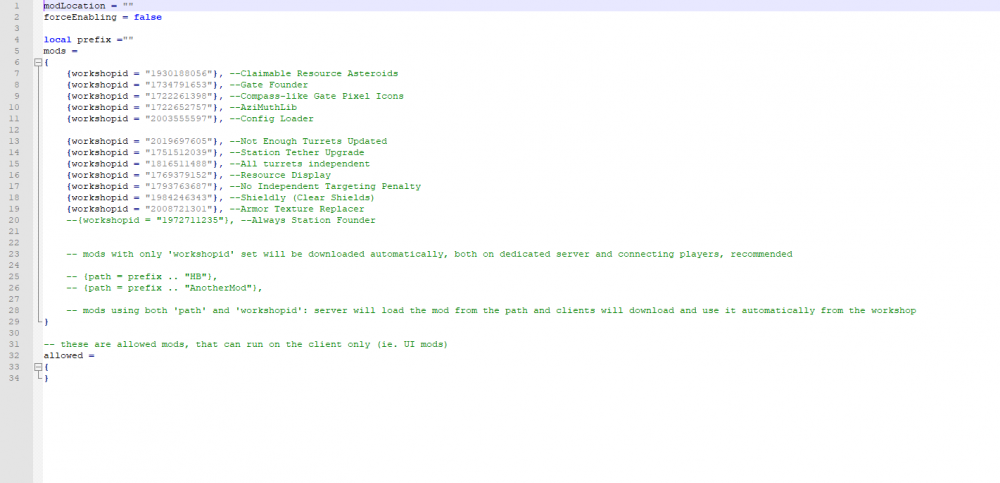
Good to know. I think that this mod issue is unrelated since I was having the problem a week ago, though it is possible that it is related. modconfig.lua
-
No problem. I appreciate your help. I'm hoping that you may see something I don't. All I see, is a message that reads roughly 0 mods found in modconfig.lua, but maybe you can gleam something that I can't.
-
I left the path empty. It's a long story, but I can actually confirm that the modconfig.lua file I have works. I setup a ubuntu vm and installed the avorion server on that. I've been using that as my modded server for a week or two ish now. I'd prefer to go back to your docker though because it is much simpler to run, and the performance was better.
-
I do Please see here: https://avorion.gamepedia.com/Using_Mods_on_Dedicated_Servers Thank you for the fast reply!
-
Do you know any reason why this docker wouldn't support mods in the avorion server? I've been running this docker for a while, and have been thrilled with the performance. Problem is, I decided I'd like to try to run mods, but have added the modconfig.lua as is described in Avorion's instructions, but it will not recognize it. It just keeps telling me 0 mods found in modconfig.lua.

