





lawrence1986
Members
-
Joined
Everything posted by lawrence1986
-
This is the log file for Day of Infamy. its also happening with Insurgency server, which has more than enough HP, 32gb of DDR4, and a 11700T. # failed to dlopen /serverdata/serverfiles/stdshader_dbg_srv.so error=/serverdata/serverfiles/stdshader_dbg_srv.so: cannot open shared object file: No such file or directory # failed to dlopen /serverdata/serverfiles/bin/stdshader_dbg_srv.so error=/serverdata/serverfiles/bin/stdshader_dbg_srv.so: cannot open shared object file: No such file or directory # failed to dlopen stdshader_dbg_srv.so error=stdshader_dbg_srv.so: cannot open shared object file: No such file or directory # failed to dlopen /serverdata/serverfiles/stdshader_dx9_srv.so error=/serverdata/serverfiles/stdshader_dx9_srv.so: cannot open shared object file: No such file or directory # failed to dlopen /serverdata/serverfiles/bin/stdshader_dx9_srv.so error=/serverdata/serverfiles/bin/stdshader_dx9_srv.so: cannot open shared object file: No such file or directory # failed to dlopen stdshader_dx9_srv.so error=stdshader_dx9_srv.so: cannot open shared object file: No such file or directory ***** OUT OF MEMORY! attempted allocation size: 4286686842 ****
-
temp fix is to pause what ever is in qb that downloaded hit mover than resume seed
-
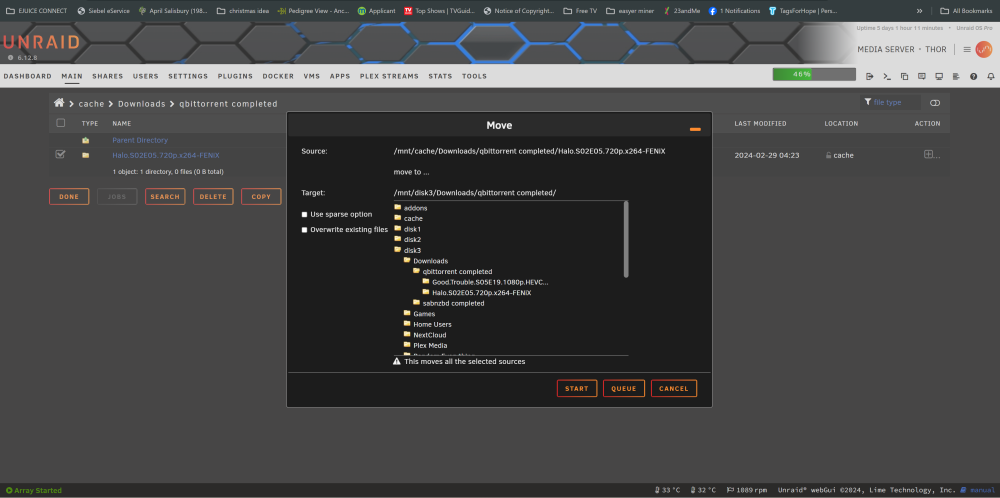
see how in the back ground in in cache drive but when i check the disk 3 its already there it never removed it from cache
-
im going to post my Log here and a photo so kinda show the issue thor-syslog-20240229-1806.zip
-
I was wondering if people are having issues with the mover or cache. It seems that for some reason my files get stuck in downloads and will not move from cache to array, but my plex does, and after it extracts the file, they are both set to cache to array. The only way I can get these files from cache to array, which isn't set right with me, is by stopping the array; they will move or disappear, but QB is still seeding, and I'm using an unpacker. Anyone seen these ghost-like files? I'm using Unpacker and QB. my shares Every file in shares is a cache array besides appdata,system, isos, and domains. Downloads go from cache to array. It will not move the data from downloads but will move it from plex, both of which are set to cache to array.
-
Well, it looks like I'll be going somewhere else, and I was thinking about making another server as well. It looks like Truenas, Open Media Value, or Debian with Casas OS.
-
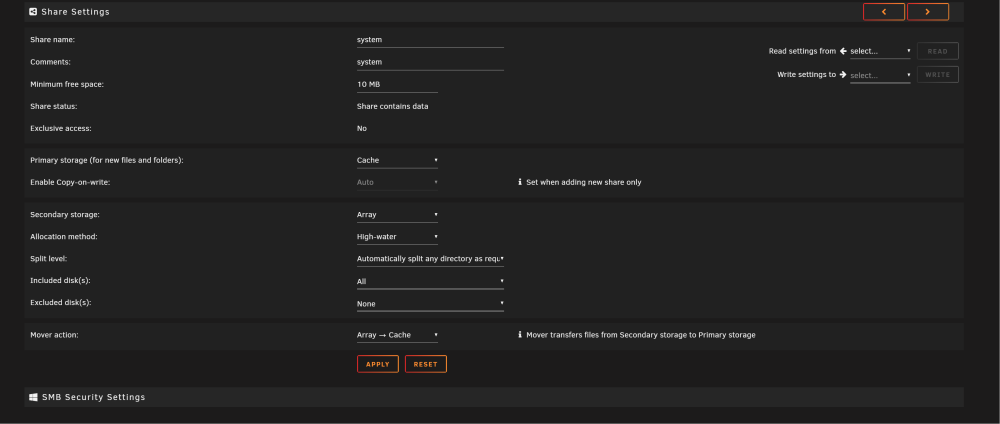
like this i repost so you wouldn't have to search for it
-
also now sense that fold is gone on disk do should i switch my shares over like in the photo i posted or just leave them cache only because I've always had them as prefer on these 4 shares appdata,system,domains.isos
-
Thank you so much, Itimpi, for solving my issue. I didn't even know that file was on the array; it was on disk 2. I must have missed it working buttery smooth with no more errors. But I'm still confused by the fact that it didn't pick it up sooner. I normally run fix common problems every 1 to 3 days just for maintenance. weird
-
ill be a SOB it worked
-
that button came in handy give me a min let me check fix commen problems sure it fixed
-
so your telling me to adjust there shares like in the pitcher disable docker and VM hit mover let it do it thing it will move the dockers or the 4 files i want from the array to cache witch would be appdata,system,domains.isos but i have a question i have looks in all 16 drives and i see none of them files on my array
-
when i installed mine i didn't see it had to to me its the whole share thing that's confusing as hell
-
im trying to keep 4 things on cache appdata,system,domains.isos
-
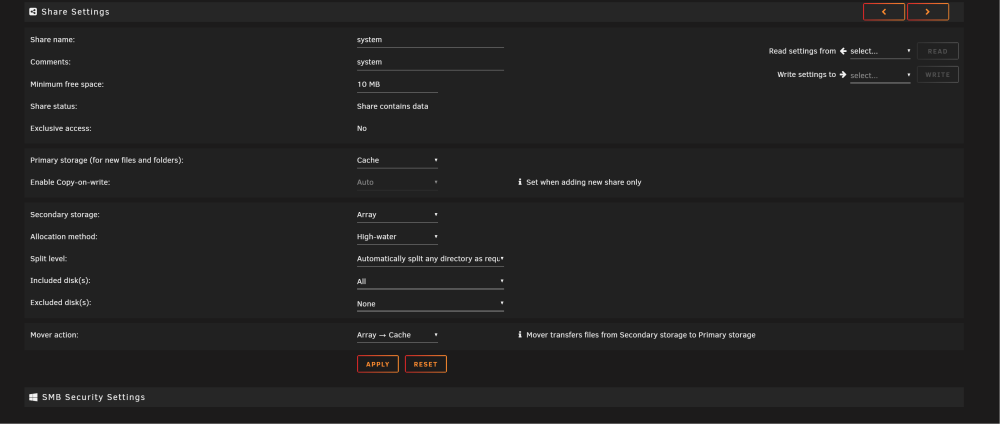
I'm very confused by these new settings as far as the shares goes is this how im suppose to have it now
-
I install this patch, and I have my system share set to cache only, but in fixing the common problem, it tells me that the system share is set to cache-only, but files and folders exist on the array, but if I change it from cache only as my primary storage to cache and my secondary storage to array, and my Mover action to cache to array, the error goes away in fixing common problems.
-
im also useing duckdns as well
-
i can disable the Proxied in cloudflare than it should work or how would i go about this? i mean it only has to be like 6 setting's right i'm just over here trying to find the combo like Killer Instinct
-
i would like help setting up. RustDeskServer-AiO Im going to list what I have done, so I port forward all the ports it wanted. That was simple. I also found the key in the appdata and placed that key on the other remote computers, which are Windows. Anything else I should do. I was hoping for self-hosing here with my own domain with NginxProxyManager. but that's not really working. I do have that set up in CloudFlare under the c name (rustdesk.example.com), and I do have it in NginxProxyManager with port 21117 with SSL on but it wont use the domain and its not working is i just place the key in the key it works but i don't know if that self-hosting or not
-
did you ever get this going haveing same issue its either cloudflare or nginx proxy i do have all portforwarded in pfsense
-
I solved my issue. i had to make sure i sync the DNSSEC from my domain to cloudflare and that solved it
-
Hello fellas I was wondering if anyone was having strange issues. I was in unraid around 12:50am to 1am in my dockers tab, where it normally says "up-to-date." 3 to 4 dockers around this time; tell me the update is not available. If I click on check for updates, what I used to say update-not available will change to up-to-date until around 12 to 1 a.m. Until the next day, then I have to repeat the steps again. It's been like this for weeks. I'm on Unraid 6.12.6, also using a Brocade ICX 7250 10GB sfp network switch as well. I'm using an Intel X540-T 10 GB network card in Unraid. It's only 3 to 4 dockers that do this. Tried fixs no flow contral to flow contral in the network switch going from bon to disabling that uninstalling the dockers that say the update is not available but return the following day in docker i change from macvlan to ipvlan I do have these warnings in my logs. Jan 14 01:38:04 Home-Server kernel: BTRFS info (device sdb1): using the crc32c (crc32c-intel) checksum algorithm Jan 14 01:38:09 Home-Server kernel: BTRFS info (device loop2): using the crc32c (crc32c-intel) checksum algorithm Jan 14 01:48:01 Home-Server root: Fix common problems: Warning: This plugin (Fix Common Problems) is not set to auto-update. Jan 22 05:31:43 Home-Server kernel: BTRFS info (device loop2): using the crc32c (crc32c-intel) checksum algorithm I have no idea what these warnings are, but if they have no effect, then I don't care. I'm more worried about the dockers not wanting to stay up-to-date more than anything. i linked logs don't worry about the Jan 20 14:35:08 Home-Server kernel: openvpn [14012] to Jan 22 02:00:12 Home-Server kernel: openvpn [5679] that was due to spectrum dropping out they had some form of maintenance hardware specs Motherboard: ASRock B660M PRO RS LGA 1700 Intel B660 SATA 6GB/s DDR4 Micro ATX Motherboard Intel 12500T processor Crucial 32GB (2 x 16GB) 288-Pin PC RAM DDR4 3200 (PC4 25600) Desktop Memory Model CT2K16G4DFRA32A home-server-syslog-20240122-1117.zip.crdownload
-
here are my logs home-server-syslog-20230824-1639.zip
-
have no ideal why. vpn works i can accress to both deluge and qb thought my domain but thats it port forarding is right no port conflicts no log errors in the logs for qb and deluge it says that web ui started but i get no web ui from any web browers both are binhex dockers with built in vpn
-
Hello fellas, I'm here because I'm having very odd issues. I'm going to tell you about my network, how things are set up, and what I've tried or haven't tried. I'm also going to upload my logs just for fun, but I don't see anything abnormal. But anyways, I have Bell Internet going into my Opnsence firewall using PPOE, then from the firewall to my Netgear XS512EM 10 Gbps switch. Here is the issue: Bell isn't a normal modem. It's a modem/router combo, and even trying to figure out how to connect that is iffy. I heard I could use PPOE, and then I was told I could only use an XGS-PON or one of these: or any of the network https://www.heyoptics.net/products/xgs-pon-10g-10g-onu-sfp-n2?fbclid=IwAR2sKorbYa1fcmR2GoJX0P8iWrVt5boeAhxLUp_DtHiRw41cMKMwME7A2l Anyway, the tech that came out to my house did say it could get randomly disconnected if I use PPOE, and I really think this may be the case, but I would eliminate the modem entirely. Here is the issue: SAB is randomly disconnecting. which is odd, but anyway, the internet is still up because I'm remote-controlling the computer, and it never affects me. I'm remoting it from work, and I was thinking if it really is a connection issue, like the house is shutting down and popping back on, it would disconnect me. Just a very dirty test, but anyway. I have tried a new Cat 6a cable and a memory test, but I read somewhere that the memory test can't tell the difference if the ECC is bad or not. I have no idea how untrue that is. But if it isn't true, then I have two well-known sticks in the system. Also, this system came with like 120 GB of RAM, and when I had all that in there, it would randomly disconnect, even worse than it is now. I also changed out the HBA card, thinking that it had a bad flash. Also, are there any BIOS settings I should turn off? I'm starting to wonder here because it feels like I'm beating my head against the wall and I'm very unfamiliar with Dell servers. Oh, and I also have this, for which I have no clue if it matters or could be a problem or not. mcelog: Kernel in lockdown Cannot enable DIMM error location reporting. Oh, and when Sab disconnects, it like laggs out the entire Unraid server, like if I have Radar open and Sab disconnects and I refresh Radar, it will lag out until I reconnect, like I said. Also, there is a 10 GB card in this, as well as a P2000. Nothing strange, and I'm using the mini-something HBA card that I flashed. But I was quick enough to hit refresh and do an internet speed test because I was ready for it, and the internet didn't skip a beat; it was 3G down and up. So it's like Unraid or that Dell is just disconnecting for some reason, which is why I'm not convinced it's the PPE or Opnsense. media-center-syslog-20230808-0101.zip

