





VlarpNL
Members
-
Joined
-
Last visited
-
It works flawless in my setup now. I added my "non-standard" appdata path and it now just shows the paths that really should be removed.
-
Then use it? It still works. In the mean time it's nice that someone else is picking up development of a newer version.
-
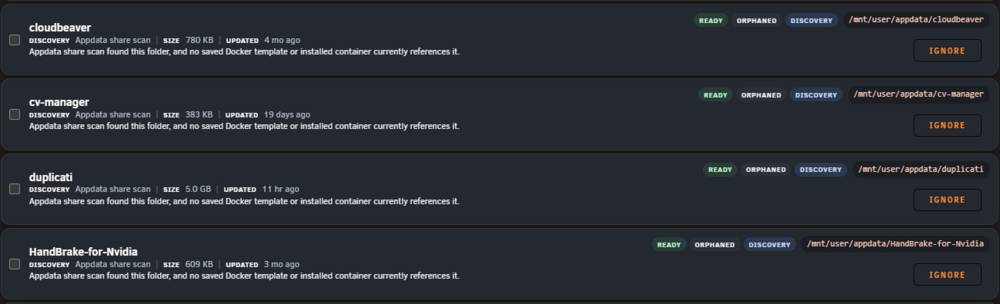
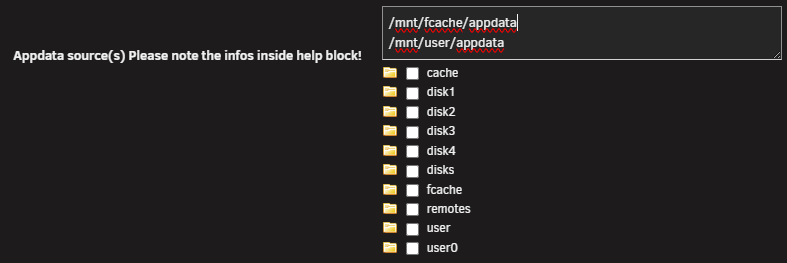
Is it possible to add support for non standard paths? Eg. when Docker containers are not using /mnt/user/appdata/. I have some Docker containers that mount on /mnt/fcache/appdata/ to remove some overhead from the /mnt/user mount. What happens now is that the plugin finds all live containers that use these mounts because in the config of the container it's referencing /mnt/fcache/appdata/ instead of /mnt/user/appdata/. Maybe this can be solved by adding an option to add all your appdata paths? The appdata backup plugin does that by adding a source selector: Thanks!
-
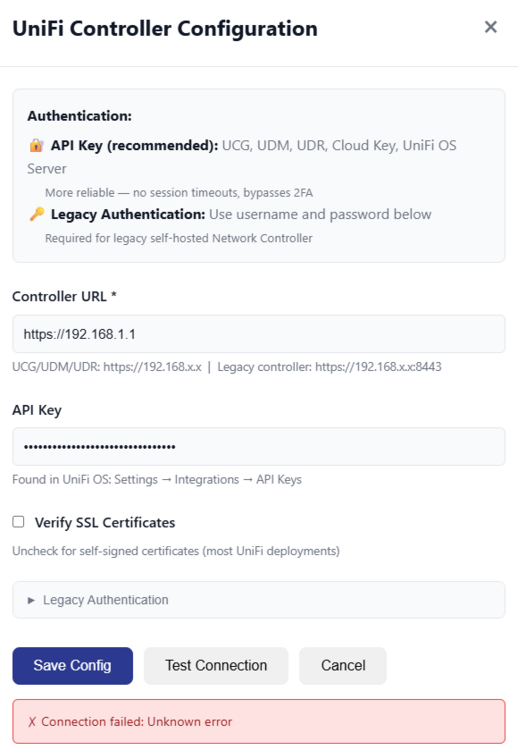
I'm trying to configure my Unifi Controller, I created an API key, entered it in the config, but when I test the Connection it fails: The log reports back this error: INFO: 192.168.1.xx:63869 - "POST /api/config/unifi/test HTTP/1.1" 422 Unprocessable Entity Not sure if I'm doing anything wrong? I'm on Unifi OS 5.0.12 (and Network 10.1.85). Edit: Wait up, I just noticed that the error actually comes from my own PC's IP, not the gateway. I should probably check some more. Edit 2: I literally get that same error from any other machine in my network that I try to test this on. So the log just shows that same error with the IP address of the machine that I use to set the configuration for the UNIFI Toolkit. Edit 3: It's probably not issue with your template, there's an open issue on the Github of unifi-toolkit: https://github.com/Crosstalk-Solutions/unifi-toolkit/issues/55
-
Thanks for the update! Just tested and it seems to work correctly now! Great work! [2026-01-14 09:48:40] ================================================== [2026-01-14 09:48:40] Plex DBRepair – Native Docker [2026-01-14 09:48:40] ================================================== [2026-01-14 09:48:40] Mode : automatic [2026-01-14 09:48:40] Plex Root : /config/Library/Application Support/Plex Media Server [2026-01-14 09:48:40] Databases : /config/Library/Application Support/Plex Media Server/Plug-in Support/Databases [2026-01-14 09:48:40] SQLite : /usr/lib/plexmediaserver/Plex SQLite (plex) [2026-01-14 09:48:40] Backups Enabled : true [2026-01-14 09:48:40] Restore Last Backup : false [2026-01-14 09:48:40] ================================================== [2026-01-14 09:48:40] Stopping Plex containers (match: Plex-Media-Server) [2026-01-14 09:48:40] ================================================== [2026-01-14 09:48:40] Skipping excluded container: dbrepair [2026-01-14 09:48:40] Stopping Plex container: Plex-Media-Server (d2c15ce7fe52) [2026-01-14 09:48:47] ================================================== [2026-01-14 09:48:47] Automatic (check → vacuum → reindex) [2026-01-14 09:48:47] ================================================== [2026-01-14 09:48:47] ================================================== [2026-01-14 09:48:47] Backup databases [2026-01-14 09:48:47] ================================================== [2026-01-14 09:48:47] Backup : com.plexapp.plugins.library.db [2026-01-14 09:48:47] Backup : com.plexapp.plugins.library.blobs.db [2026-01-14 09:48:47] Backup dir: /config/Library/Application Support/Plex Media Server/Plug-in Support/Databases/dbrepair-backups/2026-01-14_09-48-40 (2 file(s)) [2026-01-14 09:48:47] Check : com.plexapp.plugins.library.db ok [2026-01-14 09:48:50] Check : com.plexapp.plugins.library.blobs.db ok [2026-01-14 09:48:52] Vacuum : com.plexapp.plugins.library.db [2026-01-14 09:48:54] Vacuum : com.plexapp.plugins.library.blobs.db [2026-01-14 09:48:56] Reindex : com.plexapp.plugins.library.db [2026-01-14 09:48:58] Reindex : com.plexapp.plugins.library.blobs.db [2026-01-14 09:48:58] ================================================== [2026-01-14 09:48:58] DBRepair completed [2026-01-14 09:48:58] Log : /config/Library/Application Support/Plex Media Server/Plug-in Support/Databases/dbrepair-docker-2026-01-14_09-48-40.log [2026-01-14 09:48:58] Backups : /config/Library/Application Support/Plex Media Server/Plug-in Support/Databases/dbrepair-backups [2026-01-14 09:48:58] ================================================== [2026-01-14 09:48:58] ================================================== [2026-01-14 09:48:58] Restarting Plex containers [2026-01-14 09:48:58] ================================================== [2026-01-14 09:48:59] Started: d2c15ce7fe52 ** Press ANY KEY to close this window **
-
Thanks! I'll gladly test if it works.
-
I tried changing permissions using chmod to 777 for the DB files, but same thing. Ran the container with the "automatic" option. However I don't want to mess around too much with chown and chmod on the DB files as don't want to break Plex. Just checked and somehow this container creates the log and backup files as root? I thought generally speaking Docker containers on Unraid should all run using the nobody:users permission/owner, right? I'm not sure how it works exactly though, I'm hardly a Linux/Docker expert 😅. So I do appreciate the effort you're putting in. root@XXXX:/mnt/fcache/appdata/Plex-Media-Server/Library/Application Support/Plex Media Server/Plug-in Support/Databases# ls -lh total 529M -rw-r--r-- 1 nobody users 348M Jan 13 20:23 com.plexapp.plugins.library.blobs.db -rw-r--r-- 1 nobody users 32K Jan 13 20:30 com.plexapp.plugins.library.blobs.db-shm -rw-r--r-- 1 nobody users 0 Jan 13 20:30 com.plexapp.plugins.library.blobs.db-wal -rw-r--r-- 1 nobody users 180M Jan 13 20:30 com.plexapp.plugins.library.db -rw-r--r-- 1 nobody users 32K Jan 13 20:31 com.plexapp.plugins.library.db-shm -rw-r--r-- 1 nobody users 532K Jan 13 20:31 com.plexapp.plugins.library.db-wal drwxr-xr-x 1 root root 38 Jan 13 20:30 dbrepair-backups/ -rw-r--r-- 1 root root 1.4K Jan 13 20:30 dbrepair-docker-2026-01-13_20-30-23.log
-
By the way, could it be a permission/rights issue? Permissions of the DB files is 644. Is that correct? root@XXXX:/mnt/fcache/appdata/Plex-Media-Server/Library/Application Support/Plex Media Server/Plug-in Support/Databases# ls -lh total 529M -rw-r--r-- 1 nobody users 348M Jan 13 15:59 com.plexapp.plugins.library.blobs.db -rw-r--r-- 1 nobody users 32K Jan 13 16:04 com.plexapp.plugins.library.blobs.db-shm -rw-r--r-- 1 nobody users 0 Jan 13 16:04 com.plexapp.plugins.library.blobs.db-wal -rw-r--r-- 1 nobody users 180M Jan 13 16:04 com.plexapp.plugins.library.db -rw-r--r-- 1 nobody users 32K Jan 13 16:09 com.plexapp.plugins.library.db-shm -rw-r--r-- 1 nobody users 769K Jan 13 16:09 com.plexapp.plugins.library.db-wal
-
I tried all the DBREPAIR_MODE listed in your first post. All of them result in the same: Plex container is stopped, backup gets created, Plex is restarted. The repair script doesn't seem to run. The only difference was with the 'check' DBREPAIR_MODE this outputs an extra error: Error: in prepare, no such collation sequence: icu_root. Tried this twice and same error occurs. In this case also no backups are created. [2026-01-13 16:04:00] ================================================== [2026-01-13 16:04:00] Plex DBRepair – Native Docker [2026-01-13 16:04:00] ================================================== [2026-01-13 16:04:00] Mode : check [2026-01-13 16:04:00] Plex Root : /plexmediaserver/Library/Application Support/Plex Media Server [2026-01-13 16:04:00] Databases : /plexmediaserver/Library/Application Support/Plex Media Server/Plug-in Support/Databases [2026-01-13 16:04:00] SQLite : /usr/bin/sqlite3 [2026-01-13 16:04:00] Backup Dir : /plexmediaserver/Library/Application Support/Plex Media Server/Plug-in Support/Databases/dbrepair-backups/2026-01-13_16-04-00 [2026-01-13 16:04:00] Exclude Names : dbrepair,plex-dbrepair [2026-01-13 16:04:00] Exclude Image Regex : plex-dbrepair [2026-01-13 16:04:00] ================================================== [2026-01-13 16:04:00] Scanning for Plex containers to stop (match: Plex-Media-Server) [2026-01-13 16:04:00] Skipping (excluded name): dbrepair [2026-01-13 16:04:00] Stopping Plex container: Plex-Media-Server (d2c15ce7fe52) image=plexinc/pms-docker:beta [2026-01-13 16:04:06] Check: com.plexapp.plugins.library.db Error: in prepare, no such collation sequence: icu_root [2026-01-13 16:04:06] Restarting Plex containers that were stopped... [2026-01-13 16:04:07] Started: d2c15ce7fe52 ** Press ANY KEY to close this window **
-
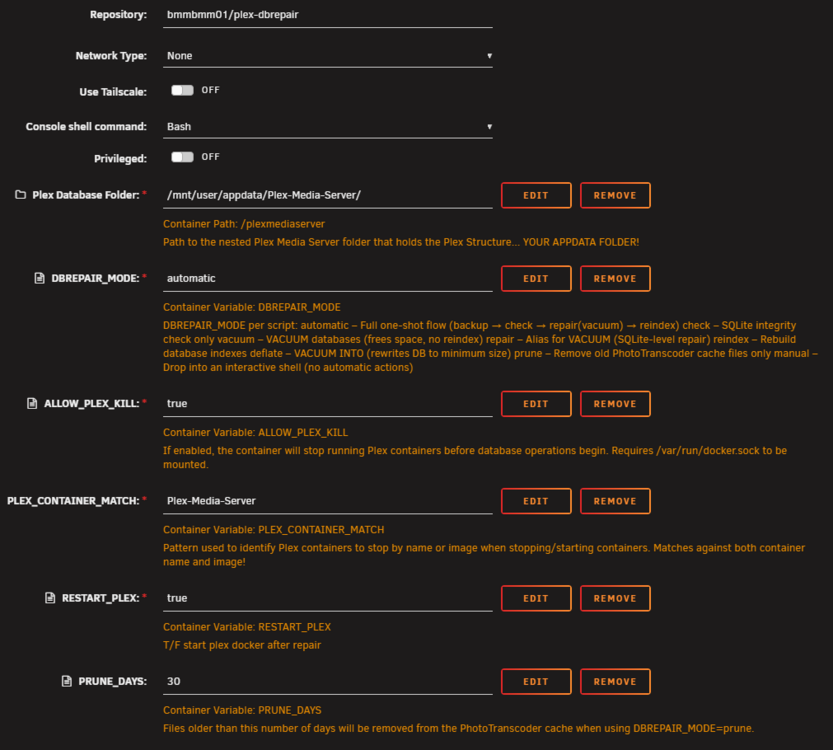
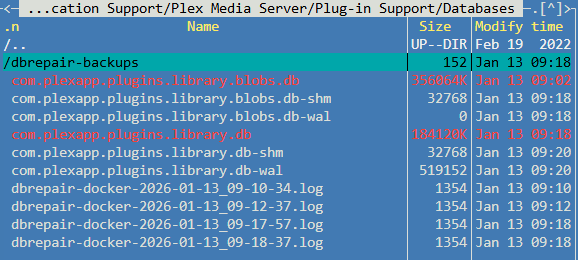
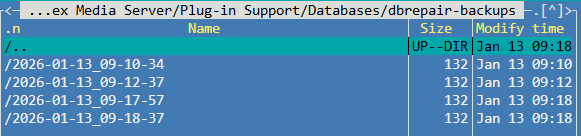
Thanks for the update! Just tested it, but somehow it looks like it doesn't run the actual DBRepair.sh script? When I start the dbrepair container it does stop my Plex Media Server container and it makes a backup of the SQLite databases, but that seems to be all it's doing before starting the PMS container again (there is no DBRepair.log for example). I'm using the official Docker container by Plex Inc. (plexinc/pms-docker:beta). Let me know if I can help you figure out what goes wrong here. Below some data I collected. I also tried running dbrepair container privileged, but that made no difference. These are the settings I'm using: The contents of the Databases directory: Contents of the dbrepair-backups folder (these all contain proper copies of teh SQLite databases): Log output of the dbrepair container: [2026-01-13 09:18:37] ================================================== [2026-01-13 09:18:37] Plex DBRepair – Native Docker [2026-01-13 09:18:37] ================================================== [2026-01-13 09:18:37] Mode : automatic [2026-01-13 09:18:37] Plex Root : /plexmediaserver/Library/Application Support/Plex Media Server [2026-01-13 09:18:37] Databases : /plexmediaserver/Library/Application Support/Plex Media Server/Plug-in Support/Databases [2026-01-13 09:18:37] SQLite : /usr/bin/sqlite3 [2026-01-13 09:18:37] Backup Dir : /plexmediaserver/Library/Application Support/Plex Media Server/Plug-in Support/Databases/dbrepair-backups/2026-01-13_09-18-37 [2026-01-13 09:18:37] Exclude Names : dbrepair,plex-dbrepair [2026-01-13 09:18:37] Exclude Image Regex : plex-dbrepair [2026-01-13 09:18:37] ================================================== [2026-01-13 09:18:37] Scanning for Plex containers to stop (match: Plex-Media-Server) [2026-01-13 09:18:37] Skipping (excluded name): dbrepair [2026-01-13 09:18:37] Stopping Plex container: Plex-Media-Server (d2c15ce7fe52) image=plexinc/pms-docker:beta [2026-01-13 09:18:44] Creating backups... [2026-01-13 09:18:44] Restarting Plex containers that were stopped... [2026-01-13 09:18:44] Started: d2c15ce7fe52 ** Press ANY KEY to close this window **
-
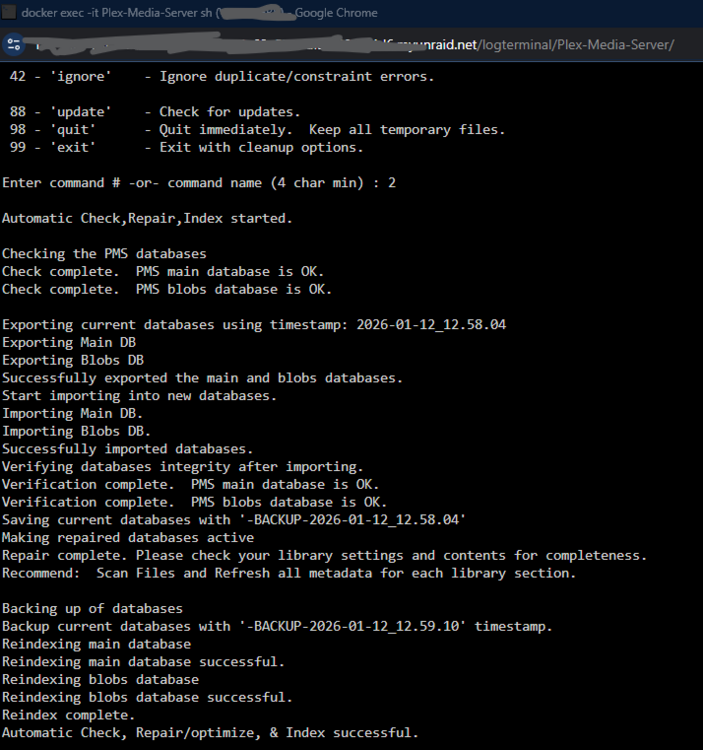
It seems this Docker is not working correctly. I ran the DBRepair script directly in my Plex Media Server container, following https://github.com/ChuckPa/DBRepair?tab=readme-ov-file#installation inside the container's console. The Check option finishes in seconds. Automatic finishes in less than a minute. The script outputs different details than the version in the Docker container. It would be helpful of the output of DBRepair.sh is also visible in this Docker's logfile. That way it might be possible to see what the problem is. I'm assuming it to be an issue with permissions, but since I can't see the raw output of the DBRepair.sh script I'm not 100% sure.
-
Same here, just running it now. It's been working for over 20 minutes. But the heartbeat is still updating and I see the script using CPU, so I guess it should be fine?
-
You can click on the folder name (so you see the settings for the folder and the Dockers added to it) and then drag items to other positions? Seems to work when I try it.
-
Just switch over to the new version. Very happy it's working again. Thanks @VladoPortos!
-
I did the same thing. But would definitely like it better when there is 0% option in the Global settings for the plugin.






