





AndreB
Members
-
Joined
-
Last visited
Everything posted by AndreB
-
Thanks, i will look in to this and report back... André
-
i'm Sorry but i don't know where to look for the mother Board log, can you guide me to it?
-
I don't know Witch to replace ?
-
Sorry for the delay, health Problem happend... Still have the error message. thanks for your help... André filesserver-syslog-20220124-1523.zip
-
My version is 2.0.5 In a UNRAID Docker. and it's runnig very fine here...
-
Done thanks for your help... André
-
Hi All, i need serius help here.... One of my UNRAID Server gave me a Warning with the Fix Common Problemes Plug-IN.... here it is.... with the mcelog. Your server has detected hardware errors. You should install mcelog via the NerdPack plugin, post your diagnostics and ask for assistance on the unRaid forums. The output of mcelog (if installed) has been logged mcelog.txt filesserver-diagnostics-20220105-1143.zip
-
hi, off topic here just for my info... i have 3 UNRAID server, and i wonder if i have to install swag, nginx proxy manager on all to get reverse proxy? André p.s. my server did not freeze since JorgeB pointed me to the Macvlan problem, so i switch to ipvlan, and so far it's good... Thanks
-
Hi, and thanks for the fast respond... i just switch to ipvlan and now have to re-install all the docker to the vland. Thanks for your help guy's. André
-
ok cool just added it with the other poste... thanks
-
Ok to all, my server did crash again last night, i do hope you will have what needed to help me fix this problem, because i sure can fix it myself. again, when the server crash all land liked to the same switch, froze, all i did to make the network working again is to unplug the network cable from the server, an voila... the network start working again, so it's definitely a server problem... then again i shut down the server by holding the power button for 5 second. and the server start like noting was wrong . the log i got is attache here so please someone, help meeeeee. syslog-20.10.20.98.log filesserver-diagnostics-20211204-2228.zip
-
Ok cool, i did setup as the screenshot in the previous post, if this is good, then the next crash, i will have it up until the crash, i hope it will be enough. let me tell you that i relay don't like doing a power off, not very good for the server and Data.
-
well then i do have a big problem, because when the server crash, i cant do anything with it.. i tried ssh, log in, but it's totaly frozen, and the only thing i can do is a cold shut down with the power button for 5sec. so... if so, i will never get that log?
-
Thanks, but i'm in there and the only syslog file i have there is the one i posted. i made a folder for all syslog and put it on an other server. but it may be because i activated it after the first message, so the crash may not be on yet.... does it make any sense?
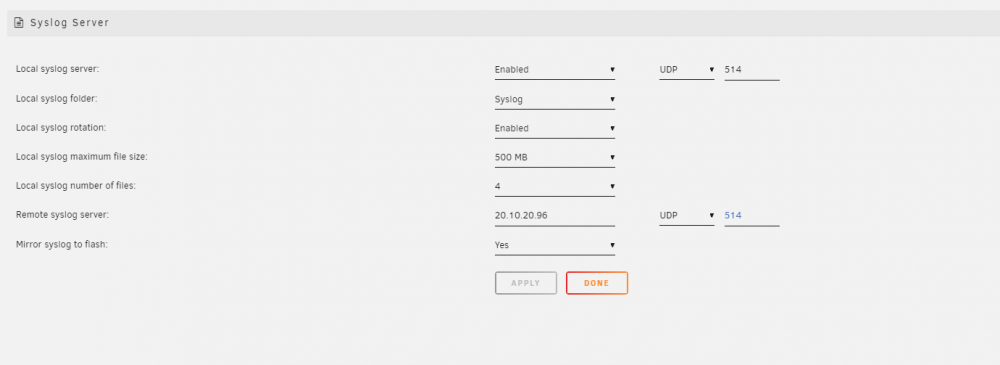
-
Hi, well i'm sorry i dont know where to get that one, can you guide me to it?. i activated the syslog server... and that is the file it give me. i'm truly sorry that i dont know witch file you whant.
-
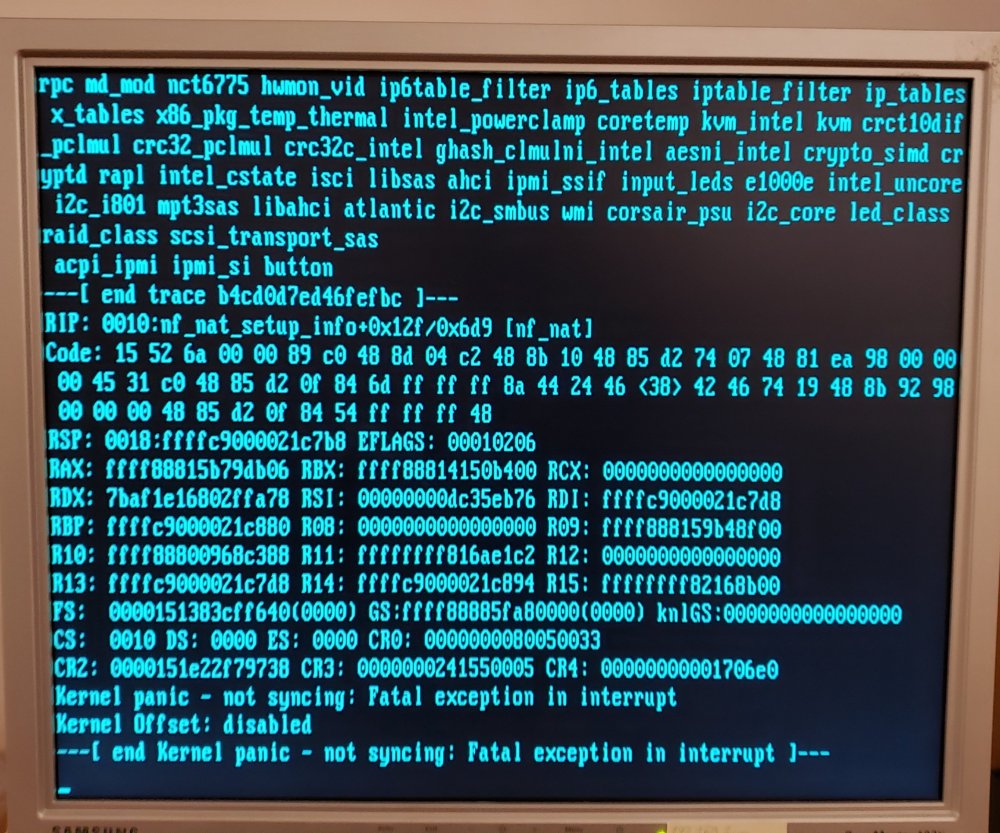
OK it just append again, all the network freeze and i can't do noting to get access to the server, i have to do a cold shutdown with the power button for 5 sec. as soon as i shut down the server all the network start up again with nothing esle to do from my part. This time i have the syslog file and i did a screen shot of the monitor attache to the server. hope you will have everything needed to help me... thanks and good day. Andre syslog.txt
-
Thanks for your fast respond, Sorry i thought that the "mcelog syslog" was the one, just activated the good one and will post it on the next crash... Thanks again for your help, very appreciated. AndréB
-
Help.... i have 3 Unraid Server And one of them is freaking me out, it's been 3 times that the server crashes and i can't find why, I need serious help here, can anyone help me.... i put the mcelog in this post... Thanks André mcelogsyslog.txt
-
Hello All, Ok now i give up, Anybody got the dam yarrs2 working in unraid Version: 6.9.0-rc2 delugevpn from binhex. i'm not sure if i tried everything, but i did try a lot, so now, i'm at that point to ask seriously if anyone have this working for real, cause i doubt it does work. so please i need someone that can relay help me fix this YARRS2 please please please... Andre
-
i try 2.1.2... and 2.1.3..... all the same .... it's simply not working i don't get it.
-
i try the link you gave me and the one that the site link us to go get it and i try YaRSS2-2.1.4-py3.7 and YaRSS2-2.1.4-py3.8 and it still does not work... it appear in the right windows, i select it and nothing else... not working.... relay don't know why it's not working.
-
Hi Danuel, thanks for the respond, i know witch version but when i install it, it's ok for me to select the YaRSS2 on the right windows but it should appear in the left windows and it doesn't, so i cant get access to it to setup any RSS Feed. i simply don't know what to do to make it work anymore, i'm out off option.
-
in your cache drive /appdata/binhex-delugevpn/plugins
-
@Jorgen I use a dedicated NIC, i have 3 NIC so, i used one for delugevpn, and i dont have anything else install, so i dont understand a conflic of port??? thanks
-
Thanks for the info for my password... i erase all docker so no port is in use i guess.


