





Krum4o
Members
-
Joined
-
Last visited
Everything posted by Krum4o
-
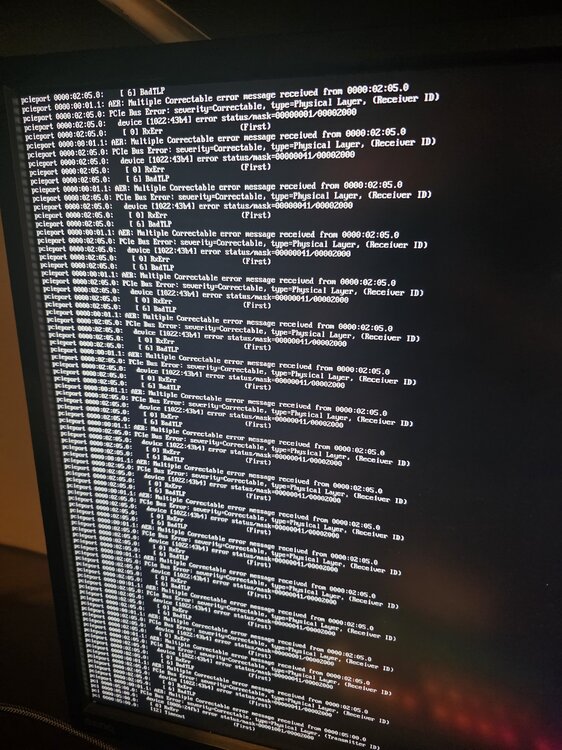
Hi, I have a problem with my Unraid server. Everytime I reboot the server regardless of if I have installed an update on Unraid itself or a docker container or amything else it goes to this loop for days. I have to hard restart it then and it takes another 2-3 days of checking rhings before I can use my server again. What can I do to fix it? Attached is a picture of what it has been doing since last Wedneday.
-
Hi, I am new to Unraid. Trying to learn as I go but I am starting from 0. I am having trouble accessing my Plex server remotely over Tailscale. Can someone give me an idea of what maybe going wrong? I can access my Plex server on the local network but when I am at another location and connected to Tailscale I can not access it. I disabled the Remote Access option in Plex Settings. Entered the Tailscale serve IP in the Network Settings with port :32400. Still not work. I have not idea of what I am doing wrong. I can access my Unraid server just fine using Tailscale but not my Plex Server Library. Thank you in advance!
-
Thank you very much, JorgeB! It worked. I really appreciate the help.
-
I have the same problem. I formatted my cache drive several times but still the same problem. Attaching my diagnostics file if anyone is able to help. Thank you! adelinetower-diagnostics-20250109-1633.zip

