





anonlio
Members
-
Joined
-
Last visited
-
Yep, it seems OK for me too now with the "cache mode" parameter removed 👍
-
I have applied your fix just now. Will report in a few days if It appears to be fixed. Or earlier if not Thanks BTW, this issue is very annoying, I just had a big scare thinking I had lost my notes for today at work 😅
-
Not sure how helpful it is..., but I'm noticing the same behavior with a similar use case, on Unraid 7.0.1 I have a "unassigned device" custom script that automatically creates a new folder on my Unraid array and move new pictures from my mounted camera to it when I plug my camera to the Unraid server. I noticed that my VM which has access to the Unraid array through virtiofs does not see the latest added content before multiple minutes later or possibly more... still monitoring. Files/folder are definitely there.
-
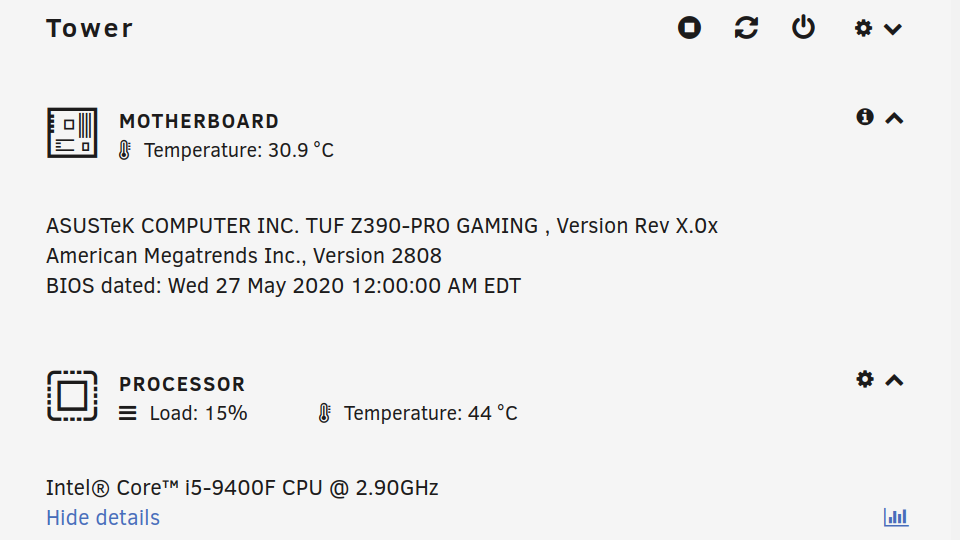
Hi there, simply wanted to report that I am also experiencing the Freeze after ~12 hours on a Ubuntu 22.08 VM. Here is my hardware setup:
-
Ok I had the same behavior for 3 folders in a share containing ~500 files & folders. Due to the number of files/folders, it took me the whole day to troubleshoot the issue. For me the problem was the presence of the ":" char in the 3 messed up folder names. I though I would post because this is the thread that put me on track to the solution after raging on this issue for the whole day. Hope it helps someone else Is this a bug in unraid or in the smb client that my ubuntu vm is using ?
-
Hi, This is not exactly what you are asking help for, but It may help solve your use case of verifiable accurate CD ripping on Unraid. https://github.com/whipper-team/whipper For your other question, afaik it's possible to install dockers from docker hub by searching directly in Unraid app store. You need to activate that option if I remember correctly.
-
Hi here So I guess the title says it pretty much, but to add a bit more detail about the question: I have been successfully using a linux VM with GPU passthrough on Unraid as my main computer for the past few years. I must say it is a blast to use and removed a good bit of data loss stress in my life after over 20 years of manually managing backups. I am now getting attracted by the idea of running my setup in a Docker container, mostly out of curiosity but I am also not sure if it really make sens. I don't really comprehend how memory would be shared in that setup. I have 32 GB of ram on my server and usually use 16GB for my desktop VM. I also run ~10 other containers for miscellaneous services. I found this question online (not Unraid related) that have some research tracks but I'm wondering if maybe there is an obvious Unraid way of achieving that objective. If this idea does not make any sens please feel free to let me know and also why. Thanks to everyone that might give some input on that topic.
-
Hi and thank your for your Jupyterlab application! It's so nice to have it as a "real" Unraid community app. I wanted to use the pandas and scikitLearn modules to do some fiddling around with machine learning in notebooks, so I found the proper pacman packages : "python-pandas" and "python-scikit-learn" and added them to the "packages" section of the container config. They were not added successfully to arch, so being a arch user myself, I switched to the console of the container and tried installing them manually. I first updated with "pacman -Syu" because otherwise it would not let me install successfully. I also updated the mirrorlist to use the latest ones from USA. With that done, I could use the libraries in Jupyter. Success ! I took a look at the dockerfile of the container but to be honest, It was my first look at one of those and I'm not sure what is missing to have the container be all set to install new packages like python-pandas. In my understanding, your line: RUN pacman --noconfirm -Syyu should do it, and it should be able to then accept some "pacman -S packages_variable_from_the_config". I think the commented part with the packages variable is what you are about to attempt. That is pretty much where my understanding of all this is at the moment, but I feel it is very close to working perfectly with that packages list config and that is going to be awesome
