






Maddeen
Members
-
Joined
-
Last visited
Everything posted by Maddeen
-
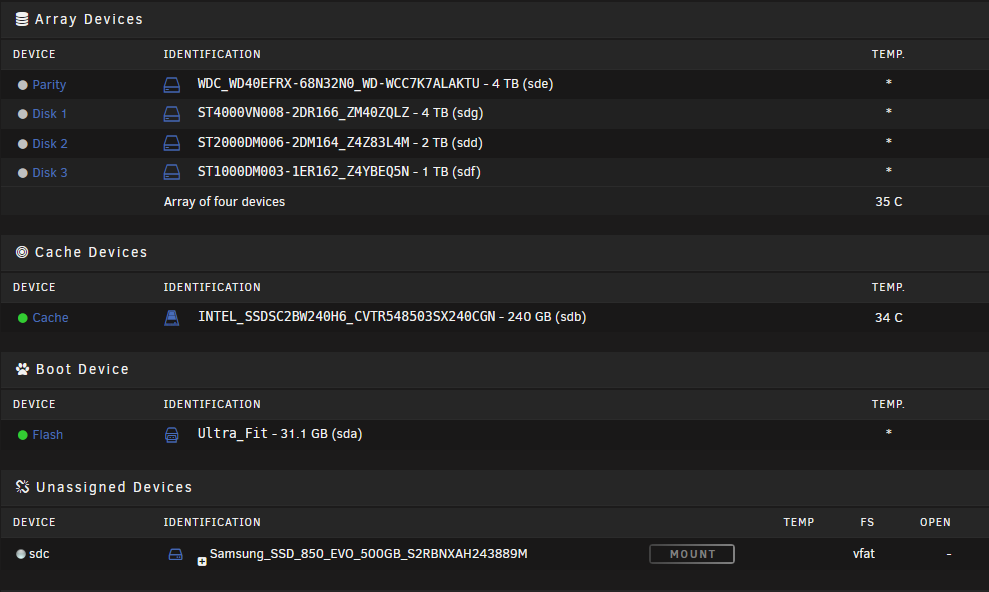
@bonienl After some days of testing, I'm completly lost. I set a global spin down AND to be sure - for every disk of my array as well. As you can see in the screenshot (made only a couple of minutes before going to bed and before the sleep time) all drives are spun down. But my server won't go to sleep ... and to make it even more cryptic - on one day it worked fine. I attached the debug log as well - on 19th of May it went to sleep with the exact configuration. (dockers [only on cache drive] are running and spun down is set up) But after that day - no sleep. Today as I wake up (8am) - the webgui of unraid even showed all drives spun down - but also no sleep in the night or even now dispite the set for sleep from 00:00 to 10:00am. How is this possible? Is there any way to see exactly what keeps the drive sdd (as mentioned in the debug log) spin up? Thank you for your help. s3_sleep.log
-
@bonienl Ok -- tonight it stops telling me that sdc got drive activity. But starts telling me about sdd My fault - I just set the spin down to the array disk and not as a "global" default within Disk Settings. I just changed it now so that all disk spin down after an hour of inactivity. I'll give another feedback, if that works or if I need to disable the docker although they only run on the cache drive.
-
Ok -- Try & Error will bring some light in my darkness - hopefully Thank you - I'll give a feedback tomorrow.
-
@Hoopster Settings / Disk-Settings / Default spin down delay: = NEVER Parity / spin down delay: = Use Default So with this settings it's impossible to get a sleep, correct? At least I have to set up a delay to the parity - because that was the only disk mentioned in the log for disk activity.
-
Yes - a Pi-Hole docker and a plex docker. But I set the docker to "work" on the cache. So in my opinion there should be no writes to the array. But maybe plex is scanning the folders constantly? The media folders are on the array. I'll stop pi-hole and plex docker tonight, to make sure, that none of these are writing anything to the arra. Sorry - I'm new to unRAID. Where can I check this?
-
@bonienl - Thanks for the hint. My log is full of this information. In general this info is pretty clear - my parity drive got disk activity - fine. But that brings me to next question. Why? It looks like the parity drive got a 24/7 activity... There (in the log) is not even a second in one of the times that could be run into sleep, where there is no activity. It must be a failure... I checked my settings of the parity check - but this is scheduled to monthly (first day). What else can cause this permanent activity? Any ideas? Thanks again
-
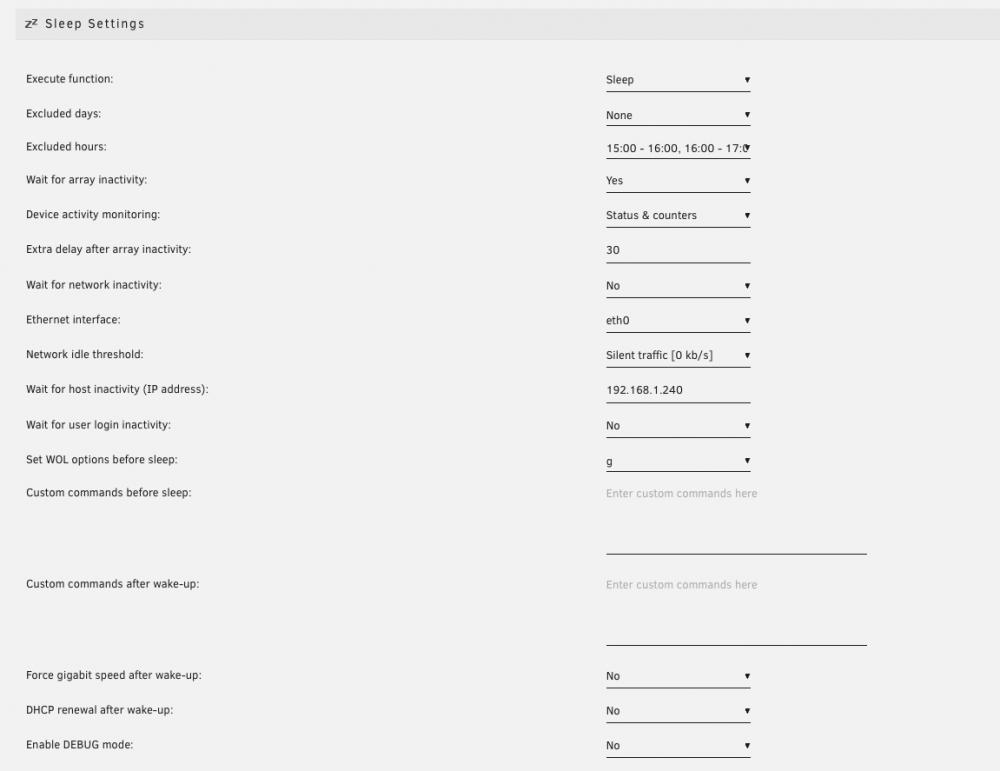
Hi there, I just want to set up a simple scheduled sleep - see attached screenshot. My plan is, that my server wakes up by WOL or Bios-RTC - what ever comes first. Then running until 24:00 (excluded hours from 15:00 until 24:00) And - after 24:00 AND an inactivity of the IP 192.168.1.240 (my iMac) AND after a delay of 30 minutes the server should go to sleep. But that dont work and I cant see the problem. Yesterday I shut my iMac down at about 23:30. So - if I understand it right - it should run until 00:01 and then starting the timer (30 minutes delay) so it should go to sleep at 00:31. But as I woke up today (06:00) the server was running. I appreciate any help - thank you and have a nice weekend.
-
Don't judge me - i'm new to unraid and using docker. 🙈 As far as I understood, you're also providing a plexpass-docker - so I think in this case is the difference to be able to use plexpass-user features - right? But where's the difference between the offical plexinc release and your "standard" binhex-plex docker?

