





Inflight
Members
-
Joined
-
Last visited
Everything posted by Inflight
-
The disks are connected to different power supply lanes but are connected to the same SAS controller, which is a LSI 9207-8i. I only have this controller, beside of the connectors on the motherboard. The LSI controller is equipped with a fan.
-
I thought it would be wise to reduce the load. Therefore I go step by step. Parity 1 is now finished and back online. Paritiy 2 will be finished soon. I think, those disk errors happen when there is high data transfer load on the device, e.g. from a large backup or when a VM pulls large backups. Just a feeling!
-
Hi folks Today at 08:12 CEST both parity disks became disabled due to errors. I had the same a few weeks ago, but with other disks. I replaced already the power supply, the motherboard, the SATA cables, obviously without success. Please find attached the diagnostic logs. Any help is highly appreciated! best regards Andreas diagnostics-20210902-1027.zip
-
I checked my shutdown script and realized, that I used ‚shutdown -h now‘ instead of ‚/sbin/poweroff‘ to power down the tower. Could that have been the cause for those disk errors?
-
I have the same behaviour as the backup volume is always mounted by the mac. In my case, disk nbr 2 always spinning. Any news here? Have you guys found a way to resolve this? Thanks, Andy
-
Hmm, that‘s what I did. I did not reboot the tower after I have seen the two disks in error state. I pulled the diagnostics then.
-
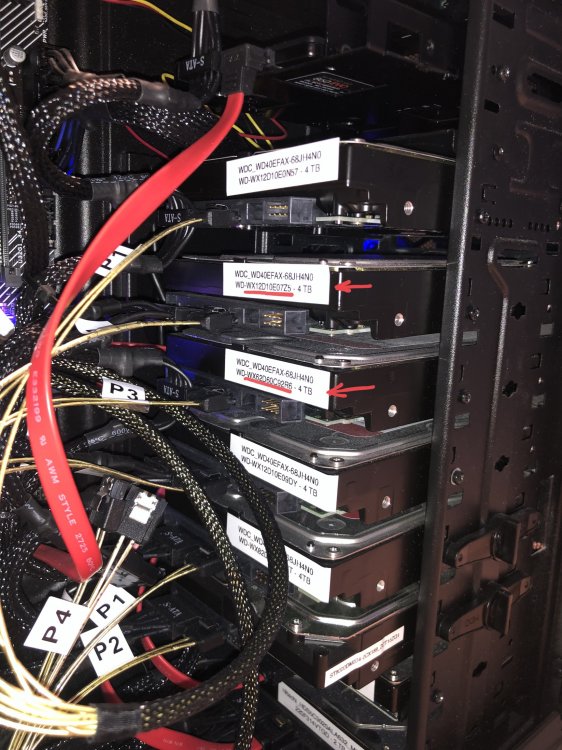
Thanks for your reply! I see the following: Both disks are connected to the same Mini-SAS x4 (SFF-8087) cable on a LSI SAS 9207-8i controller The discs are just installed next to each other. See image! They are NOT connected to the same power cable of the power supply. A look at the syslog shows that all disks at boot (about 06:00) spun up and were imported. Later, they were spun down. But I don't know where to see when the errors occurred. Do I overlook something? Any further ideas? best regards Andy
-
Dear community This morning, two disk (one parity, one array disk) have been marked as failed (error mode and spinned down) after boot of the unraid server. I had the same behavior several times a few month ago. Then I replaced the main board and installed a stronger power supply. Also the SATA cables have been replaced. Since then, I never had an issue and the host was super stable! Please find the diagnostics attached to this topic. Any help is highly appreciated! Thanks in advance! Andy nas.gachnet.ch-diagnostics-20210802-1201.zip
